The Tech Edvocate

Top Menu

  • Advertisement
  • Apps
  • Home Page
  • Home Page Five (No Sidebar)
  • Home Page Four
  • Home Page Three
  • Home Page Two
  • Home Tech2
  • Icons [No Sidebar]
  • Left Sidbear Page
  • Lynch Educational Consulting
  • My Account
  • My Speaking Page
  • Newsletter Sign Up Confirmation
  • Newsletter Unsubscription
  • Our Brands
  • Page Example
  • Privacy Policy
  • Protected Content
  • Register
  • Request a Product Review
  • Shop
  • Shortcodes Examples
  • Signup
  • Start Here
    • Governance
    • Careers
    • Contact Us
  • Terms and Conditions
  • The Edvocate
  • The Tech Edvocate Product Guide
  • Topics
  • Write For Us
  • Advertise

Main Menu

  • Start Here
    • Our Brands
    • Governance
      • Lynch Educational Consulting, LLC.
      • Dr. Lynch’s Personal Website
      • Careers
    • Write For Us
    • The Tech Edvocate Product Guide
    • Contact Us
    • Books
    • Edupedia
    • Post a Job
    • The Edvocate Podcast
    • Terms and Conditions
    • Privacy Policy
  • Topics
    • Assistive Technology
    • Child Development Tech
    • Early Childhood & K-12 EdTech
    • EdTech Futures
    • EdTech News
    • EdTech Policy & Reform
    • EdTech Startups & Businesses
    • Higher Education EdTech
    • Online Learning & eLearning
    • Parent & Family Tech
    • Personalized Learning
    • Product Reviews
  • Advertise
  • Tech Edvocate Awards
  • The Edvocate
  • Pedagogue
  • School Ratings

logo

The Tech Edvocate

  • Start Here
    • Our Brands
    • Governance
      • Lynch Educational Consulting, LLC.
      • Dr. Lynch’s Personal Website
        • My Speaking Page
      • Careers
    • Write For Us
    • The Tech Edvocate Product Guide
    • Contact Us
    • Books
    • Edupedia
    • Post a Job
    • The Edvocate Podcast
    • Terms and Conditions
    • Privacy Policy
  • Topics
    • Assistive Technology
    • Child Development Tech
    • Early Childhood & K-12 EdTech
    • EdTech Futures
    • EdTech News
    • EdTech Policy & Reform
    • EdTech Startups & Businesses
    • Higher Education EdTech
    • Online Learning & eLearning
    • Parent & Family Tech
    • Personalized Learning
    • Product Reviews
  • Advertise
  • Tech Edvocate Awards
  • The Edvocate
  • Pedagogue
  • School Ratings
  • 100 Best Apps for Data Backup

  • 100 Best Apps for Data Migration

  • 100 Best Apps for Data Transformation

  • 100 Best Apps for Data Cleaning

  • 100 Best Apps for Data Entry

  • 100 Best Apps for Business Process Automation

  • 100 Best Apps for Operational Efficiency

  • 100 Best Apps for Improving Processes

  • 100 Best Apps for Scaling Operations

  • 100 Best Apps for Community-Led Growth

Digital & Mobile Technology
Home›Digital & Mobile Technology›Customize Safari on Mac with this Ultimate Guide

Customize Safari on Mac with this Ultimate Guide
By Matthew Lynch
April 12, 2023
0
Spread the love

Tips on how to customize Safari on Mac. Here are some ideas on how to make Safari your own:

1. Start with your homepage:


By default, Safari opens with the Apple homepage. But you can easily set your own homepage by going to Preferences > General. Enter the URL of your favorite website, and it will appear every time you open Safari.

2.
Get creative with your bookmarks:


Safari’s Bookmarks Bar is a handy way to get quick access to favorite sites. You can personalize this by organizing sites into folders and adding icons. To add a new bookmark, simply click on Bookmarks > Add Bookmark. Once you’ve added bookmarks, you can drag and drop them into folders and arrange them in whatever order suits you.

3.
Customize Safari’s appearance:


Safari’s appearance can be customized to fit your preferences. To do this, go to Preferences > General and choose between Light or Dark mode. You can also adjust your font size, select a different default search engine, and change how Safari displays tabs.

4.
Enable Safari extensions:


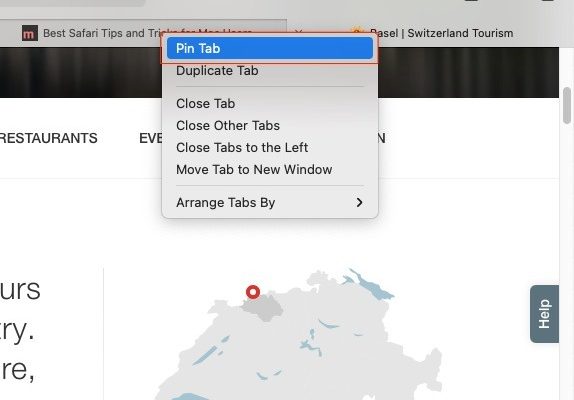
Safari extensions are third-party tools that can add extra functionality to the browser, such as ad blockers or password managers. To enable extensions, go to Preferences > Extensions and toggle the switch to turn them on. Once you’ve enabled an extension, it will show up next to the address bar.

5.
Make Safari more secure:


Safari is already secure by default, but there are ways to enhance its security. For starters, you can turn on the built-in pop-up blocker and enable private browsing. Private browsing doesn’t save your browsing history, passwords, or cookies. You can also add website restrictions and block cookies by going to Preferences > Privacy.

6.
Manage Safari’s downloads:


To manage downloaded files, go to Preferences > General and choose where you want files to be downloaded to. You can also clear your download history by clicking on Downloads > Clear.

7.
Sync Safari with your other Apple devices:
If you’re using other Apple devices, such as an iPhone or iPad, you can sync your bookmarks, history, and passwords between them using iCloud. To do this, go to Preferences > iCloud and enable Safari syncing.

These are just some ideas on how to customize Safari on Mac, but feel free to explore more to make it fit your needs and preferences. 

Previous Article

Create a Hands-Free Smart Home with SmartThings ...

Next Article

Daily Tech Tip: Step by Step Instructions ...

Matthew Lynch

Related articles More from author

  • Digital & Mobile Technology

    Best Free Software Updater Programs

    June 8, 2023
    By Matthew Lynch
  • Digital & Mobile Technology

    What is Satellite Television (Satellite TV)?

    May 11, 2023
    By Matthew Lynch
  • Digital & Mobile Technology

    How to Link Slides in Google Slides

    June 30, 2023
    By Matthew Lynch
  • Digital & Mobile Technology

    How to Fix a Blown Speaker

    May 28, 2023
    By Matthew Lynch
  • Digital & Mobile Technology

    Spotify Not Working? Common Spotify Issues and How to Fix Them

    August 5, 2023
    By Matthew Lynch
  • Digital & Mobile Technology

    What is Resource Monitor (Resmon)?

    May 11, 2023
    By Matthew Lynch

Search

Login & Registration

  • Log in
  • Entries feed
  • Comments feed
  • WordPress.org

Newsletter

Signup for The Tech Edvocate Newsletter and have the latest in EdTech news and opinion delivered to your email address!

About Us

Since technology is not going anywhere and does more good than harm, adapting is the best course of action. That is where The Tech Edvocate comes in. We plan to cover the PreK-12 and Higher Education EdTech sectors and provide our readers with the latest news and opinion on the subject. From time to time, I will invite other voices to weigh in on important issues in EdTech. We hope to provide a well-rounded, multi-faceted look at the past, present, the future of EdTech in the US and internationally.

We started this journey back in June 2016, and we plan to continue it for many more years to come. I hope that you will join us in this discussion of the past, present and future of EdTech and lend your own insight to the issues that are discussed.

Newsletter

Signup for The Tech Edvocate Newsletter and have the latest in EdTech news and opinion delivered to your email address!

Contact Us

The Tech Edvocate
910 Goddin Street
Richmond, VA 23231
(601) 630-5238
[email protected]

Copyright © 2026 Matthew Lynch. All rights reserved.