The Tech Edvocate

Top Menu

  • Advertisement
  • Apps
  • Home Page
  • Home Page Five (No Sidebar)
  • Home Page Four
  • Home Page Three
  • Home Page Two
  • Home Tech2
  • Icons [No Sidebar]
  • Left Sidbear Page
  • Lynch Educational Consulting
  • My Account
  • My Speaking Page
  • Newsletter Sign Up Confirmation
  • Newsletter Unsubscription
  • Our Brands
  • Page Example
  • Privacy Policy
  • Protected Content
  • Register
  • Request a Product Review
  • Shop
  • Shortcodes Examples
  • Signup
  • Start Here
    • Governance
    • Careers
    • Contact Us
  • Terms and Conditions
  • The Edvocate
  • The Tech Edvocate Product Guide
  • Topics
  • Write For Us
  • Advertise

Main Menu

  • Start Here
    • Our Brands
    • Governance
      • Lynch Educational Consulting, LLC.
      • Dr. Lynch’s Personal Website
      • Careers
    • Write For Us
    • The Tech Edvocate Product Guide
    • Contact Us
    • Books
    • Edupedia
    • Post a Job
    • The Edvocate Podcast
    • Terms and Conditions
    • Privacy Policy
  • Topics
    • Assistive Technology
    • Child Development Tech
    • Early Childhood & K-12 EdTech
    • EdTech Futures
    • EdTech News
    • EdTech Policy & Reform
    • EdTech Startups & Businesses
    • Higher Education EdTech
    • Online Learning & eLearning
    • Parent & Family Tech
    • Personalized Learning
    • Product Reviews
  • Advertise
  • Tech Edvocate Awards
  • The Edvocate
  • Pedagogue
  • School Ratings

logo

The Tech Edvocate

  • Start Here
    • Our Brands
    • Governance
      • Lynch Educational Consulting, LLC.
      • Dr. Lynch’s Personal Website
        • My Speaking Page
      • Careers
    • Write For Us
    • The Tech Edvocate Product Guide
    • Contact Us
    • Books
    • Edupedia
    • Post a Job
    • The Edvocate Podcast
    • Terms and Conditions
    • Privacy Policy
  • Topics
    • Assistive Technology
    • Child Development Tech
    • Early Childhood & K-12 EdTech
    • EdTech Futures
    • EdTech News
    • EdTech Policy & Reform
    • EdTech Startups & Businesses
    • Higher Education EdTech
    • Online Learning & eLearning
    • Parent & Family Tech
    • Personalized Learning
    • Product Reviews
  • Advertise
  • Tech Edvocate Awards
  • The Edvocate
  • Pedagogue
  • School Ratings
  • A Visitors Guide to Pittsburgh (PA), United States

  • A Visitors Guide to Colorado Springs (CO), United States

  • 5 Pairs of Shoes That Will Instantly Step Your Shoe Game Up

  • Radiant Youthful Skin is the Perfect Christmas Gift

  • Give Your Loved One the Gift of Youthful, Radiant Skin this Christmas

  • Give Your Loved One the Gift of a Restful Night Sleep this Christmas

  • Nex Playground’s Holiday Sales Bring Active Play Indoors This Seaso

  • A Visitors Guide to Louisville (KY), United States

  • A Visitor’s Guide to Nashville-Davidson (TN), United States

  • A Visitors Guide to Portland (OR), United States

Wordpress Multisite Hosting Providers
Home›Wordpress Multisite Hosting Providers›Change Language in WordPress: Best Guide in 2024

Change Language in WordPress: Best Guide in 2024
By Matthew Lynch
March 26, 2024
0
Spread the love

WordPress isn’t just a powerful content management system but also a global platform that supports websites across the world. It is no surprise that users may need to change the language of their WordPress site, either for personal preference or to cater to a broader audience. If you find yourself in this situation in 2024, you’re in luck, as WordPress has become more user-friendly and adaptable than ever before. Here is the best guide to changing the language on your WordPress site.

Step 1: Choosing Your Language

Before you make any changes, decide which language you need. WordPress offers a vast selection of languages thanks to its dedicated community of translators. Head to the official WordPress translation teams page to see if your desired language is available.

Step 2: Changing Site Language from the Admin Dashboard

The easiest way to change your site language is through the admin dashboard.

1. Log into your WordPress dashboard.

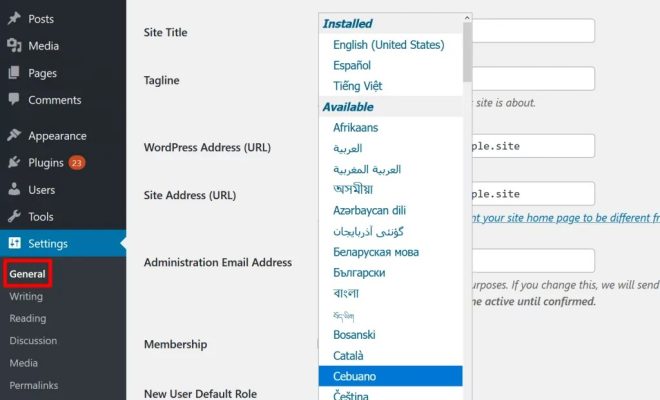
2. Navigate to `Settings` > `General`.

3. Scroll down to find the `Site Language` option.

4. From the dropdown menu, select the language you wish to use.

5. Save changes.

Your site should now display in the selected language.

Step 3: Using Plugins for Multilingual Sites

If you want parts of your site in different languages or are building a multilingual website, consider using a plugin such as WPML or Polylang.

1. Install and activate your chosen plugin from the `Plugins` section in your WordPress dashboard.

2. Follow the setup wizard where you would select the default language and add additional languages you wish to offer on your site.

3. Use the plugin’s interface to translate posts, pages, themes, and plugins.

Step 4: Manually Installing Languages

Sometimes you may need to manually install a language pack.

1. Download your desired language pack from WordPress.org’s translations repository.

2. Upload the `.mo` and `.po` files via FTP into `wp-content/languages` directory.

3. Change wp-config.php by adding or modifying the line `define(‘WPLANG’, ‘your_language_code’);`.

Replace `’your_language_code’` with the code of your new language pack.

 Step 5: Localizing Themes and Plugins

Make sure your themes and plugins support localization by checking for `.po` or `.mo` files in their directories and ensuring they are up-to-date.

1. If they are not localized, use tools like Poedit or Loco Translate plugin to translate them.

2. If updating existing translations, simply download the updated language files and replace them via FTP.

 Step 6: Adjusting Time Zone and Other Settings

Don’t forget to review other settings such as time zone and date formats after changing your website’s primary language, as each locale might have different defaults.

Go back to `Settings` > `General`, then review settings such as timezone, date format, time format, and week start day for appropriateness for your new language context.

Conclusion

Changing the language on your WordPress website in 2024 has never been easier. With built-in features in WordPress allowing quick switches between languages, plugin support for creating multilingual sites, and community resources for localization—modifying your site’s linguistic setup is truly at your fingertips! Always back up your website before making significant changes and ensure all translations reflect current vernacular nuances for best user experience.

Remember that maintaining an inclusive digital environment fosters greater connection with audiences globally – breaking down barriers with each word translated!


Previous Article

How to Make the Best Spaghetti Bolognese ...

Next Article

Secure and Convenient: Exploring the Best Online ...

Matthew Lynch

Related articles More from author

  • Wordpress Multisite Hosting Providers

    12 of the Best WordPress Hosting Options

    March 8, 2024
    By Matthew Lynch
  • Wordpress Multisite Hosting Providers

    Best Responsive WordPress Themes – 20 Themes Graphic Design Junction

    March 6, 2024
    By Matthew Lynch
  • Wordpress Multisite Hosting Providers

    4 Best School Management WordPress Plugin 2024

    March 29, 2024
    By Matthew Lynch
  • Wordpress Multisite Hosting Providers

    4 of the Best WordPress Multisite Hosting Providers Compared

    March 3, 2024
    By Matthew Lynch
  • Wordpress Multisite Hosting Providers

    Finding the Best Web Hosting for Your WordPress Blog

    March 28, 2024
    By Matthew Lynch
  • Wordpress Multisite Hosting Providers

    3 Best WordPress Job Board Plugins Compared

    March 11, 2024
    By Matthew Lynch

Search

Login & Registration

  • Register
  • Log in
  • Entries feed
  • Comments feed
  • WordPress.org

Newsletter

Signup for The Tech Edvocate Newsletter and have the latest in EdTech news and opinion delivered to your email address!

About Us

Since technology is not going anywhere and does more good than harm, adapting is the best course of action. That is where The Tech Edvocate comes in. We plan to cover the PreK-12 and Higher Education EdTech sectors and provide our readers with the latest news and opinion on the subject. From time to time, I will invite other voices to weigh in on important issues in EdTech. We hope to provide a well-rounded, multi-faceted look at the past, present, the future of EdTech in the US and internationally.

We started this journey back in June 2016, and we plan to continue it for many more years to come. I hope that you will join us in this discussion of the past, present and future of EdTech and lend your own insight to the issues that are discussed.

Newsletter

Signup for The Tech Edvocate Newsletter and have the latest in EdTech news and opinion delivered to your email address!

Contact Us

The Tech Edvocate
910 Goddin Street
Richmond, VA 23231
(601) 630-5238
[email protected]

Copyright © 2025 Matthew Lynch. All rights reserved.