The Tech Edvocate

Top Menu

  • Advertisement
  • Apps
  • Home Page
  • Home Page Five (No Sidebar)
  • Home Page Four
  • Home Page Three
  • Home Page Two
  • Home Tech2
  • Icons [No Sidebar]
  • Left Sidbear Page
  • Lynch Educational Consulting
  • My Account
  • My Speaking Page
  • Newsletter Sign Up Confirmation
  • Newsletter Unsubscription
  • Our Brands
  • Page Example
  • Privacy Policy
  • Protected Content
  • Register
  • Request a Product Review
  • Shop
  • Shortcodes Examples
  • Signup
  • Start Here
    • Governance
    • Careers
    • Contact Us
  • Terms and Conditions
  • The Edvocate
  • The Tech Edvocate Product Guide
  • Topics
  • Write For Us
  • Advertise

Main Menu

  • Start Here
    • Our Brands
    • Governance
      • Lynch Educational Consulting, LLC.
      • Dr. Lynch’s Personal Website
      • Careers
    • Write For Us
    • The Tech Edvocate Product Guide
    • Contact Us
    • Books
    • Edupedia
    • Post a Job
    • The Edvocate Podcast
    • Terms and Conditions
    • Privacy Policy
  • Topics
    • Assistive Technology
    • Child Development Tech
    • Early Childhood & K-12 EdTech
    • EdTech Futures
    • EdTech News
    • EdTech Policy & Reform
    • EdTech Startups & Businesses
    • Higher Education EdTech
    • Online Learning & eLearning
    • Parent & Family Tech
    • Personalized Learning
    • Product Reviews
  • Advertise
  • Tech Edvocate Awards
  • The Edvocate
  • Pedagogue
  • School Ratings

logo

The Tech Edvocate

  • Start Here
    • Our Brands
    • Governance
      • Lynch Educational Consulting, LLC.
      • Dr. Lynch’s Personal Website
        • My Speaking Page
      • Careers
    • Write For Us
    • The Tech Edvocate Product Guide
    • Contact Us
    • Books
    • Edupedia
    • Post a Job
    • The Edvocate Podcast
    • Terms and Conditions
    • Privacy Policy
  • Topics
    • Assistive Technology
    • Child Development Tech
    • Early Childhood & K-12 EdTech
    • EdTech Futures
    • EdTech News
    • EdTech Policy & Reform
    • EdTech Startups & Businesses
    • Higher Education EdTech
    • Online Learning & eLearning
    • Parent & Family Tech
    • Personalized Learning
    • Product Reviews
  • Advertise
  • Tech Edvocate Awards
  • The Edvocate
  • Pedagogue
  • School Ratings
  • Your Essential Guide to Navigating Consumer Tech News in 2023

  • Unveiling the Future: Must-Have Gadgets and Innovations Transforming Consumer Tech

  • Revolutionizing Everyday Life: The Must-Have Consumer Tech Innovations of 2026

  • Top Android Phones of 2026: Unveiling the Must-Have Smartphones for Every User

  • Fashion Nova 2026: A Comprehensive Review and Competitor Comparison

  • China and the US Engage in Crucial Economic Talks in Paris

  • Gold Prices in Turmoil: Will They Hold Above $5,200 Amid Geopolitical Tensions?

  • Bank of Japan Set to Maintain Interest Rates Amid Rising Global Uncertainty

  • Oil Prices Surge Amidst Geopolitical Tensions: A Closer Look at March 2026 Trends

  • Bitcoin’s Resilience: How BTC Holds Steady at $70,982 Amid Market Turbulence

Digital & Mobile Technology
Home›Digital & Mobile Technology›Beginner Geek: Everything You Need To Know About Browser Extensions

Beginner Geek: Everything You Need To Know About Browser Extensions
By Matthew Lynch
March 13, 2023
0
Spread the love

Are you new to the world of tech and curious about browser extensions? Well, you’re in luck! In this article, we’ll cover everything you need to know about browser extensions and how they can improve your browsing experience.

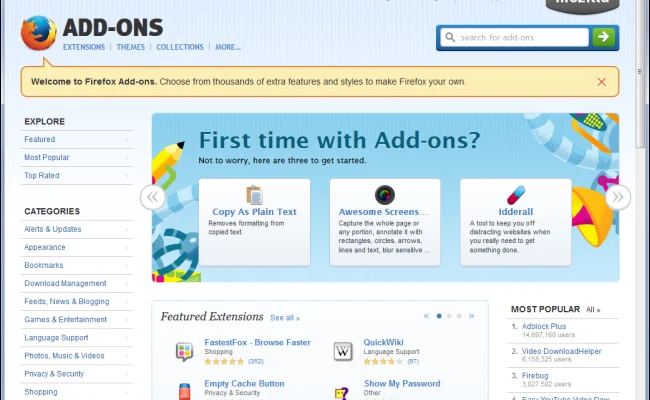
Firstly, what are browser extensions? They are small software programs that extend the functionality of your web browser. They are usually free, easy and quick to install, and can add a wide range of features to your browser.

To install an extension, simply go to the extension store for your browser (for example, the Chrome Web Store for Google Chrome) and search for the extension you want. Once you find it, click on the “Add to Chrome” button, and the extension will be installed in your browser.

There are extensions for almost anything you can imagine, from productivity tools to social media helpers, to ad-blockers and much more. Here are some examples of popular extensions and how they can enhance your browsing experience:

1. Grammarly: This extension works wonders for those who want to improve their writing skills. The Grammarly extension automatically checks your grammar and spelling while you type, making sure your emails and documents are professional and error-free.

2. Ad-blockers: Tired of seeing ads on every webpage? Ad-blockers are the extensions for you. They block ads from appearing on web pages, allowing you to surf the web without distractions.

3. LastPass: This extension is perfect for those who struggle to remember their login details. LastPass stores and encrypts your login information, allowing you to log in with just one click.

4. Pocket: Do you often come across articles or videos that you would like to read or watch later? Then Pocket is the perfect extension for you! It saves articles and videos for later viewing, allowing you to focus on what you’re currently browsing.

5. Honey: Want to save money while shopping online? Honey searches for coupon codes and discounts while you shop, ensuring you always get the best deal.

While extensions can be incredibly helpful, it’s essential to be careful about which ones you install. Always read the reviews and visit the official website of the extension to ensure they are trustworthy.

In summary, browser extensions are a quick and easy way to enhance your browsing experience. With the right extensions, you can boost your productivity, save money, and surf the web without distractions. So, go ahead and explore the wide range of extensions available for your browser – you’ll be surprised at how many useful tools are at your fingertips!


Previous Article

Best VPN for Amazon Fire TV Stick

Next Article

Effective Ways To Prevent Zero-Day Attacks

Matthew Lynch

Related articles More from author

  • Digital & Mobile Technology

    What Is a Sub-field Drive on a Plasma TV?

    June 4, 2023
    By Matthew Lynch
  • Digital & Mobile Technology

    Beginner’s Guide to Extracting Text and Images From a PDF

    June 8, 2023
    By Matthew Lynch
  • Digital & Mobile Technology

    Should You Be a Programmer? Programming Aptitude Tests to Help You Decide

    June 15, 2023
    By Matthew Lynch
  • Digital & Mobile Technology

    The Best Google Pixel 7 and Pixel 7 Pro Tips and Tricks You Need to Know

    July 15, 2023
    By Matthew Lynch
  • Digital & Mobile Technology

    What Is the BHL Parcel Shipping Scam? How to Avoid It

    June 6, 2023
    By Matthew Lynch
  • Digital & Mobile Technology

    What is Wireless LAN Security?

    May 15, 2023
    By Matthew Lynch

Search

Login & Registration

  • Register
  • Log in
  • Entries feed
  • Comments feed
  • WordPress.org

Newsletter

Signup for The Tech Edvocate Newsletter and have the latest in EdTech news and opinion delivered to your email address!

About Us

Since technology is not going anywhere and does more good than harm, adapting is the best course of action. That is where The Tech Edvocate comes in. We plan to cover the PreK-12 and Higher Education EdTech sectors and provide our readers with the latest news and opinion on the subject. From time to time, I will invite other voices to weigh in on important issues in EdTech. We hope to provide a well-rounded, multi-faceted look at the past, present, the future of EdTech in the US and internationally.

We started this journey back in June 2016, and we plan to continue it for many more years to come. I hope that you will join us in this discussion of the past, present and future of EdTech and lend your own insight to the issues that are discussed.

Newsletter

Signup for The Tech Edvocate Newsletter and have the latest in EdTech news and opinion delivered to your email address!

Contact Us

The Tech Edvocate
910 Goddin Street
Richmond, VA 23231
(601) 630-5238
[email protected]

Copyright © 2025 Matthew Lynch. All rights reserved.