The Tech Edvocate

Top Menu

  • Advertisement
  • Apps
  • Home Page
  • Home Page Five (No Sidebar)
  • Home Page Four
  • Home Page Three
  • Home Page Two
  • Home Tech2
  • Icons [No Sidebar]
  • Left Sidbear Page
  • Lynch Educational Consulting
  • My Account
  • My Speaking Page
  • Newsletter Sign Up Confirmation
  • Newsletter Unsubscription
  • Our Brands
  • Page Example
  • Privacy Policy
  • Protected Content
  • Register
  • Request a Product Review
  • Shop
  • Shortcodes Examples
  • Signup
  • Start Here
    • Governance
    • Careers
    • Contact Us
  • Terms and Conditions
  • The Edvocate
  • The Tech Edvocate Product Guide
  • Topics
  • Write For Us
  • Advertise

Main Menu

  • Start Here
    • Our Brands
    • Governance
      • Lynch Educational Consulting, LLC.
      • Dr. Lynch’s Personal Website
      • Careers
    • Write For Us
    • The Tech Edvocate Product Guide
    • Contact Us
    • Books
    • Edupedia
    • Post a Job
    • The Edvocate Podcast
    • Terms and Conditions
    • Privacy Policy
  • Topics
    • Assistive Technology
    • Child Development Tech
    • Early Childhood & K-12 EdTech
    • EdTech Futures
    • EdTech News
    • EdTech Policy & Reform
    • EdTech Startups & Businesses
    • Higher Education EdTech
    • Online Learning & eLearning
    • Parent & Family Tech
    • Personalized Learning
    • Product Reviews
  • Advertise
  • Tech Edvocate Awards
  • The Edvocate
  • Pedagogue
  • School Ratings

logo

The Tech Edvocate

  • Start Here
    • Our Brands
    • Governance
      • Lynch Educational Consulting, LLC.
      • Dr. Lynch’s Personal Website
        • My Speaking Page
      • Careers
    • Write For Us
    • The Tech Edvocate Product Guide
    • Contact Us
    • Books
    • Edupedia
    • Post a Job
    • The Edvocate Podcast
    • Terms and Conditions
    • Privacy Policy
  • Topics
    • Assistive Technology
    • Child Development Tech
    • Early Childhood & K-12 EdTech
    • EdTech Futures
    • EdTech News
    • EdTech Policy & Reform
    • EdTech Startups & Businesses
    • Higher Education EdTech
    • Online Learning & eLearning
    • Parent & Family Tech
    • Personalized Learning
    • Product Reviews
  • Advertise
  • Tech Edvocate Awards
  • The Edvocate
  • Pedagogue
  • School Ratings
  • Ramp’s Staggering $60 Billion Valuation: 8 Reasons Why Investors Are Piling In

  • Uncovering the Cost: Why This AI Startup’s Collapse Is a Troubling Sign for Tech

  • The Silent Crisis: Why Your Next Console Will Cost a Fortune

  • Advisers urged to steer clear of ‘hyperscale’ AI models

  • The Quiet Crisis: Is AI in Education Creating an ‘Illusion of Learning’?

  • 84% of Ransomware Attacks Use AI: This Is How Your Own Systems Are Turning Against You

  • The Staggering Truth About Healthcare Cyberattacks: 76.6 Million Records Exposed in 2026

  • This Crucial Deadline For Rogue AI Is Much Closer Than You Think

  • This RNA Breakthrough Could Rewrite Alzheimer’s Treatment

  • This One Thing Is Silently Crushing US Consumer Inflation — And Your Wallet

Digital & Mobile Technology
Home›Digital & Mobile Technology›Awesome Projects that Allow You to Run Android on PC

Awesome Projects that Allow You to Run Android on PC
By Matthew Lynch
April 10, 2023
0
Spread the love

Android has come a long way since its initial release in 2008. It has become the world’s most popular mobile operating system, powering over 2.5 billion active devices. However, there are situations where using an Android device is just not feasible or practical. For instance, you may want to test your app on multiple devices or just prefer to use a bigger computer screen. Luckily, several awesome projects allow you to run Android on PC, providing a seamless experience that’s almost as good as on a real Android device.

1) BlueStacks

BlueStacks is among the most popular Android emulators for PC. It lets you run Android apps and games on Windows and Mac computers. What’s interesting about BlueStacks is that it’s optimized for gaming and supports keyboard and mouse input. You can also connect controllers, gamepads, and other peripherals to enhance your gaming experience. BlueStacks is free to download, with optional premium subscriptions that add more features and remove ads.

2) Genymotion

Genymotion is another excellent Android emulator for PC that provides a range of powerful features for developers and testers. It enables you to create and run virtual devices with different Android versions, screen sizes, and hardware configurations. Genymotion supports both automatic and manual testing, with tools like Appium, Espresso, and UI Automator. Additionally, Genymotion integrates with Android Studio for seamless development and debugging. Genymotion has a free version with limited features, as well as paid plans that offer more functionality.

3) Android Studio

Android Studio is the official integrated development environment (IDE) for Android app development. Apart from coding, Android Studio comes with an emulator that lets you run and test your apps on virtual devices. Android Studio emulator uses the same Android Virtual Device (AVD) manager as Genymotion, offering various configuration options. You can use Android Studio emulator to check your app’s compatibility with different Android versions, screen sizes, and hardware features.

4) Remix OS Player

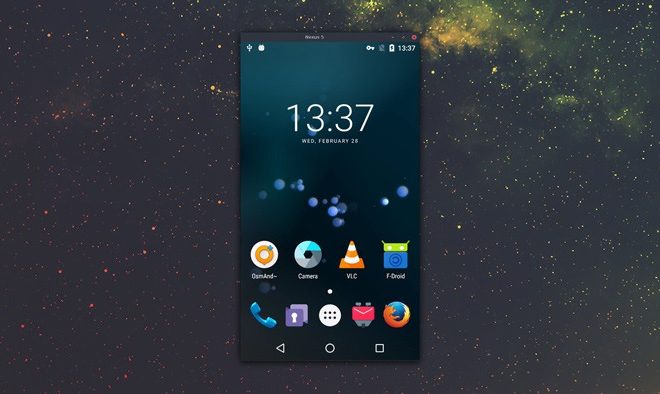
Remix OS Player was developed by Jide, a company that produced a proprietary Android-based operating system for PCs. Remix OS Player is built on the Android-x86 project, which aims to run Android on typical computer architectures. As a result, Remix OS Player offers a native Android experience on Windows computers, with a taskbar, file manager, and multi-window support. Remix OS Player is free to install and use, and the developers claim that it’s faster than other Android emulators.

5) Andy Android Emulator

Andy Android Emulator is another Android emulator that lets you run Android on PC. Its claim to fame is that it can sync with your Android device and transfer data, apps, and contacts seamlessly. Andy Android Emulator also supports keyboard and mouse input, as well as game controllers. Additionally, Andy Android Emulator comes with advanced features like root access, multi-touch support, and screen recording. Andy Android Emulator is free to download but shows ads, with an option to remove them through a paid subscription.

Conclusion

Running Android on PC is an increasingly popular trend, as it allows users to enjoy the Android platform on a bigger screen and better hardware. The above projects offer different features and functionalities, catering to different audiences. Whether you’re a developer, gamer or casual user, you can find an Android emulator that suits your needs. The future of Android on PC looks bright, and we can expect more innovations and advancements in this space.


Previous Article

8K TV Explained, and Why You Definitely ...

Next Article

Best Amazon Alexa Tips and Tricks for ...

Matthew Lynch

Related articles More from author

  • Digital & Mobile Technology

    Best Rainbow Six: Siege Tips of 2023

    June 12, 2023
    By Matthew Lynch
  • Digital & Mobile Technology

    What is Microsoft Management Console (MMC)?

    May 24, 2023
    By Matthew Lynch
  • Digital & Mobile Technology

    How to Delete Pins on Pinterest

    June 12, 2023
    By Matthew Lynch
  • Digital & Mobile Technology

    How to Unlock a Keyboard That’s Locked

    May 30, 2023
    By Matthew Lynch
  • Digital & Mobile Technology

    How to Scan a Document in Windows 11

    May 7, 2023
    By Matthew Lynch
  • Digital & Mobile Technology

    Explaining SMS Messaging and Its Limitations

    June 26, 2023
    By Matthew Lynch

Search

Login & Registration

  • Log in
  • Entries feed
  • Comments feed
  • WordPress.org

Newsletter

Signup for The Tech Edvocate Newsletter and have the latest in EdTech news and opinion delivered to your email address!

About Us

Since technology is not going anywhere and does more good than harm, adapting is the best course of action. That is where The Tech Edvocate comes in. We plan to cover the PreK-12 and Higher Education EdTech sectors and provide our readers with the latest news and opinion on the subject. From time to time, I will invite other voices to weigh in on important issues in EdTech. We hope to provide a well-rounded, multi-faceted look at the past, present, the future of EdTech in the US and internationally.

We started this journey back in June 2016, and we plan to continue it for many more years to come. I hope that you will join us in this discussion of the past, present and future of EdTech and lend your own insight to the issues that are discussed.

Newsletter

Signup for The Tech Edvocate Newsletter and have the latest in EdTech news and opinion delivered to your email address!

Contact Us

The Tech Edvocate
910 Goddin Street
Richmond, VA 23231
(601) 630-5238
[email protected]

Copyright © 2026 Matthew Lynch. All rights reserved.