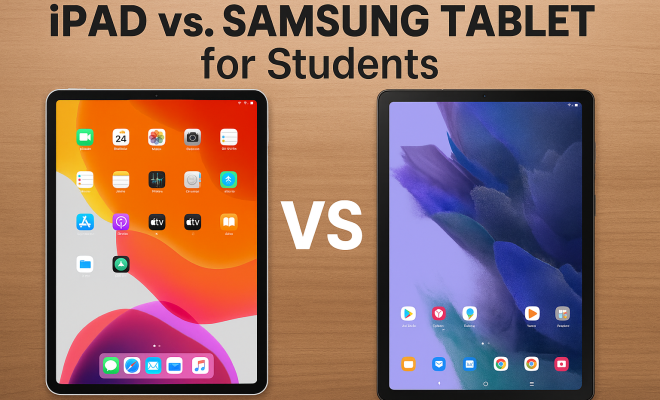
iPad vs. Samsung Tablet for Students
“`html
The debate over iPad vs Samsung Tablet is not just a matter of brand loyalty; it’s a significant decision that can influence a student’s academic performance and overall experience. As technology continues to evolve, tablets have become powerful educational tools. However, choosing the right one can be daunting, especially for students who need devices that are both functional and affordable. In this article, we’ll delve into the strengths and weaknesses of the iPad and Samsung Tablet, helping you make an informed choice.
1. Overview of iPads and Samsung Tablets
Apple’s iPad and Samsung’s Galaxy Tab series dominate the tablet market, catering to different user needs and preferences. The iPad is known for its sleek design, robust ecosystem, and a vast array of educational apps. In contrast, Samsung Tablets offer flexibility with Android’s customization options and often come at a lower price point, making them appealing to students on a budget.
Both devices serve a similar purpose: providing portability and ease of use for accessing educational materials, taking notes, and engaging in multimedia learning. However, their operating systems—iOS for iPads and Android for Samsung Tablets—create distinct user experiences that are worth exploring further.
2. Operating System Differences
The iPad runs on Apple’s iOS, renowned for its user-friendly interface and seamless integration with other Apple products. This can be a notable advantage for students already using Macs or iPhones. iOS is optimized for performance, offering a smooth experience with minimal lag, which is essential during long study sessions.
On the other hand, Samsung Tablets operate on Android, which provides greater flexibility and customization. Students can tailor their devices to fit their needs, using widgets and various launchers. However, the Android experience can vary significantly between devices, and some students may encounter app compatibility issues that could hinder their productivity. We covered iPad programs update in more detail.
3. Performance and Hardware Comparisons
When it comes to performance, Apple’s A-series chips consistently outperform many of their Android counterparts. The latest iPad models feature the M1 chip, which delivers exceptional speed and efficiency, enabling multitasking like a pro. Whether you’re running demanding apps or juggling multiple tabs, the iPad remains responsive.
Samsung Tablets, such as the Galaxy Tab S8, offer impressive hardware as well, equipped with powerful processors and ample RAM. However, the performance can vary depending on the model. While higher-end models compete well with iPads, lower-end versions may struggle with more demanding applications. Therefore, if you’re considering a Samsung Tablet, evaluate its specifications closely.
4. App Ecosystem and Educational Tools
The app ecosystem is a critical factor in the iPad vs Samsung Tablet debate, especially for students. Apple has cultivated a robust collection of educational apps, many of which are specifically designed to leverage iOS features. Popular tools like Notability and GoodNotes thrive on the iPad, offering unique functionalities that enhance note-taking and study efficiency.
Samsung Tablets, while also boasting a wide range of apps, may not match the depth of educational tools available on iOS. However, many popular apps, such as Microsoft Office and Google Workspace, are available on both platforms, ensuring that students can access essential productivity tools regardless of their tablet choice.
5. Design and Portability
Design plays a significant role in the usability of a tablet for students. iPads are often praised for their premium build quality, lightweight design, and aesthetic appeal. They’re available in several sizes, from the compact iPad Mini to the larger iPad Pro, catering to various preferences and use cases.
Samsung Tablets also come in a range of sizes, with the Galaxy Tab S series offering high-quality displays and ergonomic designs. However, some models may feel bulkier compared to their Apple counterparts. Portability is crucial for students who need to carry their devices to class, so consider how each design fits into your daily routine. (See: iPad vs Samsung Tablet comparison.)
6. Price and Value for Money
Price is one of the most significant considerations in the iPad vs Samsung Tablet discussion. iPads tend to be more expensive than their Samsung counterparts, especially when considering the higher-end models. However, many students find the investment worthwhile due to the long-lasting performance and excellent software support that Apple provides.
Samsung offers a more diverse price range, making it easier for budget-conscious students to find a suitable device. While some lower-end models may lack certain features, they can still handle most academic tasks effectively. Ultimately, your choice should balance your budget with the features you need.
7. Battery Life and Longevity
Battery life is crucial for students who rely on their tablets throughout the day. iPads are known for their impressive battery performance, often lasting 10 hours or more on a single charge, which is ideal for long study sessions or classes. Coupled with efficient power management, iPads typically age well, continuing to perform capably for several years.
Samsung Tablets also offer respectable battery life, but performance can vary between models. Some high-end Galaxy Tabs may match or even exceed iPad’s longevity, while more budget-friendly options might require more frequent charging. As a student, consider how often you’ll need to recharge and choose a tablet that meets those demands.
8. Accessories and Additional Features
Both the iPad and Samsung Tablets come with a range of accessories that can enhance their functionality. The Apple Pencil is a notable companion for the iPad, providing an excellent option for note-taking, drawing, or annotating documents. Additionally, the Smart Keyboard Folio and Magic Keyboard add a laptop-like experience, making the iPad a versatile study tool.
Samsung Tablets offer the S Pen, which is similarly effective for note-taking and drawing, especially with the Galaxy Tab S series. They also support a variety of keyboards and cases that enhance usability. When considering accessories, think about how they fit into your study habits and whether you need additional tools for your academic work.
9. Customer Support and Software Updates
Customer support and software updates are essential aspects to consider. Apple is known for its exceptional customer service and regular software updates, ensuring that users enjoy the latest features and security enhancements for years. This longevity can be a significant factor for students looking for a device that will last throughout their academic journey.
Samsung also provides solid customer support, but the frequency and duration of software updates can vary across models. While flagship devices typically receive timely updates, budget models may not enjoy the same level of support. Before making your choice, research the specific model’s update history to ensure it aligns with your needs.
10. Final Considerations: Which is Right for You?
Ultimately, the choice between an iPad and Samsung Tablet comes down to your specific needs as a student. If you value a seamless ecosystem, high-performance apps, and premium build quality, the iPad may be your best bet. Conversely, if you’re looking for a more budget-friendly option with a customizable interface and decent performance, a Samsung Tablet could meet your needs.
Before purchasing, it’s wise to consider your study habits, preferred applications, and budget constraints. Both devices offer unique advantages, so weigh them carefully to find the tablet that will serve you best throughout your academic career.
11. Deep Dive into Educational Features
When it comes to education, the specific features of each tablet can make a significant difference. Both the iPad and Samsung Tablet come with various built-in tools that cater specifically to the needs of students.
The iPad, with its native apps like Pages, Keynote, and Numbers, allows for seamless document creation and presentation design. These applications are integrated with iCloud, meaning students can access their work from any Apple device. Additionally, features like Split View enable multitasking by allowing users to work in two apps simultaneously. For instance, you can take notes in Notability while referring to a PDF in another app.
Samsung Tablets come with the Samsung Notes app that allows for easy note-taking and organization. The app supports hand-drawn notes, voice recordings, and even text recognition, which can be a lifesaver for students during lectures. Also, the integration with Google Drive and other cloud services allows for easy file sharing and collaboration with classmates. (See: Technology in Education resources.)
12. User Experience and Accessibility
Accessibility features are becoming increasingly important as educational institutions strive to create inclusive environments. The iPad offers an array of accessibility options, including VoiceOver, Magnifier, and customizable display settings. This makes it a great choice for students with disabilities. For example, VoiceOver allows visually impaired users to navigate the tablet easily, while the Magnifier can assist those with low vision.
On the Samsung side, the Galaxy Tab series also includes robust accessibility features like TalkBack, which provides spoken feedback for visually impaired users. The “Hearing” settings can help users with hearing difficulties adjust audio outputs, making it a versatile choice for a diverse student population. Related reading: Nooro's developer opportunities.
13. Statistics and Market Trends
The tablet market has seen significant growth in recent years, and understanding the statistics can provide insight into which device might be best for students. According to research conducted by IDC, Apple holds approximately 30% of the global tablet market share, while Samsung captures around 18%. This indicates that many students and professionals prefer iPads, likely due to their perceived reliability and ecosystem advantages.
In terms of user satisfaction, surveys show that iPad users report higher satisfaction rates than Android tablet users. Factors contributing to this include ease of use, the quality of available apps, and Apple’s customer support. However, Samsung’s tablet sales have been increasing steadily, especially in the mid-range and budget segments, highlighting a growing interest in more affordable solutions without sacrificing quality.
14. Expert Perspectives
To get a clearer picture of the ongoing iPad vs Samsung Tablet discussion, we reached out to tech experts and educators. Many agree that both tablets have their strengths but cater to different user bases. For instance, educational technology expert Dr. Sarah Mills notes, “For students deeply embedded in the Apple ecosystem, the iPad is often the better choice. Its integration with tools like iCloud and Apple Pencil can really enhance the learning experience.”
Conversely, technology analyst Mark Johnson points out, “The flexibility of Android is a game-changer for students who like to customize their devices. Samsung Tablets provide a great balance of performance and price, especially for those who might not need high-end capabilities.” This highlights that your choice should align with your specific needs and preferences.
15. Real-World Usage Scenarios
Understanding how each tablet performs in real-world scenarios can help you better assess your options. Let’s look at a few common use cases for students.
For a student majoring in graphic design, an iPad Pro with the Apple Pencil is often the preferred choice. The iPad Pro’s ProMotion technology offers a smooth drawing experience, while apps like Procreate and Adobe Illustrator provide tools that cater specifically to designers. The integration with the Creative Cloud suite also allows for seamless file management and collaboration.
On the flip side, a student pursuing computer science might find a Samsung Galaxy Tab S series tablet more versatile. With the Galaxy Tab’s support for a mouse and keyboard, it can be used for programming and running development environments. The ability to install different software from the Android ecosystem can be a significant advantage for those looking to experiment with various coding tools.
16. FAQ: Common Questions About iPads and Samsung Tablets
1. Which tablet is better for drawing and note-taking?
Both tablets excel in this area, but many artists and note-takers prefer the iPad due to the advanced capabilities of the Apple Pencil and apps like Procreate. Samsung’s S Pen also offers excellent functionality, especially with the Galaxy Tab S series, making it a strong contender.
2. Can I use a Samsung Tablet for iOS apps?
No, iOS apps are not compatible with Android devices. However, many popular applications are available on both platforms, so you won’t miss out on essential tools. (See: Tablet computers in education.) (future of pain management jobs)
3. How do iPads and Samsung Tablets handle gaming?
iPads are generally regarded as superior for gaming due to their powerful hardware and extensive library of optimized games. Samsung Tablets also perform well, particularly with the Galaxy Tab S series, but you may find that some games run better on iPad.
4. Is there a difference in durability between the two brands?
Both brands offer sturdy devices; however, iPads typically have a more premium feel and build quality. That said, Samsung Tablets come with Gorilla Glass, providing additional protection against drops and scratches.
5. What should I consider regarding storage options?
iPads come with fixed storage options, meaning you can’t expand it later. Samsung Tablets often offer microSD slots for additional storage, which can be a significant advantage for students who need more space for apps and files.
6. Which tablet has better customer service?
Apple has a reputation for exceptional customer service, often providing quicker resolutions and more helpful support. Samsung also has good customer service, but experiences can vary between regions and specific devices.
7. Are there significant differences in audio quality?
iPads are known for having excellent audio quality, making them suitable for media consumption. Samsung Tablets also deliver good audio, but the quality may not match that of the iPad, especially in higher-end models.
8. Will I receive updates for both devices?
Yes, both Apple and Samsung offer software updates for their tablets, but the frequency and longevity can differ. Apple typically supports their devices for a longer period, while Samsung’s update policies vary by model.
17. User Reviews and Feedback
Customer feedback plays a pivotal role in shaping perceptions about both the iPad and Samsung Tablets. Many users rave about the iPad’s intuitive interface and app reliability, often highlighting how these factors contribute to their productivity. A common sentiment among iPad users is the feeling of being well-supported by Apple through regular updates and ecosystem features that enhance their overall experience.
Samsung users, while appreciating the customization and versatility of Android, sometimes express concerns about software fragmentation, especially on lower-end models. Some users report that certain apps can behave inconsistently, which might affect their daily tasks. However, Samsung’s integration of features like DeX mode is often praised for transforming the tablet experience into a more desktop-like environment, making it ideal for multitasking and productivity.
“`
Trending Now
Frequently Asked Questions
Which is better for students, iPad or Samsung tablet?
Choosing between an iPad and a Samsung tablet depends on individual needs. iPads offer a robust ecosystem and a wide range of educational apps, while Samsung tablets provide flexibility with Android's customization options and often come at a lower price, making them suitable for budget-conscious students.
What are the main differences between iPad and Samsung tablets?
The main differences include operating systems, design, and app availability. iPads run on iOS, known for its user-friendly interface and smooth performance. In contrast, Samsung tablets use Android, which offers more customization but can lead to variable app compatibility across devices.
Are iPads worth the price for students?
iPads are often considered worth the price for students due to their seamless integration with other Apple products, long battery life, and access to a vast library of educational apps. However, students on a budget might find more value in the lower-priced Samsung tablets.
Can you use a Samsung tablet for educational purposes?
Yes, Samsung tablets are excellent for educational purposes. They support a variety of apps for note-taking, studying, and multimedia learning. Their Android operating system allows for customization, making it easier for students to tailor their devices to their specific educational needs.
What should students consider when choosing a tablet?
Students should consider factors such as budget, operating system preferences, app availability, and device compatibility with other tech they use. Evaluating the performance, battery life, and overall user experience of both iPads and Samsung tablets can also influence their decision.
What's your take on this? Share your thoughts in the comments below — we read every one.