The Tech Edvocate

Top Menu

  • Advertisement
  • Apps
  • Home Page
  • Home Page Five (No Sidebar)
  • Home Page Four
  • Home Page Three
  • Home Page Two
  • Home Tech2
  • Icons [No Sidebar]
  • Left Sidbear Page
  • Lynch Educational Consulting
  • My Account
  • My Speaking Page
  • Newsletter Sign Up Confirmation
  • Newsletter Unsubscription
  • Our Brands
  • Page Example
  • Privacy Policy
  • Protected Content
  • Register
  • Request a Product Review
  • Shop
  • Shortcodes Examples
  • Signup
  • Start Here
    • Governance
    • Careers
    • Contact Us
  • Terms and Conditions
  • The Edvocate
  • The Tech Edvocate Product Guide
  • Topics
  • Write For Us
  • Advertise

Main Menu

  • Start Here
    • Our Brands
    • Governance
      • Lynch Educational Consulting, LLC.
      • Dr. Lynch’s Personal Website
      • Careers
    • Write For Us
    • The Tech Edvocate Product Guide
    • Contact Us
    • Books
    • Edupedia
    • Post a Job
    • The Edvocate Podcast
    • Terms and Conditions
    • Privacy Policy
  • Topics
    • Assistive Technology
    • Child Development Tech
    • Early Childhood & K-12 EdTech
    • EdTech Futures
    • EdTech News
    • EdTech Policy & Reform
    • EdTech Startups & Businesses
    • Higher Education EdTech
    • Online Learning & eLearning
    • Parent & Family Tech
    • Personalized Learning
    • Product Reviews
  • Advertise
  • Tech Edvocate Awards
  • The Edvocate
  • Pedagogue
  • School Ratings

logo

The Tech Edvocate

  • Start Here
    • Our Brands
    • Governance
      • Lynch Educational Consulting, LLC.
      • Dr. Lynch’s Personal Website
        • My Speaking Page
      • Careers
    • Write For Us
    • The Tech Edvocate Product Guide
    • Contact Us
    • Books
    • Edupedia
    • Post a Job
    • The Edvocate Podcast
    • Terms and Conditions
    • Privacy Policy
  • Topics
    • Assistive Technology
    • Child Development Tech
    • Early Childhood & K-12 EdTech
    • EdTech Futures
    • EdTech News
    • EdTech Policy & Reform
    • EdTech Startups & Businesses
    • Higher Education EdTech
    • Online Learning & eLearning
    • Parent & Family Tech
    • Personalized Learning
    • Product Reviews
  • Advertise
  • Tech Edvocate Awards
  • The Edvocate
  • Pedagogue
  • School Ratings
  • Nostalgija kot oblikovalski jezik sodobnih spletnih igralniških iger

  • Piedzīvojuma naratīvs spēļu automātu bonusu ainās

  • Kā bingo elementi parādās mūsdienu kazino spēļu bibliotēkās

  • Luksusa tēli kazino spēļu vizuālajā valodā

  • Les studios de casino en direct rapprochent le jeu en ligne de l’expérience audiovisuelle

  • Wie Spieletitel Thema und Genre vor dem Start vermitteln

  • Wie Vorschaubilder die Orientierung in digitalen Casino Lobbys prägen

  • This One Privacy Camera Feature Could Change Smart Homes Forever

  • Unprecedented: White House Mandates AI Security Incident Reporting After Troubling Breaches

  • The AI Storm Tracker Predicting Viral Narratives Just Landed $7 Million – Here’s Why It Matters

Digital & Mobile Technology
Home›Digital & Mobile Technology›How to Access OneDrive From Anywhere

How to Access OneDrive From Anywhere
By Matthew Lynch
July 25, 2023
0
Spread the love

OneDrive is a cloud-based storage service that allows you to store, share, and access your files from anywhere with an internet connection. With OneDrive, you can access your files from your computer, tablet, or phone, making it easy to work on the go. In this article, we’ll go over how to access OneDrive from anywhere.

1.Sign up for OneDrive Before you can access OneDrive, you’ll need to sign up for an account. You can either sign up for a free account with 5 GB of storage, or you can sign up for a paid account with more storage. Once you’ve signed up, you’ll need to download the OneDrive app on your computer or mobile device.

2.Access OneDrive on your computer To access OneDrive on your computer, you’ll need to download and install the OneDrive app. Once you’ve installed the app, you’ll need to sign in to your account. Once you’re signed in, you can access your files by opening the OneDrive folder on your computer.

3.Access OneDrive on your mobile device To access OneDrive on your mobile device, you’ll need to download the OneDrive app from the app store. Once you’ve downloaded the app, you’ll need to sign in to your account. Once you’re signed in, you can access your files by opening the OneDrive app on your mobile device.

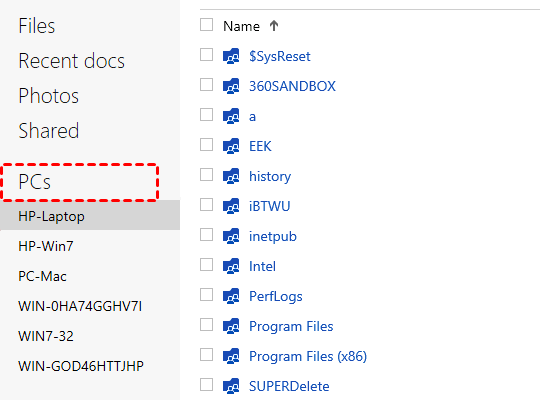
4.Access OneDrive on the web If you don’t have access to your computer or mobile device, you can still access OneDrive on the web. To do this, go to the OneDrive website and sign in to your account. Once you’re signed in, you can access your files from anywhere with an internet connection.

5.Share files with others One of the great things about OneDrive is that you can easily share files with others. To share a file, simply right-click on the file and select “Share.” You can then choose who you want to share the file with and set permissions for each person.

In conclusion, accessing OneDrive from anywhere is easy and convenient. By signing up for an account and downloading the app on your computer or mobile device, you can access your files from anywhere with an internet connection. Additionally, the ability to share files with others makes OneDrive a great tool for collaboration.


Previous Article

How to Use Incognito Mode in Google ...

Next Article

How to Play Music on All Alexa ...

Matthew Lynch

Related articles More from author

  • Digital & Mobile Technology

    Your Android Phone Won’t Charge? Tips and Fixes to Try

    June 8, 2023
    By Matthew Lynch
  • Digital & Mobile Technology

    How to Upload Photos to Google Drive From iPhone

    June 11, 2023
    By Matthew Lynch
  • Digital & Mobile Technology

    Best USB Hubs of 2023

    June 6, 2023
    By Matthew Lynch
  • Digital & Mobile Technology

    What is Green Monday?

    June 9, 2023
    By Matthew Lynch
  • Digital & Mobile Technology

    What Are System Files on Windows? Here’s What You Need to Know

    June 21, 2023
    By Matthew Lynch
  • Digital & Mobile Technology

    What is VMware?

    May 14, 2023
    By Matthew Lynch

Search

Login & Registration

  • Log in
  • Entries feed
  • Comments feed
  • WordPress.org

Newsletter

Signup for The Tech Edvocate Newsletter and have the latest in EdTech news and opinion delivered to your email address!

About Us

Since technology is not going anywhere and does more good than harm, adapting is the best course of action. That is where The Tech Edvocate comes in. We plan to cover the PreK-12 and Higher Education EdTech sectors and provide our readers with the latest news and opinion on the subject. From time to time, I will invite other voices to weigh in on important issues in EdTech. We hope to provide a well-rounded, multi-faceted look at the past, present, the future of EdTech in the US and internationally.

We started this journey back in June 2016, and we plan to continue it for many more years to come. I hope that you will join us in this discussion of the past, present and future of EdTech and lend your own insight to the issues that are discussed.

Newsletter

Signup for The Tech Edvocate Newsletter and have the latest in EdTech news and opinion delivered to your email address!

Contact Us

The Tech Edvocate
910 Goddin Street
Richmond, VA 23231
(601) 630-5238
[email protected]

Copyright © 2026 Matthew Lynch. All rights reserved.