The Tech Edvocate

Top Menu

  • Advertisement
  • Apps
  • Home Page
  • Home Page Five (No Sidebar)
  • Home Page Four
  • Home Page Three
  • Home Page Two
  • Home Tech2
  • Icons [No Sidebar]
  • Left Sidbear Page
  • Lynch Educational Consulting
  • My Account
  • My Speaking Page
  • Newsletter Sign Up Confirmation
  • Newsletter Unsubscription
  • Our Brands
  • Page Example
  • Privacy Policy
  • Protected Content
  • Register
  • Request a Product Review
  • Shop
  • Shortcodes Examples
  • Signup
  • Start Here
    • Governance
    • Careers
    • Contact Us
  • Terms and Conditions
  • The Edvocate
  • The Tech Edvocate Product Guide
  • Topics
  • Write For Us
  • Advertise

Main Menu

  • Start Here
    • Our Brands
    • Governance
      • Lynch Educational Consulting, LLC.
      • Dr. Lynch’s Personal Website
      • Careers
    • Write For Us
    • The Tech Edvocate Product Guide
    • Contact Us
    • Books
    • Edupedia
    • Post a Job
    • The Edvocate Podcast
    • Terms and Conditions
    • Privacy Policy
  • Topics
    • Assistive Technology
    • Child Development Tech
    • Early Childhood & K-12 EdTech
    • EdTech Futures
    • EdTech News
    • EdTech Policy & Reform
    • EdTech Startups & Businesses
    • Higher Education EdTech
    • Online Learning & eLearning
    • Parent & Family Tech
    • Personalized Learning
    • Product Reviews
  • Advertise
  • Tech Edvocate Awards
  • The Edvocate
  • Pedagogue
  • School Ratings

logo

The Tech Edvocate

  • Start Here
    • Our Brands
    • Governance
      • Lynch Educational Consulting, LLC.
      • Dr. Lynch’s Personal Website
        • My Speaking Page
      • Careers
    • Write For Us
    • The Tech Edvocate Product Guide
    • Contact Us
    • Books
    • Edupedia
    • Post a Job
    • The Edvocate Podcast
    • Terms and Conditions
    • Privacy Policy
  • Topics
    • Assistive Technology
    • Child Development Tech
    • Early Childhood & K-12 EdTech
    • EdTech Futures
    • EdTech News
    • EdTech Policy & Reform
    • EdTech Startups & Businesses
    • Higher Education EdTech
    • Online Learning & eLearning
    • Parent & Family Tech
    • Personalized Learning
    • Product Reviews
  • Advertise
  • Tech Edvocate Awards
  • The Edvocate
  • Pedagogue
  • School Ratings
  • The Reckless Ben Controversy: An Outrageous Fight for Justice

  • Outrageous: The Sydney Sweeney Ad Controversy You Didn’t See Coming — And Why It’s Working

  • The AI CRM War: Why Salesforce Just Made a $2 Billion Bid for a Startup

  • OpenAI’s Navier-Stokes ‘Solution’ Ignites Firestorm: Did They Steal It?

  • Blizzard’s Boldest Bet: Why a StarCraft Shooter in 2030 Could Redefine Gaming

  • Volatile: Why Top AI Bosses Just Triggered a Massive AI Stocks Decline

  • ‘Godfather of AI’ backs Anthropic chief’s call to slow down development

  • Why Millions Are Flocking to Trade Schools as AI Reshapes the Job Market

  • Unmasking the Bizarre ‘Cat in the Hat’ Trend: Why Schools Are Sounding the Alarm

  • Florida DMV Hacked: 200,000 Driver Records Exposed in Stunning Breach

Assistive Technology
Home›Assistive Technology›10 Common Dorm Room Tech Troubles & How to Fix Them

10 Common Dorm Room Tech Troubles & How to Fix Them

By Matthew Lynch
June 13, 2023
0
Spread the love

Moving into a dorm room can be an exciting and fun adventure, but it can also come with its own set of challenges. One of the most frustrating is tech troubles. If you’re having issues with your technology, don’t worry; you’re not alone. Here are 10 common dorm room tech troubles and how to fix them.

1. Slow internet speed

Slow internet speed can be a major problem, especially if you have a lot of classwork to do online. One solution is to get an Ethernet cable and connect your computer directly to the wall outlet. This can significantly boost your internet speed. If that doesn’t work, try resetting your router or contacting your school’s IT department.

2. Bluetooth connectivity problems

If you’re having trouble connecting your Bluetooth devices, try turning them off and back on again. If that doesn’t work, make sure your devices are within range of each other and that their batteries are charged. If you’re still having trouble, try updating your device’s software or contacting the manufacturer for help.

3. Dead laptop battery

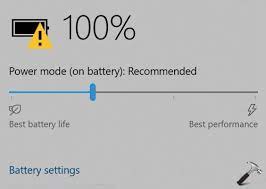
If your laptop battery dies frequently, try adjusting the display brightness, turning off unnecessary programs, and keeping your laptop cool. You can also try buying an external battery pack or investing in a portable charger.

4. Printer issues

Setting up your printer can be tricky, but there are a few things you can do to ensure it’s working properly. Make sure your printer is plugged in and turned on, and that it’s connected to the same Wi-Fi network as your computer. If you’re still having trouble, try downloading the latest drivers for your printer or contacting the manufacturer for assistance.

5. Malware and viruses

Malware and viruses can wreak havoc on your computer, so it’s important to protect yourself. Use antivirus software and make sure it’s updated regularly. Don’t download software or attachments from unknown sources, and be wary of suspicious emails and messages.

6. Crashing apps

If your apps are crashing frequently, try restarting your device, updating your software, or uninstalling and reinstalling the app. You can also try clearing your device’s cache or contacting the app’s developer for assistance.

7. Wi-Fi signal dropping

If your Wi-Fi signal is dropping frequently, try moving closer to the router or investing in a Wi-Fi extender. You can also try resetting your router or contacting your school’s IT department for help.

8. Lost files

Losing important files can be devastating, but there are a few things you can do to prevent it. Back up your files regularly and use cloud storage or an external hard drive. If you’ve already lost files, try using file recovery software or contacting a data recovery specialist.

9. Muted sound

If your sound is muted or doesn’t work at all, check your device settings to make sure the volume is turned up and the sound is not muted. You can also try plugging in headphones or external speakers to see if the sound works through them.

10. Overheating devices

If your devices are overheating, make sure they have proper ventilation and aren’t covered by blankets or other materials. You can also try adjusting your device’s power settings and turning off unnecessary programs.

In conclusion, dorm room tech troubles can be frustrating, but with a little patience and troubleshooting, you can usually fix them. If you’re still having trouble, don’t hesitate to reach out to your school’s IT department or to the manufacturer for assistance. With the right tools and knowledge, you can take control of your technology and enjoy a productive and successful school year. 

Previous Article

How to Fix Wi-Fi Calling Not Working ...

Next Article

What Does Modem Stand For?

Matthew Lynch

Related articles More from author

  • Assistive Technology

    How to Customize the Google Search Widget on Your Android Phone

    June 6, 2023
    By Matthew Lynch
  • Assistive Technology

    How to Fix the Microphone on an HP Laptop

    June 12, 2023
    By Matthew Lynch
  • Assistive Technology

    The Best Amazon Customer Service Tips That Make You a Better Shopper

    June 23, 2023
    By Matthew Lynch
  • Assistive Technology

    How to Crop an Image in Adobe Illustrator

    June 11, 2023
    By Matthew Lynch
  • Assistive Technology

    How to Upgrade to Windows 11 22H2 on Unsupported Hardware

    June 6, 2023
    By Matthew Lynch
  • Assistive Technology

    How to Take Screenshots on Ubuntu? 4 Different Methods

    June 22, 2023
    By Matthew Lynch

Search

Login & Registration

  • Log in
  • Entries feed
  • Comments feed
  • WordPress.org

Newsletter

Signup for The Tech Edvocate Newsletter and have the latest in EdTech news and opinion delivered to your email address!

About Us

Since technology is not going anywhere and does more good than harm, adapting is the best course of action. That is where The Tech Edvocate comes in. We plan to cover the PreK-12 and Higher Education EdTech sectors and provide our readers with the latest news and opinion on the subject. From time to time, I will invite other voices to weigh in on important issues in EdTech. We hope to provide a well-rounded, multi-faceted look at the past, present, the future of EdTech in the US and internationally.

We started this journey back in June 2016, and we plan to continue it for many more years to come. I hope that you will join us in this discussion of the past, present and future of EdTech and lend your own insight to the issues that are discussed.

Newsletter

Signup for The Tech Edvocate Newsletter and have the latest in EdTech news and opinion delivered to your email address!

Contact Us

The Tech Edvocate
910 Goddin Street
Richmond, VA 23231
(601) 630-5238
[email protected]

Copyright © 2026 Matthew Lynch. All rights reserved.