The Tech Edvocate

Top Menu

  • Advertisement
  • Apps
  • Home Page
  • Home Page Five (No Sidebar)
  • Home Page Four
  • Home Page Three
  • Home Page Two
  • Home Tech2
  • Icons [No Sidebar]
  • Left Sidbear Page
  • Lynch Educational Consulting
  • My Account
  • My Speaking Page
  • Newsletter Sign Up Confirmation
  • Newsletter Unsubscription
  • Our Brands
  • Page Example
  • Privacy Policy
  • Protected Content
  • Register
  • Request a Product Review
  • Shop
  • Shortcodes Examples
  • Signup
  • Start Here
    • Governance
    • Careers
    • Contact Us
  • Terms and Conditions
  • The Edvocate
  • The Tech Edvocate Product Guide
  • Topics
  • Write For Us
  • Advertise

Main Menu

  • Start Here
    • Our Brands
    • Governance
      • Lynch Educational Consulting, LLC.
      • Dr. Lynch’s Personal Website
      • Careers
    • Write For Us
    • The Tech Edvocate Product Guide
    • Contact Us
    • Books
    • Edupedia
    • Post a Job
    • The Edvocate Podcast
    • Terms and Conditions
    • Privacy Policy
  • Topics
    • Assistive Technology
    • Child Development Tech
    • Early Childhood & K-12 EdTech
    • EdTech Futures
    • EdTech News
    • EdTech Policy & Reform
    • EdTech Startups & Businesses
    • Higher Education EdTech
    • Online Learning & eLearning
    • Parent & Family Tech
    • Personalized Learning
    • Product Reviews
  • Advertise
  • Tech Edvocate Awards
  • The Edvocate
  • Pedagogue
  • School Ratings

logo

The Tech Edvocate

  • Start Here
    • Our Brands
    • Governance
      • Lynch Educational Consulting, LLC.
      • Dr. Lynch’s Personal Website
        • My Speaking Page
      • Careers
    • Write For Us
    • The Tech Edvocate Product Guide
    • Contact Us
    • Books
    • Edupedia
    • Post a Job
    • The Edvocate Podcast
    • Terms and Conditions
    • Privacy Policy
  • Topics
    • Assistive Technology
    • Child Development Tech
    • Early Childhood & K-12 EdTech
    • EdTech Futures
    • EdTech News
    • EdTech Policy & Reform
    • EdTech Startups & Businesses
    • Higher Education EdTech
    • Online Learning & eLearning
    • Parent & Family Tech
    • Personalized Learning
    • Product Reviews
  • Advertise
  • Tech Edvocate Awards
  • The Edvocate
  • Pedagogue
  • School Ratings
  • Tribit FlyBuds C3 Earbuds: Premium Features at a Budget-Friendly Price

  • Is AuraCam Pro’s Emotional AI a Privacy Nightmare or Security Breakthrough?

  • Unprecedented: N-able’s Global Shutdown After 30+ Zero-Days Revealed

  • The Urgent Truth: Your AI Tools for Financial Advisors Could Be a Compliance Nightmare

  • Unmasking the Troubling Truth About EU’s Digital Omnibus and Your Data

  • Outrageous: Your US Car Insurance 2026 Bill Is About to Explode – Here’s Why

  • Uncovering the Truth: Are AI Spending Concerns About to Tank Your Portfolio?

  • The Silent Revolution: How AI Property Valuation Is Quietly Reshaping Real Estate

  • The Astonishing Truth: Why Your Dream Car Is Now a $52,000 Illusion

  • Toxic Algorithms: Why Your Bank’s AI Could Cost You Everything

Tech Advice
Home›Tech Advice›Your Venmo Privacy Could Be Compromised. How to Protect Your Account

Your Venmo Privacy Could Be Compromised. How to Protect Your Account
By Matthew Lynch
July 20, 2023
0
Spread the love

Venmo, the popular peer-to-peer payment app, has revolutionized the way we handle financial transactions with friends and family. However, as with any online platform that deals with sensitive information, there is always a risk of privacy breaches or unauthorized access to user accounts. In this article, we will explore some essential steps you can take to protect your Venmo account and ensure your privacy remains intact.

Enable Two-Factor Authentication (2FA)

Enabling two-factor authentication adds an extra layer of security to your Venmo account by requiring a second verification step in addition to your password when logging in. This usually involves receiving a unique code via SMS or using an authenticator app on your mobile device. To enable 2FA on Venmo:

1. Open the Venmo app on your mobile device.

2. Go to Settings > Privacy & Security > Two-Factor Authentication.

3. Follow the prompts to set up and activate 2FA for added protection against unauthorized access.

Use a Strong and Unique Password

Creating a strong password is vital for securing any online account, including Venmo. Avoid using easily guessable passwords like birthdays or common phrases – instead, use a combination of uppercase and lowercase letters, numbers, and special characters.

Furthermore, it’s crucial not to reuse passwords across multiple platforms since compromised credentials from one service could potentially grant unauthorized access elsewhere if reused.

Consider utilizing a reputable password manager tool that generates complex passwords for each site while securely storing them so you don’t have to remember them all.

Regularly Review Transaction Activity

Make it a habit to regularly review transaction activity within the Venmo app. By keeping track of incoming and outgoing payments, you can quickly identify any suspicious or unfamiliar transactions that may indicate unauthorized access or potential privacy breaches.

If you notice any unauthorized activity, immediately report it to Venmo’s customer support and take necessary steps to secure your account.

Be Mindful of Privacy Settings

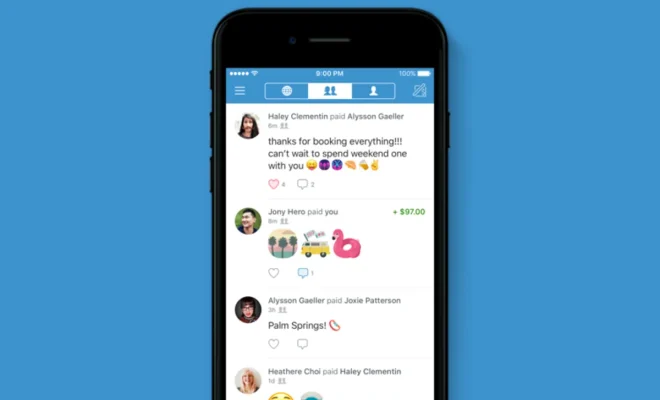
Venmo provides users with various privacy settings that allow you to control the visibility of your transactions and personal information. It’s crucial to understand these options and adjust them according to your preferences:

• Transaction Privacy: Choose whether transactions are visible only between the sender and recipient or if they can be seen by friends or even the public.

• Profile Visibility: Decide whether your profile is visible to everyone, just your friends, or only yourself.
By reviewing and adjusting these privacy settings, you can ensure that sensitive financial information is shared only with those you trust.

Keep Your Device Secure

To protect your Venmo account, it’s essential to maintain a secure environment on the device you use for accessing the app. Here are some key practices:

• Use Strong Device Passcodes/PINs: Set a strong passcode or PIN for unlocking your mobile device.

• Keep Software Updated: Regularly update both the operating system (iOS/Android) and apps on your device—including Venmo—to benefit from security patches and bug fixes.

• Beware of Public Wi-Fi Networks: Avoid using public Wi-Fi networks when accessing Venmo as they may not be secure. If necessary, utilize a virtual private network (VPN) for added protection.

Conclusion

While convenience is at the core of services like Venmo, ensuring privacy and security should remain paramount. By following these measures—enabling two-factor authentication, using strong passwords, regularly reviewing transaction activity, managing privacy settings wisely, and keeping devices secure—you significantly reduce potential risks associated with compromised Venmo accounts. Always stay vigilant about protecting personal information online as part of maintaining a safe digital presence


Previous Article

YouTube TV Review: The Best Channel Selection ...

Next Article

Your VPN Is Crushing Your Internet Speed. ...

Matthew Lynch

Related articles More from author

  • Tech Advice

    Best Home EV Chargers for 2023 – Powering Your Green Vehicle

    August 17, 2023
    By Matthew Lynch
  • Tech Advice

    Netflix’s Biggest Hit Movies and Shows, Ranked (According to Netflix)

    July 24, 2023
    By Matthew Lynch
  • Tech Advice

    What is diesel exhaust fluid and why is it more important than ever?

    July 12, 2023
    By Matthew Lynch
  • Tech Advice

    T-Mobile Home Internet Review: Plans, Prices, and Speed 2023

    August 8, 2023
    By Matthew Lynch
  • Tech Advice

    What Is Pennsylvania (PA) Sales Tax on Cars?

    August 22, 2023
    By Matthew Lynch
  • Tech Advice

    Galaxy S20 Plus review: The best of both worlds

    July 14, 2023
    By Matthew Lynch

Search

Login & Registration

  • Log in
  • Entries feed
  • Comments feed
  • WordPress.org

Newsletter

Signup for The Tech Edvocate Newsletter and have the latest in EdTech news and opinion delivered to your email address!

About Us

Since technology is not going anywhere and does more good than harm, adapting is the best course of action. That is where The Tech Edvocate comes in. We plan to cover the PreK-12 and Higher Education EdTech sectors and provide our readers with the latest news and opinion on the subject. From time to time, I will invite other voices to weigh in on important issues in EdTech. We hope to provide a well-rounded, multi-faceted look at the past, present, the future of EdTech in the US and internationally.

We started this journey back in June 2016, and we plan to continue it for many more years to come. I hope that you will join us in this discussion of the past, present and future of EdTech and lend your own insight to the issues that are discussed.

Newsletter

Signup for The Tech Edvocate Newsletter and have the latest in EdTech news and opinion delivered to your email address!

Contact Us

The Tech Edvocate
910 Goddin Street
Richmond, VA 23231
(601) 630-5238
[email protected]

Copyright © 2026 Matthew Lynch. All rights reserved.