The Tech Edvocate

Top Menu

  • Advertisement
  • Apps
  • Home Page
  • Home Page Five (No Sidebar)
  • Home Page Four
  • Home Page Three
  • Home Page Two
  • Home Tech2
  • Icons [No Sidebar]
  • Left Sidbear Page
  • Lynch Educational Consulting
  • My Account
  • My Speaking Page
  • Newsletter Sign Up Confirmation
  • Newsletter Unsubscription
  • Our Brands
  • Page Example
  • Privacy Policy
  • Protected Content
  • Register
  • Request a Product Review
  • Shop
  • Shortcodes Examples
  • Signup
  • Start Here
    • Governance
    • Careers
    • Contact Us
  • Terms and Conditions
  • The Edvocate
  • The Tech Edvocate Product Guide
  • Topics
  • Write For Us
  • Advertise

Main Menu

  • Start Here
    • Our Brands
    • Governance
      • Lynch Educational Consulting, LLC.
      • Dr. Lynch’s Personal Website
      • Careers
    • Write For Us
    • The Tech Edvocate Product Guide
    • Contact Us
    • Books
    • Edupedia
    • Post a Job
    • The Edvocate Podcast
    • Terms and Conditions
    • Privacy Policy
  • Topics
    • Assistive Technology
    • Child Development Tech
    • Early Childhood & K-12 EdTech
    • EdTech Futures
    • EdTech News
    • EdTech Policy & Reform
    • EdTech Startups & Businesses
    • Higher Education EdTech
    • Online Learning & eLearning
    • Parent & Family Tech
    • Personalized Learning
    • Product Reviews
  • Advertise
  • Tech Edvocate Awards
  • The Edvocate
  • Pedagogue
  • School Ratings

logo

The Tech Edvocate

  • Start Here
    • Our Brands
    • Governance
      • Lynch Educational Consulting, LLC.
      • Dr. Lynch’s Personal Website
        • My Speaking Page
      • Careers
    • Write For Us
    • The Tech Edvocate Product Guide
    • Contact Us
    • Books
    • Edupedia
    • Post a Job
    • The Edvocate Podcast
    • Terms and Conditions
    • Privacy Policy
  • Topics
    • Assistive Technology
    • Child Development Tech
    • Early Childhood & K-12 EdTech
    • EdTech Futures
    • EdTech News
    • EdTech Policy & Reform
    • EdTech Startups & Businesses
    • Higher Education EdTech
    • Online Learning & eLearning
    • Parent & Family Tech
    • Personalized Learning
    • Product Reviews
  • Advertise
  • Tech Edvocate Awards
  • The Edvocate
  • Pedagogue
  • School Ratings
  • Best GetYourGuide tours in Paris

  • Does Viator offer group discounts?

  • Hotels.com vs Airbnb features

  • What is Regus Business Lounge?

  • What is Couchsurfing verification?

  • How to use Viator gift cards?

  • Klook payment methods accepted

  • Best Notion templates for teams

  • WeWork vs traditional office cost

  • Klook vs GetYourGuide vs Viator

Digital & Mobile Technology
Home›Digital & Mobile Technology›Windows Memory Diagnostic

Windows Memory Diagnostic
By Matthew Lynch
June 11, 2023
0
Spread the love

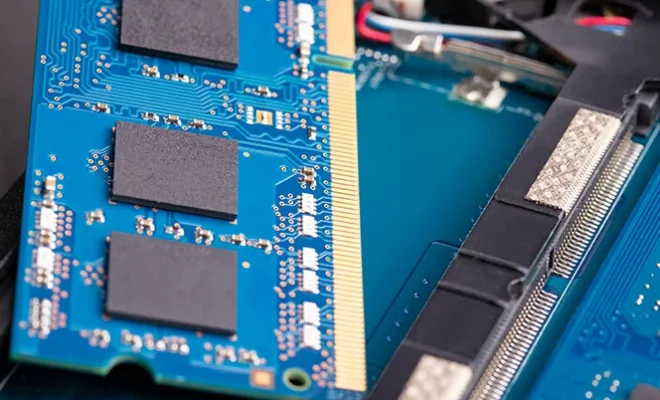
Windows Memory Diagnostic is a useful tool for checking the health of your computer’s RAM. RAM or Random Access Memory is one of the most important components of a computer system. It is responsible for storing temporary data that the computer needs to access quickly. Over time, RAM can become faulty, resulting in system crashes, errors, and data loss. Windows Memory Diagnostic offers a simple solution for detecting and repairing these issues.

What is Windows Memory Diagnostic?

Windows Memory Diagnostic is a diagnostic tool that is built into the Windows operating system. It is designed to test your computer’s RAM for various issues and errors. The tool runs a series of tests on your RAM modules to determine if there are any issues that may be affecting the system’s performance.

The Windows Memory Diagnostic tool is easy to use and can be accessed from within the Windows operating system. You can run the tool from the Settings app on Windows 10, or from the Control Panel on earlier versions of Windows.

Benefits of Windows Memory Diagnostic

Running the Windows Memory Diagnostic tool on your computer has several benefits. Firstly, it helps to identify any issues that may be affecting the performance of your computer. RAM errors can cause crashes, system errors, and data loss, so it’s important to diagnose any issues as soon as possible.

Secondly, the tool helps to isolate the problem. If your computer is experiencing crashes or other issues, it can be difficult to know what is causing the problem. Running the Windows Memory Diagnostic tool can help to identify if the issue is related to your computer’s RAM.

Thirdly, the tool is easy to use and requires no technical expertise. Even if you’re not a computer expert, you can easily run the tool and diagnose any issues with your computer’s RAM.

How to use Windows Memory Diagnostic

To use the Windows Memory Diagnostic tool, follow these steps:

Step 1: Open the Start menu and search for Windows Memory Diagnostic.

Step 2: Click on the tool to open it.

Step 3: Select whether you want to restart your computer immediately and run the tool or run the tool on the next restart.

Step 4: The tool will run several tests on your computer’s RAM. You can view the progress of the tests on the screen.

Step 5: Once the tests are completed, the tool will display the results. If any errors are detected, the tool will provide further details on the issue.

Conclusion

In conclusion, Windows Memory Diagnostic is a useful tool for diagnosing issues with your computer’s RAM. RAM errors can cause system crashes, errors, and data loss, so it’s important to diagnose and resolve any issues as soon as possible. The Windows Memory Diagnostic tool is easy to use and provides a quick and easy way to test the health of your computer’s RAM. If you’re experiencing any issues with your computer, running this tool should always be one of the first steps you take to diagnose the problem.


Previous Article

Format Command

Next Article

Best Ways to Use Your Roku TV ...

Matthew Lynch

Related articles More from author

  • Digital & Mobile Technology

    Best Third-Party YouTube Apps for Mobile You Should Try

    April 10, 2023
    By Matthew Lynch
  • Digital & Mobile Technology

    Driver Booster v10.3 Review (Free Driver Updater)

    June 6, 2023
    By Matthew Lynch
  • Digital & Mobile Technology

    Using Wireshark on Ubuntu

    April 14, 2023
    By Matthew Lynch
  • Digital & Mobile Technology

    What is a Unified Messaging System (UMS)?

    April 24, 2023
    By Matthew Lynch
  • Digital & Mobile Technology

    How to Lock the Taskbar in Windows

    July 15, 2023
    By Matthew Lynch
  • Digital & Mobile Technology

    What Is a Purple Team in Cybersecurity?

    June 15, 2023
    By Matthew Lynch

Search

Login & Registration

  • Log in
  • Entries feed
  • Comments feed
  • WordPress.org

Newsletter

Signup for The Tech Edvocate Newsletter and have the latest in EdTech news and opinion delivered to your email address!

About Us

Since technology is not going anywhere and does more good than harm, adapting is the best course of action. That is where The Tech Edvocate comes in. We plan to cover the PreK-12 and Higher Education EdTech sectors and provide our readers with the latest news and opinion on the subject. From time to time, I will invite other voices to weigh in on important issues in EdTech. We hope to provide a well-rounded, multi-faceted look at the past, present, the future of EdTech in the US and internationally.

We started this journey back in June 2016, and we plan to continue it for many more years to come. I hope that you will join us in this discussion of the past, present and future of EdTech and lend your own insight to the issues that are discussed.

Newsletter

Signup for The Tech Edvocate Newsletter and have the latest in EdTech news and opinion delivered to your email address!

Contact Us

The Tech Edvocate
910 Goddin Street
Richmond, VA 23231
(601) 630-5238
[email protected]

Copyright © 2026 Matthew Lynch. All rights reserved.