Waze Android Auto: Revolutionizing Driver Safety & Navigation
“`html
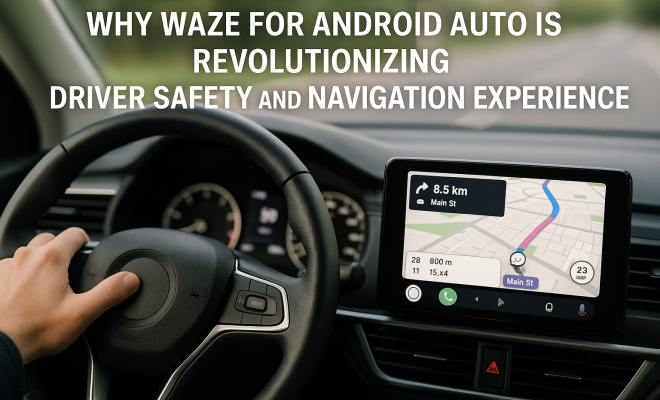
Driving can often feel like a juggling act, especially when you factor in the need for real-time navigation and alerts. With the latest updates to Waze Android Auto, navigating your way to your destination has become not only easier but significantly safer. This major update integrates Waze directly into a vehicle’s infotainment system, eliminating the need for drivers to look down at their smartphones while on the road. Let’s explore this groundbreaking development in depth.
The Significance of Waze’s Integration with Android Auto
The integration of Waze into Android Auto marks a pivotal moment for both the app and the driving experience. Historically, drivers often faced the dilemma of balancing navigation with road awareness. With mobile apps, the temptation to glance at your phone can pose significant risks. However, by projecting navigation data and real-time alerts directly onto the vehicle’s dashboard, Waze eliminates this distraction. This update is available globally for all Android Auto-enabled vehicles, making it a universal solution for millions of users.
Beyond providing real-time traffic updates, Waze also warns drivers about hazards, accidents, and other road conditions. This feature is particularly important as it promotes safety, allowing drivers to maintain focus on the road ahead while receiving critical information.
A Seamless User Experience
The new dashboard integration is designed to offer a seamless user experience. Drivers can now interact with Waze using the vehicle’s touch screen or voice commands, which reduces the cognitive load that often comes with navigating through a smartphone interface. Imagine being able to access voice-guided navigation, alerts about upcoming traffic jams, or warnings about road hazards—all without taking your eyes off the road.
This more intuitive interface enhances the overall driving experience, as users can now manage their navigation needs through a familiar and larger display. The contrast between viewing a small smartphone screen versus a spacious infotainment system is significant. While the smartphone version of Waze remains functional, the integration into Android Auto provides a more optimized experience that is hard to ignore.
Safety First: Keeping Eyes on the Road
One of the most critical aspects of this integration is safety. According to the National Highway Traffic Safety Administration (NHTSA), distracted driving is a leading cause of accidents. With the Waze Android Auto update, the primary goal is to reduce distractions by minimizing the need for drivers to look away from the road. With hazard alerts appearing directly in front of drivers, they can react more quickly to potential dangers.
The safety implications are immense. Drivers are now less likely to miss crucial alerts, such as traffic slowdowns or road closures. These features can make the difference between a smooth ride and a frustrating ordeal. The shift in focus from smartphones to the dashboard display represents a significant stride toward safer driving practices.
Social Media Buzz and User Engagement
As news of the Waze update spreads, social media platforms are buzzing with excitement. Early adopters are eager to share their experiences, posting before-and-after comparisons of the interface. Images and videos showcasing how the new system functions are likely to go viral, particularly on platforms like Instagram and Twitter.
This social engagement serves multiple purposes. For one, it creates a community of users eager to share tips, tricks, and experiences. Furthermore, it cultivates a fear of missing out (FOMO) for those who have yet to update their systems. Seeing friends and fellow drivers enjoying a safer and more convenient driving experience can encourage reluctant users to jump on the bandwagon.
Real-World Applications: Chevy Cruze and Beyond
Among the vehicles benefiting from this update, the Chevy Cruze is a standout example. Chevy owners have long appreciated the convenience of Android Auto, and with Waze now integrated, the driving experience has reached a new level. Users can receive real-time alerts while enjoying their favorite music or podcast, all without compromising their attention on the road. (See: CDC on motor vehicle safety.)
This update doesn’t just impact popular models like the Cruze; it’s a game-changer across all Android Auto-compatible cars. Whether you drive a Hyundai, Ford, or any other vehicle with Android Auto, the benefits are universal. Drivers across various demographics—commuters, road-trippers, and long-distance travelers—will find this update invaluable.
Comparing Waze with Other Navigation Apps
With this update, Waze Android Auto finds itself in direct competition with other navigation apps like Google Maps and Apple Maps. While all these apps offer basic navigation features, Waze’s strength lies in its community-driven approach. Users report real-time data on traffic conditions, police presence, and road hazards, which can make it a more dynamic tool for getting around.
Google Maps has made strides in integrating similar features, but it lacks the immediacy and user engagement that Waze fosters. The real-time notifications and updates from fellow drivers give Waze a unique edge. As more users adopt Waze through Android Auto, its data pool will only grow richer, further enhancing its value.
Potential Drawbacks of the Integration
While the integration of Waze into Android Auto has many advantages, it’s essential to consider potential drawbacks. For one, not all vehicles support Android Auto, which means that a segment of drivers will be left out of this innovation. Furthermore, some users may experience glitches or bugs as the system is rolled out globally, leading to frustration.
Additionally, the reliance on a digital interface raises concerns about over-dependence on technology. Drivers must remain vigilant and not rely solely on digital alerts. The human element—the ability to use one’s judgment and intuition on the road—should never be overshadowed by technology.
Future Prospects for Waze and Android Auto
The future looks bright for Waze and its integration with Android Auto. As technology continues to advance, there’s the potential for even more features to be added. Think augmented reality overlays that could provide enhanced navigation guidance or predictive analytics that warn drivers about potential traffic issues before they arise.
Moreover, as autonomous driving technology develops, the role of apps like Waze may evolve. While fully autonomous vehicles will reduce the need for navigation apps, the real-time information provided by Waze could still play a crucial role in enhancing safety and efficiency.
Waze Android Auto: User Feedback and Testimonials
User feedback has been overwhelmingly positive regarding the integration with Android Auto. Many drivers appreciate the ease of access to navigation features and the ability to use voice commands. One user commented, “It’s like having a co-pilot. I can ask Waze to reroute me without ever looking down.” Another shared their experience of receiving timely alerts about road conditions, saying, “I was alerted about a major accident ahead, and thanks to Waze, I took an alternate route and saved myself at least 30 minutes.”
These testimonials highlight the real-world benefits of using Waze within Android Auto, emphasizing how it enhances not just convenience but also responsiveness while driving. Many drivers have reported feeling more prepared for unexpected road conditions and enjoying a less stressful journey.
Statistics Behind Distracted Driving
To further understand the importance of keeping distractions at bay, consider this: a study conducted by the AAA Foundation for Traffic Safety indicated that nearly 60% of crashes involving teen drivers were connected to distracted driving. Furthermore, the National Highway Traffic Safety Administration stated that in 2020 alone, 3,142 people died in crashes involving distracted drivers. (See: NHTSA traffic safety resources.)
In this context, the integration of Waze with Android Auto becomes even more significant. By providing crucial information directly on the vehicle’s dashboard, Waze not only helps alleviate distracted driving but also contributes to a potential reduction in these alarming statistics. The combination of user feedback and hard data underscores the importance of prioritizing safety while driving.
Tips for Getting the Most Out of Waze Android Auto
To maximize your experience with Waze through Android Auto, consider these practical tips:
- Voice Commands: Familiarize yourself with the voice command options available. You can easily navigate or change settings without taking your hands off the wheel.
- Set Destinations Before Driving: Always set your route before you start driving. This practice minimizes distractions while on the road.
- Keep Your App Updated: Regular updates from Waze often include new features and enhancements that improve user experience. Make sure your app is current.
- Customize Alerts: Tailoring your alert settings can help you receive notifications that matter most to you, ensuring you’re not overwhelmed with information.
- Explore Community Features: Engage with other Waze users in your area to share real-time information about traffic conditions and hazards.
Common FAQs About Waze Android Auto
1. Can I use Waze without an internet connection?
No, Waze requires an internet connection to provide real-time traffic updates and alerts. However, you can download maps for offline use, but the app’s full functionality won’t be available without internet access.
2. Is Waze free to use?
Yes, Waze is a free app. It does not charge users for any of its navigation services, although it may display ads and promote partner businesses as part of its revenue model.
3. How do I set up Waze with Android Auto?
To use Waze with Android Auto, simply install the Waze app on your Android device, connect your phone to your vehicle’s USB port, and select Waze from the Android Auto interface on your car’s display.
4. Will Waze give me the fastest route every time?
Waze uses real-time data from other users to recommend the fastest route based on current traffic conditions. However, the recommended route may vary depending on the time of day and traffic patterns.
5. Is my personal data safe when using Waze?
Waze collects user data to improve its services, but it anonymizes this information. However, always review the privacy policies and settings to ensure you’re comfortable with the data being shared.
The Economic Impact of Navigation Apps
Navigation apps like Waze not only enhance driving safety and convenience but also contribute to the economy. Research shows that efficient routing can save significant fuel costs. For example, a study by the American Automobile Association (AAA) estimated that traffic congestion costs the U.S. economy nearly $87 billion annually in lost productivity. Apps like Waze help alleviate some of this burden by providing routes that avoid congested areas, saving both time and fuel. This can translate to lower fuel expenses for drivers, thereby positively impacting their overall budget.
User Safety Features: An In-Depth Look
Waze’s safety features extend beyond basic navigation. The app allows users to report road hazards, accidents, and police presence, making it a collaborative tool for thousands of drivers. These community-driven reports are updated quickly and provide real-time warnings to other users. For instance, if a driver encounters a pothole and reports it, others navigating that area will receive an alert. This real-time feedback loop helps create safer driving conditions for everyone on the road. (See: WHO on road traffic injuries.)
Additionally, Waze’s speed limit feature provides users with constant updates on prevailing speed limits based on their location. It can alert drivers if they exceed the limit, encouraging safer driving practices. With the ability to change settings for alerts based on personal preferences, drivers can customize their experience to prioritize safety without overwhelming themselves with constant notifications.
Waze and Electric Vehicles: A Growing Partnership
The rise of electric vehicles (EVs) has brought about new opportunities for Waze. With the increasing number of EVs on the road, features like charging station availability and route planning that takes charging needs into account are becoming essential. Waze users can now search for nearby electric vehicle charging stations on their route, ensuring they never run out of battery while navigating. This feature is critical as it opens up new routes that drivers may not have previously considered due to charging anxiety.
As Waze gathers data on charging station usage and locations, it can provide valuable insights to both drivers and EV manufacturers. This partnership could lead to further enhancements in navigation tools specifically designed for EV users, such as notifications about the optimal time to charge or the fastest charging stations along popular travel routes.
Peer Comparisons: Waze vs. Other Community-Driven Apps
Waze’s community-driven approach sets it apart from traditional navigation apps, but it’s not the only player in the game. Apps like Google Maps have started integrating user feedback, but they don’t yet reach the level of interactivity seen in Waze. For instance, in Waze, users can actively report conditions as they happen, while Google Maps tends to rely more on historical data and general trends for route recommendations.
This peer comparison highlights the unique strengths of Waze: it’s not just a navigation tool; it’s a communal platform that empowers users to take active roles in road safety and traffic management. For drivers who prioritize timely information and user engagement, this makes Waze a compelling choice over more traditional navigation solutions.
Conclusion: A New Era of Safer Driving
In an age where safety and efficiency are paramount, the integration of Waze into Android Auto represents a significant leap forward. By enabling real-time alerts to be displayed directly on the vehicle’s dashboard, drivers can stay informed while maintaining their focus on the road. This innovation is particularly impactful for daily commuters and road-trippers alike, as it enhances the driving experience while minimizing distractions.
As more drivers adopt this new feature, we can expect a cultural shift in how we view navigation and road safety. Waze for Android Auto is not just an upgrade; it’s a revolution in the way we navigate our roads. So, if you haven’t yet explored this update, now’s the time to make the switch and experience the benefits for yourself.
“`
Trending Now Related reading: global map search trends.
Frequently Asked Questions
How does Waze improve driver safety?
Waze enhances driver safety by integrating directly into Android Auto, allowing real-time navigation and alerts to be displayed on the vehicle's dashboard. This minimizes distractions from smartphone usage, enabling drivers to focus on the road while receiving critical information about hazards and traffic conditions.
What are the benefits of using Waze with Android Auto?
Using Waze with Android Auto offers numerous benefits, including real-time traffic updates, hazard warnings, and voice-guided navigation. The seamless integration into the vehicle's infotainment system allows drivers to interact with Waze using touch screens or voice commands, enhancing the overall driving experience while maintaining safety.
Is Waze available for all Android Auto vehicles?
Yes, Waze is available globally for all vehicles that support Android Auto. This universal compatibility allows millions of users to benefit from Waze's navigation and safety features, ensuring that more drivers can enjoy a safer and more efficient driving experience.
Can I use voice commands with Waze on Android Auto?
Absolutely! Waze on Android Auto supports voice commands, allowing drivers to interact with the app without taking their eyes off the road. This feature reduces cognitive load and enhances safety by enabling hands-free navigation and alerts.
What makes Waze different from other navigation apps?
Waze stands out from other navigation apps due to its focus on real-time community-driven data, offering traffic updates, hazard alerts, and road condition warnings. Its integration with Android Auto further enhances safety by projecting this information directly onto the vehicle's dashboard, reducing distractions.
Have you experienced this yourself? We'd love to hear your story in the comments.