The Tech Edvocate

Top Menu

  • Advertisement
  • Apps
  • Home Page
  • Home Page Five (No Sidebar)
  • Home Page Four
  • Home Page Three
  • Home Page Two
  • Home Tech2
  • Icons [No Sidebar]
  • Left Sidbear Page
  • Lynch Educational Consulting
  • My Account
  • My Speaking Page
  • Newsletter Sign Up Confirmation
  • Newsletter Unsubscription
  • Our Brands
  • Page Example
  • Privacy Policy
  • Protected Content
  • Register
  • Request a Product Review
  • Shop
  • Shortcodes Examples
  • Signup
  • Start Here
    • Governance
    • Careers
    • Contact Us
  • Terms and Conditions
  • The Edvocate
  • The Tech Edvocate Product Guide
  • Topics
  • Write For Us
  • Advertise

Main Menu

  • Start Here
    • Our Brands
    • Governance
      • Lynch Educational Consulting, LLC.
      • Dr. Lynch’s Personal Website
      • Careers
    • Write For Us
    • The Tech Edvocate Product Guide
    • Contact Us
    • Books
    • Edupedia
    • Post a Job
    • The Edvocate Podcast
    • Terms and Conditions
    • Privacy Policy
  • Topics
    • Assistive Technology
    • Child Development Tech
    • Early Childhood & K-12 EdTech
    • EdTech Futures
    • EdTech News
    • EdTech Policy & Reform
    • EdTech Startups & Businesses
    • Higher Education EdTech
    • Online Learning & eLearning
    • Parent & Family Tech
    • Personalized Learning
    • Product Reviews
  • Advertise
  • Tech Edvocate Awards
  • The Edvocate
  • Pedagogue
  • School Ratings

logo

The Tech Edvocate

  • Start Here
    • Our Brands
    • Governance
      • Lynch Educational Consulting, LLC.
      • Dr. Lynch’s Personal Website
        • My Speaking Page
      • Careers
    • Write For Us
    • The Tech Edvocate Product Guide
    • Contact Us
    • Books
    • Edupedia
    • Post a Job
    • The Edvocate Podcast
    • Terms and Conditions
    • Privacy Policy
  • Topics
    • Assistive Technology
    • Child Development Tech
    • Early Childhood & K-12 EdTech
    • EdTech Futures
    • EdTech News
    • EdTech Policy & Reform
    • EdTech Startups & Businesses
    • Higher Education EdTech
    • Online Learning & eLearning
    • Parent & Family Tech
    • Personalized Learning
    • Product Reviews
  • Advertise
  • Tech Edvocate Awards
  • The Edvocate
  • Pedagogue
  • School Ratings
  • The Future of Civilization: Economic Trends Reshaping Our World

  • Top Fintech Stocks to Watch: Insights from March 8, 2026

  • Canada’s Economic Landscape Faces Challenges Amid Slowing Population Growth

  • Vancouver Gains Canada’s First Prediction Market as Toronto Startup Makes Strategic Move

  • Anthropic Controversy: Implications for Startups in Defense Technology

  • AI Startup Thinking Machines Lab Faces Leadership Exodus to Meta Amid Rapid Growth

  • UN Highlights Gender Disparities in Legal Rights on International Women’s Day

  • Video Game Workers Unite: A New Union Emerges Amid Labor Rights Challenges

  • NIH’s Controversial Decertification of Research Union Raises Concerns for Early-Career Scientists

  • The Generational Shift: Why Grandparents Are Warmer and More Lenient with Grandchildren

Digital & Mobile Technology
Home›Digital & Mobile Technology›Why Microsoft Dropped 3D Pinball From Windows (and How to Bring It Back)?

Why Microsoft Dropped 3D Pinball From Windows (and How to Bring It Back)?
By Matthew Lynch
May 29, 2023
0
Spread the love

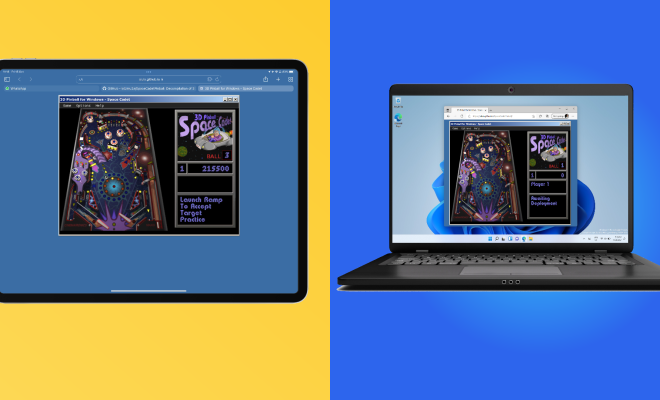
If you are a long-time Windows user, you may remember a popular game known as 3D Pinball Space Cadet. It was a part of the pre-installed games that came with Windows XP, and later versions of Windows. However, Microsoft quietly dropped the game from its operating system, starting with Windows Vista. This may have left many users wondering why the company dropped such a beloved classic. In this article, we’ll explore the reasons behind the decision and show you how to bring it back.

Why did Microsoft drop 3D Pinball from Windows?

There are a few reasons as to why Microsoft decided to discontinue 3D Pinball from its operating system. One reason was that the game was originally designed as a sample application to demonstrate the 3D gaming capabilities of Windows XP. It wasn’t intended to be a full-fledged game but was instead included as a fun bonus. With the introduction of superior 3D graphics and more advanced games, 3D Pinball became less relevant.

Another possible reason is that the game’s code was created by a third-party company called Maxis. The company was bought by Electronic Arts (EA) in 1997, which meant that Microsoft would have needed to pay licensing fees to use the game. With the release of new Windows versions, Microsoft may have decided that licensing fees for such a simple game were not worth the cost.

How to bring 3D Pinball back to Windows?

If you miss 3D Pinball on your Windows system, you can still play it after following two simple solutions.

1. Use 3D Pinball Space Cadet’s Executable File

For those who have Windows XP, they will find 3D Pinball Space Cadet’s executable file in “C:\Program Files\Windows NT\Pinball”. Users with Windows Vista and above versions can download the executable file from the internet with a quick Google search. Because this isn’t an official Windows game, we recommend that you download only from reputable sources.

Once downloaded, extract the file to your desired location, right-click on the executable file, choose “Pin to Start”, and you can now access the game through the Start menu. The game may not run smoothly on some Windows versions, especially the latest, so be prepared to face compatibility issues.

2. Use “Microsoft 3D Pinball: Space Cadet” Emulators

Another option is to use emulators that simulate the Windows XP environment on your Windows computer. This will allow you to run games that were intended for use with the Windows XP operating system, including 3D Pinball.

Two of the best emulators for this purpose are VirtualBox and VMware, which are both free to use. After installing the emulator, you’ll need to install the Windows XP operating system on the virtual machine, then download and run the game like you would on a Windows XP system.

Previous Article

Why is My WiFi So Slow: Tracking ...

Next Article

Why won’t smartphone technology ever replace PCs?

Matthew Lynch

Related articles More from author

  • Digital & Mobile Technology

    PS5 VR aka PSVR 2: News, Price, Release Date, Specs, and More

    June 6, 2023
    By Matthew Lynch
  • Digital & Mobile Technology

    Everything There Is to Know About the Edge-Lit LED TV

    June 12, 2023
    By Matthew Lynch
  • Digital & Mobile Technology

    How to Get the Administrator Password

    April 26, 2023
    By Matthew Lynch
  • Digital & Mobile Technology

    How to Stop Seeing Reels on Facebook

    August 3, 2023
    By Matthew Lynch
  • Digital & Mobile Technology

    How to Reset Your Roku Box or Streaming Stick

    June 1, 2023
    By Matthew Lynch
  • Digital & Mobile Technology

    The Best Time to Post on Instagram in 2023

    June 6, 2023
    By Matthew Lynch

Search

Login & Registration

  • Register
  • Log in
  • Entries feed
  • Comments feed
  • WordPress.org

Newsletter

Signup for The Tech Edvocate Newsletter and have the latest in EdTech news and opinion delivered to your email address!

About Us

Since technology is not going anywhere and does more good than harm, adapting is the best course of action. That is where The Tech Edvocate comes in. We plan to cover the PreK-12 and Higher Education EdTech sectors and provide our readers with the latest news and opinion on the subject. From time to time, I will invite other voices to weigh in on important issues in EdTech. We hope to provide a well-rounded, multi-faceted look at the past, present, the future of EdTech in the US and internationally.

We started this journey back in June 2016, and we plan to continue it for many more years to come. I hope that you will join us in this discussion of the past, present and future of EdTech and lend your own insight to the issues that are discussed.

Newsletter

Signup for The Tech Edvocate Newsletter and have the latest in EdTech news and opinion delivered to your email address!

Contact Us

The Tech Edvocate
910 Goddin Street
Richmond, VA 23231
(601) 630-5238
[email protected]

Copyright © 2025 Matthew Lynch. All rights reserved.