The Tech Edvocate

Top Menu

  • Advertisement
  • Apps
  • Home Page
  • Home Page Five (No Sidebar)
  • Home Page Four
  • Home Page Three
  • Home Page Two
  • Home Tech2
  • Icons [No Sidebar]
  • Left Sidbear Page
  • Lynch Educational Consulting
  • My Account
  • My Speaking Page
  • Newsletter Sign Up Confirmation
  • Newsletter Unsubscription
  • Our Brands
  • Page Example
  • Privacy Policy
  • Protected Content
  • Register
  • Request a Product Review
  • Shop
  • Shortcodes Examples
  • Signup
  • Start Here
    • Governance
    • Careers
    • Contact Us
  • Terms and Conditions
  • The Edvocate
  • The Tech Edvocate Product Guide
  • Topics
  • Write For Us
  • Advertise

Main Menu

  • Start Here
    • Our Brands
    • Governance
      • Lynch Educational Consulting, LLC.
      • Dr. Lynch’s Personal Website
      • Careers
    • Write For Us
    • The Tech Edvocate Product Guide
    • Contact Us
    • Books
    • Edupedia
    • Post a Job
    • The Edvocate Podcast
    • Terms and Conditions
    • Privacy Policy
  • Topics
    • Assistive Technology
    • Child Development Tech
    • Early Childhood & K-12 EdTech
    • EdTech Futures
    • EdTech News
    • EdTech Policy & Reform
    • EdTech Startups & Businesses
    • Higher Education EdTech
    • Online Learning & eLearning
    • Parent & Family Tech
    • Personalized Learning
    • Product Reviews
  • Advertise
  • Tech Edvocate Awards
  • The Edvocate
  • Pedagogue
  • School Ratings

logo

The Tech Edvocate

  • Start Here
    • Our Brands
    • Governance
      • Lynch Educational Consulting, LLC.
      • Dr. Lynch’s Personal Website
        • My Speaking Page
      • Careers
    • Write For Us
    • The Tech Edvocate Product Guide
    • Contact Us
    • Books
    • Edupedia
    • Post a Job
    • The Edvocate Podcast
    • Terms and Conditions
    • Privacy Policy
  • Topics
    • Assistive Technology
    • Child Development Tech
    • Early Childhood & K-12 EdTech
    • EdTech Futures
    • EdTech News
    • EdTech Policy & Reform
    • EdTech Startups & Businesses
    • Higher Education EdTech
    • Online Learning & eLearning
    • Parent & Family Tech
    • Personalized Learning
    • Product Reviews
  • Advertise
  • Tech Edvocate Awards
  • The Edvocate
  • Pedagogue
  • School Ratings
  • How to use ClickUp goals feature

  • Trello for Business

  • Can Smartsheet do automation

  • How to use Microsoft Planner boards

  • How many transactions in Kashoo

  • Sage

  • Is Sage worth it for accountants

  • How to use Smartsheet templates

  • How many users in Zoho Books free plan

  • Can Wrike integrate with Adobe Creative Cloud

Digital & Mobile Technology
Home›Digital & Mobile Technology›Ways to Fix AirPods That Keep Disconnecting From Your iPhone

Ways to Fix AirPods That Keep Disconnecting From Your iPhone
By Matthew Lynch
June 8, 2023
0
Spread the love

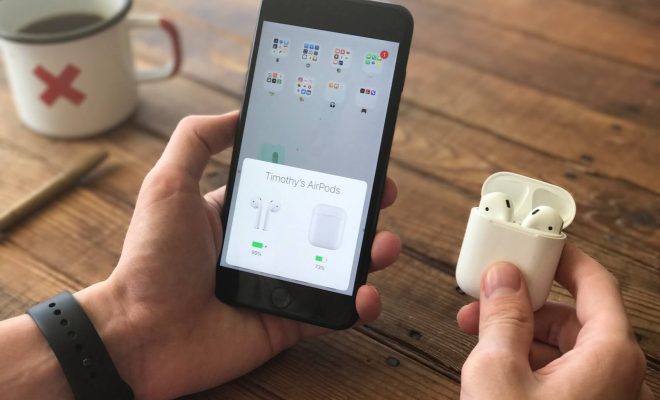
Apple’s AirPods are undoubtedly one of the most convenient and portable wireless earbuds in the market, but sometimes users might encounter an issue where their earbuds keep disconnecting from their iPhone. Anyone who uses AirPods knows how frustrating the problem is, so here are some ways to fix the issue:

1. Check AirPods Battery:

One of the most common reasons for disconnection is a low battery. So, make sure to check the battery level of your AirPods by placing them in the charging case. Also, verify that the charging case is properly charged. If the battery is low, give them some time to charge, and try connecting them to your iPhone once again.

2. Restart your iPhone:

If your AirPods are still not connecting after checking the battery, restarting your iPhone is a great fix. Restarting the iPhone clears the cache and data running in the background, thereby ensuring that the software is refreshed. To restart your iPhone, press the power button and hold until the “Slide to power off” bar appears, and then slide the bar to switch off the iPhone. Wait for a few seconds and power on your iPhone again.

3. Reset AirPods:

If none of the above methods work, then resetting the AirPods might just do the trick. To reset the AirPods, follow the below-mentioned steps:

Step 1: Keep the AirPods in the charging case and close the lid.
Step 2: Press and hold the button on the back of the charging case until the LED light starts flashing.
Step 3: Release the button, wait for a few seconds and reconnect the AirPods to your iPhone.

4. Unpair AirPods:

If the above methods don’t fix the AirPods disconnection issue, try unpairing the AirPods and then pair them again with your iPhone. To unpair, follow the steps given below:

Step 1: Connect AirPods to the iPhone.

Step 2: Go to “Settings” on your iPhone.

Step 3: Tap on “Bluetooth.”

Step 4: Locate your AirPods and click on the information (i) button.

Step 5: Click on the “Forget this Device” option to remove the AirPods from the iPhone.

5. Check for Updates:

Apple regularly updates their products, including the AirPods, to fix bugs and improve performance. So, check for available updates on your iPhone and ensure that your AirPods have the most recent firmware installed. To check for updates:

Step 1: Keep your AirPods connected to the iPhone.

Step 2: Go to “Settings” on your iPhone.

Step 3: Tap on “General.”

Step 4: Click on “Software Update.”

6. Contact Apple Support:

If none of the above-mentioned methods work, it might be time to contact Apple Support for help. Apple’s customer support team can assist you over the phone or chat to troubleshoot the problem and provide further guidance if needed.


Previous Article

What Is a Good GPU Temperature for ...

Next Article

What Does SMH Mean and How Can ...

Matthew Lynch

Related articles More from author

  • Digital & Mobile Technology

    Magic Trackpad 2: Bigger, Rechargeable, With Force Touch for Any Mac

    July 31, 2023
    By Matthew Lynch
  • Digital & Mobile Technology

    The Best PDF Readers for Windows

    June 11, 2023
    By Matthew Lynch
  • Digital & Mobile Technology

    How to Edit Instagram Captions

    June 11, 2023
    By Matthew Lynch
  • Digital & Mobile Technology

    How to Add Programs to Startup in Windows 10

    June 2, 2023
    By Matthew Lynch
  • Digital & Mobile Technology

    8 Best Places to Get Free Nook Books

    June 9, 2023
    By Matthew Lynch
  • Digital & Mobile Technology

    How to Cancel Uber

    June 12, 2023
    By Matthew Lynch

Search

Login & Registration

  • Log in
  • Entries feed
  • Comments feed
  • WordPress.org

Newsletter

Signup for The Tech Edvocate Newsletter and have the latest in EdTech news and opinion delivered to your email address!

About Us

Since technology is not going anywhere and does more good than harm, adapting is the best course of action. That is where The Tech Edvocate comes in. We plan to cover the PreK-12 and Higher Education EdTech sectors and provide our readers with the latest news and opinion on the subject. From time to time, I will invite other voices to weigh in on important issues in EdTech. We hope to provide a well-rounded, multi-faceted look at the past, present, the future of EdTech in the US and internationally.

We started this journey back in June 2016, and we plan to continue it for many more years to come. I hope that you will join us in this discussion of the past, present and future of EdTech and lend your own insight to the issues that are discussed.

Newsletter

Signup for The Tech Edvocate Newsletter and have the latest in EdTech news and opinion delivered to your email address!

Contact Us

The Tech Edvocate
910 Goddin Street
Richmond, VA 23231
(601) 630-5238
[email protected]

Copyright © 2026 Matthew Lynch. All rights reserved.