The Tech Edvocate

Top Menu

  • Advertisement
  • Apps
  • Home Page
  • Home Page Five (No Sidebar)
  • Home Page Four
  • Home Page Three
  • Home Page Two
  • Home Tech2
  • Icons [No Sidebar]
  • Left Sidbear Page
  • Lynch Educational Consulting
  • My Account
  • My Speaking Page
  • Newsletter Sign Up Confirmation
  • Newsletter Unsubscription
  • Our Brands
  • Page Example
  • Privacy Policy
  • Protected Content
  • Register
  • Request a Product Review
  • Shop
  • Shortcodes Examples
  • Signup
  • Start Here
    • Governance
    • Careers
    • Contact Us
  • Terms and Conditions
  • The Edvocate
  • The Tech Edvocate Product Guide
  • Topics
  • Write For Us
  • Advertise

Main Menu

  • Start Here
    • Our Brands
    • Governance
      • Lynch Educational Consulting, LLC.
      • Dr. Lynch’s Personal Website
      • Careers
    • Write For Us
    • The Tech Edvocate Product Guide
    • Contact Us
    • Books
    • Edupedia
    • Post a Job
    • The Edvocate Podcast
    • Terms and Conditions
    • Privacy Policy
  • Topics
    • Assistive Technology
    • Child Development Tech
    • Early Childhood & K-12 EdTech
    • EdTech Futures
    • EdTech News
    • EdTech Policy & Reform
    • EdTech Startups & Businesses
    • Higher Education EdTech
    • Online Learning & eLearning
    • Parent & Family Tech
    • Personalized Learning
    • Product Reviews
  • Advertise
  • Tech Edvocate Awards
  • The Edvocate
  • Pedagogue
  • School Ratings

logo

The Tech Edvocate

  • Start Here
    • Our Brands
    • Governance
      • Lynch Educational Consulting, LLC.
      • Dr. Lynch’s Personal Website
        • My Speaking Page
      • Careers
    • Write For Us
    • The Tech Edvocate Product Guide
    • Contact Us
    • Books
    • Edupedia
    • Post a Job
    • The Edvocate Podcast
    • Terms and Conditions
    • Privacy Policy
  • Topics
    • Assistive Technology
    • Child Development Tech
    • Early Childhood & K-12 EdTech
    • EdTech Futures
    • EdTech News
    • EdTech Policy & Reform
    • EdTech Startups & Businesses
    • Higher Education EdTech
    • Online Learning & eLearning
    • Parent & Family Tech
    • Personalized Learning
    • Product Reviews
  • Advertise
  • Tech Edvocate Awards
  • The Edvocate
  • Pedagogue
  • School Ratings
  • A Visitors Guide to Long Beach (CA), United States

  • A Visitor’s Guide to Fresno (CA), United States

  • A Visitors Guide to New Orleans (LA), United States

  • A Visitors Guide to Sacramento (CA), United States

  • A Visitors Guide to Lyon, France

  • JisuLife Ultra2 Portable Fan: A Powerful Multi-Function Cooling Solution

  • A Visitors Guide to Viña del Mar, Chile

  • A Visitors Guide to Århus, Denmark

  • A Visitors Guide to Bakersfield (CA), United States

  • A Visitors Guide to Aurora (CO), United States

Digital & Mobile Technology
Home›Digital & Mobile Technology›What Is Windows Terminal & How Does It Work?

What Is Windows Terminal & How Does It Work?
By Matthew Lynch
June 23, 2023
0
Spread the love

Windows Terminal is a modernized and feature-rich command-line interface (CLI) for the Windows operating system. It was designed to provide a more customizable and versatile terminal experience for developers and power users. In this article, we will explore what Windows Terminal is and how it works.

What Is Windows Terminal?

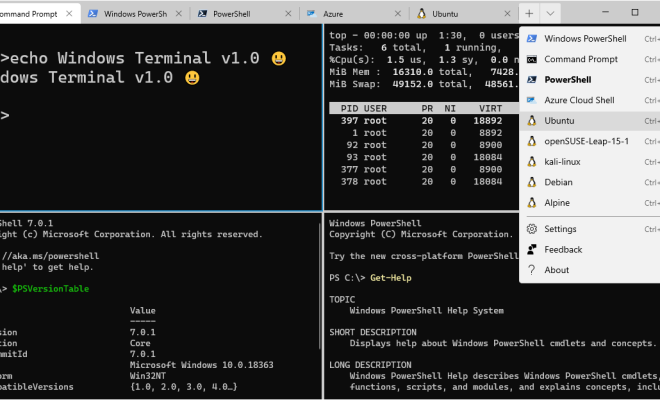
Windows Terminal is a new application introduced by Microsoft in 2019. It is an open-source project that brings together multiple CLI tools, such as Command Prompt, PowerShell, and Windows Subsystem for Linux (WSL) into a single interface. Windows Terminal supports a variety of shells and command-line tools through various configuration options.

One of the key features of Windows Terminal is its support for various tabs and panes that can be customized to open a specific shell or command-line tool. For example, users can create a tab that launches PowerShell, a pane that runs Python, and another one that runs Command Prompt. This way, users do not need to switch between multiple terminal windows or tabs, making it more convenient and efficient.

Another highlight of Windows Terminal is its advanced customization options. The application allows users to tweak the colors, fonts, and other settings to personalize the terminal experience. Users can also create custom keybindings and profiles to streamline workflows and access frequently used commands easily.

How Does Windows Terminal Work?

Windows Terminal is built on top of Microsoft’s Universal Windows Platform (UWP), which means that it has a modern and intuitive user interface. The application is available for Windows 10 and can be installed from the Microsoft Store or through the official GitHub repository.

Once installed, Windows Terminal provides users with different configuration options to customize the appearance and functionality of the application. Users can set different backgrounds, font styles, cursor colors, and other settings to make the terminal more visually appealing and easy to use.

Users can also create multiple profiles that specify the shell or command-line tool that they want to use, along with other specific settings like the starting directory, environment variables, and more. Profiles can be easily switched using the drop-down menu or keyboard shortcuts, making it easier to switch between different shells or tools.

Overall, Windows Terminal is a powerful and versatile command-line interface that offers an excellent user experience for developers and power users. Its advanced customization options, support for different tabs and panes, and various other features make it an excellent choice for anyone who works extensively with CLI tools.

Previous Article

Best Free Typing Games for Kids and ...

Next Article

Things to Consider Before Buying a DVR

Matthew Lynch

Related articles More from author

  • Digital & Mobile Technology

    The Tesla Model 2 Is Coming – Here’s What to Expect

    June 9, 2023
    By Matthew Lynch
  • Digital & Mobile Technology

    What Is WPS and How Does It Work?

    May 31, 2023
    By Matthew Lynch
  • Digital & Mobile Technology

    How to Use Apple Music in Windows 10

    June 9, 2023
    By Matthew Lynch
  • Digital & Mobile Technology

    How to Reset the iPod Touch Without Losing Your Music

    June 4, 2023
    By Matthew Lynch
  • Digital & Mobile Technology

    Reasons to Buy the 11-Inch iPad Pro Over the 12.9-Inch iPad Pro

    June 15, 2023
    By Matthew Lynch
  • Digital & Mobile Technology

    Definition of Bitmap and Raster Image

    June 10, 2023
    By Matthew Lynch

Search

Login & Registration

  • Register
  • Log in
  • Entries feed
  • Comments feed
  • WordPress.org

Newsletter

Signup for The Tech Edvocate Newsletter and have the latest in EdTech news and opinion delivered to your email address!

About Us

Since technology is not going anywhere and does more good than harm, adapting is the best course of action. That is where The Tech Edvocate comes in. We plan to cover the PreK-12 and Higher Education EdTech sectors and provide our readers with the latest news and opinion on the subject. From time to time, I will invite other voices to weigh in on important issues in EdTech. We hope to provide a well-rounded, multi-faceted look at the past, present, the future of EdTech in the US and internationally.

We started this journey back in June 2016, and we plan to continue it for many more years to come. I hope that you will join us in this discussion of the past, present and future of EdTech and lend your own insight to the issues that are discussed.

Newsletter

Signup for The Tech Edvocate Newsletter and have the latest in EdTech news and opinion delivered to your email address!

Contact Us

The Tech Edvocate
910 Goddin Street
Richmond, VA 23231
(601) 630-5238
[email protected]

Copyright © 2025 Matthew Lynch. All rights reserved.