The Tech Edvocate

Top Menu

  • Advertisement
  • Apps
  • Home Page
  • Home Page Five (No Sidebar)
  • Home Page Four
  • Home Page Three
  • Home Page Two
  • Home Tech2
  • Icons [No Sidebar]
  • Left Sidbear Page
  • Lynch Educational Consulting
  • My Account
  • My Speaking Page
  • Newsletter Sign Up Confirmation
  • Newsletter Unsubscription
  • Our Brands
  • Page Example
  • Privacy Policy
  • Protected Content
  • Register
  • Request a Product Review
  • Shop
  • Shortcodes Examples
  • Signup
  • Start Here
    • Governance
    • Careers
    • Contact Us
  • Terms and Conditions
  • The Edvocate
  • The Tech Edvocate Product Guide
  • Topics
  • Write For Us
  • Advertise

Main Menu

  • Start Here
    • Our Brands
    • Governance
      • Lynch Educational Consulting, LLC.
      • Dr. Lynch’s Personal Website
      • Careers
    • Write For Us
    • The Tech Edvocate Product Guide
    • Contact Us
    • Books
    • Edupedia
    • Post a Job
    • The Edvocate Podcast
    • Terms and Conditions
    • Privacy Policy
  • Topics
    • Assistive Technology
    • Child Development Tech
    • Early Childhood & K-12 EdTech
    • EdTech Futures
    • EdTech News
    • EdTech Policy & Reform
    • EdTech Startups & Businesses
    • Higher Education EdTech
    • Online Learning & eLearning
    • Parent & Family Tech
    • Personalized Learning
    • Product Reviews
  • Advertise
  • Tech Edvocate Awards
  • The Edvocate
  • Pedagogue
  • School Ratings

logo

The Tech Edvocate

  • Start Here
    • Our Brands
    • Governance
      • Lynch Educational Consulting, LLC.
      • Dr. Lynch’s Personal Website
        • My Speaking Page
      • Careers
    • Write For Us
    • The Tech Edvocate Product Guide
    • Contact Us
    • Books
    • Edupedia
    • Post a Job
    • The Edvocate Podcast
    • Terms and Conditions
    • Privacy Policy
  • Topics
    • Assistive Technology
    • Child Development Tech
    • Early Childhood & K-12 EdTech
    • EdTech Futures
    • EdTech News
    • EdTech Policy & Reform
    • EdTech Startups & Businesses
    • Higher Education EdTech
    • Online Learning & eLearning
    • Parent & Family Tech
    • Personalized Learning
    • Product Reviews
  • Advertise
  • Tech Edvocate Awards
  • The Edvocate
  • Pedagogue
  • School Ratings
  • Nostalgija kot oblikovalski jezik sodobnih spletnih igralniških iger

  • Piedzīvojuma naratīvs spēļu automātu bonusu ainās

  • Kā bingo elementi parādās mūsdienu kazino spēļu bibliotēkās

  • Luksusa tēli kazino spēļu vizuālajā valodā

  • Les studios de casino en direct rapprochent le jeu en ligne de l’expérience audiovisuelle

  • Wie Spieletitel Thema und Genre vor dem Start vermitteln

  • Wie Vorschaubilder die Orientierung in digitalen Casino Lobbys prägen

  • This One Privacy Camera Feature Could Change Smart Homes Forever

  • Unprecedented: White House Mandates AI Security Incident Reporting After Troubling Breaches

  • The AI Storm Tracker Predicting Viral Narratives Just Landed $7 Million – Here’s Why It Matters

Digital & Mobile Technology
Home›Digital & Mobile Technology›What Is a Node in a Computer Network?

What Is a Node in a Computer Network?
By Matthew Lynch
June 6, 2023
0
Spread the love

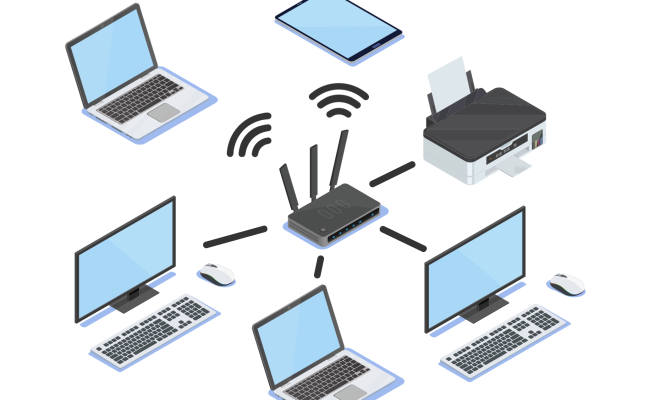
A node in a computer network is a device that is connected to other devices within the same computer network. It can be a computer, a server, a switch, a hub, a router, or any other device that has an IP address and can communicate with other devices over a network.

The term node is often used interchangeably with host, endpoint, or computer, but it can also refer to more complex devices that act as intermediaries in the network communication. These devices, such as switches and routers, are known as network nodes and play a critical role in the functioning of the network.

A node can perform various functions within a network, including sending and receiving data, transmitting messages, executing applications, and providing resources to other nodes in the network. Each node is assigned a unique IP address that identifies it on the network, allowing it to be located by other nodes when required.

Network nodes can be connected in different ways, depending on the topology of the network. A topology describes the physical or logical layout of nodes and their interconnections. Common network topologies include star, bus, ring, mesh, and hybrid.

In a star topology, nodes are connected to a central hub or switch, which acts as a central point of control for the network. In a bus topology, nodes are linked together along a single communication line. In a ring topology, nodes are linked in a circular fashion, with each node communicating only with the nodes immediately adjacent to it.

A mesh topology consists of multiple nodes that are interconnected in a complex web-like structure, allowing data to be transmitted between multiple paths. Finally, a hybrid topology is a combination of two or more different topologies.

Each topology has its advantages and disadvantages, with some being more suitable for specific network requirements than others.

In summary, a node is a device that is connected to a computer network and can communicate with other devices in the network. It can be a computer, a router, a switch, or any other device that has an IP address. Network nodes have unique functions depending on the topology of the network and play a critical role in ensuring the smooth functioning of the network.


Previous Article

How to Cast to Roku TV From ...

Next Article

How Long Does a Ring Battery Last?

Matthew Lynch

Related articles More from author

  • Digital & Mobile Technology

    Can I Play Nintendo 3DS Games on the Wii U?

    June 4, 2023
    By Matthew Lynch
  • Digital & Mobile Technology

    Best Roku to Buy

    March 19, 2023
    By Matthew Lynch
  • Digital & Mobile Technology

    How to Find Netherite in Minecraft

    June 1, 2023
    By Matthew Lynch
  • Digital & Mobile Technology

    The Best Camera Apps for Android in 2023

    July 5, 2023
    By Matthew Lynch
  • Digital & Mobile Technology

    Driver Booster v10.3 Review (Free Driver Updater)

    June 6, 2023
    By Matthew Lynch
  • Digital & Mobile Technology

    Windows 7 Command Prompt Commands

    June 9, 2023
    By Matthew Lynch

Search

Login & Registration

  • Log in
  • Entries feed
  • Comments feed
  • WordPress.org

Newsletter

Signup for The Tech Edvocate Newsletter and have the latest in EdTech news and opinion delivered to your email address!

About Us

Since technology is not going anywhere and does more good than harm, adapting is the best course of action. That is where The Tech Edvocate comes in. We plan to cover the PreK-12 and Higher Education EdTech sectors and provide our readers with the latest news and opinion on the subject. From time to time, I will invite other voices to weigh in on important issues in EdTech. We hope to provide a well-rounded, multi-faceted look at the past, present, the future of EdTech in the US and internationally.

We started this journey back in June 2016, and we plan to continue it for many more years to come. I hope that you will join us in this discussion of the past, present and future of EdTech and lend your own insight to the issues that are discussed.

Newsletter

Signup for The Tech Edvocate Newsletter and have the latest in EdTech news and opinion delivered to your email address!

Contact Us

The Tech Edvocate
910 Goddin Street
Richmond, VA 23231
(601) 630-5238
[email protected]

Copyright © 2026 Matthew Lynch. All rights reserved.