The Tech Edvocate

Top Menu

  • Advertisement
  • Apps
  • Home Page
  • Home Page Five (No Sidebar)
  • Home Page Four
  • Home Page Three
  • Home Page Two
  • Home Tech2
  • Icons [No Sidebar]
  • Left Sidbear Page
  • Lynch Educational Consulting
  • My Account
  • My Speaking Page
  • Newsletter Sign Up Confirmation
  • Newsletter Unsubscription
  • Our Brands
  • Page Example
  • Privacy Policy
  • Protected Content
  • Register
  • Request a Product Review
  • Shop
  • Shortcodes Examples
  • Signup
  • Start Here
    • Governance
    • Careers
    • Contact Us
  • Terms and Conditions
  • The Edvocate
  • The Tech Edvocate Product Guide
  • Topics
  • Write For Us
  • Advertise

Main Menu

  • Start Here
    • Our Brands
    • Governance
      • Lynch Educational Consulting, LLC.
      • Dr. Lynch’s Personal Website
      • Careers
    • Write For Us
    • The Tech Edvocate Product Guide
    • Contact Us
    • Books
    • Edupedia
    • Post a Job
    • The Edvocate Podcast
    • Terms and Conditions
    • Privacy Policy
  • Topics
    • Assistive Technology
    • Child Development Tech
    • Early Childhood & K-12 EdTech
    • EdTech Futures
    • EdTech News
    • EdTech Policy & Reform
    • EdTech Startups & Businesses
    • Higher Education EdTech
    • Online Learning & eLearning
    • Parent & Family Tech
    • Personalized Learning
    • Product Reviews
  • Advertise
  • Tech Edvocate Awards
  • The Edvocate
  • Pedagogue
  • School Ratings

logo

The Tech Edvocate

  • Start Here
    • Our Brands
    • Governance
      • Lynch Educational Consulting, LLC.
      • Dr. Lynch’s Personal Website
        • My Speaking Page
      • Careers
    • Write For Us
    • The Tech Edvocate Product Guide
    • Contact Us
    • Books
    • Edupedia
    • Post a Job
    • The Edvocate Podcast
    • Terms and Conditions
    • Privacy Policy
  • Topics
    • Assistive Technology
    • Child Development Tech
    • Early Childhood & K-12 EdTech
    • EdTech Futures
    • EdTech News
    • EdTech Policy & Reform
    • EdTech Startups & Businesses
    • Higher Education EdTech
    • Online Learning & eLearning
    • Parent & Family Tech
    • Personalized Learning
    • Product Reviews
  • Advertise
  • Tech Edvocate Awards
  • The Edvocate
  • Pedagogue
  • School Ratings
  • Viaim Opennote Review: The AI Note-Taker That Disappears Into Your Daily Routine

  • A Visitors Guide to Long Beach (CA), United States

  • A Visitor’s Guide to Fresno (CA), United States

  • A Visitors Guide to New Orleans (LA), United States

  • A Visitors Guide to Sacramento (CA), United States

  • A Visitors Guide to Lyon, France

  • JisuLife Ultra2 Portable Fan: A Powerful Multi-Function Cooling Solution

  • A Visitors Guide to Viña del Mar, Chile

  • A Visitors Guide to Århus, Denmark

  • A Visitors Guide to Bakersfield (CA), United States

Digital & Mobile Technology
Home›Digital & Mobile Technology›What Does the Inside of Your PC Look Like?

What Does the Inside of Your PC Look Like?
By Matthew Lynch
June 12, 2023
0
Spread the love

Have you ever wondered what the inside of your PC looks like? Perhaps you’ve pondered how all those complicated parts come together to create a working computer. Or maybe you’ve never given much thought to the inside of your PC at all. Either way, understanding the components inside your PC can help you diagnose problems, upgrade your system, and even build your own computer from scratch.

Inside Your PC: The Motherboard

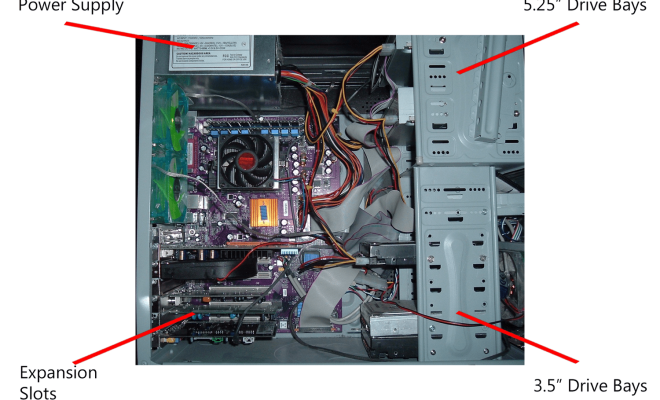
At the heart of every computer is the motherboard, a large circuit board that is responsible for connecting all the various components of your PC. The motherboard provides sockets for your CPU (Central Processing Unit), RAM (Random Access Memory), graphics card, sound card, and any other expansion cards you may have installed. It also provides connections for your power supply, hard drive, and other peripherals.

Your CPU sits at the center of the motherboard, and the RAM slots are usually located nearby. RAM is used to temporarily store data, allowing your CPU to access it quickly when needed. The graphics card, which is responsible for rendering images on your monitor, is typically installed in a PCI-Express slot on the motherboard. Sound cards and other expansion cards are also installed in PCI-Express slots.

Inside Your PC: The Power Supply

Your PC’s power supply unit (PSU) is responsible for converting the AC power from your wall outlet into DC power that your computer can use. The power supply is typically located near the top or bottom of the case, and it connects to the motherboard and other components using a variety of cables. The power supply also contains a fan that helps to keep the unit cool, as well as a switch that allows you to turn your PC on and off.

Inside Your PC: The Case

The case of your computer is responsible for housing all the various components and protecting them from damage. Most cases have a variety of slots and bays that allow you to install additional components, such as hard drives, optical drives, and fans. Cases also typically contain a number of fans that help to keep the components inside cool. The front panel of the case usually contains a power button, reset button, and a variety of ports for connecting peripherals such as USB drives or headphones.

Conclusion

The inside of your PC may seem complex at first, but once you understand the basic components, it becomes much easier to navigate. Whether you’re upgrading your system or building a new computer from scratch, understanding the inner workings of your PC is an essential skill that will help you get the most out of your technology.


Previous Article

How to Disable UAC in Windows 10

Next Article

How to Access AOL Email with Outlook

Matthew Lynch

Related articles More from author

  • Digital & Mobile Technology

    How to Get Wi-Fi Without an Internet Service Provider

    June 8, 2023
    By Matthew Lynch
  • Digital & Mobile Technology

    Here Are the Top Five ‘Tech Enablers’ in K–12 Education

    August 25, 2021
    By Matthew Lynch
  • Digital & Mobile Technology

    Why Twitter’s Third-Party App Ban Is Terrible for Users

    June 3, 2023
    By Matthew Lynch
  • Digital & Mobile Technology

    How to Disable the Windows Command Prompt or PowerShell

    June 14, 2023
    By Matthew Lynch
  • Digital & Mobile Technology

    How to Remove Your Email Address From the Spam List

    May 4, 2023
    By Matthew Lynch
  • Digital & Mobile Technology

    How to Use the Chkdsk Command in Windows

    June 1, 2023
    By Matthew Lynch

Search

Login & Registration

  • Register
  • Log in
  • Entries feed
  • Comments feed
  • WordPress.org

Newsletter

Signup for The Tech Edvocate Newsletter and have the latest in EdTech news and opinion delivered to your email address!

About Us

Since technology is not going anywhere and does more good than harm, adapting is the best course of action. That is where The Tech Edvocate comes in. We plan to cover the PreK-12 and Higher Education EdTech sectors and provide our readers with the latest news and opinion on the subject. From time to time, I will invite other voices to weigh in on important issues in EdTech. We hope to provide a well-rounded, multi-faceted look at the past, present, the future of EdTech in the US and internationally.

We started this journey back in June 2016, and we plan to continue it for many more years to come. I hope that you will join us in this discussion of the past, present and future of EdTech and lend your own insight to the issues that are discussed.

Newsletter

Signup for The Tech Edvocate Newsletter and have the latest in EdTech news and opinion delivered to your email address!

Contact Us

The Tech Edvocate
910 Goddin Street
Richmond, VA 23231
(601) 630-5238
[email protected]

Copyright © 2025 Matthew Lynch. All rights reserved.