The Tech Edvocate

Top Menu

  • Advertisement
  • Apps
  • Home Page
  • Home Page Five (No Sidebar)
  • Home Page Four
  • Home Page Three
  • Home Page Two
  • Home Tech2
  • Icons [No Sidebar]
  • Left Sidbear Page
  • Lynch Educational Consulting
  • My Account
  • My Speaking Page
  • Newsletter Sign Up Confirmation
  • Newsletter Unsubscription
  • Our Brands
  • Page Example
  • Privacy Policy
  • Protected Content
  • Register
  • Request a Product Review
  • Shop
  • Shortcodes Examples
  • Signup
  • Start Here
    • Governance
    • Careers
    • Contact Us
  • Terms and Conditions
  • The Edvocate
  • The Tech Edvocate Product Guide
  • Topics
  • Write For Us
  • Advertise

Main Menu

  • Start Here
    • Our Brands
    • Governance
      • Lynch Educational Consulting, LLC.
      • Dr. Lynch’s Personal Website
      • Careers
    • Write For Us
    • The Tech Edvocate Product Guide
    • Contact Us
    • Books
    • Edupedia
    • Post a Job
    • The Edvocate Podcast
    • Terms and Conditions
    • Privacy Policy
  • Topics
    • Assistive Technology
    • Child Development Tech
    • Early Childhood & K-12 EdTech
    • EdTech Futures
    • EdTech News
    • EdTech Policy & Reform
    • EdTech Startups & Businesses
    • Higher Education EdTech
    • Online Learning & eLearning
    • Parent & Family Tech
    • Personalized Learning
    • Product Reviews
  • Advertise
  • Tech Edvocate Awards
  • The Edvocate
  • Pedagogue
  • School Ratings

logo

The Tech Edvocate

  • Start Here
    • Our Brands
    • Governance
      • Lynch Educational Consulting, LLC.
      • Dr. Lynch’s Personal Website
        • My Speaking Page
      • Careers
    • Write For Us
    • The Tech Edvocate Product Guide
    • Contact Us
    • Books
    • Edupedia
    • Post a Job
    • The Edvocate Podcast
    • Terms and Conditions
    • Privacy Policy
  • Topics
    • Assistive Technology
    • Child Development Tech
    • Early Childhood & K-12 EdTech
    • EdTech Futures
    • EdTech News
    • EdTech Policy & Reform
    • EdTech Startups & Businesses
    • Higher Education EdTech
    • Online Learning & eLearning
    • Parent & Family Tech
    • Personalized Learning
    • Product Reviews
  • Advertise
  • Tech Edvocate Awards
  • The Edvocate
  • Pedagogue
  • School Ratings
  • The Hidden Cost of EVs: Why Your Battery Could Cost More Than Your Car in 2026

  • Jensen Huang’s Shock Exit: This Unbelievable Scandal Just Rocked Nvidia and the AI World

  • Big Walk developer House House Confirms ‘Sparing’ Use of Gen AI – Press Start

  • Baffling: How a Cyber Breach at South Korea’s Top Security Watchdog Exposed Millions

  • Wenn Ordnung den Bildschirm beruhigt: Warum klare Abläufe Casino-Unterhaltung einladender machen

  • Reddit AI Reviews: The Quiet Reshaping of Online Opinion

  • The Chilling Truth: Iran Cyberattacks Europe’s Food and Blood Supplies

  • Anthropic’s $3.4 Billion Bet on Gas: The Unseen Cost of AI’s Future

  • Tribit FlyBuds C3 Earbuds: Premium Features at a Budget-Friendly Price

  • Is AuraCam Pro’s Emotional AI a Privacy Nightmare or Security Breakthrough?

Digital & Mobile Technology
Home›Digital & Mobile Technology›What Does Corrupt File Mean?

What Does Corrupt File Mean?
By Matthew Lynch
June 9, 2023
0
Spread the love

A corrupt file refers to a file that has been damaged or modified in a way that prevents it from being accessed or used. This can happen due to a variety of reasons such as hardware or software malfunctions, viruses or other malicious content, interrupted downloads or incorrect file transfers, among others.

When a file is corrupted, it may fail to open or display properly, causing errors or unexpected behaviors in the software or applications that depend on it. For instance, a corrupted document may prevent you from editing, printing or saving changes to it, while a damaged image or video may appear distorted or unrecognizable.

Corrupted files can pose a significant challenge for both individuals and businesses, as they can lead to data loss, productivity slowdowns, and other consequences. In some cases, a corrupted file can even compromise sensitive information, such as financial records or personal data, which could have severe implications for privacy and security.

To prevent or deal with corrupt files, it is recommended to implement best practices such as making regular backups of important data, using antivirus software and firewalls, avoiding suspicious downloads or email attachments, and keeping your operating system and applications up to date with the latest security patches.

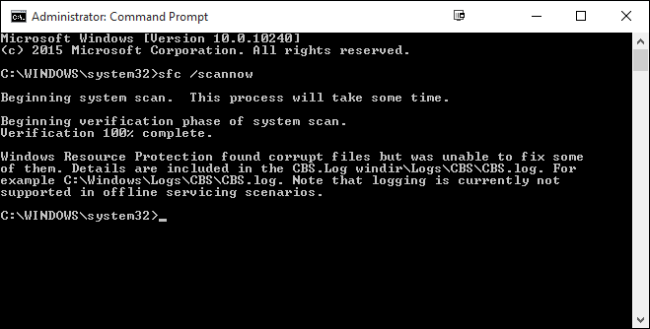
If you encounter a corrupt file, there are several things you can try to fix it. First, you can try to restore a previous version of the file if it was saved or backed up before the corruption occurred. Additionally, you can use specialized file recovery software to scan for and repair damaged files, or use built-in tools or features in your software to repair or salvage damaged files.

In some cases, however, a file may be irreparably damaged, in which case the only viable solution may be to recreate the file from scratch or obtain a new copy from the original source.

Overall, understanding what a corrupt file means and how to prevent, detect, and resolve issues related to file corruption can help you avoid significant data loss or disruption in your work or personal life. It’s important to stay vigilant and take appropriate measures to protect your digital assets and ensure their integrity and usability.


Previous Article

The 10 Best Cooking Shows on Netflix

Next Article

What to Do When Your Yahoo Mail ...

Matthew Lynch

Related articles More from author

  • Digital & Mobile Technology

    How to Set Up Incognito Mode Shortcut on Windows

    May 8, 2023
    By Matthew Lynch
  • Digital & Mobile Technology

    Best Sites to Watch Horror Movies Online for Free

    June 23, 2023
    By Matthew Lynch
  • Digital & Mobile Technology

    Android 101: How to Use Your Android Smartphone or Tablet

    June 4, 2023
    By Matthew Lynch
  • Digital & Mobile Technology

    The Best Windows 11 Dark Themes to Customize Your Desktop

    July 31, 2023
    By Matthew Lynch
  • Digital & Mobile Technology

    How to Change Your Username and Nickname on Discord

    May 21, 2023
    By Matthew Lynch
  • Digital & Mobile Technology

    What is Host Operating System?

    May 22, 2023
    By Matthew Lynch

Search

Login & Registration

  • Log in
  • Entries feed
  • Comments feed
  • WordPress.org

Newsletter

Signup for The Tech Edvocate Newsletter and have the latest in EdTech news and opinion delivered to your email address!

About Us

Since technology is not going anywhere and does more good than harm, adapting is the best course of action. That is where The Tech Edvocate comes in. We plan to cover the PreK-12 and Higher Education EdTech sectors and provide our readers with the latest news and opinion on the subject. From time to time, I will invite other voices to weigh in on important issues in EdTech. We hope to provide a well-rounded, multi-faceted look at the past, present, the future of EdTech in the US and internationally.

We started this journey back in June 2016, and we plan to continue it for many more years to come. I hope that you will join us in this discussion of the past, present and future of EdTech and lend your own insight to the issues that are discussed.

Newsletter

Signup for The Tech Edvocate Newsletter and have the latest in EdTech news and opinion delivered to your email address!

Contact Us

The Tech Edvocate
910 Goddin Street
Richmond, VA 23231
(601) 630-5238
[email protected]

Copyright © 2026 Matthew Lynch. All rights reserved.