The Tech Edvocate

Top Menu

  • Advertisement
  • Apps
  • Home Page
  • Home Page Five (No Sidebar)
  • Home Page Four
  • Home Page Three
  • Home Page Two
  • Home Tech2
  • Icons [No Sidebar]
  • Left Sidbear Page
  • Lynch Educational Consulting
  • My Account
  • My Speaking Page
  • Newsletter Sign Up Confirmation
  • Newsletter Unsubscription
  • Our Brands
  • Page Example
  • Privacy Policy
  • Protected Content
  • Register
  • Request a Product Review
  • Shop
  • Shortcodes Examples
  • Signup
  • Start Here
    • Governance
    • Careers
    • Contact Us
  • Terms and Conditions
  • The Edvocate
  • The Tech Edvocate Product Guide
  • Topics
  • Write For Us
  • Advertise

Main Menu

  • Start Here
    • Our Brands
    • Governance
      • Lynch Educational Consulting, LLC.
      • Dr. Lynch’s Personal Website
      • Careers
    • Write For Us
    • The Tech Edvocate Product Guide
    • Contact Us
    • Books
    • Edupedia
    • Post a Job
    • The Edvocate Podcast
    • Terms and Conditions
    • Privacy Policy
  • Topics
    • Assistive Technology
    • Child Development Tech
    • Early Childhood & K-12 EdTech
    • EdTech Futures
    • EdTech News
    • EdTech Policy & Reform
    • EdTech Startups & Businesses
    • Higher Education EdTech
    • Online Learning & eLearning
    • Parent & Family Tech
    • Personalized Learning
    • Product Reviews
  • Advertise
  • Tech Edvocate Awards
  • The Edvocate
  • Pedagogue
  • School Ratings

logo

The Tech Edvocate

  • Start Here
    • Our Brands
    • Governance
      • Lynch Educational Consulting, LLC.
      • Dr. Lynch’s Personal Website
        • My Speaking Page
      • Careers
    • Write For Us
    • The Tech Edvocate Product Guide
    • Contact Us
    • Books
    • Edupedia
    • Post a Job
    • The Edvocate Podcast
    • Terms and Conditions
    • Privacy Policy
  • Topics
    • Assistive Technology
    • Child Development Tech
    • Early Childhood & K-12 EdTech
    • EdTech Futures
    • EdTech News
    • EdTech Policy & Reform
    • EdTech Startups & Businesses
    • Higher Education EdTech
    • Online Learning & eLearning
    • Parent & Family Tech
    • Personalized Learning
    • Product Reviews
  • Advertise
  • Tech Edvocate Awards
  • The Edvocate
  • Pedagogue
  • School Ratings
  • A Visitors Guide to Long Beach (CA), United States

  • A Visitor’s Guide to Fresno (CA), United States

  • A Visitors Guide to New Orleans (LA), United States

  • A Visitors Guide to Sacramento (CA), United States

  • A Visitors Guide to Lyon, France

  • JisuLife Ultra2 Portable Fan: A Powerful Multi-Function Cooling Solution

  • A Visitors Guide to Viña del Mar, Chile

  • A Visitors Guide to Århus, Denmark

  • A Visitors Guide to Bakersfield (CA), United States

  • A Visitors Guide to Aurora (CO), United States

Digital & Mobile Technology
Home›Digital & Mobile Technology›Ways to Customize Your Mac: Color Schemes, Icons, Sounds, and More

Ways to Customize Your Mac: Color Schemes, Icons, Sounds, and More
By Matthew Lynch
June 23, 2023
0
Spread the love

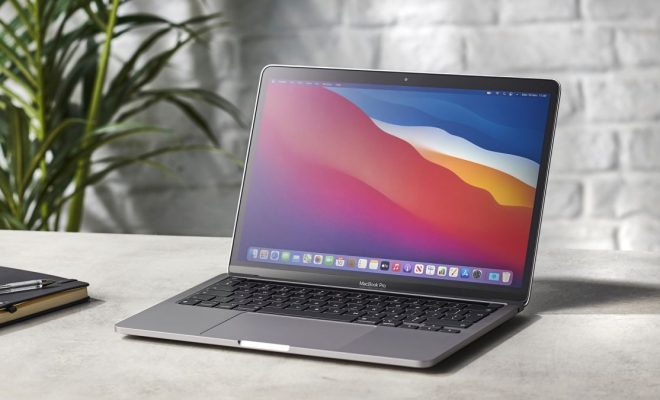
When it comes to personalizing your Mac, the possibilities are endless. Customizing your Mac not only gives it a unique look but also can enhance your productivity and enjoyment of using your computer. Here are some ways you can customize your Mac to make it truly your own.

1. Change Your Color Scheme

Changing your Mac’s color scheme is one of the quickest and easiest ways to personalize it. To change your color scheme, go to System Preferences, then General, and choose from the available options. You can choose from blue, graphite, silver, and a few other colors. Additionally, you can use third-party apps such as Flavours to create custom color schemes.

2. Customize Your Icons

Mac has a collection of default icons for your folders and applications, but if you want to make your Mac even more unique, you can customize them. You can either create or download custom icons from websites like IconArchive or IconFactory, or you can use third-party apps like LiteIcon or CandyBar to change your icons.

3. Change Your Desktop Background

Changing your desktop background can add a personal touch to your Mac. You can choose from the pre-installed backgrounds on your Mac or download new ones. Websites like Unsplash and Pexels offer a large variety of high-quality wallpapers, perfect for your Mac.

4. Modify Your Dock

The Dock is an essential part of your Mac’s interface. It allows you to easily access frequently used applications and folders. You can customize the Dock’s size, position, and add or remove apps from it. You can also change the appearance of the icons in the Dock to make them more visually appealing.

5. Customize Your Sounds

Customizing your sounds can add a personal touch to your Mac. You can change the sound effects that your Mac makes, such as the startup sound, the alert sound, and the keyboard feedback sound. You can also download custom sound packs from websites like SoundBible or SoundDogs to make your Mac’s sounds truly unique.
6. Create Keyboard Shortcuts

Keyboard shortcuts can enhance your productivity significantly. You can create custom keyboard shortcuts for all of your favorite applications just by going to System Preferences, then Keyboard, and then Shortcuts. This way, you can quickly access specific features without having to remember the menu path.

7. Add Widgets to Your Desktop

Widgets are small applications that run on your Mac’s Dashboard, providing you with quick access to information such as weather, news, and reminders. You can download new widgets from the Mac App Store or create your own using third-party apps like Dashcode.


Previous Article

How to Check Who You’ve Blocked on ...

Next Article

How to Update Ubuntu in the Command ...

Matthew Lynch

Related articles More from author

  • Digital & Mobile Technology

    What’s the Difference Between the Internet and the World Wide Web?

    June 15, 2023
    By Matthew Lynch
  • Digital & Mobile Technology

    The Best Sites to Download Free DVD and Blu-ray Covers

    June 15, 2023
    By Matthew Lynch
  • Digital & Mobile Technology

    Amazing Apps to Customize Your iPhone Home Screen Design

    June 8, 2023
    By Matthew Lynch
  • Digital & Mobile Technology

    How to Monitor Texting With AT&T Mobile

    April 30, 2023
    By Matthew Lynch
  • Digital & Mobile Technology

    Is Your Apple Watch Not Charging? Here’s What to Do

    September 7, 2023
    By Matthew Lynch
  • Digital & Mobile Technology

    How to Delete a Facebook Group

    June 2, 2023
    By Matthew Lynch

Search

Login & Registration

  • Register
  • Log in
  • Entries feed
  • Comments feed
  • WordPress.org

Newsletter

Signup for The Tech Edvocate Newsletter and have the latest in EdTech news and opinion delivered to your email address!

About Us

Since technology is not going anywhere and does more good than harm, adapting is the best course of action. That is where The Tech Edvocate comes in. We plan to cover the PreK-12 and Higher Education EdTech sectors and provide our readers with the latest news and opinion on the subject. From time to time, I will invite other voices to weigh in on important issues in EdTech. We hope to provide a well-rounded, multi-faceted look at the past, present, the future of EdTech in the US and internationally.

We started this journey back in June 2016, and we plan to continue it for many more years to come. I hope that you will join us in this discussion of the past, present and future of EdTech and lend your own insight to the issues that are discussed.

Newsletter

Signup for The Tech Edvocate Newsletter and have the latest in EdTech news and opinion delivered to your email address!

Contact Us

The Tech Edvocate
910 Goddin Street
Richmond, VA 23231
(601) 630-5238
[email protected]

Copyright © 2025 Matthew Lynch. All rights reserved.