The Tech Edvocate

Top Menu

  • Advertisement
  • Apps
  • Home Page
  • Home Page Five (No Sidebar)
  • Home Page Four
  • Home Page Three
  • Home Page Two
  • Home Tech2
  • Icons [No Sidebar]
  • Left Sidbear Page
  • Lynch Educational Consulting
  • My Account
  • My Speaking Page
  • Newsletter Sign Up Confirmation
  • Newsletter Unsubscription
  • Our Brands
  • Page Example
  • Privacy Policy
  • Protected Content
  • Register
  • Request a Product Review
  • Shop
  • Shortcodes Examples
  • Signup
  • Start Here
    • Governance
    • Careers
    • Contact Us
  • Terms and Conditions
  • The Edvocate
  • The Tech Edvocate Product Guide
  • Topics
  • Write For Us
  • Advertise

Main Menu

  • Start Here
    • Our Brands
    • Governance
      • Lynch Educational Consulting, LLC.
      • Dr. Lynch’s Personal Website
      • Careers
    • Write For Us
    • The Tech Edvocate Product Guide
    • Contact Us
    • Books
    • Edupedia
    • Post a Job
    • The Edvocate Podcast
    • Terms and Conditions
    • Privacy Policy
  • Topics
    • Assistive Technology
    • Child Development Tech
    • Early Childhood & K-12 EdTech
    • EdTech Futures
    • EdTech News
    • EdTech Policy & Reform
    • EdTech Startups & Businesses
    • Higher Education EdTech
    • Online Learning & eLearning
    • Parent & Family Tech
    • Personalized Learning
    • Product Reviews
  • Advertise
  • Tech Edvocate Awards
  • The Edvocate
  • Pedagogue
  • School Ratings

logo

The Tech Edvocate

  • Start Here
    • Our Brands
    • Governance
      • Lynch Educational Consulting, LLC.
      • Dr. Lynch’s Personal Website
        • My Speaking Page
      • Careers
    • Write For Us
    • The Tech Edvocate Product Guide
    • Contact Us
    • Books
    • Edupedia
    • Post a Job
    • The Edvocate Podcast
    • Terms and Conditions
    • Privacy Policy
  • Topics
    • Assistive Technology
    • Child Development Tech
    • Early Childhood & K-12 EdTech
    • EdTech Futures
    • EdTech News
    • EdTech Policy & Reform
    • EdTech Startups & Businesses
    • Higher Education EdTech
    • Online Learning & eLearning
    • Parent & Family Tech
    • Personalized Learning
    • Product Reviews
  • Advertise
  • Tech Edvocate Awards
  • The Edvocate
  • Pedagogue
  • School Ratings
  • 100 Best Legal Apps

  • 100 Best Payroll Apps

  • 100 Best HR Apps

  • 100 Best Project Management Apps

  • 100 Best Invoicing Apps

  • 100 Best CRM Apps

  • The Game-Changing September Beauty Products You Need to Try

  • Revelado: El Secreto Detrás de los Productos Más Vendidos de Septiembre que Querrás Tener

  • This Crucial FDA Hearing Could Transform Mental Healthcare Forever

  • WoW’s New Paid Race Sparked Outrage: Here’s Why Gamers Are Furious

Assistive Technology
Home›Assistive Technology›USB-A vs. USB-C: What Is the Difference?

USB-A vs. USB-C: What Is the Difference?
By Matthew Lynch
June 8, 2023
0
Spread the love

USB technology has revolutionized the way we transfer data and charge our devices. Since its first consumer release in 1996, USB has gone through several iterations, with each updated version delivering faster data transfer, better power delivery, and more reliability.

Currently, there are two types of USB connectors that are most commonly used in devices: USB-A and USB-C. Both have similar functions but are different in terms of appearance and ability. This article will give you an in-depth overview of the differences between USB-A and USB-C.

USB-A: What Is It?

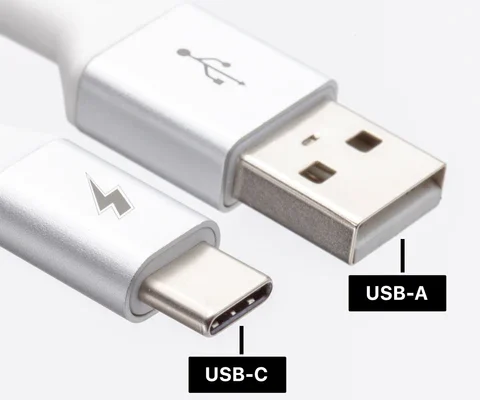
USB-A is the original connector developed in the 1990s. It is the most recognizable USB type, and you’ve probably used one before. It is a rectangular-shaped design with a flat end connector, while the other end is plugged into the device. USB-A is usually considered as the host port, the device that offers power and data to another device.

The USB-A port provides maximum speed transfer at approximately 480Mbps (megabytes per second), which is suitable for most data transfer operations. USB-A is an excellent choice for charging small devices like smartphones as it offers up to 2.5W of power output.

USB-C: What Is It?

USB-C was introduced in 2014 and is now the most preferred type of USB port. It has a smaller and sleeker design compared to USB-A, and is reversible. This means you can plug it in any direction without worrying about getting it wrong.

USB-C has become the standard for many devices, including laptops, tablets, and mobile phones. It offers a maximum speed transfer of up to 10Gbps (gigabytes per second), which is approximately 20 times faster than USB-A.

Unlike USB-A, which only offers up to 2.5 W of power output, USB-C offers up to 100 W of power output, enough to charge even laptops. It also boasts additional features such as the ability to transfer audio and video signals, making it a versatile choice for multimedia content creators.

USB-A vs. USB-C: What Are the Differences?

The main differences between USB-A and USB-C lie in the design, speed, power output, and versatility.

Design: USB-A is rectangular and only functions one way, while USB-C is smaller and can be plugged in either way.

Speed: USB-A provides a maximum data transfer rate of 480Mbps, while USB-C offers a speed of up to 10Gbps.

Power output: USB-A only offers up to 2.5W of power output, while USB-C can deliver up to 100W, which is capable of charging laptops.

Versatility: USB-A is limited to data transfer and charging, while USB-C features various functions such as video and audio transfers.

Which One Should You Choose?

Choosing between USB-A and USB-C depends on your devices’ requirements and intended usage. If you have older devices that work well with USB-A, then there is no need to switch to USB-C. USB-A is still an excellent choice for charging phones and transferring data.

However, if you require faster transfer speeds, greater power output, and versatile functionality, then USB-C is the way to go. USB-C compatibility is becoming standard with most modern devices, making it the future of USB connectivity.

Previous Article

Safari vs. Chrome for Mac: Reasons You ...

Next Article

How to Get Exclusive Pokémon in Pokémon ...

Matthew Lynch

Related articles More from author

  • Assistive Technology

    How to Convert STL to G-Code: The Easiest Way

    June 15, 2023
    By Matthew Lynch
  • Assistive Technology

    How to Change Time on Your Fitbit

    June 8, 2023
    By Matthew Lynch
  • Assistive Technology

    How to Cancel PlayStation Plus

    June 10, 2023
    By Matthew Lynch
  • Assistive Technology

    How to Use the less, more, and most Commands to Read Text Files in Linux

    June 15, 2023
    By Matthew Lynch
  • Assistive Technology

    How to Remove the Login Password on Windows 11

    June 15, 2023
    By Matthew Lynch
  • Assistive Technology

    How to Refresh iPhone

    June 10, 2023
    By Matthew Lynch

Search

Login & Registration

  • Log in
  • Entries feed
  • Comments feed
  • WordPress.org

Newsletter

Signup for The Tech Edvocate Newsletter and have the latest in EdTech news and opinion delivered to your email address!

About Us

Since technology is not going anywhere and does more good than harm, adapting is the best course of action. That is where The Tech Edvocate comes in. We plan to cover the PreK-12 and Higher Education EdTech sectors and provide our readers with the latest news and opinion on the subject. From time to time, I will invite other voices to weigh in on important issues in EdTech. We hope to provide a well-rounded, multi-faceted look at the past, present, the future of EdTech in the US and internationally.

We started this journey back in June 2016, and we plan to continue it for many more years to come. I hope that you will join us in this discussion of the past, present and future of EdTech and lend your own insight to the issues that are discussed.

Newsletter

Signup for The Tech Edvocate Newsletter and have the latest in EdTech news and opinion delivered to your email address!

Contact Us

The Tech Edvocate
910 Goddin Street
Richmond, VA 23231
(601) 630-5238
[email protected]

Copyright © 2026 Matthew Lynch. All rights reserved.