The Tech Edvocate

Top Menu

  • Advertisement
  • Apps
  • Home Page
  • Home Page Five (No Sidebar)
  • Home Page Four
  • Home Page Three
  • Home Page Two
  • Home Tech2
  • Icons [No Sidebar]
  • Left Sidbear Page
  • Lynch Educational Consulting
  • My Account
  • My Speaking Page
  • Newsletter Sign Up Confirmation
  • Newsletter Unsubscription
  • Our Brands
  • Page Example
  • Privacy Policy
  • Protected Content
  • Register
  • Request a Product Review
  • Shop
  • Shortcodes Examples
  • Signup
  • Start Here
    • Governance
    • Careers
    • Contact Us
  • Terms and Conditions
  • The Edvocate
  • The Tech Edvocate Product Guide
  • Topics
  • Write For Us
  • Advertise

Main Menu

  • Start Here
    • Our Brands
    • Governance
      • Lynch Educational Consulting, LLC.
      • Dr. Lynch’s Personal Website
      • Careers
    • Write For Us
    • The Tech Edvocate Product Guide
    • Contact Us
    • Books
    • Edupedia
    • Post a Job
    • The Edvocate Podcast
    • Terms and Conditions
    • Privacy Policy
  • Topics
    • Assistive Technology
    • Child Development Tech
    • Early Childhood & K-12 EdTech
    • EdTech Futures
    • EdTech News
    • EdTech Policy & Reform
    • EdTech Startups & Businesses
    • Higher Education EdTech
    • Online Learning & eLearning
    • Parent & Family Tech
    • Personalized Learning
    • Product Reviews
  • Advertise
  • Tech Edvocate Awards
  • The Edvocate
  • Pedagogue
  • School Ratings

logo

The Tech Edvocate

  • Start Here
    • Our Brands
    • Governance
      • Lynch Educational Consulting, LLC.
      • Dr. Lynch’s Personal Website
        • My Speaking Page
      • Careers
    • Write For Us
    • The Tech Edvocate Product Guide
    • Contact Us
    • Books
    • Edupedia
    • Post a Job
    • The Edvocate Podcast
    • Terms and Conditions
    • Privacy Policy
  • Topics
    • Assistive Technology
    • Child Development Tech
    • Early Childhood & K-12 EdTech
    • EdTech Futures
    • EdTech News
    • EdTech Policy & Reform
    • EdTech Startups & Businesses
    • Higher Education EdTech
    • Online Learning & eLearning
    • Parent & Family Tech
    • Personalized Learning
    • Product Reviews
  • Advertise
  • Tech Edvocate Awards
  • The Edvocate
  • Pedagogue
  • School Ratings
  • 100 Best Apps for Data Backup

  • 100 Best Apps for Data Migration

  • 100 Best Apps for Data Transformation

  • 100 Best Apps for Data Cleaning

  • 100 Best Apps for Data Entry

  • 100 Best Apps for Business Process Automation

  • 100 Best Apps for Operational Efficiency

  • 100 Best Apps for Improving Processes

  • 100 Best Apps for Scaling Operations

  • 100 Best Apps for Community-Led Growth

Assistive TechnologyInstructional Technology
Home›Assistive Technology›Tips to Make the Best PowerPoint Presentations

Tips to Make the Best PowerPoint Presentations
By Matthew Lynch
April 10, 2023
0
Spread the love

PowerPoint presentations are an essential part of any business meeting or academic presentation. However, not all presentations are created equal. Some are engaging, informative, and unforgettable, while others are bland and forgettable. The good news is that anyone can create a great PowerPoint presentation with some tips that assist in achieving incredible results.

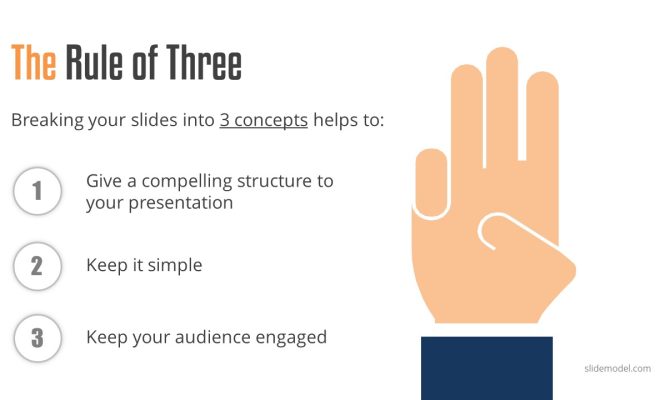
1. Develop a compelling storyline

To make the best PowerPoint presentation, you require strong content. A storyline designed specifically for the presentation can be an effective way to keep the audience engaged. The content should be arranged in a way that is easy to follow, and the storyline should capture the audience’s attention and leave them feeling informed and motivated.

2. Keep slides simple and concise

The most effective PowerPoint presentations are those that have a simple and clear slide design. Busy slides filled with text, font, and graphics can be overwhelming and confusing to viewers. Instead, opt for a simple design with minimal text that emphasizes the points you want to make.

3. Use high-quality images and graphics

Images and graphics add visual appeal to the presentation, but it’s essential to use high-quality ones that are not grainy or blurry. Use image and graphic resources from reputable sources that offer free or paid professional images like Shutterstock, Unsplash, or Canva. Another option for those on the go is to use your phone camera to capture images that you can use in your presentation.

4. Practice good slide transitions and animations

Slide transitions and animations should be subtle and not distracting. Instead, they should have a seamless effect that moves the presentation forward. Use animations and transitions that are relatively quick and natural in their movement, like fading in and out.

5. Keep it focused and concise

The best PowerPoint presentations are the ones that get to the point quickly and efficiently without dragging on. Bullet points are great for organizing content and for keeping the presentation to the point.

In conclusion, the key to making the best PowerPoint presentation is by knowing your audience, keeping to a concise script, incorporating high-quality images and graphics, practice good slide transitions, and keeping it focused and concise. With these simple tips in mind, you will be able to make a presentation that is engaging, informative, and memorable.


Previous Article

Tips to Optimize Your Windows 11 PC ...

Next Article

Steps to Successful Hard Drive Maintenance

Matthew Lynch

Related articles More from author

  • Assistive Technology

    How to Change Alexa’s Language

    June 12, 2023
    By Matthew Lynch
  • Assistive Technology

    How to Make a Private Story on Snapchat

    June 6, 2023
    By Matthew Lynch
  • Assistive Technology

    Ways to Fix It When Gmail Isn’t Working on Android

    June 11, 2023
    By Matthew Lynch
  • Assistive Technology

    How to Take a Screenshot on a Surface Pro Tablet

    June 23, 2023
    By Matthew Lynch
  • Assistive Technology

    How to Fix the “VAC Was Unable to Verify Your Game Session” Error on Steam for Windows

    September 7, 2023
    By Matthew Lynch
  • Assistive Technology

    How to Delete Profiles on Xbox Series X|S, Xbox One, or Xbox 360

    June 14, 2023
    By Matthew Lynch

Search

Login & Registration

  • Log in
  • Entries feed
  • Comments feed
  • WordPress.org

Newsletter

Signup for The Tech Edvocate Newsletter and have the latest in EdTech news and opinion delivered to your email address!

About Us

Since technology is not going anywhere and does more good than harm, adapting is the best course of action. That is where The Tech Edvocate comes in. We plan to cover the PreK-12 and Higher Education EdTech sectors and provide our readers with the latest news and opinion on the subject. From time to time, I will invite other voices to weigh in on important issues in EdTech. We hope to provide a well-rounded, multi-faceted look at the past, present, the future of EdTech in the US and internationally.

We started this journey back in June 2016, and we plan to continue it for many more years to come. I hope that you will join us in this discussion of the past, present and future of EdTech and lend your own insight to the issues that are discussed.

Newsletter

Signup for The Tech Edvocate Newsletter and have the latest in EdTech news and opinion delivered to your email address!

Contact Us

The Tech Edvocate
910 Goddin Street
Richmond, VA 23231
(601) 630-5238
[email protected]

Copyright © 2026 Matthew Lynch. All rights reserved.