The Tech Edvocate

Top Menu

  • Advertisement
  • Apps
  • Home Page
  • Home Page Five (No Sidebar)
  • Home Page Four
  • Home Page Three
  • Home Page Two
  • Home Tech2
  • Icons [No Sidebar]
  • Left Sidbear Page
  • Lynch Educational Consulting
  • My Account
  • My Speaking Page
  • Newsletter Sign Up Confirmation
  • Newsletter Unsubscription
  • Our Brands
  • Page Example
  • Privacy Policy
  • Protected Content
  • Register
  • Request a Product Review
  • Shop
  • Shortcodes Examples
  • Signup
  • Start Here
    • Governance
    • Careers
    • Contact Us
  • Terms and Conditions
  • The Edvocate
  • The Tech Edvocate Product Guide
  • Topics
  • Write For Us
  • Advertise

Main Menu

  • Start Here
    • Our Brands
    • Governance
      • Lynch Educational Consulting, LLC.
      • Dr. Lynch’s Personal Website
      • Careers
    • Write For Us
    • The Tech Edvocate Product Guide
    • Contact Us
    • Books
    • Edupedia
    • Post a Job
    • The Edvocate Podcast
    • Terms and Conditions
    • Privacy Policy
  • Topics
    • Assistive Technology
    • Child Development Tech
    • Early Childhood & K-12 EdTech
    • EdTech Futures
    • EdTech News
    • EdTech Policy & Reform
    • EdTech Startups & Businesses
    • Higher Education EdTech
    • Online Learning & eLearning
    • Parent & Family Tech
    • Personalized Learning
    • Product Reviews
  • Advertise
  • Tech Edvocate Awards
  • The Edvocate
  • Pedagogue
  • School Ratings

logo

The Tech Edvocate

  • Start Here
    • Our Brands
    • Governance
      • Lynch Educational Consulting, LLC.
      • Dr. Lynch’s Personal Website
        • My Speaking Page
      • Careers
    • Write For Us
    • The Tech Edvocate Product Guide
    • Contact Us
    • Books
    • Edupedia
    • Post a Job
    • The Edvocate Podcast
    • Terms and Conditions
    • Privacy Policy
  • Topics
    • Assistive Technology
    • Child Development Tech
    • Early Childhood & K-12 EdTech
    • EdTech Futures
    • EdTech News
    • EdTech Policy & Reform
    • EdTech Startups & Businesses
    • Higher Education EdTech
    • Online Learning & eLearning
    • Parent & Family Tech
    • Personalized Learning
    • Product Reviews
  • Advertise
  • Tech Edvocate Awards
  • The Edvocate
  • Pedagogue
  • School Ratings
  • This SmartHome Guardian 3.0 Feature Is Sparking Outcry — Here’s Why

  • This One Startup Just Secured Half a Billion to Revolutionize Home Buying

  • Elon Musk’s xAI Just Scored a Major Victory Against Minnesota’s ‘Nudification’ Law – Here’s Why It Matters

  • Wild: This Viral Game’s Website Was Caught Pimping Sex Workers to Teenagers

  • Unbelievable: Xbox Deals Collapse, Leading to Ninja Theory Layoffs – What This Means for Gaming

  • Urgent: 95% of Leaders Fear AI-Powered Attacks on Critical Infrastructure by 2026

  • Global Warning: AI’s Bubble and Existential Threats Could Unleash Chaos

  • Explosive: Student Loan Crisis Hits $234 Billion as Millions Face Brutal Collections

  • Jamie Dimon’s Unsettling AI Cybersecurity Warning: What You Haven’t Been Told

  • California’s Wild Robotaxi Rules: Are They Enough to Tame the AI Beast?

Assistive Technology
Home›Assistive Technology›How to Fix Surface Pro Screen Shaking and Flickering

How to Fix Surface Pro Screen Shaking and Flickering
By Matthew Lynch
June 8, 2023
0
Spread the love

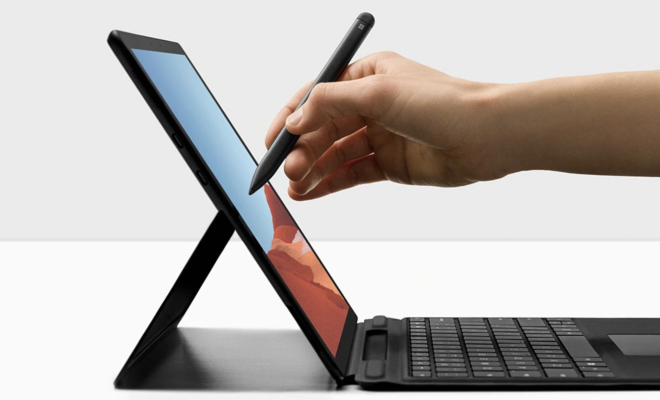
The Microsoft Surface Pro is a versatile and powerful device that combines the portability of a tablet with the productivity of a laptop. However, some users have reported a screen shaking and flickering issue with their device, which can be quite frustrating and distracting when working or using the device. Luckily, there are various ways to fix this issue, and in this article, we will walk you through them.

  1. Restart your Surface Pro

The first and easiest fix for the screen shaking and flickering issue on your Surface Pro is to restart the device. A simple restart may resolve the issue, as it can clear any temporary glitches and bugs that may be causing the problem.

  1. Update your graphics driver

An outdated or faulty graphics driver can cause issues with your device’s display, including screen flickering and shaking. Therefore, updating your graphics driver may fix the problem. To do this, follow these steps:

– Select Start > Settings > Update & Security > Windows Update > Check for updates.

– Download and install any updates available for your Surface Pro. This may include a graphics driver update.

– Restart your device and check if the issue is resolved.

  1. Disable any display adapters

If you have a secondary display adapter connected to your Surface Pro, it may be interfering with the device’s built-in display and causing the shaking and flickering issue. To disable the display adapter, follow these steps:

– Press the Windows Key + X and select Device Manager.

– Expand the Display Adapters category.

– Right-click on the adapter that you want to disable and select Disable device.

– Restart your device and check if the issue is resolved.

  1. Use the Surface Pro in a cool environment

Overheating can cause various issues with your device, including screen flickering and shaking. Therefore, using your Surface Pro in a cool environment can help resolve this issue. Ensure that the device is not placed near direct sunlight or under a source of heat.

  1. Adjust the screen resolution

The Surface Pro’s default screen resolution may not be compatible with some applications or your environment, which may cause the screen to flicker or shake. Therefore, adjusting the screen resolution may fix the issue. To do this, follow these steps:

– Right-click on your desktop and select Display settings.

– Under Scale and layout, select Display resolution.

– Adjust the resolution to a lower or higher setting and check if the issue is resolved.

In conclusion, the screen shaking and flickering issue on your Surface Pro can be quite frustrating, but it can be resolved using the methods above. If the issue persists after trying these fixes, you may need to contact Microsoft support or a professional technician for further assistance.


Previous Article

How to Change Time on Your Fitbit

Next Article

Best Educational Websites for Taking Online Courses ...

Matthew Lynch

Related articles More from author

  • Assistive Technology

    How to Fix the OneDrive Error Code 0x8004de40 in Windows

    June 5, 2023
    By Matthew Lynch
  • Assistive Technology

    How to Watch Peacock on Your Smart TV

    June 6, 2023
    By Matthew Lynch
  • Assistive Technology

    How to Wirelessly Connect a Surface Tablet to a TV

    June 15, 2023
    By Matthew Lynch
  • Assistive Technology

    How to Use Ubuntu Disk Utility for Better HDD/SSD Management

    June 23, 2023
    By Matthew Lynch
  • Assistive Technology

    Chromebook Frozen? 8 Ways to Fix That

    June 6, 2023
    By Matthew Lynch
  • Assistive Technology

    How to Get the AQI Complication on Apple Watch

    June 23, 2023
    By Matthew Lynch

Search

Login & Registration

  • Log in
  • Entries feed
  • Comments feed
  • WordPress.org

Newsletter

Signup for The Tech Edvocate Newsletter and have the latest in EdTech news and opinion delivered to your email address!

About Us

Since technology is not going anywhere and does more good than harm, adapting is the best course of action. That is where The Tech Edvocate comes in. We plan to cover the PreK-12 and Higher Education EdTech sectors and provide our readers with the latest news and opinion on the subject. From time to time, I will invite other voices to weigh in on important issues in EdTech. We hope to provide a well-rounded, multi-faceted look at the past, present, the future of EdTech in the US and internationally.

We started this journey back in June 2016, and we plan to continue it for many more years to come. I hope that you will join us in this discussion of the past, present and future of EdTech and lend your own insight to the issues that are discussed.

Newsletter

Signup for The Tech Edvocate Newsletter and have the latest in EdTech news and opinion delivered to your email address!

Contact Us

The Tech Edvocate
910 Goddin Street
Richmond, VA 23231
(601) 630-5238
[email protected]

Copyright © 2026 Matthew Lynch. All rights reserved.