The Tech Edvocate

Top Menu

  • Advertisement
  • Apps
  • Home Page
  • Home Page Five (No Sidebar)
  • Home Page Four
  • Home Page Three
  • Home Page Two
  • Home Tech2
  • Icons [No Sidebar]
  • Left Sidbear Page
  • Lynch Educational Consulting
  • My Account
  • My Speaking Page
  • Newsletter Sign Up Confirmation
  • Newsletter Unsubscription
  • Our Brands
  • Page Example
  • Privacy Policy
  • Protected Content
  • Register
  • Request a Product Review
  • Shop
  • Shortcodes Examples
  • Signup
  • Start Here
    • Governance
    • Careers
    • Contact Us
  • Terms and Conditions
  • The Edvocate
  • The Tech Edvocate Product Guide
  • Topics
  • Write For Us
  • Advertise

Main Menu

  • Start Here
    • Our Brands
    • Governance
      • Lynch Educational Consulting, LLC.
      • Dr. Lynch’s Personal Website
      • Careers
    • Write For Us
    • The Tech Edvocate Product Guide
    • Contact Us
    • Books
    • Edupedia
    • Post a Job
    • The Edvocate Podcast
    • Terms and Conditions
    • Privacy Policy
  • Topics
    • Assistive Technology
    • Child Development Tech
    • Early Childhood & K-12 EdTech
    • EdTech Futures
    • EdTech News
    • EdTech Policy & Reform
    • EdTech Startups & Businesses
    • Higher Education EdTech
    • Online Learning & eLearning
    • Parent & Family Tech
    • Personalized Learning
    • Product Reviews
  • Advertise
  • Tech Edvocate Awards
  • The Edvocate
  • Pedagogue
  • School Ratings

logo

The Tech Edvocate

  • Start Here
    • Our Brands
    • Governance
      • Lynch Educational Consulting, LLC.
      • Dr. Lynch’s Personal Website
        • My Speaking Page
      • Careers
    • Write For Us
    • The Tech Edvocate Product Guide
    • Contact Us
    • Books
    • Edupedia
    • Post a Job
    • The Edvocate Podcast
    • Terms and Conditions
    • Privacy Policy
  • Topics
    • Assistive Technology
    • Child Development Tech
    • Early Childhood & K-12 EdTech
    • EdTech Futures
    • EdTech News
    • EdTech Policy & Reform
    • EdTech Startups & Businesses
    • Higher Education EdTech
    • Online Learning & eLearning
    • Parent & Family Tech
    • Personalized Learning
    • Product Reviews
  • Advertise
  • Tech Edvocate Awards
  • The Edvocate
  • Pedagogue
  • School Ratings
  • A Visitors Guide to Long Beach (CA), United States

  • A Visitor’s Guide to Fresno (CA), United States

  • A Visitors Guide to New Orleans (LA), United States

  • A Visitors Guide to Sacramento (CA), United States

  • A Visitors Guide to Lyon, France

  • JisuLife Ultra2 Portable Fan: A Powerful Multi-Function Cooling Solution

  • A Visitors Guide to Viña del Mar, Chile

  • A Visitors Guide to Århus, Denmark

  • A Visitors Guide to Bakersfield (CA), United States

  • A Visitors Guide to Aurora (CO), United States

Digital & Mobile Technology
Home›Digital & Mobile Technology›The Best Free Translator Apps for Windows

The Best Free Translator Apps for Windows
By Matthew Lynch
June 15, 2023
0
Spread the love

Translation has never been easier than it is today, with the advancement of technology and the availability of translator apps. Whether you need to translate a document, webpage, or conversation in real-time, there are a plethora of options for Windows users. In this article, we will explore the best free translator apps for Windows.

1. Google Translate

Google Translate is undoubtedly the most popular translation app available for Windows. It can translate texts, web pages, and even speech in real-time. The app supports more than 100 languages and allows you to save your translations for future reference. Additionally, it offers features such as dictionary lookup, machine learning-powered translations, and pronunciation assistance.

2. DeepL

If you’re looking for an app that can provide more accurate translations, DeepL is the go-to option. It uses artificial intelligence and neural machine translation to provide high-quality results. The app supports over 20 languages and provides context for every translation to ensure accuracy. Additionally, DeepL has a desktop app that allows you to work offline.

3. Microsoft Translator

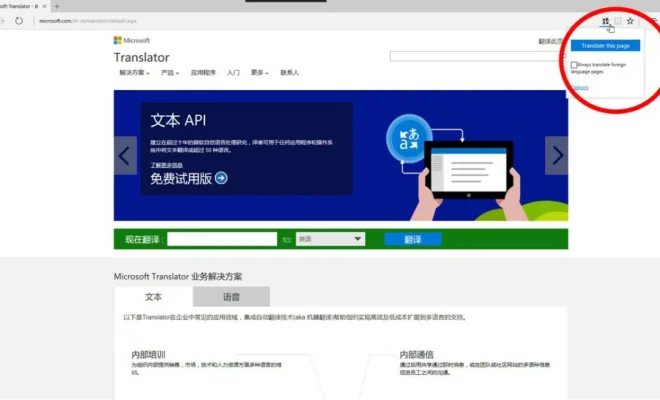
If you’re using Windows 10, you already have access to Microsoft Translator. The app can translate texts, voice inputs, and web pages. It supports over 60 languages and even allows you to translate whole documents. Furthermore, Microsoft Translator has integration with other Windows apps such as Office and Skype, which makes it easy to use.

4. Mate Translate

Mate Translate is a free extension for the Windows 10 browser that provides instant translations. It supports over 100 languages and allows you to translate selected texts or entire pages. Additionally, Mate Translate has a dictionary feature that provides definitions, synonyms, and usage examples.

5. Free Translator

Free Translator is a simple app that provides quick translations of texts. It supports over 50 languages and allows you to translate words, phrases, or entire paragraphs. With its user-friendly interface and easy-to-use features, Free Translator is an excellent option for people who want a no-frills translator.

Conclusion

In conclusion, these are the five best free translator apps for Windows. Google Translate and Microsoft Translator are excellent options for general translation needs, while DeepL can provide more accurate translations. Mate Translate and Free Translator are great for quick translations and come in handy when translating texts online. Whatever your translation needs are, these apps will make it easier to communicate with people from different parts of the world.


Previous Article

Free Apps and Sites to Learn How ...

Next Article

What Is a Bootloader? How Does a ...

Matthew Lynch

Related articles More from author

  • Digital & Mobile Technology

    How to Get a Floating Present in Animal Crossing

    June 9, 2023
    By Matthew Lynch
  • Digital & Mobile Technology

    Best Websites to Simplify Appointment Scheduling

    June 23, 2023
    By Matthew Lynch
  • Digital & Mobile Technology

    How to Delete Your YouTube Comments

    June 23, 2023
    By Matthew Lynch
  • Digital & Mobile Technology

    How to Import Downloaded Music to iTunes

    July 14, 2023
    By Matthew Lynch
  • Digital & Mobile Technology

    Easy Ways to Modify Clip Art

    August 5, 2023
    By Matthew Lynch
  • Digital & Mobile Technology

    Ways to Fix the Windows Desktop When It Turns Pink or Purple

    June 4, 2023
    By Matthew Lynch

Search

Login & Registration

  • Register
  • Log in
  • Entries feed
  • Comments feed
  • WordPress.org

Newsletter

Signup for The Tech Edvocate Newsletter and have the latest in EdTech news and opinion delivered to your email address!

About Us

Since technology is not going anywhere and does more good than harm, adapting is the best course of action. That is where The Tech Edvocate comes in. We plan to cover the PreK-12 and Higher Education EdTech sectors and provide our readers with the latest news and opinion on the subject. From time to time, I will invite other voices to weigh in on important issues in EdTech. We hope to provide a well-rounded, multi-faceted look at the past, present, the future of EdTech in the US and internationally.

We started this journey back in June 2016, and we plan to continue it for many more years to come. I hope that you will join us in this discussion of the past, present and future of EdTech and lend your own insight to the issues that are discussed.

Newsletter

Signup for The Tech Edvocate Newsletter and have the latest in EdTech news and opinion delivered to your email address!

Contact Us

The Tech Edvocate
910 Goddin Street
Richmond, VA 23231
(601) 630-5238
[email protected]

Copyright © 2025 Matthew Lynch. All rights reserved.