The Tech Edvocate

Top Menu

  • Advertisement
  • Apps
  • Home Page
  • Home Page Five (No Sidebar)
  • Home Page Four
  • Home Page Three
  • Home Page Two
  • Home Tech2
  • Icons [No Sidebar]
  • Left Sidbear Page
  • Lynch Educational Consulting
  • My Account
  • My Speaking Page
  • Newsletter Sign Up Confirmation
  • Newsletter Unsubscription
  • Our Brands
  • Page Example
  • Privacy Policy
  • Protected Content
  • Register
  • Request a Product Review
  • Shop
  • Shortcodes Examples
  • Signup
  • Start Here
    • Governance
    • Careers
    • Contact Us
  • Terms and Conditions
  • The Edvocate
  • The Tech Edvocate Product Guide
  • Topics
  • Write For Us
  • Advertise

Main Menu

  • Start Here
    • Our Brands
    • Governance
      • Lynch Educational Consulting, LLC.
      • Dr. Lynch’s Personal Website
      • Careers
    • Write For Us
    • The Tech Edvocate Product Guide
    • Contact Us
    • Books
    • Edupedia
    • Post a Job
    • The Edvocate Podcast
    • Terms and Conditions
    • Privacy Policy
  • Topics
    • Assistive Technology
    • Child Development Tech
    • Early Childhood & K-12 EdTech
    • EdTech Futures
    • EdTech News
    • EdTech Policy & Reform
    • EdTech Startups & Businesses
    • Higher Education EdTech
    • Online Learning & eLearning
    • Parent & Family Tech
    • Personalized Learning
    • Product Reviews
  • Advertise
  • Tech Edvocate Awards
  • The Edvocate
  • Pedagogue
  • School Ratings

logo

The Tech Edvocate

  • Start Here
    • Our Brands
    • Governance
      • Lynch Educational Consulting, LLC.
      • Dr. Lynch’s Personal Website
        • My Speaking Page
      • Careers
    • Write For Us
    • The Tech Edvocate Product Guide
    • Contact Us
    • Books
    • Edupedia
    • Post a Job
    • The Edvocate Podcast
    • Terms and Conditions
    • Privacy Policy
  • Topics
    • Assistive Technology
    • Child Development Tech
    • Early Childhood & K-12 EdTech
    • EdTech Futures
    • EdTech News
    • EdTech Policy & Reform
    • EdTech Startups & Businesses
    • Higher Education EdTech
    • Online Learning & eLearning
    • Parent & Family Tech
    • Personalized Learning
    • Product Reviews
  • Advertise
  • Tech Edvocate Awards
  • The Edvocate
  • Pedagogue
  • School Ratings
  • A Visitors Guide to Portland (OR), United States

  • 7 Men’s Bruno Marc Shoes That Are the Perfect Christmas Gift

  • A Visitors Guide to Oklahoma City (OK), United States

  • A Visitor’s Guide to Tucson, Arizona, United States

  • A Visitor’s Guide to Hamilton, Canada

  • Beware of Fiverr: You Might Get Scammed

  • The Future of Artificial Intelligence: Navigating the Next Frontier

  • Best Home Backup Generators for 2026

  • Online Learning Platforms: Transforming Education in the Digital Age

  • Fastest Growing Sectors of the EdTech Market: Exploring Emerging Trends

Digital & Mobile Technology
Home›Digital & Mobile Technology›Mouse Keeps Disappearing on Mac? Here’s the Fix

Mouse Keeps Disappearing on Mac? Here’s the Fix
By Matthew Lynch
July 31, 2023
0
Spread the love

As a Mac user, many of us have experienced the frustration of losing our mouse cursor on our screens. This can be a particularly aggravating issue if you’re in the middle of important work, gaming, or just browsing the web. Fortunately, there are a few simple fixes to this common problem.

Firstly, try the easy solution of restarting your Mac. Occasionally, the mouse can stop functioning due to a software glitch that requires a simple restart to clear up. So, shut down your Mac, unplug any peripherals connected to it and then wait for a few seconds before powering it back on. Hopefully, this should fix the issue of the disappearing mouse cursor.

If that doesn’t work, try resetting the SMC or PRAM. The System Management Controller (SMC) and Parameter Random Access Memory (PRAM) store essential settings for your Mac’s hardware. When these settings are corrupt or out of date, it can lead to a variety of problems like a disappearing mouse cursor. SMC and PRAM resets will vary depending on the age and model of your Mac, so refer to Apple’s support pages or seek assistance from a professional if you’re unsure.

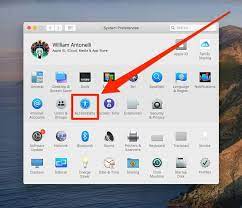
Another possible fix is to ensure that your Mac is updated with the latest version of its operating system. Regular updates to the software help fix bugs that could lead to a missing cursor. In most cases, macOS updates can be found in the ‘System Preferences’ app under the ‘Software Update’ tab. Once installed, restart your Mac and check if the problem has been fixed.

Sometimes a disappearing cursor is caused when your mouse’s software is outdated. Apple frequently releases updates and patches for the mouse’s firmware as well, so opening up ‘System Preferences’ and checking to see if any updates are available for your mouse can be a good idea.

Lastly, it’s important to check if a physical issue is causing the problem. The mouse itself could be the root of the issue, such as a loose connection or an outdated firmware. Try disconnecting and reconnecting the mouse, and make sure that it’s not running out of battery power. If the problem persists, you may need to replace the mouse or seek professional help.

All in all, dealing with a disappearing mouse cursor on your Mac can be a frustrating problem, but there are several easy fixes that you can try. By following the steps above, you can quickly get your mouse cursor back on track and avoid interruptions to your work.


Previous Article

How to Format Code Blocks in Google ...

Next Article

How to Create Custom App Icons on ...

Matthew Lynch

Related articles More from author

  • Digital & Mobile Technology

    Remote Jobs That Don’t Require a Degree

    June 14, 2023
    By Matthew Lynch
  • Digital & Mobile Technology

    How to Fix the Error Code 0X800701B1 on Windows 10

    August 5, 2023
    By Matthew Lynch
  • Digital & Mobile Technology

    What is Security Incident and Event Management (SIEM)?

    May 11, 2023
    By Matthew Lynch
  • Digital & Mobile Technology

    Everything You Need to Know About Gmail’s Login Security Warning Alerts

    August 5, 2023
    By Matthew Lynch
  • Digital & Mobile Technology

    Best SNES Emulators for Android of 2023

    June 7, 2023
    By Matthew Lynch
  • Digital & Mobile Technology

    Best Android Auto Apps for Messaging, Music, and More

    August 5, 2023
    By Matthew Lynch

Search

Login & Registration

  • Register
  • Log in
  • Entries feed
  • Comments feed
  • WordPress.org

Newsletter

Signup for The Tech Edvocate Newsletter and have the latest in EdTech news and opinion delivered to your email address!

About Us

Since technology is not going anywhere and does more good than harm, adapting is the best course of action. That is where The Tech Edvocate comes in. We plan to cover the PreK-12 and Higher Education EdTech sectors and provide our readers with the latest news and opinion on the subject. From time to time, I will invite other voices to weigh in on important issues in EdTech. We hope to provide a well-rounded, multi-faceted look at the past, present, the future of EdTech in the US and internationally.

We started this journey back in June 2016, and we plan to continue it for many more years to come. I hope that you will join us in this discussion of the past, present and future of EdTech and lend your own insight to the issues that are discussed.

Newsletter

Signup for The Tech Edvocate Newsletter and have the latest in EdTech news and opinion delivered to your email address!

Contact Us

The Tech Edvocate
910 Goddin Street
Richmond, VA 23231
(601) 630-5238
[email protected]

Copyright © 2025 Matthew Lynch. All rights reserved.