The Tech Edvocate

Top Menu

  • Advertisement
  • Apps
  • Home Page
  • Home Page Five (No Sidebar)
  • Home Page Four
  • Home Page Three
  • Home Page Two
  • Home Tech2
  • Icons [No Sidebar]
  • Left Sidbear Page
  • Lynch Educational Consulting
  • My Account
  • My Speaking Page
  • Newsletter Sign Up Confirmation
  • Newsletter Unsubscription
  • Our Brands
  • Page Example
  • Privacy Policy
  • Protected Content
  • Register
  • Request a Product Review
  • Shop
  • Shortcodes Examples
  • Signup
  • Start Here
    • Governance
    • Careers
    • Contact Us
  • Terms and Conditions
  • The Edvocate
  • The Tech Edvocate Product Guide
  • Topics
  • Write For Us
  • Advertise

Main Menu

  • Start Here
    • Our Brands
    • Governance
      • Lynch Educational Consulting, LLC.
      • Dr. Lynch’s Personal Website
      • Careers
    • Write For Us
    • The Tech Edvocate Product Guide
    • Contact Us
    • Books
    • Edupedia
    • Post a Job
    • The Edvocate Podcast
    • Terms and Conditions
    • Privacy Policy
  • Topics
    • Assistive Technology
    • Child Development Tech
    • Early Childhood & K-12 EdTech
    • EdTech Futures
    • EdTech News
    • EdTech Policy & Reform
    • EdTech Startups & Businesses
    • Higher Education EdTech
    • Online Learning & eLearning
    • Parent & Family Tech
    • Personalized Learning
    • Product Reviews
  • Advertise
  • Tech Edvocate Awards
  • The Edvocate
  • Pedagogue
  • School Ratings

logo

The Tech Edvocate

  • Start Here
    • Our Brands
    • Governance
      • Lynch Educational Consulting, LLC.
      • Dr. Lynch’s Personal Website
        • My Speaking Page
      • Careers
    • Write For Us
    • The Tech Edvocate Product Guide
    • Contact Us
    • Books
    • Edupedia
    • Post a Job
    • The Edvocate Podcast
    • Terms and Conditions
    • Privacy Policy
  • Topics
    • Assistive Technology
    • Child Development Tech
    • Early Childhood & K-12 EdTech
    • EdTech Futures
    • EdTech News
    • EdTech Policy & Reform
    • EdTech Startups & Businesses
    • Higher Education EdTech
    • Online Learning & eLearning
    • Parent & Family Tech
    • Personalized Learning
    • Product Reviews
  • Advertise
  • Tech Edvocate Awards
  • The Edvocate
  • Pedagogue
  • School Ratings
  • Când ecranul devine salon: atmosfera cazinoului online

  • 100 Best Performance Optimization Apps

  • LG’s Shocking Privacy Scandal: Why Is Apple Partnering on a Smart Doorbell Anyway?

  • The Astonishing New Weight Loss Drugs 2023 Set to Transform Everything

  • The Staggering Cost of Bad Actors: Honest DeFi Protocols Foot the Bill

  • OpenAI’s Secret Weapon: The Screenless AI Device That Could Kill Your iPhone

  • Why These 7 Esports Stocks Could Explode Your Portfolio by 2027

  • The Quiet Revolution: How AI Finance Tools 2026 Are Taking Over Your Money

  • Your Money, AI’s Brain: Why 7 in 10 Americans Are Ready for the Robot Revolution in Finance

  • The Staggering Truth About Student Loan Forgiveness Delays You Won’t Believe

Digital & Mobile Technology
Home›Digital & Mobile Technology›Most Common Online Error Codes

Most Common Online Error Codes
By Matthew Lynch
June 12, 2023
0
Spread the love

In today’s fast-paced online world, error codes can be a frustrating experience when trying to access a website, application, or service. Error codes are usually numerical or alphanumerical messages that are displayed on a user’s screen when there is an issue with a website or application. Here are some of the most common online error codes and their meanings.

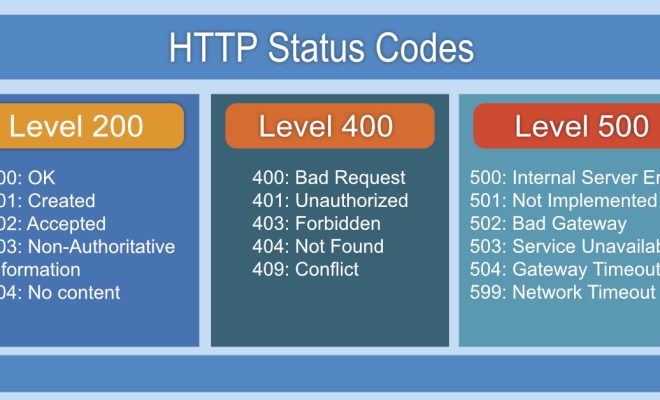
  1. HTTP Error 404 – This error code is the most common and one that every internet user has likely encountered at least once. HTTP error 404 means that the website you are trying to reach or the page you are trying to access does not exist. This error code can occur due to several reasons such as incorrect URL, server downtime, or the webpage has been removed.
  2. Error 500 – This is an internal server error that occurs when a server fails to execute a request due to an unexpected condition. When you see Error 500, it is an indication that there is a problem with the website’s server, which cannot process your request. This error code may occur due to server maintenance or coding errors.
  3. Error 503 – This error code is usually displayed when a server is not available due to maintenance or has exceeded its capacity to serve requests. When you see Error 503, it means that you should try again at a later time when the server is available.
  4. Error 400 – This error code is usually associated with a bad request. When Error 400 is displayed on your screen, it means that the server has rejected your request due to reasons like incorrect parameters or invalid syntax.
  5. Error 401 – This error code is related to an unauthorized access attempt to a restricted page or service. Error 401 indicates that access is denied due to authentication issues. This error code may occur due to the expiry of the session or an invalid login credential.
  6. Error 403 – This error code typically means that the server recognized your request, but the server has denied access to the requested content. Some of the reasons for Error 403 include IP blocking, restriction of access to a particular geographical location, or a configured firewall.
  7. Error 504 – This error code is associated with Gateway Timeout. When you encounter Error 504, it means that there is a break in communication between two servers, and the request from your browser could not reach the intended server.

In conclusion, online error codes can be quite frustrating and can hinder your internet experience. However, understanding the most common error codes will help you to identify the cause of these errors and determine the best course of action. If you frequently encounter an error code, it is always best to reach out to a website or application support team for assistance.


Previous Article

How to Fix It When Windows 10 ...

Next Article

How to Change Text Size on Android

Matthew Lynch

Related articles More from author

  • Digital & Mobile Technology

    How to Take an iPhone Screenshot Without the Home or Power Buttons

    August 5, 2023
    By Matthew Lynch
  • Digital & Mobile Technology

    What is Microarchitecture (µarch)?

    May 24, 2023
    By Matthew Lynch
  • Digital & Mobile Technology

    How to Delete Your Amazon Account

    May 28, 2023
    By Matthew Lynch
  • Digital & Mobile Technology

    What Is a Crypto Liquidity Pool? Why Are They So Important to DeFi?

    July 31, 2023
    By Matthew Lynch
  • Digital & Mobile Technology

    Learn to Spot Clashing Colors Used in Graphic Design

    June 3, 2023
    By Matthew Lynch
  • Digital & Mobile Technology

    Best Music Download Apps for Android and iPhone

    August 5, 2023
    By Matthew Lynch

Search

Login & Registration

  • Log in
  • Entries feed
  • Comments feed
  • WordPress.org

Newsletter

Signup for The Tech Edvocate Newsletter and have the latest in EdTech news and opinion delivered to your email address!

About Us

Since technology is not going anywhere and does more good than harm, adapting is the best course of action. That is where The Tech Edvocate comes in. We plan to cover the PreK-12 and Higher Education EdTech sectors and provide our readers with the latest news and opinion on the subject. From time to time, I will invite other voices to weigh in on important issues in EdTech. We hope to provide a well-rounded, multi-faceted look at the past, present, the future of EdTech in the US and internationally.

We started this journey back in June 2016, and we plan to continue it for many more years to come. I hope that you will join us in this discussion of the past, present and future of EdTech and lend your own insight to the issues that are discussed.

Newsletter

Signup for The Tech Edvocate Newsletter and have the latest in EdTech news and opinion delivered to your email address!

Contact Us

The Tech Edvocate
910 Goddin Street
Richmond, VA 23231
(601) 630-5238
[email protected]

Copyright © 2026 Matthew Lynch. All rights reserved.