The Tech Edvocate

Top Menu

  • Advertisement
  • Apps
  • Home Page
  • Home Page Five (No Sidebar)
  • Home Page Four
  • Home Page Three
  • Home Page Two
  • Home Tech2
  • Icons [No Sidebar]
  • Left Sidbear Page
  • Lynch Educational Consulting
  • My Account
  • My Speaking Page
  • Newsletter Sign Up Confirmation
  • Newsletter Unsubscription
  • Our Brands
  • Page Example
  • Privacy Policy
  • Protected Content
  • Register
  • Request a Product Review
  • Shop
  • Shortcodes Examples
  • Signup
  • Start Here
    • Governance
    • Careers
    • Contact Us
  • Terms and Conditions
  • The Edvocate
  • The Tech Edvocate Product Guide
  • Topics
  • Write For Us
  • Advertise

Main Menu

  • Start Here
    • Our Brands
    • Governance
      • Lynch Educational Consulting, LLC.
      • Dr. Lynch’s Personal Website
      • Careers
    • Write For Us
    • The Tech Edvocate Product Guide
    • Contact Us
    • Books
    • Edupedia
    • Post a Job
    • The Edvocate Podcast
    • Terms and Conditions
    • Privacy Policy
  • Topics
    • Assistive Technology
    • Child Development Tech
    • Early Childhood & K-12 EdTech
    • EdTech Futures
    • EdTech News
    • EdTech Policy & Reform
    • EdTech Startups & Businesses
    • Higher Education EdTech
    • Online Learning & eLearning
    • Parent & Family Tech
    • Personalized Learning
    • Product Reviews
  • Advertise
  • Tech Edvocate Awards
  • The Edvocate
  • Pedagogue
  • School Ratings

logo

The Tech Edvocate

  • Start Here
    • Our Brands
    • Governance
      • Lynch Educational Consulting, LLC.
      • Dr. Lynch’s Personal Website
        • My Speaking Page
      • Careers
    • Write For Us
    • The Tech Edvocate Product Guide
    • Contact Us
    • Books
    • Edupedia
    • Post a Job
    • The Edvocate Podcast
    • Terms and Conditions
    • Privacy Policy
  • Topics
    • Assistive Technology
    • Child Development Tech
    • Early Childhood & K-12 EdTech
    • EdTech Futures
    • EdTech News
    • EdTech Policy & Reform
    • EdTech Startups & Businesses
    • Higher Education EdTech
    • Online Learning & eLearning
    • Parent & Family Tech
    • Personalized Learning
    • Product Reviews
  • Advertise
  • Tech Edvocate Awards
  • The Edvocate
  • Pedagogue
  • School Ratings
  • This SmartHome Guardian 3.0 Feature Is Sparking Outcry — Here’s Why

  • This One Startup Just Secured Half a Billion to Revolutionize Home Buying

  • Elon Musk’s xAI Just Scored a Major Victory Against Minnesota’s ‘Nudification’ Law – Here’s Why It Matters

  • Wild: This Viral Game’s Website Was Caught Pimping Sex Workers to Teenagers

  • Unbelievable: Xbox Deals Collapse, Leading to Ninja Theory Layoffs – What This Means for Gaming

  • Urgent: 95% of Leaders Fear AI-Powered Attacks on Critical Infrastructure by 2026

  • Global Warning: AI’s Bubble and Existential Threats Could Unleash Chaos

  • Explosive: Student Loan Crisis Hits $234 Billion as Millions Face Brutal Collections

  • Jamie Dimon’s Unsettling AI Cybersecurity Warning: What You Haven’t Been Told

  • California’s Wild Robotaxi Rules: Are They Enough to Tame the AI Beast?

Digital & Mobile Technology
Home›Digital & Mobile Technology›Maximize Your Productivity: Easy DIY Computer Monitor Stands

Maximize Your Productivity: Easy DIY Computer Monitor Stands
By Matthew Lynch
June 23, 2023
0
Spread the love

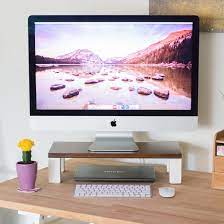
As remote work continues to dominate, many of us are finding ourselves spending extended periods of time sitting at a desk. While sitting for long periods of time can be damaging to your health, using a computer monitor stand can help reduce the strain on your neck and eyes, while also improving your productivity.

While there are many different types of monitor stands available on the market, they can be pricey and often not cater to personal preferences. Luckily, creating your own DIY monitor stand is not only easy, but it can be personalized to fit your workspace perfectly.

Here are a few DIY computer monitor stand ideas to help maximize your productivity:

1. Stackable shelf

One of the easiest and most affordable DIY monitor stands is stacking up hallow shelves. Find a set of tall, narrow shelves that can be stacked on top of one another to create a customized monitor stand that fits your needs. This option is great because it adds additional storage space to your desk and allows for a compact design. Just be sure to measure your monitor and the height you need the stand to be before purchasing the shelves.

2. Wooden box stand

Another DIY monitor stand idea is creating a box stand out of wood or metal. This option offers more stability and is perfect for those who prefer a more industrial look. You can purchase metal boxes or wooden crates that can be easily glued together to create an elevated base for your desktop monitor.

3. Brick and wood stand

If you’re looking for a rustic and affordable option, a brick and wood stand may be a great choice. This involves stacking bricks on top of each other with a plank of wood placed on top to create a raised platform. Just be sure to measure your monitor and the height you need the stand to be before purchasing the bricks and wood.

4. Keyboard drawer

If you’re short on desk space, a keyboard drawer with an adjustable monitor stand built-in may be a perfect solution for you. Simply install the keyboard drawer under your desk, then adjust the height of the monitor stand as needed. This option is great because it keeps the desk surface free of clutter, and the adjustable height allows for a more comfortable viewing angle.

In conclusion, creating your own DIY computer monitor stand is an easy and low-cost way to improve your productivity while working from home. Each of the above ideas can be customized to fit your needs and requirements perfectly. Plus, the added benefit of a comfortable workstation will help you stay focused and productive throughout the day.


Previous Article

How to Set Up a Sleep Timer ...

Next Article

Ways to Set Reminders in Windows

Matthew Lynch

Related articles More from author

  • Digital & Mobile Technology

    How to Create a Virtual Machine in Windows 10

    July 6, 2023
    By Matthew Lynch
  • Digital & Mobile Technology

    How to Use Text Boxes in Microsoft Word

    June 12, 2023
    By Matthew Lynch
  • Digital & Mobile Technology

    How to Share a Screen on Google Meet

    June 11, 2023
    By Matthew Lynch
  • Digital & Mobile Technology

    What is Java?

    May 23, 2023
    By Matthew Lynch
  • Digital & Mobile Technology

    Instagram Web Has a New Look: Here’s What Changed

    August 5, 2023
    By Matthew Lynch
  • Digital & Mobile Technology

    Document Go Code Automatically Using Godoc

    June 22, 2023
    By Matthew Lynch

Search

Login & Registration

  • Log in
  • Entries feed
  • Comments feed
  • WordPress.org

Newsletter

Signup for The Tech Edvocate Newsletter and have the latest in EdTech news and opinion delivered to your email address!

About Us

Since technology is not going anywhere and does more good than harm, adapting is the best course of action. That is where The Tech Edvocate comes in. We plan to cover the PreK-12 and Higher Education EdTech sectors and provide our readers with the latest news and opinion on the subject. From time to time, I will invite other voices to weigh in on important issues in EdTech. We hope to provide a well-rounded, multi-faceted look at the past, present, the future of EdTech in the US and internationally.

We started this journey back in June 2016, and we plan to continue it for many more years to come. I hope that you will join us in this discussion of the past, present and future of EdTech and lend your own insight to the issues that are discussed.

Newsletter

Signup for The Tech Edvocate Newsletter and have the latest in EdTech news and opinion delivered to your email address!

Contact Us

The Tech Edvocate
910 Goddin Street
Richmond, VA 23231
(601) 630-5238
[email protected]

Copyright © 2026 Matthew Lynch. All rights reserved.