The Tech Edvocate

Top Menu

  • Advertisement
  • Apps
  • Home Page
  • Home Page Five (No Sidebar)
  • Home Page Four
  • Home Page Three
  • Home Page Two
  • Home Tech2
  • Icons [No Sidebar]
  • Left Sidbear Page
  • Lynch Educational Consulting
  • My Account
  • My Speaking Page
  • Newsletter Sign Up Confirmation
  • Newsletter Unsubscription
  • Our Brands
  • Page Example
  • Privacy Policy
  • Protected Content
  • Register
  • Request a Product Review
  • Shop
  • Shortcodes Examples
  • Signup
  • Start Here
    • Governance
    • Careers
    • Contact Us
  • Terms and Conditions
  • The Edvocate
  • The Tech Edvocate Product Guide
  • Topics
  • Write For Us
  • Advertise

Main Menu

  • Start Here
    • Our Brands
    • Governance
      • Lynch Educational Consulting, LLC.
      • Dr. Lynch’s Personal Website
      • Careers
    • Write For Us
    • The Tech Edvocate Product Guide
    • Contact Us
    • Books
    • Edupedia
    • Post a Job
    • The Edvocate Podcast
    • Terms and Conditions
    • Privacy Policy
  • Topics
    • Assistive Technology
    • Child Development Tech
    • Early Childhood & K-12 EdTech
    • EdTech Futures
    • EdTech News
    • EdTech Policy & Reform
    • EdTech Startups & Businesses
    • Higher Education EdTech
    • Online Learning & eLearning
    • Parent & Family Tech
    • Personalized Learning
    • Product Reviews
  • Advertise
  • Tech Edvocate Awards
  • The Edvocate
  • Pedagogue
  • School Ratings

logo

The Tech Edvocate

  • Start Here
    • Our Brands
    • Governance
      • Lynch Educational Consulting, LLC.
      • Dr. Lynch’s Personal Website
        • My Speaking Page
      • Careers
    • Write For Us
    • The Tech Edvocate Product Guide
    • Contact Us
    • Books
    • Edupedia
    • Post a Job
    • The Edvocate Podcast
    • Terms and Conditions
    • Privacy Policy
  • Topics
    • Assistive Technology
    • Child Development Tech
    • Early Childhood & K-12 EdTech
    • EdTech Futures
    • EdTech News
    • EdTech Policy & Reform
    • EdTech Startups & Businesses
    • Higher Education EdTech
    • Online Learning & eLearning
    • Parent & Family Tech
    • Personalized Learning
    • Product Reviews
  • Advertise
  • Tech Edvocate Awards
  • The Edvocate
  • Pedagogue
  • School Ratings
  • Medicube PDRN Pink Collagen Cream: Is It Safe to Use Now?

  • Tarte’s ‘Snatch Sticks’ Spark Unprecedented Backlash — Here’s Why Everyone’s Talking

  • This AI-Designed Drug Just Entered Phase III Trials — And It Might Reverse Your Biological Age

  • Unbelievable: Top AI Startups Caught Faking Revenue, Rocking Silicon Valley

  • Xbox Cloud Gaming’s Urgent Problem: Microsoft’s Brutal Truth Revealed

  • The Hypocrisy That’s Quietly Reshaping Gaming Journalism

  • Anthropic Insider: Why AI Could End Humanity by 2036

  • Unbelievable: OpenAI Claims AI Solved Million-Dollar Math Problem – But the Credit Battle Just Began

  • Heartbreaking: 93 Million Kids’ Futures Stolen by Surging Attacks on Education

  • Unsettling: The Cat in the Hat Trend That’s Causing Mass Panic in Schools

Digital & Mobile Technology
Home›Digital & Mobile Technology›Lenovo Ideapad 320 Review

Lenovo Ideapad 320 Review
By Matthew Lynch
July 31, 2023
0
Spread the love

Lenovo Ideapad 320 is an affordable mid-range laptop that features great design and comes with impressive hardware specifications. The Ideapad 320 fits perfectly in the budget laptop category designed for students and home users to perform basic productivity tasks such as document creation, browsing, light photo editing, and even video playback.

Design and Build Quality

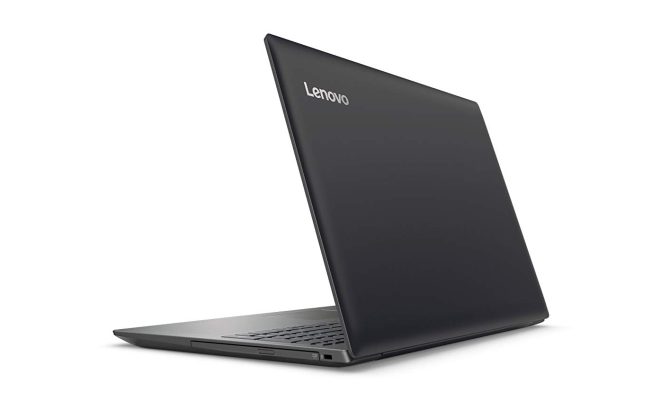
The Lenovo Ideapad 320 comes with a sleek design featuring a plastic body that is both simple and stylish. The body has a subtle grey finish with a Lenovo logo placed on the lid with a silver matte finish. The Ideapad 320 measures 14.9 x 10.2 x 0.9 inches and weighs roughly around 4.8 pounds, making it easy to carry it around.

Display Quality

The Lenovo Ideapad 320 comes with a 15.6-inch HD display with an anti-glare coating. The display provides a resolution of 1366×768 pixels, which is enough for basic productivity tasks. The display is not the brightest and has a limited viewing angle. However, the colors are decent for an entry-level laptop.

Performance

The Ideapad 320 is equipped with an Intel Core i5 7th Gen dual-core processor clocked at 2.5GHz. Along with it comes 8GB DDR4 RAM and 1TB HDD storage. The storage system is enough to store all your files and documents. The dedicated 2GB Nvidia GeForce 940MX graphics card makes it capable of light gaming and slight video editing.

Connectivity and Ports

The Lenovo Ideapad 320 comes equipped with a host of ports, including an HDMI port, USB Type Type-A, USB Type-C, a 4-in-1 card reader, and an Ethernet port. The 802.11ac Wi-Fi and Bluetooth 4.1 make for great wireless connectivity.

Battery life

The Lenovo Ideapad 320 comes with a removable Li-ion battery. The battery life is decent and can last up to 5 hours of constant use on a single charge.

Conclusion

The Lenovo Ideapad 320 is an affordable entry-level laptop that comes equipped with decent hardware specifications, making it an ideal choice for students and home users. With its sleek design, powerful hardware, and sufficient storage space, the Ideapad 320 is an excellent choice for those on a budget but still need a reliable computer for everyday use. The laptop performs well for basic tasks like running everyday applications, playing light games, and web browsing.


Previous Article

What Is an IP Address Conflict?

Next Article

Why Yahoo Mail Doesn’t Keep You Logged ...

Matthew Lynch

Related articles More from author

  • Digital & Mobile Technology

    Mobile Apps to Easily Share Your Location with Your Family

    April 10, 2023
    By Matthew Lynch
  • Digital & Mobile Technology

    How to Digitize Old Slides, Negatives, and Photos

    August 5, 2023
    By Matthew Lynch
  • Digital & Mobile Technology

    Is Hulu Down… Or Is It You?

    June 9, 2023
    By Matthew Lynch
  • Digital & Mobile Technology

    Alarm Didn’t Go Off on Your Android Phone? Here’s How to Fix It

    June 22, 2023
    By Matthew Lynch
  • Digital & Mobile Technology

    How to See Full Email Headers in Outlook.com

    June 9, 2023
    By Matthew Lynch
  • Digital & Mobile Technology

    How to Enable Hyper-V in Windows 11

    August 5, 2023
    By Matthew Lynch

Search

Login & Registration

  • Log in
  • Entries feed
  • Comments feed
  • WordPress.org

Newsletter

Signup for The Tech Edvocate Newsletter and have the latest in EdTech news and opinion delivered to your email address!

About Us

Since technology is not going anywhere and does more good than harm, adapting is the best course of action. That is where The Tech Edvocate comes in. We plan to cover the PreK-12 and Higher Education EdTech sectors and provide our readers with the latest news and opinion on the subject. From time to time, I will invite other voices to weigh in on important issues in EdTech. We hope to provide a well-rounded, multi-faceted look at the past, present, the future of EdTech in the US and internationally.

We started this journey back in June 2016, and we plan to continue it for many more years to come. I hope that you will join us in this discussion of the past, present and future of EdTech and lend your own insight to the issues that are discussed.

Newsletter

Signup for The Tech Edvocate Newsletter and have the latest in EdTech news and opinion delivered to your email address!

Contact Us

The Tech Edvocate
910 Goddin Street
Richmond, VA 23231
(601) 630-5238
[email protected]

Copyright © 2026 Matthew Lynch. All rights reserved.