The Tech Edvocate

Top Menu

  • Advertisement
  • Apps
  • Home Page
  • Home Page Five (No Sidebar)
  • Home Page Four
  • Home Page Three
  • Home Page Two
  • Home Tech2
  • Icons [No Sidebar]
  • Left Sidbear Page
  • Lynch Educational Consulting
  • My Account
  • My Speaking Page
  • Newsletter Sign Up Confirmation
  • Newsletter Unsubscription
  • Our Brands
  • Page Example
  • Privacy Policy
  • Protected Content
  • Register
  • Request a Product Review
  • Shop
  • Shortcodes Examples
  • Signup
  • Start Here
    • Governance
    • Careers
    • Contact Us
  • Terms and Conditions
  • The Edvocate
  • The Tech Edvocate Product Guide
  • Topics
  • Write For Us
  • Advertise

Main Menu

  • Start Here
    • Our Brands
    • Governance
      • Lynch Educational Consulting, LLC.
      • Dr. Lynch’s Personal Website
      • Careers
    • Write For Us
    • The Tech Edvocate Product Guide
    • Contact Us
    • Books
    • Edupedia
    • Post a Job
    • The Edvocate Podcast
    • Terms and Conditions
    • Privacy Policy
  • Topics
    • Assistive Technology
    • Child Development Tech
    • Early Childhood & K-12 EdTech
    • EdTech Futures
    • EdTech News
    • EdTech Policy & Reform
    • EdTech Startups & Businesses
    • Higher Education EdTech
    • Online Learning & eLearning
    • Parent & Family Tech
    • Personalized Learning
    • Product Reviews
  • Advertise
  • Tech Edvocate Awards
  • The Edvocate
  • Pedagogue
  • School Ratings

logo

The Tech Edvocate

  • Start Here
    • Our Brands
    • Governance
      • Lynch Educational Consulting, LLC.
      • Dr. Lynch’s Personal Website
        • My Speaking Page
      • Careers
    • Write For Us
    • The Tech Edvocate Product Guide
    • Contact Us
    • Books
    • Edupedia
    • Post a Job
    • The Edvocate Podcast
    • Terms and Conditions
    • Privacy Policy
  • Topics
    • Assistive Technology
    • Child Development Tech
    • Early Childhood & K-12 EdTech
    • EdTech Futures
    • EdTech News
    • EdTech Policy & Reform
    • EdTech Startups & Businesses
    • Higher Education EdTech
    • Online Learning & eLearning
    • Parent & Family Tech
    • Personalized Learning
    • Product Reviews
  • Advertise
  • Tech Edvocate Awards
  • The Edvocate
  • Pedagogue
  • School Ratings
  • Wenn Ordnung den Bildschirm beruhigt: Warum klare Abläufe Casino-Unterhaltung einladender machen

  • Reddit AI Reviews: The Quiet Reshaping of Online Opinion

  • The Chilling Truth: Iran Cyberattacks Europe’s Food and Blood Supplies

  • Anthropic’s $3.4 Billion Bet on Gas: The Unseen Cost of AI’s Future

  • Tribit FlyBuds C3 Earbuds: Premium Features at a Budget-Friendly Price

  • Is AuraCam Pro’s Emotional AI a Privacy Nightmare or Security Breakthrough?

  • Unprecedented: N-able’s Global Shutdown After 30+ Zero-Days Revealed

  • The Urgent Truth: Your AI Tools for Financial Advisors Could Be a Compliance Nightmare

  • Unmasking the Troubling Truth About EU’s Digital Omnibus and Your Data

  • Outrageous: Your US Car Insurance 2026 Bill Is About to Explode – Here’s Why

Online Learning & eLearning
Home›Online Learning & eLearning›How to View the System Log on a Mac

How to View the System Log on a Mac
By Matthew Lynch
March 27, 2023
0
Spread the love

As a Mac user, it is essential to know how to view the system log. The system log contains critical information about the system like errors, crashes, and warnings. It is a tool that can help diagnose and troubleshoot any issues with the Mac and its applications. In this article, we’ll explore how to view the system log on a Mac.

What is the System Log?

The system log is an essential log file that records all events and system messages on a Mac. It contains detailed information about the applications, hardware, system settings, and other components of the operating system. This log file is helpful to technicians who need to diagnose and resolve issues on a computer. It can provide insight into the causes of crashes, unexpected behaviors, or other issues.

How to access the System Log on Mac

There are two ways to access the system log on a Mac:

1. Using Console App

The Console is a built-in macOS utility that displays the system log. To access the console:

1. Open the Finder app on your Mac

2. Go to the /Applications/Utilities/ folder

3. Find and open the Console app

4. In the Console app, click on “System Log Queries” in the toolbar

5. You’ll see a list of different types of logs you can view. Choose a relevant log depending on the issue you’re trying to diagnose.

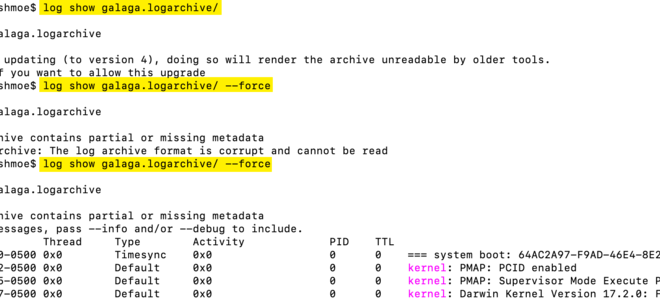
2. Using Terminal

If you prefer using the command line, you can access the system log using the Terminal app. To view the log using Terminal:

1. Open the Terminal app on your Mac

2. Type `sudo less /var/log/system.log` and hit Enter

3. You’ll be prompted to enter your admin password

4. Once you enter your password, you’ll see the system log file in the Terminal window.

5. Use the arrow keys to scroll through the log or type `/` to search for a specific string.

Conclusion Accessing the system log is an essential tool to troubleshoot and diagnose various issues on a Mac. By using the Console app or Terminal, you can view detailed information about system events and processes, which can help you identify the root cause of the issue. Whether you prefer using a graphical user interface or the command line, Macs offer multiple options to view the system log, giving you the flexibility to choose the method that works best for you.


Previous Article

How to View the HTML Source in ...

Next Article

How to View Your Google Play Store ...

Matthew Lynch

Related articles More from author

  • Online Learning & eLearning

    How to Watch Netflix, Hulu, and Amazon Prime on Linux

    March 27, 2023
    By Matthew Lynch
  • Online Learning & eLearning

    The Metaverse Will Be a Multi-Platform Mess

    March 19, 2023
    By Matthew Lynch
  • Online Learning & eLearning

    Top 4 Ways to Remove Duplicate Photos on Android

    April 2, 2023
    By Matthew Lynch
  • Online Learning & eLearning

    3 Essential Online Learning Best Practices

    December 21, 2021
    By Matthew Lynch
  • Curriculum & InstructionEdTech & InnovationK-12Online Learning & eLearningPreK-12

    How to Create Beautiful Online Courses: Layout

    October 22, 2020
    By Matthew Lynch
  • Online Learning & eLearning

    Top 5 Bluetooth Speakers With AUX Input

    April 2, 2023
    By Matthew Lynch

Search

Login & Registration

  • Log in
  • Entries feed
  • Comments feed
  • WordPress.org

Newsletter

Signup for The Tech Edvocate Newsletter and have the latest in EdTech news and opinion delivered to your email address!

About Us

Since technology is not going anywhere and does more good than harm, adapting is the best course of action. That is where The Tech Edvocate comes in. We plan to cover the PreK-12 and Higher Education EdTech sectors and provide our readers with the latest news and opinion on the subject. From time to time, I will invite other voices to weigh in on important issues in EdTech. We hope to provide a well-rounded, multi-faceted look at the past, present, the future of EdTech in the US and internationally.

We started this journey back in June 2016, and we plan to continue it for many more years to come. I hope that you will join us in this discussion of the past, present and future of EdTech and lend your own insight to the issues that are discussed.

Newsletter

Signup for The Tech Edvocate Newsletter and have the latest in EdTech news and opinion delivered to your email address!

Contact Us

The Tech Edvocate
910 Goddin Street
Richmond, VA 23231
(601) 630-5238
[email protected]

Copyright © 2026 Matthew Lynch. All rights reserved.