The Tech Edvocate

Top Menu

  • Advertisement
  • Apps
  • Home Page
  • Home Page Five (No Sidebar)
  • Home Page Four
  • Home Page Three
  • Home Page Two
  • Home Tech2
  • Icons [No Sidebar]
  • Left Sidbear Page
  • Lynch Educational Consulting
  • My Account
  • My Speaking Page
  • Newsletter Sign Up Confirmation
  • Newsletter Unsubscription
  • Our Brands
  • Page Example
  • Privacy Policy
  • Protected Content
  • Register
  • Request a Product Review
  • Shop
  • Shortcodes Examples
  • Signup
  • Start Here
    • Governance
    • Careers
    • Contact Us
  • Terms and Conditions
  • The Edvocate
  • The Tech Edvocate Product Guide
  • Topics
  • Write For Us
  • Advertise

Main Menu

  • Start Here
    • Our Brands
    • Governance
      • Lynch Educational Consulting, LLC.
      • Dr. Lynch’s Personal Website
      • Careers
    • Write For Us
    • The Tech Edvocate Product Guide
    • Contact Us
    • Books
    • Edupedia
    • Post a Job
    • The Edvocate Podcast
    • Terms and Conditions
    • Privacy Policy
  • Topics
    • Assistive Technology
    • Child Development Tech
    • Early Childhood & K-12 EdTech
    • EdTech Futures
    • EdTech News
    • EdTech Policy & Reform
    • EdTech Startups & Businesses
    • Higher Education EdTech
    • Online Learning & eLearning
    • Parent & Family Tech
    • Personalized Learning
    • Product Reviews
  • Advertise
  • Tech Edvocate Awards
  • The Edvocate
  • Pedagogue
  • School Ratings

logo

The Tech Edvocate

  • Start Here
    • Our Brands
    • Governance
      • Lynch Educational Consulting, LLC.
      • Dr. Lynch’s Personal Website
        • My Speaking Page
      • Careers
    • Write For Us
    • The Tech Edvocate Product Guide
    • Contact Us
    • Books
    • Edupedia
    • Post a Job
    • The Edvocate Podcast
    • Terms and Conditions
    • Privacy Policy
  • Topics
    • Assistive Technology
    • Child Development Tech
    • Early Childhood & K-12 EdTech
    • EdTech Futures
    • EdTech News
    • EdTech Policy & Reform
    • EdTech Startups & Businesses
    • Higher Education EdTech
    • Online Learning & eLearning
    • Parent & Family Tech
    • Personalized Learning
    • Product Reviews
  • Advertise
  • Tech Edvocate Awards
  • The Edvocate
  • Pedagogue
  • School Ratings
  • Unmasking the Troubling Truth About EU’s Digital Omnibus and Your Data

  • Outrageous: Your US Car Insurance 2026 Bill Is About to Explode – Here’s Why

  • Uncovering the Truth: Are AI Spending Concerns About to Tank Your Portfolio?

  • The Silent Revolution: How AI Property Valuation Is Quietly Reshaping Real Estate

  • The Astonishing Truth: Why Your Dream Car Is Now a $52,000 Illusion

  • Toxic Algorithms: Why Your Bank’s AI Could Cost You Everything

  • OpenAI’s GPT-6 Cyber: A Dangerous New AI Threat or Our Ultimate Digital Guardian?

  • This Game-Changing Natural Ozempic Alternative Just Blew Up on Social Media

  • Bónuszösszeg, ingyen pörgetés és befizetési feltétel: üdvözlő és befizetés nélküli kaszinóajánlatok magyar játékosoknak

  • 9 Critical Reasons Why Athexio Might Be The Investment You Need (Or Should Avoid)

Online Learning & eLearning
Home›Online Learning & eLearning›How to Use Your Roku Without a Remote

How to Use Your Roku Without a Remote
By Matthew Lynch
March 26, 2023
0
Spread the love

As a Roku user, dealing with a lost or broken remote can be a frustrating experience. However, you don’t have to miss out on streaming your favorite content just because of a missing remote. In this article, we will explore how to use your Roku without a remote.

1. Download the Roku App

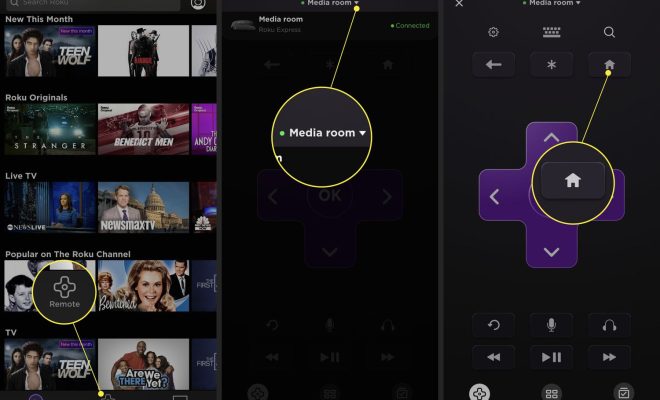
The Roku mobile app is the ideal substitute for a remote. With the app, you can get access to all the features of your Roku device, including playback control and search. To use this feature, download the app on your smartphone or tablet, connect your device to the same Wi-Fi network as your Roku, and launch the app.

Once connected, select the remote icon located at the bottom of the screen, and you’re ready to go. You’ll be able to control your Roku just like you would with the physical remote.

2. Use a Universal Remote

A universal remote is another option for controlling your Roku TV without an original remote. You can get a compatible universal remote by searching online for Roku-compatible remote models. Once you have them, follow the directions from the manufacturer to pair your universal remote with your Roku TV.

This is a great method for those who prefer not to use their smartphone or tablet, as it is a one-time investment that will allow you to use your Roku TV like any other TV with a remote.

3. Use the Buttons on Your TV

Most Roku TVs have physical buttons located on the side or bottom of the display. These buttons allow you to control some of the basic features of your Roku TV, including powering it on or off, adjusting the volume, and changing channels.

If you find yourself without a remote, using the physical buttons on your TV is a reliable way to gain control of your Roku TV. However, this method can be time-consuming and inconvenient when browsing through apps or channels.

4. Use HDMI-CEC

HDMI-CEC (Consumer Electronics Control) is a feature built into most modern TVs and streaming devices, including Roku TVs. It allows devices to communicate with each other through the HDMI cable, which can power on and adjust the settings of compatible devices automatically.

To enable HDMI-CEC, locate the setting in your Roku TV menu under “System” and enable it. Once activated, you can use your TV remote to control your connected Roku TV device, including the playback control and search functions.

In conclusion, losing your Roku remote can be a frustrating experience, but there are ways to control your streaming device without it. Whether you are using the Roku mobile app, a universal remote, physical buttons on your TV, or enabling HDMI-CEC, there is a method that can work for you. Follow these tips to continue streaming your favorite content without the need for a physical remote.

Previous Article

How to Use Your Phone as a ...

Next Article

How to Use Zoom on a Chromebook

Matthew Lynch

Related articles More from author

  • Online Learning & eLearningUncategorized

    What Every Teacher Must Know About Copyright For Online Lessons

    November 25, 2020
    By Matthew Lynch
  • Higher EducationOnline Learning & eLearning

    Why Hasn’t Online Learning Made Higher Education More Affordable?

    July 12, 2019
    By Matthew Lynch
  • Online Learning & eLearning

    Rapid Online Learning Development Tools: The Huge Role They Play

    March 23, 2023
    By Matthew Lynch
  • Elementary EducationOnline Learning & eLearning

    The Best Photoshop Alternatives for Mac

    March 31, 2023
    By Matthew Lynch
  • AssessmentOnline Learning & eLearning

    5 Common Mistakes To Avoid When Developing eLearning Assessments

    January 9, 2020
    By Matthew Lynch
  • Online Learning & eLearning

    Getting The Most Out Of Your Online Learning Course: Study Tips For Online Learners

    March 23, 2023
    By Matthew Lynch

Search

Login & Registration

  • Log in
  • Entries feed
  • Comments feed
  • WordPress.org

Newsletter

Signup for The Tech Edvocate Newsletter and have the latest in EdTech news and opinion delivered to your email address!

About Us

Since technology is not going anywhere and does more good than harm, adapting is the best course of action. That is where The Tech Edvocate comes in. We plan to cover the PreK-12 and Higher Education EdTech sectors and provide our readers with the latest news and opinion on the subject. From time to time, I will invite other voices to weigh in on important issues in EdTech. We hope to provide a well-rounded, multi-faceted look at the past, present, the future of EdTech in the US and internationally.

We started this journey back in June 2016, and we plan to continue it for many more years to come. I hope that you will join us in this discussion of the past, present and future of EdTech and lend your own insight to the issues that are discussed.

Newsletter

Signup for The Tech Edvocate Newsletter and have the latest in EdTech news and opinion delivered to your email address!

Contact Us

The Tech Edvocate
910 Goddin Street
Richmond, VA 23231
(601) 630-5238
[email protected]

Copyright © 2026 Matthew Lynch. All rights reserved.