How to use Google Wallet for tap to pay
“`html
As mobile payment solutions continue to evolve, Google Wallet tap to pay emerges as a frontrunner, revolutionizing the way we handle transactions. Integrating seamlessly with smartphones, this technology offers users a quick, secure, and hassle-free method to make purchases. In this comprehensive guide, we’ll explore how you can effectively use Google Wallet for tap to pay, along with its key benefits, setup process, and practical tips to enhance your experience.
1. The Rise of Contactless Payments
Over the past few years, contactless payments have gained significant traction, particularly in the wake of the COVID-19 pandemic. Consumers prioritize hygiene and convenience, driving the adoption of mobile wallets. According to a report by Statista, mobile payment transactions are expected to reach $12 trillion by 2024. Google Wallet plays a crucial role in this digital shift, enabling users to complete transactions with a simple tap.
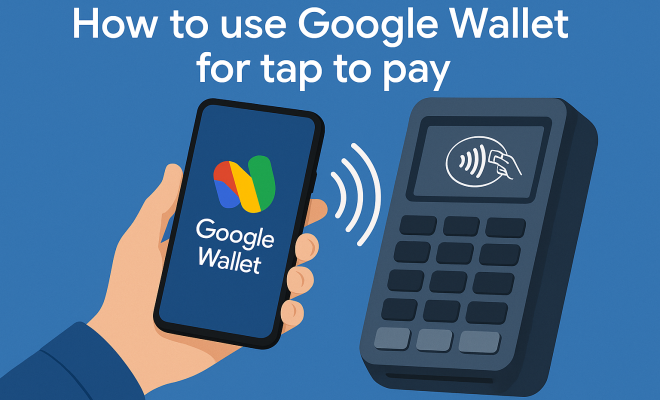
Contactless payment methods, including Google Wallet tap to pay, utilize near-field communication (NFC) technology. This allows devices to communicate when they are within close proximity, facilitating fast transactions. As businesses increasingly adopt NFC-enabled payment terminals, the accessibility of Google Wallet for everyday purchases continues to expand.
2. Setting Up Google Wallet for Tap to Pay
Before you can enjoy the benefits of Google Wallet tap to pay, you must first download the app and set up your account. Here’s a step-by-step guide:
- Download the App: Search for Google Wallet in the Google Play Store or Apple App Store and download it.
- Create an Account: If you already have a Google account, you can sign in using your credentials. Otherwise, follow the prompts to create a new account.
- Add Payment Methods: Once logged in, navigate to the ‘Payment’ section. You can add credit or debit cards by entering your card details manually or scanning them with your phone camera.
- Verify Your Payment Methods: Google Wallet may require verification from your card issuer to ensure that your payment method is legitimate. Follow any verification steps provided.
- Enable Tap to Pay: Ensure that NFC is enabled on your device in the settings, and make sure your Google Wallet app is up to date.
After completing these steps, you’ll be ready to start using Google Wallet tap to pay at participating merchants.
3. How to Use Google Wallet Tap to Pay
Using Google Wallet for tap to pay is simple and intuitive. Here’s how to do it:
- Unlock Your Phone: You don’t need to open the app; just unlock your phone to access your payment method.
- Locate an NFC Terminal: Look for the contactless payment symbol at checkout. Most retail stores, restaurants, and even transportation services are equipped with NFC-enabled payment systems.
- Tap Your Phone: Hold your device near the terminal until you hear a sound or feel a vibration indicating that the payment has been processed. Depending on your settings, you may need to authenticate the payment with a PIN or biometric verification.
- Wait for Confirmation: After the transaction is completed, the terminal will confirm payment, and you’ll receive a notification on your phone.
In just a few seconds, you can complete your purchase without fumbling for cash or cards, making it a highly efficient option.
4. Security Features of Google Wallet Tap to Pay
One of the most significant concerns regarding mobile payments is security. Google Wallet tap to pay incorporates several advanced security features to protect your financial information:
- Tokenization: When you make a payment, Google Wallet generates a unique token for that transaction. This means your actual card number is never shared with merchants, reducing the risk of fraud.
- Biometric Authentication: Many devices allow you to secure your Google Wallet app with fingerprint recognition or facial recognition, adding an extra layer of protection.
- Remote Locking: If your phone is lost or stolen, you can remotely lock your Google Wallet account, preventing any unauthorized transactions.
- Transaction Alerts: Google Wallet sends real-time notifications for every transaction, enabling you to monitor your spending and quickly identify any unauthorized activity.
These features combine to make Google Wallet tap to pay a secure option for managing your finances.
5. Benefits of Using Google Wallet Tap to Pay
The adoption of Google Wallet for tap to pay comes with a host of advantages:
- Convenience: With just a tap of your phone, you can complete transactions swiftly, freeing you from the hassle of cash and cards.
- Rewards and Offers: Many businesses offer special promotions or rewards for using mobile payments. Google Wallet allows you to link loyalty programs, helping you earn points and discounts seamlessly.
- Expense Tracking: The app keeps a record of your transactions, making it easier to track your spending habits and manage your budget.
- Widely Accepted: Google Wallet is accepted at a growing number of retail locations, restaurants, and even some online platforms, making it a versatile payment option.
These benefits illustrate why many users are gravitating toward Google Wallet as their preferred payment solution. (See: social distancing guidelines during COVID-19.)
6. Common Issues and Troubleshooting
As with any technology, users may encounter issues while using Google Wallet tap to pay. Here are some common problems and their solutions:
- Payment Not Accepted: If your payment is not processed, ensure that NFC is enabled on your device, and that the terminal supports contactless payments. Try restarting your phone if the issue persists.
- Failed Authentication: Ensure your biometric features are set up correctly. If you continue to have trouble, consider using a PIN as an alternative.
- App Crashing: If the Google Wallet app frequently crashes, check for updates in your app store and ensure that your device’s operating system is current.
- Transaction Notifications Missing: If you’re not receiving notifications, check your app settings and ensure notifications are enabled for Google Wallet.
By understanding these common issues, you can troubleshoot effectively and continue enjoying the convenience of Google Wallet tap to pay.
7. Real-World Applications and Use Cases
Google Wallet tap to pay isn’t just a theoretical concept; it’s already being used in various real-world scenarios. Here are a few applications:
- Retail Shopping: Major retailers like Target, Walmart, and Starbucks have integrated tap to pay capabilities, allowing customers to checkout directly from their smartphones.
- Public Transportation: Many cities have adopted mobile payment options for public transport systems. Users can tap their phones to pay for bus or train fares, eliminating the need for physical tickets.
- Event Ticketing: Some entertainment venues now accept mobile payments for tickets and concessions, making it easier for attendees to enjoy events without worrying about cash.
- Online Purchases: Several e-commerce platforms allow users to check out via Google Wallet, streamlining the online shopping experience.
These examples demonstrate the flexibility and practicality of Google Wallet tap to pay in everyday life.
8. The Future of Google Wallet and Mobile Payments
As technology continues to advance, the future of Google Wallet and mobile payments looks promising. Innovations such as biometric payment authentication and deeper integration with online services are on the horizon. Google is also likely to expand partnerships with more retailers and service providers, increasing the adoption of contactless payments.
Furthermore, with the growing focus on digital currencies and blockchain technology, Google Wallet may explore integrating cryptocurrencies into its platform. This could offer users even more flexibility in how they pay and manage their finances.
As we move forward, staying informed on updates and new features within Google Wallet will be essential for users eager to take advantage of the latest advancements in mobile payment technology.
9. Taking the Leap: Embracing Google Wallet Tap to Pay
Embracing Google Wallet tap to pay can significantly enhance how you manage your finances and make purchases. The convenience, security, and growing acceptance make it an appealing option for consumers looking to streamline their payment experience.
To get started, download the app, set up your account, and practice using it at local merchants. As you grow accustomed to this payment method, you’ll likely find that it becomes an indispensable part of your daily routine.
In a world increasingly leaning towards digital solutions, adopting Google Wallet for tap to pay not only future-proofs your purchasing habits but also simplifies everyday transactions. So why wait? Start exploring the exciting features of Google Wallet today!
10. Frequently Asked Questions (FAQ)
What devices are compatible with Google Wallet tap to pay?
Google Wallet tap to pay is compatible with most Android devices that support NFC technology. For iPhone users, Google Wallet can be used on models that support Apple Pay and have the Google Wallet app installed. Always check your device specifications to ensure compatibility.
Is there a transaction limit when using Google Wallet tap to pay?
Yes, many merchants impose a transaction limit for contactless payments. This limit can vary depending on the retailer and local regulations. Typically, transactions over a certain amount may require additional verification, such as entering your PIN or signing a receipt.
Can I use Google Wallet for international transactions?
Google Wallet can be used for international transactions, but it depends on the merchant and the payment methods they accept. Additionally, keep in mind that currency conversion rates may apply if you’re making purchases in a different currency. (See: the rise of contactless payments.)
What should I do if I lose my phone with Google Wallet installed?
If you lose your phone, immediately use the “Find My Device” feature to locate it, and consider remotely locking your Google Wallet account through the Google account settings. This will prevent any unauthorized access to your payment methods.
How does Google Wallet tap to pay compare to other mobile payment options?
Google Wallet tap to pay is similar to other mobile payment solutions like Apple Pay and Samsung Pay. All three use NFC technology for contactless payments, but the differences lie in their ecosystem and features. For example, Apple Pay is deeply integrated with iOS devices, while Google Wallet offers broader compatibility with Android and some online services. Each has its pros and cons, so it ultimately depends on user preference and device usage.
Are there fees associated with using Google Wallet tap to pay?
Generally, there are no fees for using Google Wallet tap to pay for in-store purchases, but check with your bank or card issuer, as they may have fees for certain types of transactions or for foreign currency conversions. However, using Google Wallet for online purchases or money transfers may incur fees, depending on the nature of the transaction.
Can I still use Google Wallet if I don’t have a bank account?
Yes, you can use Google Wallet without a traditional bank account. You can load money onto your Google Wallet using prepaid debit cards or through third-party services that allow you to add funds. This makes it a viable option for anyone wanting to participate in digital payments without having a conventional bank account.
11. Expert Perspectives on Google Wallet Tap to Pay
Industry experts are enthusiastic about the future of mobile payments, particularly Google Wallet. According to Jim McCarthy, a payment technology expert, “Google Wallet represents a significant leap forward in consumer convenience and payment security. As more consumers recognize the advantages of contactless payments, we can expect to see a broader adoption across various sectors.”
Additionally, financial analysts predict that as businesses upgrade their payment systems to accept contactless payments, Google Wallet will become an even more essential tool for both consumers and merchants. The blend of technology, convenience, and evolving consumer behavior will likely define the next wave of shopping experiences.
12. The Global Landscape of Mobile Payments
Mobile payment adoption varies widely across the globe. According to a report from the World Bank, countries such as China and Sweden are leading the charge in mobile payment technology. In China, platforms like Alipay and WeChat Pay dominate, accounting for more than 80% of mobile transactions. Conversely, the U.S. is slowly catching up, with Google Wallet, Apple Pay, and Venmo gaining popularity among younger consumers.
Statistics reveal that in 2022, mobile wallet transactions in the U.S. surged by 29%, reflecting a growing trend toward digital payment solutions. As more consumers embrace these technologies, we can expect that mobile wallets will eventually become a standard payment method, much like cash and card payments are today.
13. Best Practices for Using Google Wallet Tap to Pay
To maximize your experience with Google Wallet tap to pay, consider these best practices:
- Regularly Update the App: Ensure that you keep the Google Wallet app updated to access the latest features and security updates.
- Monitor Transaction History: Frequently review your transaction history to track your spending and identify any unauthorized transactions quickly.
- Link Multiple Payment Methods: Consider linking multiple bank accounts, credit cards, or prepaid cards to ensure you have options in case one method fails at checkout.
- Stay Informed on Promotions: Keep an eye out for promotions or rewards offered by merchants for using Google Wallet. These can enhance your overall shopping experience and save you money.
- Educate Yourself on Security Features: Familiarize yourself with the app’s security features, such as two-step verification and biometric authentication, to ensure maximum protection for your financial information.
By applying these practices, you can enjoy a smoother and more secure experience with Google Wallet tap to pay.
14. Comparing Google Wallet Tap to Pay with Other Payment Methods
When it comes to digital payments, Google Wallet tap to pay competes with various other payment options, including traditional credit/debit cards, Apple Pay, and mobile payment apps like Venmo and Cash App. Understanding the advantages and disadvantages of each can help you choose the best option for your needs.
Convenience: Google Wallet tap to pay is often viewed as more convenient than traditional cards since you just need to tap your phone instead of fumbling for a card. However, some users may still prefer physical cards for certain purchases.
Speed: Transactions via Google Wallet are generally quicker than entering PINs or signing receipts for card payments. The quick tap-and-go feature enhances the checkout experience, especially during busy times.
Rewards and Loyalty Programs: Google Wallet allows users to link loyalty programs, providing the opportunity to earn rewards with every purchase. While many credit cards also offer rewards, digital wallets can streamline the process of accumulating points by integrating these programs directly into the app.
Security: Google Wallet’s tokenization and biometric authentication features provide an added layer of security compared to traditional card payments. However, users should be aware that any digital payment method carries some risks related to data breaches and cyber threats.
Each method has its pros and cons, so it’s essential to consider your shopping habits and preferences when selecting a payment solution.
15. Future Trends in Mobile Payments
The future of mobile payments, including Google Wallet tap to pay, is expected to evolve significantly. Here are some trends to watch:
- Increased Adoption of Biometric Payments: As biometric technologies like facial recognition and fingerprint scanning become more advanced, we can expect to see them integrated even further into mobile payment systems, enhancing security and user convenience.
- Integration with Augmented Reality (AR) and Virtual Reality (VR): Brands are starting to explore how AR and VR can create immersive shopping experiences. This could lead to new payment methods where consumers can pay directly through an AR interface.
- Growth of Peer-to-Peer (P2P) Payments: The rise of P2P payment solutions continues to change how people exchange money. Google Wallet’s integration with other apps could simplify transferring funds among friends and family, making it easier to split bills or share expenses.
- Enhanced Fraud Detection: As mobile payment fraud continues to be a concern, companies are investing in AI and machine learning to develop more advanced fraud detection systems that can analyze transaction patterns in real-time and identify suspicious activities.
- Global Expansion: Google Wallet and similar services are expected to penetrate new markets, particularly in developing countries where mobile banking is becoming more prevalent. This could lead to increased financial inclusion worldwide.
Staying informed about these trends can help consumers and businesses adapt to the changing landscape of mobile payments, and take advantage of the latest innovations.
“`
Trending Now
Frequently Asked Questions
How do I set up Google Wallet for tap to pay?
To set up Google Wallet for tap to pay, download the app from the Google Play Store or Apple App Store. Create an account using your Google credentials, then navigate to the 'Payment' section to add your credit or debit cards either by entering details manually or scanning them with your phone camera.
What are the benefits of using Google Wallet for tap to pay?
Google Wallet offers several benefits for tap to pay, including enhanced convenience, speed in transactions, and improved hygiene by minimizing contact. It uses NFC technology for quick payments, making it a secure option for everyday purchases as more businesses adopt NFC-enabled terminals.
Is Google Wallet safe to use for payments?
Yes, Google Wallet is designed with security in mind. It utilizes encryption and tokenization to protect your payment information. Additionally, you can secure your app with a password, fingerprint, or face recognition, ensuring that only you can access your wallet.
Where can I use Google Wallet for tap to pay?
You can use Google Wallet for tap to pay at any merchant that has NFC-enabled payment terminals. These are increasingly common in retail stores, restaurants, and service providers, making it easy to complete transactions with just a tap of your smartphone.
What devices are compatible with Google Wallet tap to pay?
Google Wallet tap to pay is compatible with most smartphones that support NFC technology. Ensure your device is running the latest version of the app and has NFC enabled in the settings. Most modern Android and iOS devices are supported.
What did we miss? Let us know in the comments and join the conversation.