The Tech Edvocate

Top Menu

  • Advertisement
  • Apps
  • Home Page
  • Home Page Five (No Sidebar)
  • Home Page Four
  • Home Page Three
  • Home Page Two
  • Home Tech2
  • Icons [No Sidebar]
  • Left Sidbear Page
  • Lynch Educational Consulting
  • My Account
  • My Speaking Page
  • Newsletter Sign Up Confirmation
  • Newsletter Unsubscription
  • Our Brands
  • Page Example
  • Privacy Policy
  • Protected Content
  • Register
  • Request a Product Review
  • Shop
  • Shortcodes Examples
  • Signup
  • Start Here
    • Governance
    • Careers
    • Contact Us
  • Terms and Conditions
  • The Edvocate
  • The Tech Edvocate Product Guide
  • Topics
  • Write For Us
  • Advertise

Main Menu

  • Start Here
    • Our Brands
    • Governance
      • Lynch Educational Consulting, LLC.
      • Dr. Lynch’s Personal Website
      • Careers
    • Write For Us
    • The Tech Edvocate Product Guide
    • Contact Us
    • Books
    • Edupedia
    • Post a Job
    • The Edvocate Podcast
    • Terms and Conditions
    • Privacy Policy
  • Topics
    • Assistive Technology
    • Child Development Tech
    • Early Childhood & K-12 EdTech
    • EdTech Futures
    • EdTech News
    • EdTech Policy & Reform
    • EdTech Startups & Businesses
    • Higher Education EdTech
    • Online Learning & eLearning
    • Parent & Family Tech
    • Personalized Learning
    • Product Reviews
  • Advertise
  • Tech Edvocate Awards
  • The Edvocate
  • Pedagogue
  • School Ratings

logo

The Tech Edvocate

  • Start Here
    • Our Brands
    • Governance
      • Lynch Educational Consulting, LLC.
      • Dr. Lynch’s Personal Website
        • My Speaking Page
      • Careers
    • Write For Us
    • The Tech Edvocate Product Guide
    • Contact Us
    • Books
    • Edupedia
    • Post a Job
    • The Edvocate Podcast
    • Terms and Conditions
    • Privacy Policy
  • Topics
    • Assistive Technology
    • Child Development Tech
    • Early Childhood & K-12 EdTech
    • EdTech Futures
    • EdTech News
    • EdTech Policy & Reform
    • EdTech Startups & Businesses
    • Higher Education EdTech
    • Online Learning & eLearning
    • Parent & Family Tech
    • Personalized Learning
    • Product Reviews
  • Advertise
  • Tech Edvocate Awards
  • The Edvocate
  • Pedagogue
  • School Ratings
  • Miro vs Conceptboard for project management

  • How to use Teamwork for resource management

  • How much does Procore cost per month

  • How to organize Microsoft Planner buckets

  • Is Teamwork good for billable hours

  • Procore vs Buildertrend which is better

  • Airtable project management templates

  • Can Miro track project progress

  • How to use Basecamp for client work

  • Can Lucidchart create swimlane diagrams

Assistive Technology
Home›Assistive Technology›How to Use Covey’s 4 Quadrants Matrix for Effective Time Management

How to Use Covey’s 4 Quadrants Matrix for Effective Time Management
By Matthew Lynch
June 14, 2023
0
Spread the love

Effective time management is the key to success in anything you do. We all have 24 hours in a day, but it is how we manage our time that makes all the difference. For successful time management, it is important to prioritize tasks and find ways to achieve maximum productivity. One of the most effective ways to do this is by using Covey’s 4 quadrants matrix.

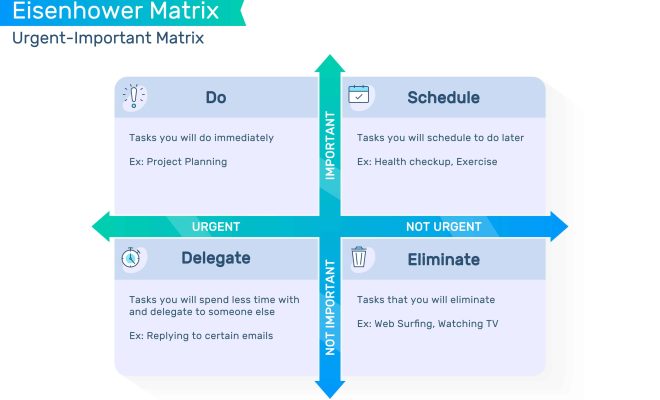
First introduced by author Stephen Covey in his book “The 7 Habits of Highly Effective People,” the 4 quadrant matrix is a simple tool that helps people prioritize their tasks and manage their time efficiently. The matrix divides all activities into four categories – Urgent and Important, Urgent but not Important, Important but not Urgent, and Not Important and not Urgent. Each quadrant represents a different level of importance and requires a different level of attention.

Quadrant 1 – Urgent and Important

Activities in Quadrant 1 are both urgent and important. They require immediate attention and cannot be postponed or ignored. Examples of activities in Quadrant 1 include meeting deadlines, handling emergencies, and addressing urgent personal matters. It is important to prioritize these activities over others and ensure that they are completed on time.

Quadrant 2 – Important but not Urgent

Activities in Quadrant 2 are important but not urgent. They do not require immediate attention but are crucial for long-term success. Examples of activities in Quadrant 2 include planning, goal setting, building relationships, and personal development. It is important to devote time to these activities regularly to avoid them becoming urgent and stressful.

Quadrant 3 – Urgent but not Important

Activities in Quadrant 3 are urgent but not important. They may appear important, but they do not contribute to long-term goals and can be safely delegated or eliminated. Examples of activities in Quadrant 3 include answering phone calls, attending meetings, and responding to emails. It is important to limit the time spent on these activities to avoid getting sidetracked from important tasks.

Quadrant 4 – Not Important and not Urgent

Activities in Quadrant 4 are not important and not urgent. They are time-wasters that should be eliminated or minimized. Examples of activities in Quadrant 4 include watching TV, browsing social media, and playing games. It is important to avoid doing these activities during working hours and limit them to breaks or leisure time.

Once you have identified the activities in each quadrant, the next step is to prioritize them. Activities in Quadrant 1 and Quadrant 2 are the most important and should be given top priority. Activities in Quadrant 3 should be delegated or minimized, and activities in Quadrant 4 should be eliminated or kept to a minimum.


Previous Article

How to Sign Into HBO Max on ...

Next Article

The Best Electric Vehicles For Off-Roading

Matthew Lynch

Related articles More from author

  • Assistive Technology

    How to Transfer Files From Android to PC

    June 23, 2023
    By Matthew Lynch
  • Assistive Technology

    How to Change the Clock Brightness on Echo Dot

    June 10, 2023
    By Matthew Lynch
  • Assistive Technology

    How to Install VirtualBox Guest Additions on Linux

    June 22, 2023
    By Matthew Lynch
  • Assistive Technology

    How to Add Fonts to Word

    June 6, 2023
    By Matthew Lynch
  • Assistive TechnologyDigital & Mobile Technology

    MP3 File (What It Is & How to Open One)

    June 6, 2023
    By Matthew Lynch
  • Assistive Technology

    How to Create a Markdown Table

    June 14, 2023
    By Matthew Lynch

Search

Login & Registration

  • Log in
  • Entries feed
  • Comments feed
  • WordPress.org

Newsletter

Signup for The Tech Edvocate Newsletter and have the latest in EdTech news and opinion delivered to your email address!

About Us

Since technology is not going anywhere and does more good than harm, adapting is the best course of action. That is where The Tech Edvocate comes in. We plan to cover the PreK-12 and Higher Education EdTech sectors and provide our readers with the latest news and opinion on the subject. From time to time, I will invite other voices to weigh in on important issues in EdTech. We hope to provide a well-rounded, multi-faceted look at the past, present, the future of EdTech in the US and internationally.

We started this journey back in June 2016, and we plan to continue it for many more years to come. I hope that you will join us in this discussion of the past, present and future of EdTech and lend your own insight to the issues that are discussed.

Newsletter

Signup for The Tech Edvocate Newsletter and have the latest in EdTech news and opinion delivered to your email address!

Contact Us

The Tech Edvocate
910 Goddin Street
Richmond, VA 23231
(601) 630-5238
[email protected]

Copyright © 2026 Matthew Lynch. All rights reserved.