The Tech Edvocate

Top Menu

  • Advertisement
  • Apps
  • Home Page
  • Home Page Five (No Sidebar)
  • Home Page Four
  • Home Page Three
  • Home Page Two
  • Home Tech2
  • Icons [No Sidebar]
  • Left Sidbear Page
  • Lynch Educational Consulting
  • My Account
  • My Speaking Page
  • Newsletter Sign Up Confirmation
  • Newsletter Unsubscription
  • Our Brands
  • Page Example
  • Privacy Policy
  • Protected Content
  • Register
  • Request a Product Review
  • Shop
  • Shortcodes Examples
  • Signup
  • Start Here
    • Governance
    • Careers
    • Contact Us
  • Terms and Conditions
  • The Edvocate
  • The Tech Edvocate Product Guide
  • Topics
  • Write For Us
  • Advertise

Main Menu

  • Start Here
    • Our Brands
    • Governance
      • Lynch Educational Consulting, LLC.
      • Dr. Lynch’s Personal Website
      • Careers
    • Write For Us
    • The Tech Edvocate Product Guide
    • Contact Us
    • Books
    • Edupedia
    • Post a Job
    • The Edvocate Podcast
    • Terms and Conditions
    • Privacy Policy
  • Topics
    • Assistive Technology
    • Child Development Tech
    • Early Childhood & K-12 EdTech
    • EdTech Futures
    • EdTech News
    • EdTech Policy & Reform
    • EdTech Startups & Businesses
    • Higher Education EdTech
    • Online Learning & eLearning
    • Parent & Family Tech
    • Personalized Learning
    • Product Reviews
  • Advertise
  • Tech Edvocate Awards
  • The Edvocate
  • Pedagogue
  • School Ratings

logo

The Tech Edvocate

  • Start Here
    • Our Brands
    • Governance
      • Lynch Educational Consulting, LLC.
      • Dr. Lynch’s Personal Website
        • My Speaking Page
      • Careers
    • Write For Us
    • The Tech Edvocate Product Guide
    • Contact Us
    • Books
    • Edupedia
    • Post a Job
    • The Edvocate Podcast
    • Terms and Conditions
    • Privacy Policy
  • Topics
    • Assistive Technology
    • Child Development Tech
    • Early Childhood & K-12 EdTech
    • EdTech Futures
    • EdTech News
    • EdTech Policy & Reform
    • EdTech Startups & Businesses
    • Higher Education EdTech
    • Online Learning & eLearning
    • Parent & Family Tech
    • Personalized Learning
    • Product Reviews
  • Advertise
  • Tech Edvocate Awards
  • The Edvocate
  • Pedagogue
  • School Ratings
  • This New Weight Loss Drug Delivers Astonishing Results — But There’s a Catch

  • This Crucial Cybersecurity Blind Spot Is Leaving You Exposed

  • This Japanese AI Startup Just Blew Open Medical Records – Here’s Why It Matters

  • This One Toxic Trend Is Killing Gaming: Aion 2’s Monetization Mess Is Just The Latest Victim

  • Does AI have a soul? Pope Leo and Anthropic clash.

  • Your Mac’s Dirty Little AI Secret: Apple’s Urgent New Privacy Shield

  • The Staggering Truth About AI Education in Colleges You Aren’t Being Told

  • CAZ Investments Data Breach: Your Money, Exposed? Why This Is a Critical Alert

  • Unbelievable: 16-Year-Old Suspected of Masterminding Global KillSec Ransomware Group

  • Your Car Is Spying On You: 7 Disturbing Ways It Threatens Your Privacy

Digital & Mobile Technology
Home›Digital & Mobile Technology›How to Update an Echo Dot

How to Update an Echo Dot
By Matthew Lynch
June 9, 2023
0
Spread the love

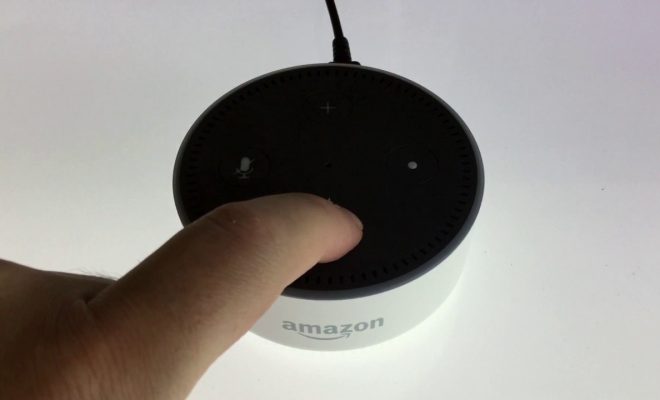
Updating your Echo Dot is very important for ensuring your device functions smoothly and efficiently. By keeping your device updated, you can enjoy the latest features, bug fixes, and security updates released by Amazon.

Here’s how you can update your Echo Dot device.

Step 1: Check Your Echo Dot’s Software Version

The first thing you need to do is check the software version of your Echo Dot. To do this, follow these instructions:

1. Open the Alexa app on your phone or tablet.

2. Tap on the Devices tab in the bottom right corner of the screen.

3. Select your Echo Dot device.

4. Tap on the gear icon in the top right corner of the screen.

5. Scroll down and select Device Options.

6. Check the software version in the System Updates section.

If the software version is up-to-date, there’s no need to update your Echo Dot. But, if your device needs an update, you’ll see a notification in the Alexa app.

Step 2: Update Your Echo Dot

To update your Echo Dot, follow these instructions:

1. Make sure your device is connected to a Wi-Fi network.

2. Say, “Alexa, check for software updates” or “Alexa, can you update my device?”

3. Your Echo Dot will check for any available updates. If there’s an update available, Alexa will prompt you to install it.

4. Say, “Yes” to install the updates.

5. Your Echo Dot will start downloading the update. The download time will depend on your Wi-Fi speed.

6. Once the download is complete, your Echo Dot will automatically restart.

7. After restarting, your Echo Dot will install the update.

8. Wait for a few minutes, and your device will be updated.

Step 3: Verify Your Echo Dot is Updated

Once the update is complete, check the software version of your Echo Dot to make sure it’s up-to-date.

To do this, follow the instructions we provided earlier to check your Echo Dot’s software version.

Congratulations! You’ve successfully updated your Echo Dot.

Updating your Echo Dot is easy, and it’s important to keep your device up-to-date for smooth and efficient operation. By following these simple steps, you can ensure your device is always updated with the latest software version.

Previous Article

How to Close All Tabs in Safari ...

Next Article

How to Find Old Friends on Facebook

Matthew Lynch

Related articles More from author

  • Digital & Mobile Technology

    How to Stop the iPhone from Dimming Its Screen

    July 5, 2023
    By Matthew Lynch
  • Digital & Mobile Technology

    HDR vs. SDR: What’s the Difference?

    June 15, 2023
    By Matthew Lynch
  • Digital & Mobile Technology

    What Is an M3U8 File?

    June 1, 2023
    By Matthew Lynch
  • Digital & Mobile Technology

    How to Fix Roblox Not Updating on a Mac

    May 31, 2023
    By Matthew Lynch
  • Digital & Mobile Technology

    What Does Apple MFi-Certified Mean for iPhone Accessories?

    June 22, 2023
    By Matthew Lynch
  • Digital & Mobile Technology

    Netgear Nighthawk C7000 Review

    June 12, 2023
    By Matthew Lynch

Search

Login & Registration

  • Log in
  • Entries feed
  • Comments feed
  • WordPress.org

Newsletter

Signup for The Tech Edvocate Newsletter and have the latest in EdTech news and opinion delivered to your email address!

About Us

Since technology is not going anywhere and does more good than harm, adapting is the best course of action. That is where The Tech Edvocate comes in. We plan to cover the PreK-12 and Higher Education EdTech sectors and provide our readers with the latest news and opinion on the subject. From time to time, I will invite other voices to weigh in on important issues in EdTech. We hope to provide a well-rounded, multi-faceted look at the past, present, the future of EdTech in the US and internationally.

We started this journey back in June 2016, and we plan to continue it for many more years to come. I hope that you will join us in this discussion of the past, present and future of EdTech and lend your own insight to the issues that are discussed.

Newsletter

Signup for The Tech Edvocate Newsletter and have the latest in EdTech news and opinion delivered to your email address!

Contact Us

The Tech Edvocate
910 Goddin Street
Richmond, VA 23231
(601) 630-5238
[email protected]

Copyright © 2026 Matthew Lynch. All rights reserved.