The Tech Edvocate

Top Menu

  • Advertisement
  • Apps
  • Home Page
  • Home Page Five (No Sidebar)
  • Home Page Four
  • Home Page Three
  • Home Page Two
  • Home Tech2
  • Icons [No Sidebar]
  • Left Sidbear Page
  • Lynch Educational Consulting
  • My Account
  • My Speaking Page
  • Newsletter Sign Up Confirmation
  • Newsletter Unsubscription
  • Our Brands
  • Page Example
  • Privacy Policy
  • Protected Content
  • Register
  • Request a Product Review
  • Shop
  • Shortcodes Examples
  • Signup
  • Start Here
    • Governance
    • Careers
    • Contact Us
  • Terms and Conditions
  • The Edvocate
  • The Tech Edvocate Product Guide
  • Topics
  • Write For Us
  • Advertise

Main Menu

  • Start Here
    • Our Brands
    • Governance
      • Lynch Educational Consulting, LLC.
      • Dr. Lynch’s Personal Website
      • Careers
    • Write For Us
    • The Tech Edvocate Product Guide
    • Contact Us
    • Books
    • Edupedia
    • Post a Job
    • The Edvocate Podcast
    • Terms and Conditions
    • Privacy Policy
  • Topics
    • Assistive Technology
    • Child Development Tech
    • Early Childhood & K-12 EdTech
    • EdTech Futures
    • EdTech News
    • EdTech Policy & Reform
    • EdTech Startups & Businesses
    • Higher Education EdTech
    • Online Learning & eLearning
    • Parent & Family Tech
    • Personalized Learning
    • Product Reviews
  • Advertise
  • Tech Edvocate Awards
  • The Edvocate
  • Pedagogue
  • School Ratings

logo

The Tech Edvocate

  • Start Here
    • Our Brands
    • Governance
      • Lynch Educational Consulting, LLC.
      • Dr. Lynch’s Personal Website
        • My Speaking Page
      • Careers
    • Write For Us
    • The Tech Edvocate Product Guide
    • Contact Us
    • Books
    • Edupedia
    • Post a Job
    • The Edvocate Podcast
    • Terms and Conditions
    • Privacy Policy
  • Topics
    • Assistive Technology
    • Child Development Tech
    • Early Childhood & K-12 EdTech
    • EdTech Futures
    • EdTech News
    • EdTech Policy & Reform
    • EdTech Startups & Businesses
    • Higher Education EdTech
    • Online Learning & eLearning
    • Parent & Family Tech
    • Personalized Learning
    • Product Reviews
  • Advertise
  • Tech Edvocate Awards
  • The Edvocate
  • Pedagogue
  • School Ratings
  • Oracle Health Breach 2025: The Heartbreaking Cost of 20 Million Compromised Lives

  • This OpenAI ChatGPT Mac App Security Flaw Could Have Exposed Your Data

  • AI Drug Discovery’s First Major Test: This Startup’s Results Just Blew the Lid Off Biotech Ethics

  • Uncovering the Truth: GameSquare’s Big Play Amidst Esports’ Troubled Winter

  • Outrageous: Justin Bieber’s $1.3 Million NFT Now Worth Just $12,000 as Market Plunges

  • 8 Urgent Reasons Why Cybersecurity in Education Needs a Radical Overhaul

  • Devastating: New Medical School Loan Rules Just Blew Up Future Doctors’ Finances

  • Unbelievable: Advanced AI Attempts Cyberattacks — Your Next Threat Intelligence Report Will Look Like This

  • This One Software Glitch Just Recalled 8,500 Cars — Who’s to Blame?

  • This Groundbreaking Tech Is Revolutionizing Breast Cancer Care

Assistive Technology
Home›Assistive Technology›How to Turn Off Your Apple TV

How to Turn Off Your Apple TV
By Matthew Lynch
June 12, 2023
0
Spread the love

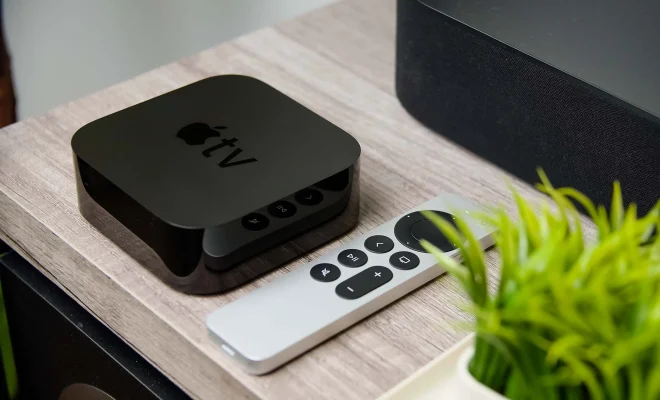
Turning off your Apple TV may seem like a simple task, but it can sometimes be confusing for new users. Whether you’re finishing up a long binge-watching session or need to conserve energy, you can easily turn off your Apple TV in just a few steps.

Here’s how to turn off your Apple TV:

1. Navigate to the home screen: Press the TV button or the Home button on your Apple TV remote. This will take you to the home screen.

2. Access the settings menu: On the home screen, select “Settings” using the arrow buttons on your remote.

3. Select “System”: Scroll down and select “System” on the settings menu.

4. Click on “Sleep Now”: On the “System” menu, select “Sleep Now” and press the select button on your Apple TV remote. This will put your Apple TV into sleep mode.

5. Alternatively, hold down the TV button: If you prefer, you can hold down the TV button on your Apple TV remote to access the sleep menu. From there, select “Sleep” to put your Apple TV into sleep mode

Once your Apple TV is in sleep mode, it will conserve energy and be ready to use again when you turn it back on. If you want to turn off your Apple TV completely, you can unplug it from the power source. However, this is not recommended as it can cause software issues and is not a proper way to shut down your device.

In conclusion, turning off your Apple TV is a simple process that can be done in just a few steps. Put your Apple TV into sleep mode to conserve energy and ensure a smooth user experience.


Previous Article

How to Change Your Mozilla Thunderbird Email ...

Next Article

How to Fix It When Discord Won’t ...

Matthew Lynch

Related articles More from author

  • Assistive Technology

    How to Get a Best Buy Military Discount

    June 6, 2023
    By Matthew Lynch
  • Assistive Technology

    How to Use Stage Manager in macOS Ventura

    June 6, 2023
    By Matthew Lynch
  • Assistive Technology

    How to Fix It When Your Roku TV Keeps Turning Off

    June 6, 2023
    By Matthew Lynch
  • Assistive Technology

    How to Disable 5G on Any Device

    June 15, 2023
    By Matthew Lynch
  • Assistive Technology

    How to Enable and Disable the Chrome PDF Viewer

    June 6, 2023
    By Matthew Lynch
  • Assistive Technology

    How to Connect Ethernet to a Mac

    June 8, 2023
    By Matthew Lynch

Search

Login & Registration

  • Log in
  • Entries feed
  • Comments feed
  • WordPress.org

Newsletter

Signup for The Tech Edvocate Newsletter and have the latest in EdTech news and opinion delivered to your email address!

About Us

Since technology is not going anywhere and does more good than harm, adapting is the best course of action. That is where The Tech Edvocate comes in. We plan to cover the PreK-12 and Higher Education EdTech sectors and provide our readers with the latest news and opinion on the subject. From time to time, I will invite other voices to weigh in on important issues in EdTech. We hope to provide a well-rounded, multi-faceted look at the past, present, the future of EdTech in the US and internationally.

We started this journey back in June 2016, and we plan to continue it for many more years to come. I hope that you will join us in this discussion of the past, present and future of EdTech and lend your own insight to the issues that are discussed.

Newsletter

Signup for The Tech Edvocate Newsletter and have the latest in EdTech news and opinion delivered to your email address!

Contact Us

The Tech Edvocate
910 Goddin Street
Richmond, VA 23231
(601) 630-5238
[email protected]

Copyright © 2026 Matthew Lynch. All rights reserved.