The Tech Edvocate

Top Menu

  • Advertisement
  • Apps
  • Home Page
  • Home Page Five (No Sidebar)
  • Home Page Four
  • Home Page Three
  • Home Page Two
  • Home Tech2
  • Icons [No Sidebar]
  • Left Sidbear Page
  • Lynch Educational Consulting
  • My Account
  • My Speaking Page
  • Newsletter Sign Up Confirmation
  • Newsletter Unsubscription
  • Our Brands
  • Page Example
  • Privacy Policy
  • Protected Content
  • Register
  • Request a Product Review
  • Shop
  • Shortcodes Examples
  • Signup
  • Start Here
    • Governance
    • Careers
    • Contact Us
  • Terms and Conditions
  • The Edvocate
  • The Tech Edvocate Product Guide
  • Topics
  • Write For Us
  • Advertise

Main Menu

  • Start Here
    • Our Brands
    • Governance
      • Lynch Educational Consulting, LLC.
      • Dr. Lynch’s Personal Website
      • Careers
    • Write For Us
    • The Tech Edvocate Product Guide
    • Contact Us
    • Books
    • Edupedia
    • Post a Job
    • The Edvocate Podcast
    • Terms and Conditions
    • Privacy Policy
  • Topics
    • Assistive Technology
    • Child Development Tech
    • Early Childhood & K-12 EdTech
    • EdTech Futures
    • EdTech News
    • EdTech Policy & Reform
    • EdTech Startups & Businesses
    • Higher Education EdTech
    • Online Learning & eLearning
    • Parent & Family Tech
    • Personalized Learning
    • Product Reviews
  • Advertise
  • Tech Edvocate Awards
  • The Edvocate
  • Pedagogue
  • School Ratings

logo

The Tech Edvocate

  • Start Here
    • Our Brands
    • Governance
      • Lynch Educational Consulting, LLC.
      • Dr. Lynch’s Personal Website
        • My Speaking Page
      • Careers
    • Write For Us
    • The Tech Edvocate Product Guide
    • Contact Us
    • Books
    • Edupedia
    • Post a Job
    • The Edvocate Podcast
    • Terms and Conditions
    • Privacy Policy
  • Topics
    • Assistive Technology
    • Child Development Tech
    • Early Childhood & K-12 EdTech
    • EdTech Futures
    • EdTech News
    • EdTech Policy & Reform
    • EdTech Startups & Businesses
    • Higher Education EdTech
    • Online Learning & eLearning
    • Parent & Family Tech
    • Personalized Learning
    • Product Reviews
  • Advertise
  • Tech Edvocate Awards
  • The Edvocate
  • Pedagogue
  • School Ratings
  • The Staggering Truth About These New Weight Loss Drugs — And Why You Need to Know

  • The Quiet Crisis: Why Your Auto Loan Interest Rates Are Still Skyrocketing

  • Elvis’s Ghost Haunts AI: The $41 Million Anthropic Copyright Lawsuit Explained

  • 7 Micro-SaaS Tools Quietly Transforming Freelance Productivity — Don’t Miss Out!

  • Who Really Owns the Moon? The Shocking Truth About Lunar Real Estate

  • 7 Shocking Ways Trophy Games’ Q3 2026 Earnings Reshape the Industry

  • The Trillion-Dollar Wall: 10 Urgent Steps to Protect Your CRE Investments Now

  • Mind-Blowing: AI in Law Will Unleash a 30% Deluge of New Cases

  • Slik leser du casinovurderinger utover poengsummen

  • Casinoomtaler som sammenligningsverktøy for ulike spillbehov

Digital & Mobile Technology
Home›Digital & Mobile Technology›How to Set Up a Video Projector to Create Your Own Home Theater

How to Set Up a Video Projector to Create Your Own Home Theater
By Matthew Lynch
June 15, 2023
0
Spread the love

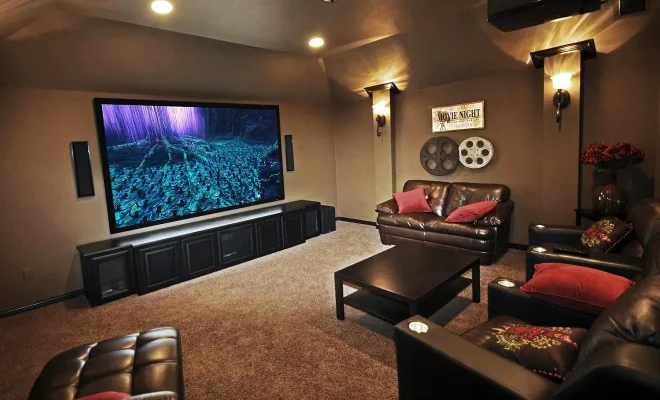
Setting up a video projector to create your own home theater can transform your entertainment experience. If you want to enjoy movies, TV shows, or games on a larger screen with higher quality imagery and sound, a video projector is the perfect solution. Here is how to set up a video projector to create your own home theater:

1. Choose the Right Projector

The first step is to choose the right projector for your needs. Look for a projector with high brightness (measured in lumens) and resolution, such as 1080p or 4K. Consider the size of the room and the distance between the projector and the screen, as well as the throw ratio, which determines the size of the displayed image based on the distance from the screen. Also, consider the types of connections that the projector offers such as HDMI, VGA, and USB.

2. Pick the Right Screen

A good screen can make a huge difference in your viewing experience. There are many types of screens to choose from, including matte white, glass bead, and silver screens. Ideally, the screen should be white, non-glossy, and reflect the projection accurately. The screen size should also match the projector’s aspect ratio.

3. Find the Right Position for the Projector

Now that you have your projector and screen, the next step is to find the right position for the projector. Consider the distance between the projector and the screen, the height of the projector, and the angle of the projection. The projector should be level with the bottom of the screen and perpendicular to the screen’s center. Tilt the projector if necessary to achieve a perfectly rectangular image.

4. Connect the Projector

Connect the projector to your video source, such as a Blu-ray player, streaming device, or gaming console. Make sure that you have the right cables and ports, such as HDMI or VGA cables, to connect the devices. Adjust the settings on both the projector and the video source to optimize the output, such as aspect ratio and image size.

5. Adjust the Focus and Zoom

After connecting the projector, you need to adjust the focus and zoom to display a clear and focused image. Most projectors have manual focus and zoom controls. Use the remote control to adjust the focus until the text on the screen is sharp and clear. Adjust the zoom to stretch the image to fit the size of the screen.

6. Optimize the Picture and Sound

Once you have the projector set up, it’s time to optimize the picture and sound. Adjust the lighting in the room to minimize any glare on the screen. Adjust the color balance, contrast, and brightness to get the best possible picture quality. Connect external speakers or a sound system to enhance the audio output, as most projectors have low-quality built-in speakers.

7. Enjoy the Show

With all the settings calibrated, sit back, relax, and enjoy the show! You now have a home theater setup that can rival any cinema in both image and sound. Whether you’re watching movies, TV shows, or playing games, your video projector setup can provide an immersive experience that can’t be matched by smaller screens.

In conclusion, setting up a video projector to create your own home theater doesn’t have to be complicated or expensive. With the right projector, screen, and setup, you can enjoy a cinematic experience in the comfort of your own home. The most important thing is to take the time to optimize the settings for the best possible picture and sound quality, and then sit back and enjoy the show.

Previous Article

What Is Spot Trading in Crypto?

Next Article

Don’t Like the Shared Content on Your ...

Matthew Lynch

Related articles More from author

  • Digital & Mobile Technology

    Use This Trick to Convert Any Image to PDF on Windows 10

    June 15, 2023
    By Matthew Lynch
  • Digital & Mobile Technology

    How to Connect AirPods to Kindle Fire

    July 5, 2023
    By Matthew Lynch
  • Digital & Mobile Technology

    What Is the Amazon Echo Look?

    June 21, 2023
    By Matthew Lynch
  • Digital & Mobile Technology

    What Is a MUX Switch and Why Should Your Next Gaming Laptop Have One?

    April 18, 2023
    By Matthew Lynch
  • Digital & Mobile Technology

    How to Find Stop Codes and Fix Windows 10 Errors

    June 8, 2023
    By Matthew Lynch
  • Digital & Mobile Technology

    What Is Computer Hardware Maintenance?

    May 6, 2023
    By Matthew Lynch

Search

Login & Registration

  • Log in
  • Entries feed
  • Comments feed
  • WordPress.org

Newsletter

Signup for The Tech Edvocate Newsletter and have the latest in EdTech news and opinion delivered to your email address!

About Us

Since technology is not going anywhere and does more good than harm, adapting is the best course of action. That is where The Tech Edvocate comes in. We plan to cover the PreK-12 and Higher Education EdTech sectors and provide our readers with the latest news and opinion on the subject. From time to time, I will invite other voices to weigh in on important issues in EdTech. We hope to provide a well-rounded, multi-faceted look at the past, present, the future of EdTech in the US and internationally.

We started this journey back in June 2016, and we plan to continue it for many more years to come. I hope that you will join us in this discussion of the past, present and future of EdTech and lend your own insight to the issues that are discussed.

Newsletter

Signup for The Tech Edvocate Newsletter and have the latest in EdTech news and opinion delivered to your email address!

Contact Us

The Tech Edvocate
910 Goddin Street
Richmond, VA 23231
(601) 630-5238
[email protected]

Copyright © 2026 Matthew Lynch. All rights reserved.