The Tech Edvocate

Top Menu

  • Advertisement
  • Apps
  • Home Page
  • Home Page Five (No Sidebar)
  • Home Page Four
  • Home Page Three
  • Home Page Two
  • Home Tech2
  • Icons [No Sidebar]
  • Left Sidbear Page
  • Lynch Educational Consulting
  • My Account
  • My Speaking Page
  • Newsletter Sign Up Confirmation
  • Newsletter Unsubscription
  • Our Brands
  • Page Example
  • Privacy Policy
  • Protected Content
  • Register
  • Request a Product Review
  • Shop
  • Shortcodes Examples
  • Signup
  • Start Here
    • Governance
    • Careers
    • Contact Us
  • Terms and Conditions
  • The Edvocate
  • The Tech Edvocate Product Guide
  • Topics
  • Write For Us
  • Advertise

Main Menu

  • Start Here
    • Our Brands
    • Governance
      • Lynch Educational Consulting, LLC.
      • Dr. Lynch’s Personal Website
      • Careers
    • Write For Us
    • The Tech Edvocate Product Guide
    • Contact Us
    • Books
    • Edupedia
    • Post a Job
    • The Edvocate Podcast
    • Terms and Conditions
    • Privacy Policy
  • Topics
    • Assistive Technology
    • Child Development Tech
    • Early Childhood & K-12 EdTech
    • EdTech Futures
    • EdTech News
    • EdTech Policy & Reform
    • EdTech Startups & Businesses
    • Higher Education EdTech
    • Online Learning & eLearning
    • Parent & Family Tech
    • Personalized Learning
    • Product Reviews
  • Advertise
  • Tech Edvocate Awards
  • The Edvocate
  • Pedagogue
  • School Ratings

logo

The Tech Edvocate

  • Start Here
    • Our Brands
    • Governance
      • Lynch Educational Consulting, LLC.
      • Dr. Lynch’s Personal Website
        • My Speaking Page
      • Careers
    • Write For Us
    • The Tech Edvocate Product Guide
    • Contact Us
    • Books
    • Edupedia
    • Post a Job
    • The Edvocate Podcast
    • Terms and Conditions
    • Privacy Policy
  • Topics
    • Assistive Technology
    • Child Development Tech
    • Early Childhood & K-12 EdTech
    • EdTech Futures
    • EdTech News
    • EdTech Policy & Reform
    • EdTech Startups & Businesses
    • Higher Education EdTech
    • Online Learning & eLearning
    • Parent & Family Tech
    • Personalized Learning
    • Product Reviews
  • Advertise
  • Tech Edvocate Awards
  • The Edvocate
  • Pedagogue
  • School Ratings
  • This SmartHome Guardian 3.0 Feature Is Sparking Outcry — Here’s Why

  • This One Startup Just Secured Half a Billion to Revolutionize Home Buying

  • Elon Musk’s xAI Just Scored a Major Victory Against Minnesota’s ‘Nudification’ Law – Here’s Why It Matters

  • Wild: This Viral Game’s Website Was Caught Pimping Sex Workers to Teenagers

  • Unbelievable: Xbox Deals Collapse, Leading to Ninja Theory Layoffs – What This Means for Gaming

  • Urgent: 95% of Leaders Fear AI-Powered Attacks on Critical Infrastructure by 2026

  • Global Warning: AI’s Bubble and Existential Threats Could Unleash Chaos

  • Explosive: Student Loan Crisis Hits $234 Billion as Millions Face Brutal Collections

  • Jamie Dimon’s Unsettling AI Cybersecurity Warning: What You Haven’t Been Told

  • California’s Wild Robotaxi Rules: Are They Enough to Tame the AI Beast?

Digital & Mobile Technology
Home›Digital & Mobile Technology›How to Reset Bluetooth Speakers

How to Reset Bluetooth Speakers
By Matthew Lynch
June 4, 2023
0
Spread the love

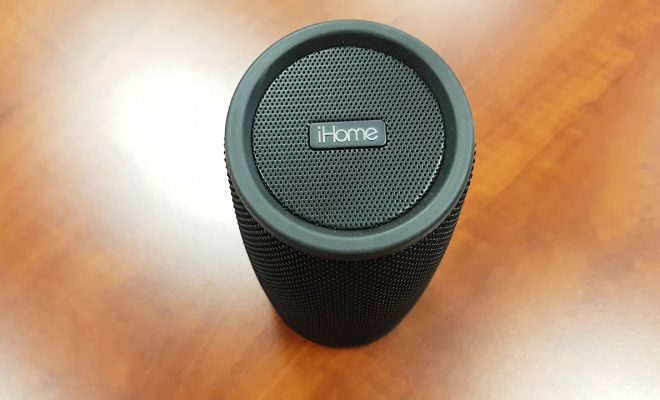
Bluetooth speakers are a great way to wirelessly play music from your phone, laptop, or tablet. However, sometimes they can give you trouble and not connect properly. The simplest and quickest solution to this problem is to reset your Bluetooth speaker. Here is a guide on how to reset Bluetooth speakers.

Step 1: Turn Off Your Bluetooth Speaker

The first step is to turn off your Bluetooth speaker. You can do this by pressing and holding the power button until the LED light turns off. If your speaker doesn’t have a power button, unplug the device from the power source.

Step 2: Clear the Paired List

Next, on your phone or device, go to Settings > Bluetooth and find the name of your Bluetooth speaker. Tap the “i” button or gear icon next to it to go to the device settings, then select “Forget This Device” or “Unpair.” This will clear your Bluetooth speaker from your device’s memory.

Step 3: Reset Your Bluetooth Speaker

Depending on your speaker model, you can reset your Bluetooth speaker in two ways:

Option A: Press and hold the power button and the volume up button at the same time for 5 seconds or until the LED light flashes quickly. This usually means that the speaker is back in pairing mode.

Option B: Press and hold the power button and the play/pause button or the pair button (if available) at the same time for 5 seconds. The LED light will flash a few times indicating a successful reset, and the speaker will be back in pairing mode.

Step 4: Pair Your Bluetooth Speaker

From your phone or device’s Bluetooth settings, look for the name of your Bluetooth speaker and select it to pair. Follow the on-screen instructions to complete the pairing process.

Conclusion

Resetting your Bluetooth speaker is a quick and easy solution to solve connectivity problems or any other issues. If you’re unsure about how to reset your Bluetooth speaker, refer to the device’s user manual or contact the manufacturer’s customer support. Following these simple steps will ensure you enjoy uninterrupted music streaming on your favorite wireless speakers.


Previous Article

Using Facebook Emojis and Smileys

Next Article

The 6 Best Apple TV Remote Apps ...

Matthew Lynch

Related articles More from author

  • Digital & Mobile Technology

    How to Text From Your Computer: 10 Apps to View and Send Text Messages

    August 5, 2023
    By Matthew Lynch
  • Digital & Mobile Technology

    How to See Every Like, Post, and Comment You’ve Made on Facebook

    June 12, 2023
    By Matthew Lynch
  • Digital & Mobile Technology

    What Is an MDT File?

    July 24, 2023
    By Matthew Lynch
  • Digital & Mobile TechnologyMobile LearningOnline Learning & eLearning

    How to Make Your Own Barcode or QR Code

    June 12, 2023
    By Matthew Lynch
  • Digital & Mobile Technology

    What is Enterprise Systems Architecture (ESA)?

    May 7, 2023
    By Matthew Lynch
  • Digital & Mobile Technology

    How to Add a Background Image to a Message in Outlook

    June 4, 2023
    By Matthew Lynch

Search

Login & Registration

  • Log in
  • Entries feed
  • Comments feed
  • WordPress.org

Newsletter

Signup for The Tech Edvocate Newsletter and have the latest in EdTech news and opinion delivered to your email address!

About Us

Since technology is not going anywhere and does more good than harm, adapting is the best course of action. That is where The Tech Edvocate comes in. We plan to cover the PreK-12 and Higher Education EdTech sectors and provide our readers with the latest news and opinion on the subject. From time to time, I will invite other voices to weigh in on important issues in EdTech. We hope to provide a well-rounded, multi-faceted look at the past, present, the future of EdTech in the US and internationally.

We started this journey back in June 2016, and we plan to continue it for many more years to come. I hope that you will join us in this discussion of the past, present and future of EdTech and lend your own insight to the issues that are discussed.

Newsletter

Signup for The Tech Edvocate Newsletter and have the latest in EdTech news and opinion delivered to your email address!

Contact Us

The Tech Edvocate
910 Goddin Street
Richmond, VA 23231
(601) 630-5238
[email protected]

Copyright © 2026 Matthew Lynch. All rights reserved.