The Tech Edvocate

Top Menu

  • Advertisement
  • Apps
  • Home Page
  • Home Page Five (No Sidebar)
  • Home Page Four
  • Home Page Three
  • Home Page Two
  • Home Tech2
  • Icons [No Sidebar]
  • Left Sidbear Page
  • Lynch Educational Consulting
  • My Account
  • My Speaking Page
  • Newsletter Sign Up Confirmation
  • Newsletter Unsubscription
  • Our Brands
  • Page Example
  • Privacy Policy
  • Protected Content
  • Register
  • Request a Product Review
  • Shop
  • Shortcodes Examples
  • Signup
  • Start Here
    • Governance
    • Careers
    • Contact Us
  • Terms and Conditions
  • The Edvocate
  • The Tech Edvocate Product Guide
  • Topics
  • Write For Us
  • Advertise

Main Menu

  • Start Here
    • Our Brands
    • Governance
      • Lynch Educational Consulting, LLC.
      • Dr. Lynch’s Personal Website
      • Careers
    • Write For Us
    • The Tech Edvocate Product Guide
    • Contact Us
    • Books
    • Edupedia
    • Post a Job
    • The Edvocate Podcast
    • Terms and Conditions
    • Privacy Policy
  • Topics
    • Assistive Technology
    • Child Development Tech
    • Early Childhood & K-12 EdTech
    • EdTech Futures
    • EdTech News
    • EdTech Policy & Reform
    • EdTech Startups & Businesses
    • Higher Education EdTech
    • Online Learning & eLearning
    • Parent & Family Tech
    • Personalized Learning
    • Product Reviews
  • Advertise
  • Tech Edvocate Awards
  • The Edvocate
  • Pedagogue
  • School Ratings

logo

The Tech Edvocate

  • Start Here
    • Our Brands
    • Governance
      • Lynch Educational Consulting, LLC.
      • Dr. Lynch’s Personal Website
        • My Speaking Page
      • Careers
    • Write For Us
    • The Tech Edvocate Product Guide
    • Contact Us
    • Books
    • Edupedia
    • Post a Job
    • The Edvocate Podcast
    • Terms and Conditions
    • Privacy Policy
  • Topics
    • Assistive Technology
    • Child Development Tech
    • Early Childhood & K-12 EdTech
    • EdTech Futures
    • EdTech News
    • EdTech Policy & Reform
    • EdTech Startups & Businesses
    • Higher Education EdTech
    • Online Learning & eLearning
    • Parent & Family Tech
    • Personalized Learning
    • Product Reviews
  • Advertise
  • Tech Edvocate Awards
  • The Edvocate
  • Pedagogue
  • School Ratings
  • Trader Joe’s March 2026 Arrivals: Affordable Gems and Customer Favorites

  • Mark Sprague Takes the Helm as Director of St. Pete-Clearwater International Airport

  • Consumer Attitudes Toward Editing Claim Images: A Growing Concern for Insurers

  • ProstaVive: A Comprehensive Review of the Prostate Health Supplement in 2026

  • Discover Trader Joe’s Top Picks for 2026: Customer Choice Awards Highlights

  • U.S. Stock Market Faces Uncertainty Amid Rising Oil Prices and Geopolitical Tensions

  • Asian Markets Show Mixed Results Amid Rising Oil Prices and U.S. Futures Decline

  • Stability in Fuel Prices Amidst Global Crude Market Turmoil: An Analysis

  • Crude Oil Prices Surge Amid Tensions in the Strait of Hormuz

  • Indian Stock Market Opens Flat Amid Geopolitical Tensions and Oil Price Fluctuations

Digital & Mobile Technology
Home›Digital & Mobile Technology›How to Replace a Motherboard

How to Replace a Motherboard
By Matthew Lynch
July 5, 2023
0
Spread the love

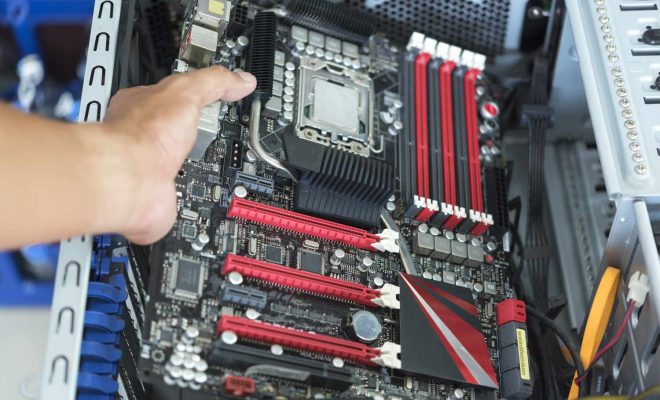
When it comes to upgrading or fixing your computer, replacing the motherboard may be necessary. The motherboard is the central component of any computer, and it can be challenging to replace. However, with proper guidance, anyone can learn how to replace a motherboard. Follow the steps below to replace your motherboard and get your computer running smoothly.

Step 1: Gather the Tools and Components

Before beginning, a few essential tools and components are necessary. First, ensure you have the right motherboard for your computer. You will also need a Phillips head screwdriver, a thermal paste (if not included), and an antistatic strap to protect your new motherboard and other components from damage due to static electricity.

Step 2: Disconnect and Remove the Old Motherboard

Power off your computer and unplug it to ensure safety before beginning the process of replacing your motherboard. Using your screwdriver, remove the screws that hold the motherboard in place. Carefully disconnect all the cables and connections from your old motherboard like your power supply connectors, data cables, RAM, graphics card, and any other expansion devices you may have. Next, remove the old motherboard from the case by gently disconnecting it from the I/O shield on the back of your computer.

Step 3: Install the New Motherboard

Start by mounting your new motherboard into your case. Ensure that the I/O shield is correctly aligned, and the screws align with the standoffs located in the case. The standoffs are the small metal pieces that hold the motherboard in place. Tighten the screws but not too much that it twists the motherboard. Then, you need to attach the power supply connectors, data cables, RAM, graphics card, and other expansion devices to your new motherboard. Be sure to connect them in the appropriate places and use the motherboard manual as a reference.

Step 4: Apply the Thermal Paste

When replacing your motherboard, you may need to reapply thermal paste before reinstalling the CPU cooler. This paste helps transfer heat from the CPU to the heat sink that cools it to prevent overheating. Apply a small pea-size amount of thermal paste at the center of the CPU, and make sure only to apply enough to cover the surface of the CPU.

Step 5: Testing

Once all cables and connections are reinstalled, perform a quick check to make sure all connections are correctly placed. Plug your computer back in and power it on. Check that your computer boots up and runs smoothly. If it is not functioning properly, double-check that all cables and connections are plugged in correctly.

In conclusion, replacing a motherboard can seem intimidating, but by following these simple steps, it can be done quickly and efficiently without requiring professional help. Always read the motherboard manual before proceeding and protect your motherboard and components from damage due to static electricity with an antistatic strap. With patience and careful attention to detail, you can successfully replace your motherboard and have your computer running smoothly once again.


Previous Article

How to Stop the iPhone from Dimming ...

Next Article

The Full Rundown of Instant Messaging or ...

Matthew Lynch

Related articles More from author

  • Digital & Mobile Technology

    How to See Who Shared Your TikTok

    June 1, 2023
    By Matthew Lynch
  • Digital & Mobile Technology

    How to Fix Netflix Error Code NSES-500

    June 2, 2023
    By Matthew Lynch
  • Digital & Mobile Technology

    How to Use OpenPGP Encryption for Emails in Thunderbird

    May 30, 2023
    By Matthew Lynch
  • Digital & Mobile Technology

    HDR Gaming: What You Need to Know

    June 26, 2023
    By Matthew Lynch
  • Digital & Mobile Technology

    Correct Poor White Balance in Photos With GIMP

    July 4, 2023
    By Matthew Lynch
  • Digital & Mobile Technology

    Ways to Create a Windows 11 Bootable USB Drive

    June 22, 2023
    By Matthew Lynch

Search

Login & Registration

  • Register
  • Log in
  • Entries feed
  • Comments feed
  • WordPress.org

Newsletter

Signup for The Tech Edvocate Newsletter and have the latest in EdTech news and opinion delivered to your email address!

About Us

Since technology is not going anywhere and does more good than harm, adapting is the best course of action. That is where The Tech Edvocate comes in. We plan to cover the PreK-12 and Higher Education EdTech sectors and provide our readers with the latest news and opinion on the subject. From time to time, I will invite other voices to weigh in on important issues in EdTech. We hope to provide a well-rounded, multi-faceted look at the past, present, the future of EdTech in the US and internationally.

We started this journey back in June 2016, and we plan to continue it for many more years to come. I hope that you will join us in this discussion of the past, present and future of EdTech and lend your own insight to the issues that are discussed.

Newsletter

Signup for The Tech Edvocate Newsletter and have the latest in EdTech news and opinion delivered to your email address!

Contact Us

The Tech Edvocate
910 Goddin Street
Richmond, VA 23231
(601) 630-5238
[email protected]

Copyright © 2025 Matthew Lynch. All rights reserved.