
The Tech Edvocate

Top Menu

  • Advertisement
  • Apps
  • Home Page
  • Home Page Five (No Sidebar)
  • Home Page Four
  • Home Page Three
  • Home Page Two
  • Home Tech2
  • Icons [No Sidebar]
  • Left Sidbear Page
  • Lynch Educational Consulting
  • My Account
  • My Speaking Page
  • Newsletter Sign Up Confirmation
  • Newsletter Unsubscription
  • Our Brands
  • Page Example
  • Privacy Policy
  • Protected Content
  • Register
  • Request a Product Review
  • Shop
  • Shortcodes Examples
  • Signup
  • Start Here
    • Governance
    • Careers
    • Contact Us
  • Terms and Conditions
  • The Edvocate
  • The Tech Edvocate Product Guide
  • Topics
  • Write For Us
  • Advertise

Main Menu

  • Start Here
    • Our Brands
    • Governance
      • Lynch Educational Consulting, LLC.
      • Dr. Lynch’s Personal Website
      • Careers
    • Write For Us
    • The Tech Edvocate Product Guide
    • Contact Us
    • Books
    • Edupedia
    • Post a Job
    • The Edvocate Podcast
    • Terms and Conditions
    • Privacy Policy
  • Topics
    • Assistive Technology
    • Child Development Tech
    • Early Childhood & K-12 EdTech
    • EdTech Futures
    • EdTech News
    • EdTech Policy & Reform
    • EdTech Startups & Businesses
    • Higher Education EdTech
    • Online Learning & eLearning
    • Parent & Family Tech
    • Personalized Learning
    • Product Reviews
  • Advertise
  • Tech Edvocate Awards
  • The Edvocate
  • Pedagogue
  • School Ratings

logo

The Tech Edvocate

  • Start Here
    • Our Brands
    • Governance
      • Lynch Educational Consulting, LLC.
      • Dr. Lynch’s Personal Website
        • My Speaking Page
      • Careers
    • Write For Us
    • The Tech Edvocate Product Guide
    • Contact Us
    • Books
    • Edupedia
    • Post a Job
    • The Edvocate Podcast
    • Terms and Conditions
    • Privacy Policy
  • Topics
    • Assistive Technology
    • Child Development Tech
    • Early Childhood & K-12 EdTech
    • EdTech Futures
    • EdTech News
    • EdTech Policy & Reform
    • EdTech Startups & Businesses
    • Higher Education EdTech
    • Online Learning & eLearning
    • Parent & Family Tech
    • Personalized Learning
    • Product Reviews
  • Advertise
  • Tech Edvocate Awards
  • The Edvocate
  • Pedagogue
  • School Ratings
  • Viaim Opennote Review: The AI Note-Taker That Disappears Into Your Daily Routine

  • A Visitors Guide to Long Beach (CA), United States

  • A Visitor’s Guide to Fresno (CA), United States

  • A Visitors Guide to New Orleans (LA), United States

  • A Visitors Guide to Sacramento (CA), United States

  • A Visitors Guide to Lyon, France

  • JisuLife Ultra2 Portable Fan: A Powerful Multi-Function Cooling Solution

  • A Visitors Guide to Viña del Mar, Chile

  • A Visitors Guide to Århus, Denmark

  • A Visitors Guide to Bakersfield (CA), United States

How To
Home›How To›How to Open DLL Files: 10 Steps

How to Open DLL Files: 10 Steps
By Matthew Lynch
March 22, 2024
0
Spread the love

DLL (Dynamic Link Library) files are essential for the smooth functioning of your Windows operating system. They contain vital instructions and code that allows programs to run flawlessly. However, there might be times when you need to access or view the contents of a DLL file. In this article, we will walk you through 10 steps to open DLL files.

Step 1: Back up your DLL file

Before opening a DLL file, it’s crucial to create a backup. Since they contain crucial information, any accidental change or deletion can lead to unwanted consequences. Copy the file and save it in a secured location as a precautionary measure.

Step 2: Identify the purpose of the DLL file

Know why you need to open the file. Whether it’s for repairing a corrupt file or extracting resources like icons or images, identifying the purpose will help you choose the right tools and procedures for the task.

Step 3: Use a text editor

Simple text editors like Notepad can open DLL files as they display raw text data. Open Notepad, go to File > Open, navigate to the location of your DLL file, select it and click “Open”. Keep in mind that most of the information displayed won’t make any sense as it is coded.

Step 4: Use a dedicated hex editor

When dealing with binary files like DLLs, using a hex editor can provide better readability than typical text editors. Examples include HxD, Hex Fiend, and XVI32. Download one of these programs, open your DLL file in the hex editor, and observe its content in hexadecimal format.

Step 5: Use decompiler software

A dedicated decompiler like DotPeek or JustDecompile can translate contents of DLL files into readable programming languages (such as C#, VB.NET). This is particularly useful when analyzing or modifying computer programs stored within a DLL.

Step 6: Use resource extractors

If you are looking to extract resources like icons, images, or strings from a DLL file, try using resource extraction tools like Resource Hacker or ResEdit. These programs let you view and modify the resources within DLL files in an organized manner.

Step 7: Use a debugger

Debugging tools like OllyDbg or x64dbg can open, examine, and debug the contents of DLL files. This is often used by developers to inspect and understand how specific DLL files function.

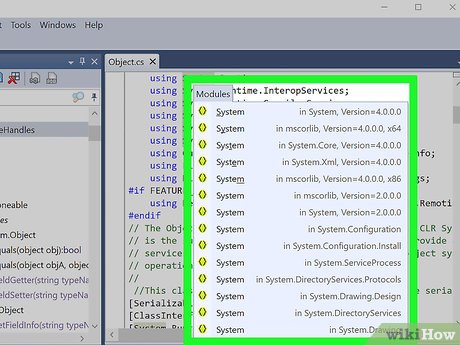
Step 8: Load the DLL into Visual Studio

If you have access to Microsoft Visual Studio, you can import the DLL file into your project and examine its content in the IDE’s debugging and analysis tools.

Step 9: Register or unregister the DLL file

If your goal was to repair a malfunctioning DLL file, registering or unregistering the file is useful. Use an administrative command prompt to execute commands like “regsvr32 /u [DLL name]” to unregister and “regsvr32 [DLL name]” to register the DLL.

Step 10: Seek professional help

If none of these methods work or cause further issues, consult professional developers or technicians who specialize in working with DLL files. Their expertise will ensure that your objective is accomplished with minimal risks.

In conclusion, opening DLL files can be done using various methods depending on your purpose. Be cautious when working with these files, as they are critical components for the proper functioning of your system. Following these steps will ensure that you’ve covered all bases when attempting to open a DLL file.


Previous Article

4 Ways to Copy and Paste on ...

Next Article

4 Ways to Track a Cell Phone

Matthew Lynch

Related articles More from author

  • How To

    How to Make a Pamphlet

    February 14, 2024
    By Matthew Lynch
  • How To

    3 Ways to Install Flooring

    January 25, 2024
    By Matthew Lynch
  • How To

    How to Climb a Ladder Safely: 9 Steps

    December 21, 2023
    By Matthew Lynch
  • How To

    How to Darken Roots: 15 Steps

    November 15, 2023
    By Matthew Lynch
  • How To

    3 Simple Ways to Lighten Dark Wood Stain

    October 10, 2023
    By Matthew Lynch
  • How To

    How to Do Something New: 15 Steps

    November 4, 2023
    By Matthew Lynch

Search

Login & Registration

  • Register
  • Log in
  • Entries feed
  • Comments feed
  • WordPress.org

Newsletter

Signup for The Tech Edvocate Newsletter and have the latest in EdTech news and opinion delivered to your email address!

About Us

Since technology is not going anywhere and does more good than harm, adapting is the best course of action. That is where The Tech Edvocate comes in. We plan to cover the PreK-12 and Higher Education EdTech sectors and provide our readers with the latest news and opinion on the subject. From time to time, I will invite other voices to weigh in on important issues in EdTech. We hope to provide a well-rounded, multi-faceted look at the past, present, the future of EdTech in the US and internationally.

We started this journey back in June 2016, and we plan to continue it for many more years to come. I hope that you will join us in this discussion of the past, present and future of EdTech and lend your own insight to the issues that are discussed.

Newsletter

Signup for The Tech Edvocate Newsletter and have the latest in EdTech news and opinion delivered to your email address!

Contact Us

The Tech Edvocate
910 Goddin Street
Richmond, VA 23231
(601) 630-5238
[email protected]

Copyright © 2025 Matthew Lynch. All rights reserved.