The Tech Edvocate

Top Menu

  • Advertisement
  • Apps
  • Home Page
  • Home Page Five (No Sidebar)
  • Home Page Four
  • Home Page Three
  • Home Page Two
  • Home Tech2
  • Icons [No Sidebar]
  • Left Sidbear Page
  • Lynch Educational Consulting
  • My Account
  • My Speaking Page
  • Newsletter Sign Up Confirmation
  • Newsletter Unsubscription
  • Our Brands
  • Page Example
  • Privacy Policy
  • Protected Content
  • Register
  • Request a Product Review
  • Shop
  • Shortcodes Examples
  • Signup
  • Start Here
    • Governance
    • Careers
    • Contact Us
  • Terms and Conditions
  • The Edvocate
  • The Tech Edvocate Product Guide
  • Topics
  • Write For Us
  • Advertise

Main Menu

  • Start Here
    • Our Brands
    • Governance
      • Lynch Educational Consulting, LLC.
      • Dr. Lynch’s Personal Website
      • Careers
    • Write For Us
    • The Tech Edvocate Product Guide
    • Contact Us
    • Books
    • Edupedia
    • Post a Job
    • The Edvocate Podcast
    • Terms and Conditions
    • Privacy Policy
  • Topics
    • Assistive Technology
    • Child Development Tech
    • Early Childhood & K-12 EdTech
    • EdTech Futures
    • EdTech News
    • EdTech Policy & Reform
    • EdTech Startups & Businesses
    • Higher Education EdTech
    • Online Learning & eLearning
    • Parent & Family Tech
    • Personalized Learning
    • Product Reviews
  • Advertise
  • Tech Edvocate Awards
  • The Edvocate
  • Pedagogue
  • School Ratings

logo

The Tech Edvocate

  • Start Here
    • Our Brands
    • Governance
      • Lynch Educational Consulting, LLC.
      • Dr. Lynch’s Personal Website
        • My Speaking Page
      • Careers
    • Write For Us
    • The Tech Edvocate Product Guide
    • Contact Us
    • Books
    • Edupedia
    • Post a Job
    • The Edvocate Podcast
    • Terms and Conditions
    • Privacy Policy
  • Topics
    • Assistive Technology
    • Child Development Tech
    • Early Childhood & K-12 EdTech
    • EdTech Futures
    • EdTech News
    • EdTech Policy & Reform
    • EdTech Startups & Businesses
    • Higher Education EdTech
    • Online Learning & eLearning
    • Parent & Family Tech
    • Personalized Learning
    • Product Reviews
  • Advertise
  • Tech Edvocate Awards
  • The Edvocate
  • Pedagogue
  • School Ratings
  • Mind-Blowing: These Viral Amazon Products Are NOT What You Expect

  • Bizarre: AI-Generated Fake Health Influencers Are Invading Your Feed – Here’s How to Spot Them

  • Six Startups Launch IPOs in One Day: Is This India’s Most Audacious Bet Yet?

  • The Baffling Twitter Startup Name Change: Why ‘Bluebird’ Had to Die

  • The PlayStation Trump Tariff Refunds You Won’t Get: Why Sony’s Silence Is Infuriating Gamers

  • The White House ‘Arcade’ Scandal: Why the Tetris Controversy Is Just the Beginning

  • The Billion-Dollar Battle: Seattle Times’ AI Lawsuit Could Redefine Digital Rights

  • This OpenAI Pause Reveals a Disturbing Truth About AI’s Future

  • Stunning: Feds Quietly Erase Data on Gender-Based Bullying – What It Means for Vulnerable Students

  • The Raw Truth About the Colorado Student Walkout You Haven’t Heard

Digital & Mobile Technology
Home›Digital & Mobile Technology›How To Modify Your Existing Desk to Make It a Standing Desk

How To Modify Your Existing Desk to Make It a Standing Desk
By Matthew Lynch
April 30, 2023
0
Spread the love

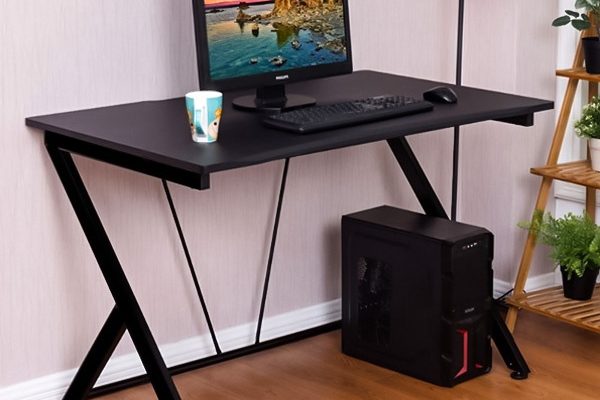
In this article, we will show you how to modify your existing desk to make it a standing desk.

1. Measure the Height of Your Desk

The first thing you need to do is to measure the height of your desk. To get the right size, stand in front of your desk and bend your arms at a 90-degree angle. If your hands rest comfortably on the desktop, your desk might not need any modifications.

However, if your hands are too low or too high, then you need to adjust the height of your desk. Ideally, your elbows should be at the same height as your keyboard, and your computer monitor should be at eye level.

2. Elevate Your Desk

To raise the height of your desk, you can use different materials such as wood, crates, or books. Place the material under each leg to create a stable foundation. Alternatively, you can use bed risers, which are specifically designed to raise bed frames, to increase the height of your desk.

Another option is to use a set of adjustable desk legs. These legs can be easily attached to the bottom of your desk for quick and easy height adjustment.

3. Use a Standing Desk Converter

If you don’t want to modify your existing desk or don’t have the necessary tools, you can opt for a standing desk converter. This is a device that sits on top of your desk and allows you to adjust the height of your workstation from sitting to standing.

There are different types of standing desk converters available on the market, ranging from simple models with a single keyboard tray to more elaborate designs, including a monitor arm, mouse pad, and multiple levels.

4. Improve Your Posture

Regardless of whether you use a modified desk or a standing desk converter, it’s essential to maintain proper posture while standing. Keep your shoulders relaxed, your arms at your sides, and your feet shoulder-width apart.

Try to avoid leaning on your desk or locking your knees, as this can lead to pressure on your lower back and joints. Take breaks and alternate between sitting and standing throughout the day to avoid fatigue.

Conclusion

Standing desks are becoming increasingly popular, but not everyone can afford to purchase a standing desk outright. By modifying your existing desk or using a standing desk converter, you can still enjoy the benefits of standing while working without breaking the bank.

Remember to measure the height of your desk and elevate it to the right level. If you opt for a standing desk converter, make sure to maintain proper posture to avoid fatigue or strain on your back and joints. With a little effort and creativity, you can upgrade your workspace and improve your overall health and productivity.    

Previous Article

How to Modify the Time Machine Backup ...

Next Article

How to Monitor (and Reduce) Your Data ...

Matthew Lynch

Related articles More from author

  • Digital & Mobile Technology

    How to Customize the Quick Settings Panel on a Samsung Galaxy Phone

    June 4, 2023
    By Matthew Lynch
  • Digital & Mobile Technology

    How RFID Can Be Hacked and What You Can Do to Stay Safe

    June 12, 2023
    By Matthew Lynch
  • Digital & Mobile Technology

    What is a nibble in computers and digital technology?

    April 18, 2023
    By Matthew Lynch
  • Digital & Mobile Technology

    Best Free Microsoft Office Alternatives for Android

    June 22, 2023
    By Matthew Lynch
  • Digital & Mobile Technology

    Instagram Scams and How to Avoid Them

    June 13, 2023
    By Matthew Lynch
  • Digital & Mobile Technology

    How to Boot in Safe Mode on Windows 10

    July 6, 2023
    By Matthew Lynch

Search

Login & Registration

  • Log in
  • Entries feed
  • Comments feed
  • WordPress.org

Newsletter

Signup for The Tech Edvocate Newsletter and have the latest in EdTech news and opinion delivered to your email address!

About Us

Since technology is not going anywhere and does more good than harm, adapting is the best course of action. That is where The Tech Edvocate comes in. We plan to cover the PreK-12 and Higher Education EdTech sectors and provide our readers with the latest news and opinion on the subject. From time to time, I will invite other voices to weigh in on important issues in EdTech. We hope to provide a well-rounded, multi-faceted look at the past, present, the future of EdTech in the US and internationally.

We started this journey back in June 2016, and we plan to continue it for many more years to come. I hope that you will join us in this discussion of the past, present and future of EdTech and lend your own insight to the issues that are discussed.

Newsletter

Signup for The Tech Edvocate Newsletter and have the latest in EdTech news and opinion delivered to your email address!

Contact Us

The Tech Edvocate
910 Goddin Street
Richmond, VA 23231
(601) 630-5238
[email protected]

Copyright © 2026 Matthew Lynch. All rights reserved.