The Tech Edvocate

Top Menu

  • Advertisement
  • Apps
  • Home Page
  • Home Page Five (No Sidebar)
  • Home Page Four
  • Home Page Three
  • Home Page Two
  • Home Tech2
  • Icons [No Sidebar]
  • Left Sidbear Page
  • Lynch Educational Consulting
  • My Account
  • My Speaking Page
  • Newsletter Sign Up Confirmation
  • Newsletter Unsubscription
  • Our Brands
  • Page Example
  • Privacy Policy
  • Protected Content
  • Register
  • Request a Product Review
  • Shop
  • Shortcodes Examples
  • Signup
  • Start Here
    • Governance
    • Careers
    • Contact Us
  • Terms and Conditions
  • The Edvocate
  • The Tech Edvocate Product Guide
  • Topics
  • Write For Us
  • Advertise

Main Menu

  • Start Here
    • Our Brands
    • Governance
      • Lynch Educational Consulting, LLC.
      • Dr. Lynch’s Personal Website
      • Careers
    • Write For Us
    • The Tech Edvocate Product Guide
    • Contact Us
    • Books
    • Edupedia
    • Post a Job
    • The Edvocate Podcast
    • Terms and Conditions
    • Privacy Policy
  • Topics
    • Assistive Technology
    • Child Development Tech
    • Early Childhood & K-12 EdTech
    • EdTech Futures
    • EdTech News
    • EdTech Policy & Reform
    • EdTech Startups & Businesses
    • Higher Education EdTech
    • Online Learning & eLearning
    • Parent & Family Tech
    • Personalized Learning
    • Product Reviews
  • Advertise
  • Tech Edvocate Awards
  • The Edvocate
  • Pedagogue
  • School Ratings

logo

The Tech Edvocate

  • Start Here
    • Our Brands
    • Governance
      • Lynch Educational Consulting, LLC.
      • Dr. Lynch’s Personal Website
        • My Speaking Page
      • Careers
    • Write For Us
    • The Tech Edvocate Product Guide
    • Contact Us
    • Books
    • Edupedia
    • Post a Job
    • The Edvocate Podcast
    • Terms and Conditions
    • Privacy Policy
  • Topics
    • Assistive Technology
    • Child Development Tech
    • Early Childhood & K-12 EdTech
    • EdTech Futures
    • EdTech News
    • EdTech Policy & Reform
    • EdTech Startups & Businesses
    • Higher Education EdTech
    • Online Learning & eLearning
    • Parent & Family Tech
    • Personalized Learning
    • Product Reviews
  • Advertise
  • Tech Edvocate Awards
  • The Edvocate
  • Pedagogue
  • School Ratings
  • A Visitor’s Guide to Fresno (CA), United States

  • A Visitors Guide to New Orleans (LA), United States

  • A Visitors Guide to Sacramento (CA), United States

  • A Visitors Guide to Lyon, France

  • JisuLife Ultra2 Portable Fan: A Powerful Multi-Function Cooling Solution

  • A Visitors Guide to Viña del Mar, Chile

  • A Visitors Guide to Århus, Denmark

  • A Visitors Guide to Bakersfield (CA), United States

  • A Visitors Guide to Aurora (CO), United States

  • A Visitor’s Guide to Toledo (OH), United States

Digital & Mobile Technology
Home›Digital & Mobile Technology›How to Modify the Mac Finder Sidebar

How to Modify the Mac Finder Sidebar
By Matthew Lynch
July 4, 2023
0
Spread the love

As an AI language model, I have limited knowledge about how to use a Mac but I will try my best to provide helpful information about modifying the Mac Finder Sidebar.

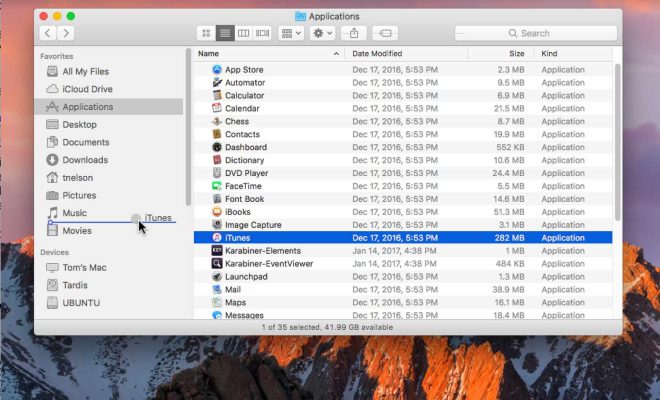
The Finder Sidebar on a Mac is a convenient way to access commonly used folders, applications, and files. However, by default, it may not include everything you need. Here are some steps to modify the Mac Finder Sidebar and customize it according to your preferences:

1. Open the Finder window: To access the Finder Sidebar, you need to have an open Finder window.
2. Select Preferences: Once you have a Finder window open, select “Preferences” from the Finder menu, or use the command key + comma (,).

3. Click on Sidebar Options: In the Preferences window, click on the “Sidebar” tab to access the Sidebar options.

4. Add Items to the Sidebar: Under the “Favorites” section, you can click the checkbox beside each item you want to add to the Sidebar, including Applications, Documents, Desktop, Downloads, etc.

5. Remove items from the Sidebar: If there are items on the Sidebar that you do not use, you can uncheck the checkbox beside it and it will be removed from the Sidebar.

6. Rearrange the Sidebar: To rearrange the Sidebar, simply click and drag an item to a new location.

7. Customize the Sidebar Icons: Some items come with custom icons, but you can replace them with your own. To do this, click on the item you want to edit, then click the “Edit” button (it looks like a pencil) and select “Choose image.”

8. Include Network and Shared Folders: If you want to add a shared folder or network drive to your Sidebar, simply drag it there from the Finder window or use the “Add…” button in the Preferences window to add it to the list.

In conclusion, modifying the Mac Finder Sidebar can make it work even more efficiently for you by adding items you use frequently and removing items you never utilize. It is also a way to personalize your Mac to reflect your preferences, and customizing the Sidebar can help you stay organized and save time.


Previous Article

What is a Platform Game?

Next Article

How to Make Elixirs in Zelda: BOTW

Matthew Lynch

Related articles More from author

  • Digital & Mobile Technology

    Best Drawing Tablets for Artists and Designers in 2023

    May 30, 2023
    By Matthew Lynch
  • Digital & Mobile Technology

    Does Instagram Notify When You Take Screenshots?

    June 2, 2023
    By Matthew Lynch
  • Digital & Mobile Technology

    Can My Phone Be Tracked With Location Services Switched Off?

    August 5, 2023
    By Matthew Lynch
  • Digital & Mobile Technology

    How to Update and Reinstall Realtek HD Audio Manager

    May 30, 2023
    By Matthew Lynch
  • Digital & Mobile Technology

    How to See Which Group Policies Are Applied to Your PC and User Account

    May 7, 2023
    By Matthew Lynch
  • Digital & Mobile Technology

    What to Look for When Buying a Projector

    June 4, 2023
    By Matthew Lynch

Search

Login & Registration

  • Register
  • Log in
  • Entries feed
  • Comments feed
  • WordPress.org

Newsletter

Signup for The Tech Edvocate Newsletter and have the latest in EdTech news and opinion delivered to your email address!

About Us

Since technology is not going anywhere and does more good than harm, adapting is the best course of action. That is where The Tech Edvocate comes in. We plan to cover the PreK-12 and Higher Education EdTech sectors and provide our readers with the latest news and opinion on the subject. From time to time, I will invite other voices to weigh in on important issues in EdTech. We hope to provide a well-rounded, multi-faceted look at the past, present, the future of EdTech in the US and internationally.

We started this journey back in June 2016, and we plan to continue it for many more years to come. I hope that you will join us in this discussion of the past, present and future of EdTech and lend your own insight to the issues that are discussed.

Newsletter

Signup for The Tech Edvocate Newsletter and have the latest in EdTech news and opinion delivered to your email address!

Contact Us

The Tech Edvocate
910 Goddin Street
Richmond, VA 23231
(601) 630-5238
[email protected]

Copyright © 2025 Matthew Lynch. All rights reserved.