The Tech Edvocate

Top Menu

  • Advertisement
  • Apps
  • Home Page
  • Home Page Five (No Sidebar)
  • Home Page Four
  • Home Page Three
  • Home Page Two
  • Home Tech2
  • Icons [No Sidebar]
  • Left Sidbear Page
  • Lynch Educational Consulting
  • My Account
  • My Speaking Page
  • Newsletter Sign Up Confirmation
  • Newsletter Unsubscription
  • Our Brands
  • Page Example
  • Privacy Policy
  • Protected Content
  • Register
  • Request a Product Review
  • Shop
  • Shortcodes Examples
  • Signup
  • Start Here
    • Governance
    • Careers
    • Contact Us
  • Terms and Conditions
  • The Edvocate
  • The Tech Edvocate Product Guide
  • Topics
  • Write For Us
  • Advertise

Main Menu

  • Start Here
    • Our Brands
    • Governance
      • Lynch Educational Consulting, LLC.
      • Dr. Lynch’s Personal Website
      • Careers
    • Write For Us
    • The Tech Edvocate Product Guide
    • Contact Us
    • Books
    • Edupedia
    • Post a Job
    • The Edvocate Podcast
    • Terms and Conditions
    • Privacy Policy
  • Topics
    • Assistive Technology
    • Child Development Tech
    • Early Childhood & K-12 EdTech
    • EdTech Futures
    • EdTech News
    • EdTech Policy & Reform
    • EdTech Startups & Businesses
    • Higher Education EdTech
    • Online Learning & eLearning
    • Parent & Family Tech
    • Personalized Learning
    • Product Reviews
  • Advertise
  • Tech Edvocate Awards
  • The Edvocate
  • Pedagogue
  • School Ratings

logo

The Tech Edvocate

  • Start Here
    • Our Brands
    • Governance
      • Lynch Educational Consulting, LLC.
      • Dr. Lynch’s Personal Website
        • My Speaking Page
      • Careers
    • Write For Us
    • The Tech Edvocate Product Guide
    • Contact Us
    • Books
    • Edupedia
    • Post a Job
    • The Edvocate Podcast
    • Terms and Conditions
    • Privacy Policy
  • Topics
    • Assistive Technology
    • Child Development Tech
    • Early Childhood & K-12 EdTech
    • EdTech Futures
    • EdTech News
    • EdTech Policy & Reform
    • EdTech Startups & Businesses
    • Higher Education EdTech
    • Online Learning & eLearning
    • Parent & Family Tech
    • Personalized Learning
    • Product Reviews
  • Advertise
  • Tech Edvocate Awards
  • The Edvocate
  • Pedagogue
  • School Ratings
  • A Visitors Guide to Long Beach (CA), United States

  • A Visitor’s Guide to Fresno (CA), United States

  • A Visitors Guide to New Orleans (LA), United States

  • A Visitors Guide to Sacramento (CA), United States

  • A Visitors Guide to Lyon, France

  • JisuLife Ultra2 Portable Fan: A Powerful Multi-Function Cooling Solution

  • A Visitors Guide to Viña del Mar, Chile

  • A Visitors Guide to Århus, Denmark

  • A Visitors Guide to Bakersfield (CA), United States

  • A Visitors Guide to Aurora (CO), United States

Assistive Technology
Home›Assistive Technology›How to Make a Wi-Fi Antenna Out of a Pringles Can

How to Make a Wi-Fi Antenna Out of a Pringles Can
By Matthew Lynch
June 23, 2023
0
Spread the love

In the world of technology, Wi-Fi connectivity is essential for our daily lives. Whether it’s for business, communication, or entertainment, having a good Wi-Fi signal is crucial. However, sometimes it can be challenging to get a strong signal in your home or office. To help improve your Wi-Fi connection, you can create a homemade Wi-Fi antenna using a Pringles can.

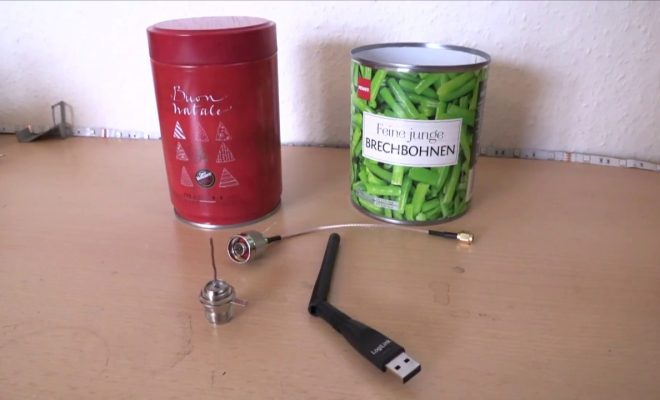
Materials needed:

– A Pringles can (or similar cylindrical object)
– Scissors or a knife
– A ruler
– Conductive copper tape
– An N-Type connector
– A drill (optional)

Instructions:

1. Gather all the materials needed for the project.

2. Measure the halfway point of the Pringles can’s length and mark it with a marker or a pen.

3. Using scissors or a knife, cut around the marked line, effectively splitting the can in half.

4. Cut the bottom of the can so that it’s completely removed.

5. Cover the inner surface of one side of the can with the conductive copper tape. Make sure there is no overlap and all spots are securely attached.

6. Drill a hole in the middle of the can’s base.

7. Thread the N-type connector through the hole in the base, so the connector’s threads and the nut are on the inside of the can.

8. Cut a small piece of conductive copper tape and wrap it around the N-type connector, making sure that the tape’s edges are securely attached to the can.

9. Place the can onto the Wi-Fi antenna of your router or computer.

10. Adjust the angle and direction of the can so that it points towards the area where you need the strongest Wi-Fi signal.

11. Once you have found the optimal position, tighten the N-type connector nut and secure it in place.

The homemade Wi-Fi antenna made from a Pringles can might seem like a small project, but it can make a big difference in getting a better Wi-Fi signal. Conductive copper tape acts as the antenna itself, picking up the Wi-Fi signals and boosting them towards the desired area. The half-can design helps to direct the signal to one specific area, creating a stronger signal overall.

In conclusion, if your Wi-Fi signal is weak and unreliable, a homemade Wi-Fi antenna can help rectify that. By creating a Wi-Fi antenna out of a Pringles can, you can improve your signal strength and connectivity. With this simple, cost-effective project, you’ll find that your Wi-Fi signal is stronger and more reliable than ever before. Give it a try and see how much it can improve your daily Wi-Fi experience.


Previous Article

How to Strikethrough in Excel

Next Article

How to Disable Ads in Mobile Games: ...

Matthew Lynch

Related articles More from author

  • Assistive Technology

    How to Change the Name of Your Mac

    June 21, 2023
    By Matthew Lynch
  • Assistive Technology

    How to Find and Change Your DNS Server on Linux

    June 15, 2023
    By Matthew Lynch
  • Assistive Technology

    How to Get 5G or 4G Internet Access on Your Laptop

    June 8, 2023
    By Matthew Lynch
  • Assistive Technology

    How to Convert a PDF to Word on a Mac

    June 11, 2023
    By Matthew Lynch
  • Assistive Technology

    How to Boot a Raspberry Pi From SSD and Use It for Permanent Storage

    June 23, 2023
    By Matthew Lynch
  • Assistive TechnologyHealth & Wellness

    6 Strategies That Will Help You Manage Your Stress During the Holidays

    February 1, 2024
    By Matthew Lynch

Search

Login & Registration

  • Register
  • Log in
  • Entries feed
  • Comments feed
  • WordPress.org

Newsletter

Signup for The Tech Edvocate Newsletter and have the latest in EdTech news and opinion delivered to your email address!

About Us

Since technology is not going anywhere and does more good than harm, adapting is the best course of action. That is where The Tech Edvocate comes in. We plan to cover the PreK-12 and Higher Education EdTech sectors and provide our readers with the latest news and opinion on the subject. From time to time, I will invite other voices to weigh in on important issues in EdTech. We hope to provide a well-rounded, multi-faceted look at the past, present, the future of EdTech in the US and internationally.

We started this journey back in June 2016, and we plan to continue it for many more years to come. I hope that you will join us in this discussion of the past, present and future of EdTech and lend your own insight to the issues that are discussed.

Newsletter

Signup for The Tech Edvocate Newsletter and have the latest in EdTech news and opinion delivered to your email address!

Contact Us

The Tech Edvocate
910 Goddin Street
Richmond, VA 23231
(601) 630-5238
[email protected]

Copyright © 2025 Matthew Lynch. All rights reserved.