The Tech Edvocate

Top Menu

  • Advertisement
  • Apps
  • Home Page
  • Home Page Five (No Sidebar)
  • Home Page Four
  • Home Page Three
  • Home Page Two
  • Home Tech2
  • Icons [No Sidebar]
  • Left Sidbear Page
  • Lynch Educational Consulting
  • My Account
  • My Speaking Page
  • Newsletter Sign Up Confirmation
  • Newsletter Unsubscription
  • Our Brands
  • Page Example
  • Privacy Policy
  • Protected Content
  • Register
  • Request a Product Review
  • Shop
  • Shortcodes Examples
  • Signup
  • Start Here
    • Governance
    • Careers
    • Contact Us
  • Terms and Conditions
  • The Edvocate
  • The Tech Edvocate Product Guide
  • Topics
  • Write For Us
  • Advertise

Main Menu

  • Start Here
    • Our Brands
    • Governance
      • Lynch Educational Consulting, LLC.
      • Dr. Lynch’s Personal Website
      • Careers
    • Write For Us
    • The Tech Edvocate Product Guide
    • Contact Us
    • Books
    • Edupedia
    • Post a Job
    • The Edvocate Podcast
    • Terms and Conditions
    • Privacy Policy
  • Topics
    • Assistive Technology
    • Child Development Tech
    • Early Childhood & K-12 EdTech
    • EdTech Futures
    • EdTech News
    • EdTech Policy & Reform
    • EdTech Startups & Businesses
    • Higher Education EdTech
    • Online Learning & eLearning
    • Parent & Family Tech
    • Personalized Learning
    • Product Reviews
  • Advertise
  • Tech Edvocate Awards
  • The Edvocate
  • Pedagogue
  • School Ratings

logo

The Tech Edvocate

  • Start Here
    • Our Brands
    • Governance
      • Lynch Educational Consulting, LLC.
      • Dr. Lynch’s Personal Website
        • My Speaking Page
      • Careers
    • Write For Us
    • The Tech Edvocate Product Guide
    • Contact Us
    • Books
    • Edupedia
    • Post a Job
    • The Edvocate Podcast
    • Terms and Conditions
    • Privacy Policy
  • Topics
    • Assistive Technology
    • Child Development Tech
    • Early Childhood & K-12 EdTech
    • EdTech Futures
    • EdTech News
    • EdTech Policy & Reform
    • EdTech Startups & Businesses
    • Higher Education EdTech
    • Online Learning & eLearning
    • Parent & Family Tech
    • Personalized Learning
    • Product Reviews
  • Advertise
  • Tech Edvocate Awards
  • The Edvocate
  • Pedagogue
  • School Ratings
  • The Hidden Cost of EVs: Why Your Battery Could Cost More Than Your Car in 2026

  • Jensen Huang’s Shock Exit: This Unbelievable Scandal Just Rocked Nvidia and the AI World

  • Big Walk developer House House Confirms ‘Sparing’ Use of Gen AI – Press Start

  • Baffling: How a Cyber Breach at South Korea’s Top Security Watchdog Exposed Millions

  • Wenn Ordnung den Bildschirm beruhigt: Warum klare Abläufe Casino-Unterhaltung einladender machen

  • Reddit AI Reviews: The Quiet Reshaping of Online Opinion

  • The Chilling Truth: Iran Cyberattacks Europe’s Food and Blood Supplies

  • Anthropic’s $3.4 Billion Bet on Gas: The Unseen Cost of AI’s Future

  • Tribit FlyBuds C3 Earbuds: Premium Features at a Budget-Friendly Price

  • Is AuraCam Pro’s Emotional AI a Privacy Nightmare or Security Breakthrough?

Digital & Mobile Technology
Home›Digital & Mobile Technology›How to Make a Public Profile on Snapchat

How to Make a Public Profile on Snapchat
By Matthew Lynch
June 12, 2023
0
Spread the love

Snapchat has been gaining popularity in recent years among social media users, especially among the younger generation. Users can express themselves using snaps, filters, and lenses with their friends and followers on this platform. But what if you want to expand your friend circle and increase your followers? For that, you need a Snapchat public profile, and in this article, we will be discussing how to make a public profile on Snapchat.

Step 1: Update your Snapchat

The first step to making your Snapchat public profile is to make sure you have the latest version of the app. Head over to the App Store (iOS) or Google Play Store (Android) and update the application if it’s necessary.

Step 2: Enable Public Profile

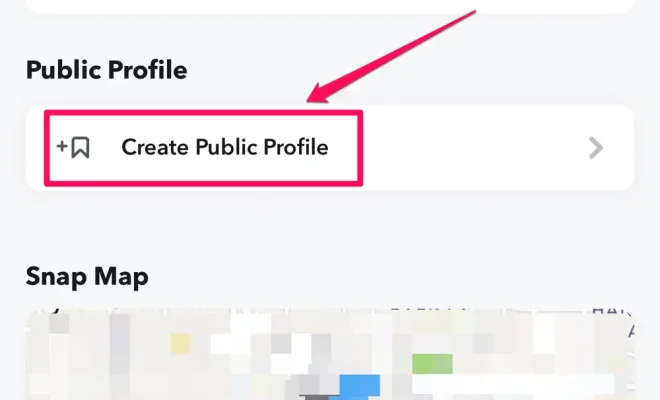
Once you have the latest version of Snapchat installed on your device, launch the app and tap on your Profile icon on the top left. Next, tap on the Gear icon at the top right to open Settings. Scroll down to “Who Can” and tap on “View My Story,” then select “Public” to enable your public profile.

Step 3: Customize your Public Profile

Once you have enabled your public profile, you can customize it by adding a profile photo or a profile video showcasing your personality or brand. You can also add links or hashtags to your public profile, which will make it easier for people to find you on Snapchat.

Step 4: Promote your Public Profile

Now that you have set up your public profile, it’s time to start promoting it to increase your followers. You can spread the word about your public profile by sharing your username on your other social media accounts or by directly telling your friends and family members to follow you on Snapchat.

Step 5: Keep your content engaging

Now that you have a public profile, it’s essential to keep its content engaging and interesting for your followers. You can do that by using various filters, lenses, and stickers on your snaps, sharing your daily activities, and showing your followers behind-the-scenes footage of your life or business.

In conclusion, making a public profile on Snapchat is not rocket science, and it’s an excellent way to expand your reach and increase your followers. By following the simple steps mentioned above and keeping your content engaging, you can create a successful public profile on Snapchat.


Previous Article

Is the Nintendo 3DS Region Free or ...

Next Article

How to Access iCloud From Your Android ...

Matthew Lynch

Related articles More from author

  • Digital & Mobile Technology

    The Best Galaxy Watch Workout Apps

    June 23, 2023
    By Matthew Lynch
  • Digital & Mobile Technology

    What Is a GIF, and How Do You Use Them?

    April 18, 2023
    By Matthew Lynch
  • Digital & Mobile Technology

    Can You Download Safari on Windows?

    June 23, 2023
    By Matthew Lynch
  • Digital & Mobile Technology

    How to Find the MAC Address of Your Laptop

    September 7, 2023
    By Matthew Lynch
  • Digital & Mobile Technology

    How to Use Maps on the Apple Watch

    July 14, 2023
    By Matthew Lynch
  • Digital & Mobile Technology

    How to Add Multiple Accounts to Meta (Oculus) Quest 2

    June 3, 2023
    By Matthew Lynch

Search

Login & Registration

  • Log in
  • Entries feed
  • Comments feed
  • WordPress.org

Newsletter

Signup for The Tech Edvocate Newsletter and have the latest in EdTech news and opinion delivered to your email address!

About Us

Since technology is not going anywhere and does more good than harm, adapting is the best course of action. That is where The Tech Edvocate comes in. We plan to cover the PreK-12 and Higher Education EdTech sectors and provide our readers with the latest news and opinion on the subject. From time to time, I will invite other voices to weigh in on important issues in EdTech. We hope to provide a well-rounded, multi-faceted look at the past, present, the future of EdTech in the US and internationally.

We started this journey back in June 2016, and we plan to continue it for many more years to come. I hope that you will join us in this discussion of the past, present and future of EdTech and lend your own insight to the issues that are discussed.

Newsletter

Signup for The Tech Edvocate Newsletter and have the latest in EdTech news and opinion delivered to your email address!

Contact Us

The Tech Edvocate
910 Goddin Street
Richmond, VA 23231
(601) 630-5238
[email protected]

Copyright © 2026 Matthew Lynch. All rights reserved.