The Tech Edvocate

Top Menu

  • Advertisement
  • Apps
  • Home Page
  • Home Page Five (No Sidebar)
  • Home Page Four
  • Home Page Three
  • Home Page Two
  • Home Tech2
  • Icons [No Sidebar]
  • Left Sidbear Page
  • Lynch Educational Consulting
  • My Account
  • My Speaking Page
  • Newsletter Sign Up Confirmation
  • Newsletter Unsubscription
  • Our Brands
  • Page Example
  • Privacy Policy
  • Protected Content
  • Register
  • Request a Product Review
  • Shop
  • Shortcodes Examples
  • Signup
  • Start Here
    • Governance
    • Careers
    • Contact Us
  • Terms and Conditions
  • The Edvocate
  • The Tech Edvocate Product Guide
  • Topics
  • Write For Us
  • Advertise

Main Menu

  • Start Here
    • Our Brands
    • Governance
      • Lynch Educational Consulting, LLC.
      • Dr. Lynch’s Personal Website
      • Careers
    • Write For Us
    • The Tech Edvocate Product Guide
    • Contact Us
    • Books
    • Edupedia
    • Post a Job
    • The Edvocate Podcast
    • Terms and Conditions
    • Privacy Policy
  • Topics
    • Assistive Technology
    • Child Development Tech
    • Early Childhood & K-12 EdTech
    • EdTech Futures
    • EdTech News
    • EdTech Policy & Reform
    • EdTech Startups & Businesses
    • Higher Education EdTech
    • Online Learning & eLearning
    • Parent & Family Tech
    • Personalized Learning
    • Product Reviews
  • Advertise
  • Tech Edvocate Awards
  • The Edvocate
  • Pedagogue
  • School Ratings

logo

The Tech Edvocate

  • Start Here
    • Our Brands
    • Governance
      • Lynch Educational Consulting, LLC.
      • Dr. Lynch’s Personal Website
        • My Speaking Page
      • Careers
    • Write For Us
    • The Tech Edvocate Product Guide
    • Contact Us
    • Books
    • Edupedia
    • Post a Job
    • The Edvocate Podcast
    • Terms and Conditions
    • Privacy Policy
  • Topics
    • Assistive Technology
    • Child Development Tech
    • Early Childhood & K-12 EdTech
    • EdTech Futures
    • EdTech News
    • EdTech Policy & Reform
    • EdTech Startups & Businesses
    • Higher Education EdTech
    • Online Learning & eLearning
    • Parent & Family Tech
    • Personalized Learning
    • Product Reviews
  • Advertise
  • Tech Edvocate Awards
  • The Edvocate
  • Pedagogue
  • School Ratings
  • Unbelievable: This One Ad Sparked Mass Fury — And It’s Not What You Think

  • Urgent: 25,000 Dressers Recalled on Amazon, Wayfair – A Fatal Flaw You Need to Know

  • This Wild AI Startup Feud Is Exposing the Dark Side of Viral Marketing

  • Unbelievable: Judges Just Upheld the Trump Blacklisting of a Major AI Startup

  • The Scandalous PapaSmithy Apology: Why Fans Are Still Furious About FlyQuest’s Controversial Video

  • Macau Gaming Dispute Escalates to Classroom Knife Attack: A Troubling Warning

  • School Surveys & Student Privacy: A Parent Guide for 2026

  • The Billion-Dollar Blunder: Why AI Detection Software Is Failing Our Students

  • China’s 5-Minute EV Charge: The Staggering Truth America Ignores

  • This Astonishing Nikon AI Controversy Exposes Science’s New Frontier

Assistive Technology
Home›Assistive Technology›How to Know if Someone Else Is Using Your PSN Account

How to Know if Someone Else Is Using Your PSN Account
By Matthew Lynch
June 30, 2023
0
Spread the love

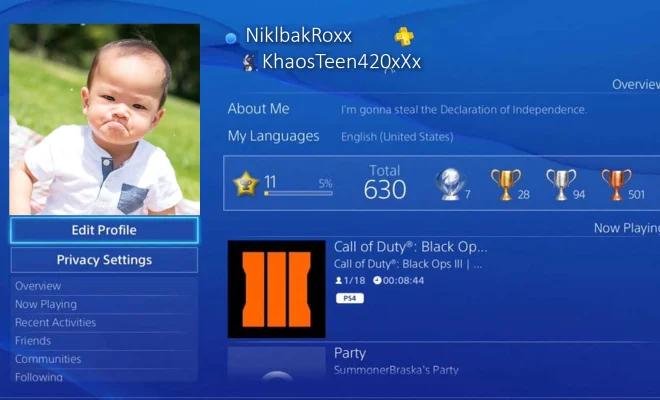
If you’re an avid PlayStation gamer, you may have noticed strange activity on your account or purchases you didn’t make. In that case, you’re likely to be hacked, and your account credentials stolen by a third party. So, the question is, how do you know if someone else is using your PSN account? In this article, we’ll show you some common signs that can help you spot unauthorized access and tips to protect your account.

1. Unauthorized Purchases:

One of the most apparent signs of a hacked account is unauthorized purchases that were not made by you. You may notice strange account activity such as billing statements you don’t recognize, or titles and content in your purchase history you didn’t buy. Once you realize this, quickly contact Sony’s customer support and report the fraudulent activities.

2. Change in Password:

Another suspicious activity is a change in your PSN account’s password. This could indicate that someone else has gained access to your account and changed the password to prevent you from accessing it. If you haven’t made any such changes, then change your credentials immediately and enable two-factor authentication for additional security.

3. Suspicious Notifications:

If you have enabled email notifications from PlayStation Network, then you can keep track of all activities inside your PSN account. If you receive notifications about activities or purchases that you didn’t initiate or request, it’s a sign that someone else is using your account, and you need to take immediate action by contacting Sony.

4. Friends and Messages:

If you notice unusual friends or messages in your chat list, it could mean that someone else has access to your account and is using it to socialize with other players. The hackers can use your account to send malicious messages, viruses, or spread scams and phishing links. Therefore, it’s necessary to monitor your friend’s list regularly and take prompt action if you suspect any suspicious activity.

5. Gamertag and Avatar:

If you notice any changes in your PSN account’s gamertag, avatar, or profile picture, it could mean that someone has hacked into your account and attempting to alter your account’s appearance for their own benefit. Therefore, make sure to inspect your account frequently, and if anything seems out of place, reset your account password immediately.

In conclusion, it is vital to keep an eye on your PSN account activity from time to time to prevent the possibility of unauthorized access. Whenever you notice any suspicious activity, quickly report it to Sony’s customer support, change your password, and enable two-factor authentication to protect your account. Remember, always be cautious about giving out your account details and password, especially to anyone you don’t know, as it can lead to severe consequences that could harm both you and your account.


Previous Article

How to Use PlayStation 2 Devices on ...

Next Article

How to View Your Doorbell Camera on ...

Matthew Lynch

Related articles More from author

  • Assistive Technology

    How to Check Your Mac’s Memory for Problems

    June 15, 2023
    By Matthew Lynch
  • Assistive Technology

    How to Fix DNS Server Not Responding Errors

    June 22, 2023
    By Matthew Lynch
  • Assistive Technology

    How to Check the Battery Health of Your MacBook

    June 14, 2023
    By Matthew Lynch
  • Assistive Technology

    How to Connect Bluetooth Headphones to Your PC

    June 23, 2023
    By Matthew Lynch
  • Assistive Technology

    How to Turn Off Your Nintendo Switch

    June 8, 2023
    By Matthew Lynch
  • Assistive Technology

    How to Avoid People You Know on Tinder

    June 12, 2023
    By Matthew Lynch

Search

Login & Registration

  • Log in
  • Entries feed
  • Comments feed
  • WordPress.org

Newsletter

Signup for The Tech Edvocate Newsletter and have the latest in EdTech news and opinion delivered to your email address!

About Us

Since technology is not going anywhere and does more good than harm, adapting is the best course of action. That is where The Tech Edvocate comes in. We plan to cover the PreK-12 and Higher Education EdTech sectors and provide our readers with the latest news and opinion on the subject. From time to time, I will invite other voices to weigh in on important issues in EdTech. We hope to provide a well-rounded, multi-faceted look at the past, present, the future of EdTech in the US and internationally.

We started this journey back in June 2016, and we plan to continue it for many more years to come. I hope that you will join us in this discussion of the past, present and future of EdTech and lend your own insight to the issues that are discussed.

Newsletter

Signup for The Tech Edvocate Newsletter and have the latest in EdTech news and opinion delivered to your email address!

Contact Us

The Tech Edvocate
910 Goddin Street
Richmond, VA 23231
(601) 630-5238
[email protected]

Copyright © 2026 Matthew Lynch. All rights reserved.