The Tech Edvocate

Top Menu

  • Advertisement
  • Apps
  • Home Page
  • Home Page Five (No Sidebar)
  • Home Page Four
  • Home Page Three
  • Home Page Two
  • Home Tech2
  • Icons [No Sidebar]
  • Left Sidbear Page
  • Lynch Educational Consulting
  • My Account
  • My Speaking Page
  • Newsletter Sign Up Confirmation
  • Newsletter Unsubscription
  • Our Brands
  • Page Example
  • Privacy Policy
  • Protected Content
  • Register
  • Request a Product Review
  • Shop
  • Shortcodes Examples
  • Signup
  • Start Here
    • Governance
    • Careers
    • Contact Us
  • Terms and Conditions
  • The Edvocate
  • The Tech Edvocate Product Guide
  • Topics
  • Write For Us
  • Advertise

Main Menu

  • Start Here
    • Our Brands
    • Governance
      • Lynch Educational Consulting, LLC.
      • Dr. Lynch’s Personal Website
      • Careers
    • Write For Us
    • The Tech Edvocate Product Guide
    • Contact Us
    • Books
    • Edupedia
    • Post a Job
    • The Edvocate Podcast
    • Terms and Conditions
    • Privacy Policy
  • Topics
    • Assistive Technology
    • Child Development Tech
    • Early Childhood & K-12 EdTech
    • EdTech Futures
    • EdTech News
    • EdTech Policy & Reform
    • EdTech Startups & Businesses
    • Higher Education EdTech
    • Online Learning & eLearning
    • Parent & Family Tech
    • Personalized Learning
    • Product Reviews
  • Advertise
  • Tech Edvocate Awards
  • The Edvocate
  • Pedagogue
  • School Ratings

logo

The Tech Edvocate

  • Start Here
    • Our Brands
    • Governance
      • Lynch Educational Consulting, LLC.
      • Dr. Lynch’s Personal Website
        • My Speaking Page
      • Careers
    • Write For Us
    • The Tech Edvocate Product Guide
    • Contact Us
    • Books
    • Edupedia
    • Post a Job
    • The Edvocate Podcast
    • Terms and Conditions
    • Privacy Policy
  • Topics
    • Assistive Technology
    • Child Development Tech
    • Early Childhood & K-12 EdTech
    • EdTech Futures
    • EdTech News
    • EdTech Policy & Reform
    • EdTech Startups & Businesses
    • Higher Education EdTech
    • Online Learning & eLearning
    • Parent & Family Tech
    • Personalized Learning
    • Product Reviews
  • Advertise
  • Tech Edvocate Awards
  • The Edvocate
  • Pedagogue
  • School Ratings
  • 10 Crucial AI Literacy Courses Every Parent Needs Now

  • The Unseen Force Quietly Reshaping Rural Life: 7 Satellite Internet Providers Battling for Supremacy

  • Best Buy’s Gamers Hub: The Unbelievable Truth About Its “Rewards” And Discounts

  • 8 Crucial Reasons Why MAI-DxO Just Obliterated Doctors in a Head-to-Head Diagnosis Battle

  • The Brutal Truth About Student Loan Refinancing for New Grads in 2024

  • The Brutal Truth: AI Just Blew Up PHP Security – Here’s How to Survive ‘Black October’

  • Sodium-ion storage maker Peak Energy raises $108 million in GM-led round – PV Magazine

  • Stunning: 93,000 Nursing School Applicants Rejected — Here’s Why It’s a Crisis

  • One Ancient PHP Bug Hid for 14 Years — Until AI Found It in 7 Days

  • The Brutal Truth: Why 12 Million Users Couldn’t Save Character.AI From Bankruptcy

Digital & Mobile Technology
Home›Digital & Mobile Technology›How to Increase Storage on a Laptop

How to Increase Storage on a Laptop
By Matthew Lynch
June 12, 2023
0
Spread the love

As technology becomes more mobile and compact, the amount of storage on a laptop might not always be enough. Upgrading the storage on a laptop is not always an option, but there are a few options to increase the storage capacity.

1. External Hard Drive

An external hard drive is an easy and affordable way to increase storage. It’s simple to connect to a laptop via USB or Thunderbolt and can be used to store files, photos, videos, and documents. External hard drives can come in different sizes and storage capacities, so be sure to get one that suits your needs.

2. Cloud Storage

Another way to increase storage on a laptop is to use cloud storage services like Google Drive, Dropbox or OneDrive. These services allow you to store and access files and documents from anywhere as long as you have an internet connection. This makes it easier to access files from multiple devices without the need for physical storage space.

3. Upgrade the Internal Hard Drive

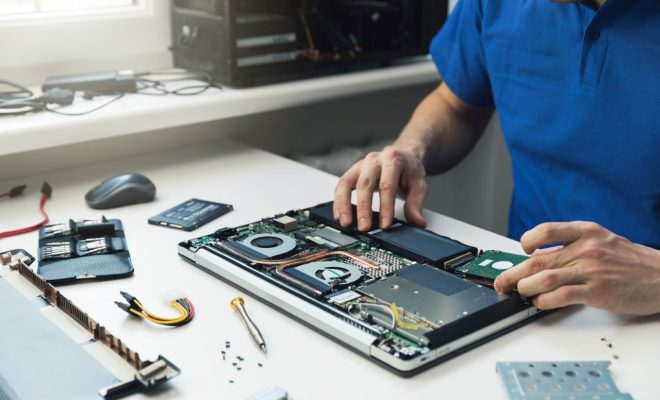
If you’re comfortable opening up your laptop, you could consider upgrading the internal hard drive to one with a larger capacity. This option may require some technical know-how, and it’s important to ensure compatibility before purchasing a new hard drive. It’s also recommended to backup all essential files before making any modifications.

4. Solid-State Drives (SSDs)

SSDs are the newer version of hard drives with a larger storage capacity than traditional hard drives. They work faster, generate less heat, and are more durable. If your laptop still uses a traditional hard drive, consider upgrading to an SSD.

5. SD Cards or USB Drives

Using an SD card or USB drive is a quick and easy way to increase storage. However, using them as permanent storage options can be risky, as they can be lost or damaged. It’s best to use them for temporary storage or as a backup for files.

In conclusion, there are several ways to increase storage on a laptop – some easier and more cost-effective than others. External hard drives, cloud storage, SSDs, SD cards or USB drives, or upgrading the internal hard drive are all options worth considering depending on your needs and budget. As always, it’s essential to backup all files before making any modifications, to ensure safety and ultimately protect your valuable data.


Previous Article

Best British Streaming Services in 2023

Next Article

How to Convert a Word Document to ...

Matthew Lynch

Related articles More from author

  • Digital & Mobile Technology

    Free Fan-Made Pokémon MMOs All Trainers Will Love

    August 5, 2023
    By Matthew Lynch
  • Digital & Mobile Technology

    Is eBay Down … or Is It Just You?

    June 10, 2023
    By Matthew Lynch
  • Digital & Mobile Technology

    How to Find Public Restrooms Near You with Google Maps

    May 28, 2023
    By Matthew Lynch
  • Digital & Mobile Technology

    How to restore a deleted voice mail on the iPhone

    July 4, 2023
    By Matthew Lynch
  • Digital & Mobile Technology

    How to Disable JavaScript in Safari for iPhone

    June 4, 2023
    By Matthew Lynch
  • Digital & Mobile Technology

    Family-Friendly Stand-Up Comedy Specials to Watch on Netflix

    April 13, 2023
    By Matthew Lynch

Search

Login & Registration

  • Log in
  • Entries feed
  • Comments feed
  • WordPress.org

Newsletter

Signup for The Tech Edvocate Newsletter and have the latest in EdTech news and opinion delivered to your email address!

About Us

Since technology is not going anywhere and does more good than harm, adapting is the best course of action. That is where The Tech Edvocate comes in. We plan to cover the PreK-12 and Higher Education EdTech sectors and provide our readers with the latest news and opinion on the subject. From time to time, I will invite other voices to weigh in on important issues in EdTech. We hope to provide a well-rounded, multi-faceted look at the past, present, the future of EdTech in the US and internationally.

We started this journey back in June 2016, and we plan to continue it for many more years to come. I hope that you will join us in this discussion of the past, present and future of EdTech and lend your own insight to the issues that are discussed.

Newsletter

Signup for The Tech Edvocate Newsletter and have the latest in EdTech news and opinion delivered to your email address!

Contact Us

The Tech Edvocate
910 Goddin Street
Richmond, VA 23231
(601) 630-5238
[email protected]

Copyright © 2026 Matthew Lynch. All rights reserved.