The Tech Edvocate

Top Menu

  • Advertisement
  • Apps
  • Home Page
  • Home Page Five (No Sidebar)
  • Home Page Four
  • Home Page Three
  • Home Page Two
  • Home Tech2
  • Icons [No Sidebar]
  • Left Sidbear Page
  • Lynch Educational Consulting
  • My Account
  • My Speaking Page
  • Newsletter Sign Up Confirmation
  • Newsletter Unsubscription
  • Our Brands
  • Page Example
  • Privacy Policy
  • Protected Content
  • Register
  • Request a Product Review
  • Shop
  • Shortcodes Examples
  • Signup
  • Start Here
    • Governance
    • Careers
    • Contact Us
  • Terms and Conditions
  • The Edvocate
  • The Tech Edvocate Product Guide
  • Topics
  • Write For Us
  • Advertise

Main Menu

  • Start Here
    • Our Brands
    • Governance
      • Lynch Educational Consulting, LLC.
      • Dr. Lynch’s Personal Website
      • Careers
    • Write For Us
    • The Tech Edvocate Product Guide
    • Contact Us
    • Books
    • Edupedia
    • Post a Job
    • The Edvocate Podcast
    • Terms and Conditions
    • Privacy Policy
  • Topics
    • Assistive Technology
    • Child Development Tech
    • Early Childhood & K-12 EdTech
    • EdTech Futures
    • EdTech News
    • EdTech Policy & Reform
    • EdTech Startups & Businesses
    • Higher Education EdTech
    • Online Learning & eLearning
    • Parent & Family Tech
    • Personalized Learning
    • Product Reviews
  • Advertise
  • Tech Edvocate Awards
  • The Edvocate
  • Pedagogue
  • School Ratings

logo

The Tech Edvocate

  • Start Here
    • Our Brands
    • Governance
      • Lynch Educational Consulting, LLC.
      • Dr. Lynch’s Personal Website
        • My Speaking Page
      • Careers
    • Write For Us
    • The Tech Edvocate Product Guide
    • Contact Us
    • Books
    • Edupedia
    • Post a Job
    • The Edvocate Podcast
    • Terms and Conditions
    • Privacy Policy
  • Topics
    • Assistive Technology
    • Child Development Tech
    • Early Childhood & K-12 EdTech
    • EdTech Futures
    • EdTech News
    • EdTech Policy & Reform
    • EdTech Startups & Businesses
    • Higher Education EdTech
    • Online Learning & eLearning
    • Parent & Family Tech
    • Personalized Learning
    • Product Reviews
  • Advertise
  • Tech Edvocate Awards
  • The Edvocate
  • Pedagogue
  • School Ratings
  • Cybersecurity vs. Green Energy: Which Path Will Make You Richer in 2026?

  • Why These 10 Renewable Energy Certifications Are Quietly Reshaping Careers by 2026

  • Why Millions Are Rushing to Online Renewable Energy Certifications Right Now

  • August AI vs. USMLE: The Unsettling Future of Medical Licensing

  • One AI’s Perfect USMLE Score Just Blew Up Medical Education As We Know It

  • This AI Just Aced the USMLE: Why Your Medical Career Might Never Be the Same

  • The Quiet Exodus: Why Senior FinTech Developers Are Abandoning Corporate Life

  • The Quiet Revolution: Where Elite FinTech Developers Are Fleeing in 2026

  • The Quiet Exodus: Why Senior FinTech Developers Are Ditching Corporate Life

  • AI Governance Software: Pricing and Features Comparison

Digital & Mobile Technology
Home›Digital & Mobile Technology›How To Extend Your Wi-Fi Network With Simple Access Points

How To Extend Your Wi-Fi Network With Simple Access Points
By Matthew Lynch
May 28, 2023
0
Spread the love

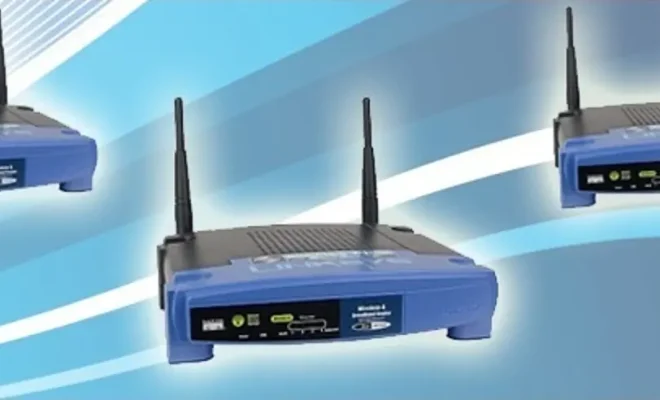
If you are having trouble covering the entire area of your home or office with a Wi-Fi signal, you may need to extend your network’s reach with access points. Access points are devices that connect to your existing network and broadcast a Wi-Fi signal in a different location. They can be a simple and cost-effective solution to your Wi-Fi coverage woes. Here are some steps to extend your Wi-Fi network with access points.

Step 1: Choose the Right Access Point

Before installing access points, you need to choose the right device for your network. There are two types of access points: wireless and wired. Wireless access points connect to your existing network wirelessly, while wired access points need an Ethernet cable to connect to the network.

Wireless access points are suitable when you don’t have Ethernet cables running throughout your home, giving you the flexibility to place access points in different locations. Wired access points are preferred when you have wires already installed. They provide a more stable and faster connection to the network.

Moreover, you need to choose an access point with features that suit your needs. For example, if you have a large home, you may need an access point with a longer range. If your network handles many devices, then you need an access point with a high capacity.

Step 2: Find the Right Location for the Access Point

The location of the access point is essential to ensure it provides optimal coverage. The access point should be located close to the area where the signal strength is low. Always keep in mind that the signal decreases when it passes through walls or obstacles.

Choose a central location that has the least obstruction and maximum coverage area. A good place could be in the middle of the house, on the ceiling, or on the wall around the stairwell. If you have Ethernet cable running, try to place the access point where you can easily connect them.

Step 3: Configure the Access Point

Once you find the right position for your access point, the next step is to configure it. Depending on the manufacturer, there are different requirements to set up the device, but most access points have a web-based interface where you can configure them.

To access the web interface, connect your computer to the access point with an Ethernet cable, then open a browser and enter the access point’s IP address. The IP address can be found in the user manual or labeled on the device.

Once you are in the web interface, you can configure the access point’s name, security settings, password, and other settings. You need to make sure to use the same network name (SSID) and password as your existing network to ensure a seamless transition between access points.

Step 4: Test Your Network

After configuring the access point, test your network to ensure proper coverage. Connect your devices to the Wi-Fi network and move around the house or office to test the signal strength. Ensure the Wi-Fi signal is stable and that your devices are smoothly switching between access points.

In a nutshell, using access points to extend your Wi-Fi network is an efficient way to increase coverage area and improve signal strength. You just need to follow these simple steps to configure the access points correctly, and you can enjoy a seamless Wi-Fi experience across your entire property.


Previous Article

How to Factory Reset a Chromebook (Even ...

Next Article

How to Factory Reset a Windows 11 ...

Matthew Lynch

Related articles More from author

  • Digital & Mobile Technology

    Great Sites Where You Can Sell Your Own Music

    June 21, 2023
    By Matthew Lynch
  • Digital & Mobile Technology

    How to Unblock Netflix

    May 30, 2023
    By Matthew Lynch
  • Digital & Mobile Technology

    The Funniest Stand-Up Comedy Videos on YouTube

    June 12, 2023
    By Matthew Lynch
  • Digital & Mobile Technology

    How to Change Lock Screen on Mac

    July 6, 2023
    By Matthew Lynch
  • Digital & Mobile Technology

    How to Use Data Validation in Google Sheets

    June 22, 2023
    By Matthew Lynch
  • Digital & Mobile Technology

    What Are TikTok Gifts, Diamonds, and Coins?

    June 6, 2023
    By Matthew Lynch

Search

Login & Registration

  • Log in
  • Entries feed
  • Comments feed
  • WordPress.org

Newsletter

Signup for The Tech Edvocate Newsletter and have the latest in EdTech news and opinion delivered to your email address!

About Us

Since technology is not going anywhere and does more good than harm, adapting is the best course of action. That is where The Tech Edvocate comes in. We plan to cover the PreK-12 and Higher Education EdTech sectors and provide our readers with the latest news and opinion on the subject. From time to time, I will invite other voices to weigh in on important issues in EdTech. We hope to provide a well-rounded, multi-faceted look at the past, present, the future of EdTech in the US and internationally.

We started this journey back in June 2016, and we plan to continue it for many more years to come. I hope that you will join us in this discussion of the past, present and future of EdTech and lend your own insight to the issues that are discussed.

Newsletter

Signup for The Tech Edvocate Newsletter and have the latest in EdTech news and opinion delivered to your email address!

Contact Us

The Tech Edvocate
910 Goddin Street
Richmond, VA 23231
(601) 630-5238
[email protected]

Copyright © 2026 Matthew Lynch. All rights reserved.