How to create picture in picture effect
“`html
The picture in picture effect (PiP) has become a go-to technique in video production, streaming, and social media, allowing viewers to multitask while keeping an eye on the content they love. Whether you’re a content creator wanting to engage your audience or just someone looking to enhance your video-watching experience, knowing how to create this effect is an essential skill. In this article, we’ll explore what the picture in picture effect is, how to create it across different platforms, and some tips on maximizing its impact.
1. Understanding the Picture in Picture Effect
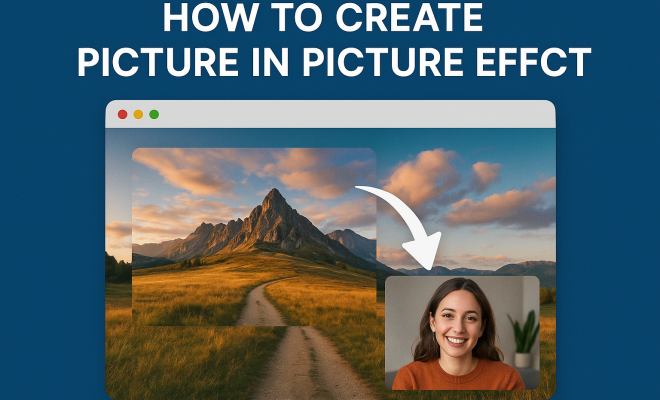
The picture in picture effect allows a small video window to overlay on top of another video or content, making it possible to view multiple pieces of content at once. Originally popularized by television broadcasts—where a sports game might be shown alongside news updates—this technique has now transitioned into the digital realm, particularly in video conferencing, streaming, and mobile applications.
One of the most appealing aspects of PiP is its versatility. It can be used for various purposes: live tutorials, gaming streams, or simply watching a video while browsing the internet. This multi-window functionality enhances user engagement, allowing viewers to consume content without losing focus on their primary task.
2. Tools You Need to Create Picture in Picture Effect
Creating the picture in picture effect requires specific tools that depend on your needs and the platform you’re using. Here are some popular options:
- Video Editing Software: Programs like Adobe Premiere Pro, Final Cut Pro, and DaVinci Resolve offer robust features for creating PiP effects. They allow precise control over video layers, resizing, and positioning.
- Screen Recording Tools: Software like OBS Studio or Camtasia enables users to record their screens while using the PiP effect, suitable for tutorials and presentations.
- Mobile Apps: For quick edits on-the-go, apps like KineMaster or iMovie on smartphones can achieve the PiP effect with relative ease.
Choosing the right tool depends on your level of expertise and the complexity of the project. Beginners might prefer mobile apps for simplicity, while advanced users will benefit from full-fledged video editing software.
3. Creating Picture in Picture Effect on Desktop
To create the picture in picture effect on a desktop, follow these general steps using a video editing software. Let’s use Adobe Premiere Pro as an example:
- Import Your Videos: Start by importing both the primary video and the video you wish to overlay into your project panel.
- Drag to Timeline: Place your primary video on Video Track 1 and your overlay video on Video Track 2 in the timeline.
- Transform the Overlay: Click on the overlay video clip in the timeline, then go to the ‘Effects Controls’ panel. Here, you can resize and reposition the overlay video to create the PiP effect.
- Add Borders or Shadows: To make your PiP video stand out, consider adding borders or shadows through the effects panel.
- Export Your Video: Once satisfied, export your project to render the final video with the picture in picture effect.
By mastering these steps in a desktop environment, you can create polished productions that keep your audience engaged.
4. Creating Picture in Picture Effect on Mobile
The process of creating a picture in picture effect on mobile can be just as effective, albeit simpler. Using KineMaster, here’s how you can achieve it:
- Open KineMaster: Launch the app and create a new project. Then, import your main video clip.
- Add Overlay: Tap on the media button to add your overlay video, which will be placed on a new layer.
- Resize and Position: Use pinch gestures to resize the overlay video and drag it to your desired position on the screen.
- Export Your Project: After editing, tap the export button to save your video with the desired picture in picture effect.
Mobile apps such as KineMaster are designed for quick edits, making the process intuitive and user-friendly. (See: Wikipedia article on Picture-in-Picture.)
5. Using Picture in Picture in Live Streaming
The picture in picture effect is increasingly used in live streaming to maintain viewer engagement. Platforms like OBS Studio or Streamlabs OBS allow streamers to integrate PiP easily:
- Set Up Your Sources: In OBS, add your video source (such as a game capture) and your webcam.
- Position Your Webcam: Resize and position the webcam feed to create the PiP effect. You can drag it around the canvas as needed.
- Configure Streaming Settings: Before going live, ensure all settings are optimized for quality.
Streamers can engage with their audience while displaying gameplay or other content, enhancing the overall viewing experience.
6. Benefits of Using Picture in Picture Effect
Incorporating the picture in picture effect into your content offers numerous benefits:
- Enhanced Engagement: Viewers can consume dual content, significantly increasing retention rates.
- Improved Learning: In educational videos, PiP can show a tutor alongside their instructional content, which aids visual learning.
- Creative Flexibility: The PiP effect encourages innovative storytelling by allowing creators to blend different content types seamlessly.
These benefits make it clear why the PiP effect continues to gain traction across various platforms, from YouTube tutorials to live gaming streams.
7. Common Mistakes to Avoid
While the picture in picture effect can greatly enhance your video content, there are common pitfalls to watch out for:
- Overlapping Content: Too much overlay can clutter the screen and confuse viewers. Maintain a balance between the primary and secondary content.
- Inconsistent Quality: Ensure that the overlay video matches the quality of the primary video to avoid distracting viewers.
- Poor Positioning: Always position the overlay in a way that it doesn’t block essential parts of the primary video.
Avoiding these mistakes will help you create a more polished and professional-looking product.
8. Current Trends and Future of Picture in Picture Effect
The use of the picture in picture effect is evolving, especially with the rise of virtual reality (VR) and augmented reality (AR). These immersive technologies are beginning to integrate PiP-like features, allowing users to experience content in ways previously unimagined.
Moreover, as social media platforms continue to expand their video capabilities, it’s likely that the demand for more sophisticated PiP options will grow. Expect future apps and software to provide even more tools to create dynamic, engaging content that keeps viewers captivated.
9. Tips for Maximizing Your Picture in Picture Effect
To truly make your picture in picture effect stand out, consider these expert tips:
- Keep it Simple: A simple design often works best. Avoid overly complicated overlays that may distract from the main content.
- Test Different Sizes: Experiment with different sizes and positions of the PiP window to find what works best for your specific content.
- Engage with Viewers: If applicable, use the PiP effect to respond to viewer questions or comments in real-time, creating a more interactive experience.
With these tips, you can harness the full potential of the picture in picture effect to enhance your content and engage with your audience more effectively. (See: CDC resources on multimedia effects.)
10. Examples of Picture in Picture Effect in Action
Seeing the picture in picture effect in action can provide inspiration and insight into how it can be effectively utilized across various platforms. Here are some examples:
- Educational Videos: Many online educators use the PiP effect to display themselves while demonstrating software or leading tutorials. This technique adds a personal touch and helps create a connection with the audience.
- Gaming Streams: Streamers like Ninja and Pokimane effectively use PiP to keep their face and reactions visible while showcasing gameplay. This dual focus keeps viewers engaged by allowing them to experience both the game and the streamer’s reactions simultaneously.
- Product Reviews: Influencers and reviewers often employ the PiP effect to show products in use while providing commentary. This method highlights features and benefits in real-time.
11. Statistics on Viewer Engagement
Understanding how the picture in picture effect impacts viewer engagement can help content creators realize its potential. Here are some relevant statistics:
- A study by Wyzowl found that 84% of people say they’ve been convinced to buy a product or service after watching a brand’s video.
- According to HubSpot, including video content on landing pages can increase conversion rates by up to 80%.
- Viewers retain 95% of a message when they watch it in a video compared to just 10% when reading it in text.
These statistics emphasize the importance of engaging video content and the role of techniques like the picture in picture effect in enhancing viewer retention and persuasion.
12. FAQ About the Picture in Picture Effect
What is the picture in picture effect?
The picture in picture effect is a video technique that allows one video to overlay another, enabling viewers to see both simultaneously. This is commonly used in streaming, tutorials, and presentations.
Can I use the picture in picture effect for live streaming?
Yes, many live streaming software options, such as OBS Studio and Streamlabs OBS, allow streamers to implement the picture in picture effect easily, enhancing viewer engagement.
Is the picture in picture effect easy to create?
Creating the picture in picture effect can be straightforward, especially with user-friendly mobile apps like KineMaster or video editing software such as Adobe Premiere Pro. As you practice, you’ll get the hang of it quickly.
What are some common mistakes when using the picture in picture effect?
Common mistakes include cluttering the screen with too much content, using videos of inconsistent quality, and poorly positioning the overlay video so that it obstructs key parts of the main content.
How can I maximize the picture in picture effect in my videos?
To maximize the effect, keep designs simple, test different overlay sizes and positions, and engage with your viewers through real-time interactions. Always aim for a clean and professional look. (See: Research on video multitasking effects.)
Are there any platforms that specifically support the picture in picture effect?
Yes, platforms like YouTube, Facebook Live, and Twitch support the picture in picture effect, allowing for a richer viewing experience across various types of content.
13. Advanced Techniques for Picture in Picture Effect
If you’re looking to elevate your use of the picture in picture effect, consider these advanced techniques:
- Dynamic Resizing: Instead of a static overlay, use keyframes to create animations that make the PiP window grow, shrink, or move during the video. This keeps it visually engaging.
- Interactive Elements: Incorporate clickable elements in your PiP overlay that can guide viewers to additional content or prompts, enhancing interactivity.
- Color Grading: Ensure that your overlay video matches the color grading of your primary video. This creates a cohesive look and feel that enhances professionalism.
14. Real-World Applications of Picture in Picture Effect
The picture in picture effect isn’t just a trendy video editing technique; it has real-world applications across various industries. Here are a few notable examples:
- Corporate Training: Many companies use PiP in training videos, placing an instructor’s video alongside slides or demonstrations. This approach personalizes the learning experience and can lead to better retention of information.
- News Broadcasting: News channels frequently utilize PiP to present live reports while showcasing footage relevant to ongoing stories. This allows viewers to stay informed about multiple aspects of current events simultaneously.
- Health and Fitness: Fitness trainers use PiP to demonstrate exercises while providing verbal instructions, enabling viewers to follow along more effectively.
15. Challenges When Implementing Picture in Picture Effect
While the picture in picture effect is powerful, there are challenges involved in its implementation:
- Technical Limitations: Some platforms may have restrictions on how many video sources can be used simultaneously. This can limit a creator’s ability to produce complex PiP setups.
- Viewer Distraction: If not executed well, a PiP effect can overwhelm viewers, detracting from the primary message. Striking the right balance is crucial.
- File Size and Performance: Maintaining video quality while implementing PiP can lead to increased file sizes, which may affect performance on slower devices or internet connections.
16. Future Innovations in Picture in Picture Technology
The future of the picture in picture effect is promising, with existing technology steadily evolving. Here are a few innovations to watch for:
- AI Integration: With advancements in artificial intelligence, we can expect smarter video editing tools that automatically suggest optimal placements for PiP windows based on the content being displayed.
- Virtual Reality (VR) Implementations: As VR continues to grow, integrating PiP into VR experiences could allow users to watch their favorite content while immersed in a virtual environment, enhancing the overall experience.
- Augmented Reality (AR) Applications: AR can bring the PiP effect into real-world applications, where users can overlay instructional videos on real objects, such as in DIY projects or repairs.
17. Conclusion
The picture in picture effect is more than just a video editing trick; it’s a powerful tool that enhances viewer engagement and encourages effective communication across various platforms. By mastering its use, you can create compelling content that resonates with your audience, whether through tutorials, live streams, or presentations. The journey of creating dynamic video content with the PiP effect is continuously evolving as technology advances, and by staying informed about new trends and techniques, you can ensure your content remains relevant and engaging.
“`
Trending Now
Frequently Asked Questions
What is the picture in picture effect?
The picture in picture effect (PiP) allows a small video window to overlay on top of another video or content. It enables viewers to multitask by watching multiple pieces of content simultaneously, enhancing user engagement and experience.
How do I create a picture in picture effect?
To create a picture in picture effect, you can use video editing software like Adobe Premiere Pro or Final Cut Pro. These tools allow you to layer videos, adjust sizes, and position them as needed to achieve the PiP effect.
What tools do I need for picture in picture effect?
Creating the picture in picture effect requires tools like video editing software (e.g., Adobe Premiere Pro), screen recording tools (e.g., OBS Studio), or mobile apps (e.g., KineMaster) depending on your platform and needs.
Where is the picture in picture effect commonly used?
The picture in picture effect is widely used in video production, streaming, and social media. It's common in live tutorials, gaming streams, and video conferencing, allowing users to engage with multiple content sources at once.
What are the benefits of using picture in picture?
The benefits of using the picture in picture effect include enhanced viewer engagement, the ability to multitask, and improved content consumption. It allows users to focus on primary tasks while keeping an eye on additional content.
Agree or disagree? Drop a comment and tell us what you think.