
The Tech Edvocate

Top Menu

  • Advertisement
  • Apps
  • Home Page
  • Home Page Five (No Sidebar)
  • Home Page Four
  • Home Page Three
  • Home Page Two
  • Home Tech2
  • Icons [No Sidebar]
  • Left Sidbear Page
  • Lynch Educational Consulting
  • My Account
  • My Speaking Page
  • Newsletter Sign Up Confirmation
  • Newsletter Unsubscription
  • Our Brands
  • Page Example
  • Privacy Policy
  • Protected Content
  • Register
  • Request a Product Review
  • Shop
  • Shortcodes Examples
  • Signup
  • Start Here
    • Governance
    • Careers
    • Contact Us
  • Terms and Conditions
  • The Edvocate
  • The Tech Edvocate Product Guide
  • Topics
  • Write For Us
  • Advertise

Main Menu

  • Start Here
    • Our Brands
    • Governance
      • Lynch Educational Consulting, LLC.
      • Dr. Lynch’s Personal Website
      • Careers
    • Write For Us
    • The Tech Edvocate Product Guide
    • Contact Us
    • Books
    • Edupedia
    • Post a Job
    • The Edvocate Podcast
    • Terms and Conditions
    • Privacy Policy
  • Topics
    • Assistive Technology
    • Child Development Tech
    • Early Childhood & K-12 EdTech
    • EdTech Futures
    • EdTech News
    • EdTech Policy & Reform
    • EdTech Startups & Businesses
    • Higher Education EdTech
    • Online Learning & eLearning
    • Parent & Family Tech
    • Personalized Learning
    • Product Reviews
  • Advertise
  • Tech Edvocate Awards
  • The Edvocate
  • Pedagogue
  • School Ratings

logo

The Tech Edvocate

  • Start Here
    • Our Brands
    • Governance
      • Lynch Educational Consulting, LLC.
      • Dr. Lynch’s Personal Website
        • My Speaking Page
      • Careers
    • Write For Us
    • The Tech Edvocate Product Guide
    • Contact Us
    • Books
    • Edupedia
    • Post a Job
    • The Edvocate Podcast
    • Terms and Conditions
    • Privacy Policy
  • Topics
    • Assistive Technology
    • Child Development Tech
    • Early Childhood & K-12 EdTech
    • EdTech Futures
    • EdTech News
    • EdTech Policy & Reform
    • EdTech Startups & Businesses
    • Higher Education EdTech
    • Online Learning & eLearning
    • Parent & Family Tech
    • Personalized Learning
    • Product Reviews
  • Advertise
  • Tech Edvocate Awards
  • The Edvocate
  • Pedagogue
  • School Ratings
  • This One Flaw in AI Investment Advice Could Cost You Everything

  • Your Medical Data Exposed: A $2.7M Data Breach Settlement Reveals Shocking Negligence

  • Jaw-Dropping: AI Used to Bug OpenAI, Then AI Caught the Culprit

  • This New Disney Video Game Could Be Its Most Controversial…Here’s Why

  • Ubisoft Layoffs: Why This Studio Closure Is a Heartbreaking Sign of Industry-Wide Rot

  • Your AI Financial Advisor Could Be a Costly Mistake — Here’s Why You’re On The Hook

  • 8 Critical AI Zero-Day Vulnerabilities Exploits That Will Keep You Up At Night

  • Outrageous: 16 Colleges Now Cost Over $100,000 Annually — Here’s Why

  • The Startling Truth About Liberal Arts vs Technical Education in the AI Era

  • Dramatic: Volkswagen’s EV Recall Reveals a Hidden Battery Flaw You Need to Know

How To
Home›How To›How to Create a Facebook Page

How to Create a Facebook Page
By Matthew Lynch
March 31, 2024
0
Spread the love

Creating a Facebook Page for your business, organization, or personal brand is an essential step to establish a strong online presence and connect with your audience. Setting up a Facebook Page is simple, and this step-by-step guide will walk you through the process from start to finish.

Step 1: Sign in to Your Facebook Account

To create a Facebook Page, you must first be logged into your Facebook account. If you do not have an account yet, sign up at www.facebook.com.

Step 2: Access the “Create a Page” Interface

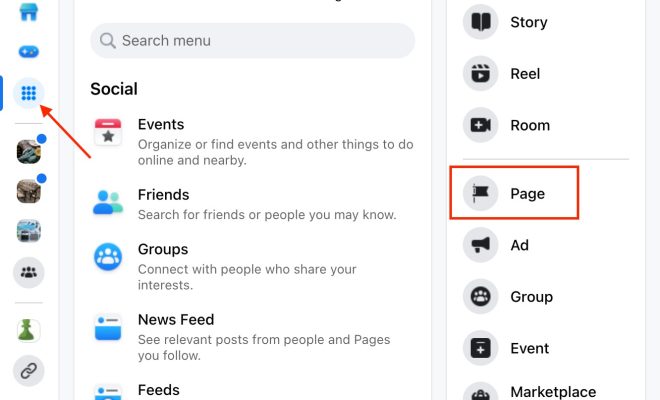
Once you are logged in, access the “Create a Page” interface by clicking on the ‘Pages’ tab on the left side of your News Feed or by typing “facebook.com/pages/create” in your browser’s address bar.

Step 3: Choose a Page Type

You will be presented with two page categories: ‘Business or brand’ and ‘Community or public figure.’ Decide which category best describes your purpose and click on the appropriate option.

Step 4: Enter Basic Information

Now that you have selected a category for your new Facebook Page:

– For ‘Business or brand,’ provide a name for your page, select your business category (e.g., retail company), provide the physical address and phone number (optional), and click ‘Continue.’

– For ‘Community or public figure,’ enter the name of your page, choose a category (e.g., local business), and click ‘Continue.’

Step 5: Add Photos

Your new Facebook Page will begin with no profile picture or cover photo. These images are crucial for branding purposes and creating an attractive page. Click on each placeholder image to upload high-quality photos.

Recommended dimensions:

– Profile picture: square image of 170×170 pixels.

– Cover photo: rectangular image of at least 820×312 pixels.

Step 6: Customize Your Page

To provide more information and enhance visitor experience, you should customize your page. Click on the ‘Edit Page Info’ tab on the top right corner to update:

– Description: Briefly summarize your business or purpose (255 characters maximum).

– Categories: Add up to three categories.

– Contact Information: Add phone number, email address, and website.

– Location: Provide a map location and operating hours if relevant.

– More options: Add a price range, privacy policy link, or an Impressum.

Step 7: Create Your First Post

Now that your Facebook Page is customized, it’s time to create your first post. Use the publisher tool by clicking ‘Create Post’ to write a welcome message or share exciting news and updates with your audience.

Step 8: Invite Friends to Like Your Page

To start growing your Facebook Page’s audience, invite your friends from your personal account to like and share the new page. You can also promote the page through other social media platforms within your online presence.

Step 9: Update Settings (Optional)

If you wish to grant roles to others, adjust posting permissions, or tailor notifications for yourself, click on ‘Settings’ in the top right corner of the page and browse through the numerous options available.

Congratulations! You have successfully created a Facebook Page. Now engage with your audience by posting regular updates, sharing valuable content, or running ads to promote products and services. The opportunities are endless with this powerful social media platform.


Previous Article

Easy Ways to Play Tambola: 9 Steps

Next Article

3 Easy Ways to Purchase Company Shares

Matthew Lynch

Related articles More from author

  • How To

    How to Create a Harry Potter Bedroom

    October 17, 2023
    By Matthew Lynch
  • How To

    How to Open Internet Explorer

    January 4, 2024
    By Matthew Lynch
  • How To

    How to Set up an AutoCAD Drawing

    February 25, 2024
    By Matthew Lynch
  • How To

    5 Ways to Repair a Paperback Book

    October 3, 2023
    By Matthew Lynch
  • How To

    4 Ways to Make Edible Glitter

    October 9, 2023
    By Matthew Lynch
  • How To

    How to Play Snaps: 13 steps

    October 25, 2023
    By Matthew Lynch

Search

Login & Registration

  • Log in
  • Entries feed
  • Comments feed
  • WordPress.org

Newsletter

Signup for The Tech Edvocate Newsletter and have the latest in EdTech news and opinion delivered to your email address!

About Us

Since technology is not going anywhere and does more good than harm, adapting is the best course of action. That is where The Tech Edvocate comes in. We plan to cover the PreK-12 and Higher Education EdTech sectors and provide our readers with the latest news and opinion on the subject. From time to time, I will invite other voices to weigh in on important issues in EdTech. We hope to provide a well-rounded, multi-faceted look at the past, present, the future of EdTech in the US and internationally.

We started this journey back in June 2016, and we plan to continue it for many more years to come. I hope that you will join us in this discussion of the past, present and future of EdTech and lend your own insight to the issues that are discussed.

Newsletter

Signup for The Tech Edvocate Newsletter and have the latest in EdTech news and opinion delivered to your email address!

Contact Us

The Tech Edvocate
910 Goddin Street
Richmond, VA 23231
(601) 630-5238
[email protected]

Copyright © 2026 Matthew Lynch. All rights reserved.