The Tech Edvocate

Top Menu

  • Advertisement
  • Apps
  • Home Page
  • Home Page Five (No Sidebar)
  • Home Page Four
  • Home Page Three
  • Home Page Two
  • Home Tech2
  • Icons [No Sidebar]
  • Left Sidbear Page
  • Lynch Educational Consulting
  • My Account
  • My Speaking Page
  • Newsletter Sign Up Confirmation
  • Newsletter Unsubscription
  • Our Brands
  • Page Example
  • Privacy Policy
  • Protected Content
  • Register
  • Request a Product Review
  • Shop
  • Shortcodes Examples
  • Signup
  • Start Here
    • Governance
    • Careers
    • Contact Us
  • Terms and Conditions
  • The Edvocate
  • The Tech Edvocate Product Guide
  • Topics
  • Write For Us
  • Advertise

Main Menu

  • Start Here
    • Our Brands
    • Governance
      • Lynch Educational Consulting, LLC.
      • Dr. Lynch’s Personal Website
      • Careers
    • Write For Us
    • The Tech Edvocate Product Guide
    • Contact Us
    • Books
    • Edupedia
    • Post a Job
    • The Edvocate Podcast
    • Terms and Conditions
    • Privacy Policy
  • Topics
    • Assistive Technology
    • Child Development Tech
    • Early Childhood & K-12 EdTech
    • EdTech Futures
    • EdTech News
    • EdTech Policy & Reform
    • EdTech Startups & Businesses
    • Higher Education EdTech
    • Online Learning & eLearning
    • Parent & Family Tech
    • Personalized Learning
    • Product Reviews
  • Advertise
  • Tech Edvocate Awards
  • The Edvocate
  • Pedagogue
  • School Ratings

logo

The Tech Edvocate

  • Start Here
    • Our Brands
    • Governance
      • Lynch Educational Consulting, LLC.
      • Dr. Lynch’s Personal Website
        • My Speaking Page
      • Careers
    • Write For Us
    • The Tech Edvocate Product Guide
    • Contact Us
    • Books
    • Edupedia
    • Post a Job
    • The Edvocate Podcast
    • Terms and Conditions
    • Privacy Policy
  • Topics
    • Assistive Technology
    • Child Development Tech
    • Early Childhood & K-12 EdTech
    • EdTech Futures
    • EdTech News
    • EdTech Policy & Reform
    • EdTech Startups & Businesses
    • Higher Education EdTech
    • Online Learning & eLearning
    • Parent & Family Tech
    • Personalized Learning
    • Product Reviews
  • Advertise
  • Tech Edvocate Awards
  • The Edvocate
  • Pedagogue
  • School Ratings
  • Miro vs Conceptboard for project management

  • How to use Teamwork for resource management

  • How much does Procore cost per month

  • How to organize Microsoft Planner buckets

  • Is Teamwork good for billable hours

  • Procore vs Buildertrend which is better

  • Airtable project management templates

  • Can Miro track project progress

  • How to use Basecamp for client work

  • Can Lucidchart create swimlane diagrams

Digital & Mobile Technology
Home›Digital & Mobile Technology›How to Connect a Galaxy Watch to an iPhone

How to Connect a Galaxy Watch to an iPhone
By Matthew Lynch
June 1, 2023
0
Spread the love

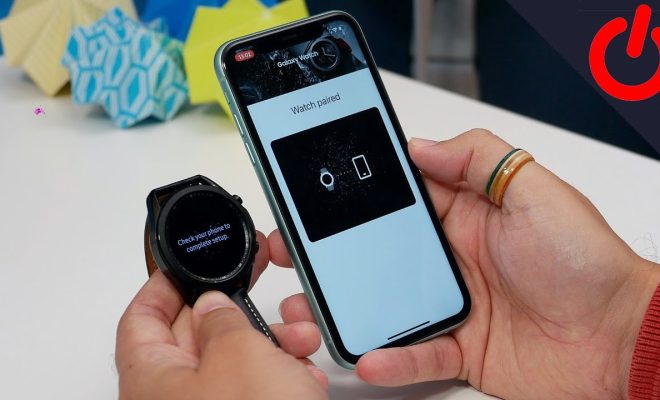
The Galaxy Watch is a popular smartwatch by Samsung, and it works well with both Android and iOS devices. However, connecting it to an iPhone may be a little more complicated than pairing it with an Android device. Here’s how to connect a Galaxy Watch to an iPhone.

1. Download the Galaxy Wearable app

To begin, you need to download the Galaxy Wearable app on your iPhone. Open the App Store, search for the app and install it. Once the download is complete, launch the app.

2. Pair the Galaxy Watch

The Galaxy Watch needs to be within range and in pairing mode to connect. To put your Galaxy Watch in pairing mode, press the power button to turn it on, and select the language. You should see a message that says “Connect to phone”. Tap on that message, and then select “Galaxy Wearable” from the list of available devices.

3. Allow permissions

The Galaxy Wearable app will ask for a series of permissions, including access to your location, notifications, and health data. Grant them all to ensure that the app can function properly.

4. Set up your Galaxy Watch

Once your Galaxy Watch is paired, you can use the Galaxy Wearable app to customize its settings. You can choose your watch face, customize notifications, access your music library, and more.

5. Add apps to your watch

The Galaxy Watch has a variety of apps available in the Galaxy Store, and you can download them directly to your watch. From the Galaxy Wearable app, go to the “Apps” section and search for the apps you want to install.

In conclusion, connecting a Galaxy Watch to an iPhone is relatively simple when you follow the above steps. Once connected, you can enjoy all the features and functionalities of your smartwatch, including notifications, fitness tracking, and much more. So, go ahead and complete the setup process, and start using your Galaxy Watch with your iPhone.


Previous Article

Reboot vs. Reset: What’s the Difference?

Next Article

How to Change the Keyboard on Android

Matthew Lynch

Related articles More from author

  • Digital & Mobile Technology

    What Is Flickr? An Intro to the Popular Photo Site

    June 4, 2023
    By Matthew Lynch
  • Digital & Mobile Technology

    How to Manage Users from the Command Line in Linux

    April 30, 2023
    By Matthew Lynch
  • Digital & Mobile Technology

    What is an Enterprise Collaboration System (ECS)?

    May 5, 2023
    By Matthew Lynch
  • Digital & Mobile Technology

    Best Cookie Editor Extensions for Google Chrome

    June 8, 2023
    By Matthew Lynch
  • Digital & Mobile Technology

    The HSV Color Model in Graphic Design

    June 8, 2023
    By Matthew Lynch
  • Digital & Mobile Technology

    What Is Bayesian Spam Filtering?

    July 24, 2023
    By Matthew Lynch

Search

Login & Registration

  • Log in
  • Entries feed
  • Comments feed
  • WordPress.org

Newsletter

Signup for The Tech Edvocate Newsletter and have the latest in EdTech news and opinion delivered to your email address!

About Us

Since technology is not going anywhere and does more good than harm, adapting is the best course of action. That is where The Tech Edvocate comes in. We plan to cover the PreK-12 and Higher Education EdTech sectors and provide our readers with the latest news and opinion on the subject. From time to time, I will invite other voices to weigh in on important issues in EdTech. We hope to provide a well-rounded, multi-faceted look at the past, present, the future of EdTech in the US and internationally.

We started this journey back in June 2016, and we plan to continue it for many more years to come. I hope that you will join us in this discussion of the past, present and future of EdTech and lend your own insight to the issues that are discussed.

Newsletter

Signup for The Tech Edvocate Newsletter and have the latest in EdTech news and opinion delivered to your email address!

Contact Us

The Tech Edvocate
910 Goddin Street
Richmond, VA 23231
(601) 630-5238
[email protected]

Copyright © 2026 Matthew Lynch. All rights reserved.