The Tech Edvocate

Top Menu

  • Advertisement
  • Apps
  • Home Page
  • Home Page Five (No Sidebar)
  • Home Page Four
  • Home Page Three
  • Home Page Two
  • Home Tech2
  • Icons [No Sidebar]
  • Left Sidbear Page
  • Lynch Educational Consulting
  • My Account
  • My Speaking Page
  • Newsletter Sign Up Confirmation
  • Newsletter Unsubscription
  • Our Brands
  • Page Example
  • Privacy Policy
  • Protected Content
  • Register
  • Request a Product Review
  • Shop
  • Shortcodes Examples
  • Signup
  • Start Here
    • Governance
    • Careers
    • Contact Us
  • Terms and Conditions
  • The Edvocate
  • The Tech Edvocate Product Guide
  • Topics
  • Write For Us
  • Advertise

Main Menu

  • Start Here
    • Our Brands
    • Governance
      • Lynch Educational Consulting, LLC.
      • Dr. Lynch’s Personal Website
      • Careers
    • Write For Us
    • The Tech Edvocate Product Guide
    • Contact Us
    • Books
    • Edupedia
    • Post a Job
    • The Edvocate Podcast
    • Terms and Conditions
    • Privacy Policy
  • Topics
    • Assistive Technology
    • Child Development Tech
    • Early Childhood & K-12 EdTech
    • EdTech Futures
    • EdTech News
    • EdTech Policy & Reform
    • EdTech Startups & Businesses
    • Higher Education EdTech
    • Online Learning & eLearning
    • Parent & Family Tech
    • Personalized Learning
    • Product Reviews
  • Advertise
  • Tech Edvocate Awards
  • The Edvocate
  • Pedagogue
  • School Ratings

logo

The Tech Edvocate

  • Start Here
    • Our Brands
    • Governance
      • Lynch Educational Consulting, LLC.
      • Dr. Lynch’s Personal Website
        • My Speaking Page
      • Careers
    • Write For Us
    • The Tech Edvocate Product Guide
    • Contact Us
    • Books
    • Edupedia
    • Post a Job
    • The Edvocate Podcast
    • Terms and Conditions
    • Privacy Policy
  • Topics
    • Assistive Technology
    • Child Development Tech
    • Early Childhood & K-12 EdTech
    • EdTech Futures
    • EdTech News
    • EdTech Policy & Reform
    • EdTech Startups & Businesses
    • Higher Education EdTech
    • Online Learning & eLearning
    • Parent & Family Tech
    • Personalized Learning
    • Product Reviews
  • Advertise
  • Tech Edvocate Awards
  • The Edvocate
  • Pedagogue
  • School Ratings
  • Cybersecurity vs. Green Energy: Which Path Will Make You Richer in 2026?

  • Why These 10 Renewable Energy Certifications Are Quietly Reshaping Careers by 2026

  • Why Millions Are Rushing to Online Renewable Energy Certifications Right Now

  • August AI vs. USMLE: The Unsettling Future of Medical Licensing

  • One AI’s Perfect USMLE Score Just Blew Up Medical Education As We Know It

  • This AI Just Aced the USMLE: Why Your Medical Career Might Never Be the Same

  • The Quiet Exodus: Why Senior FinTech Developers Are Abandoning Corporate Life

  • The Quiet Revolution: Where Elite FinTech Developers Are Fleeing in 2026

  • The Quiet Exodus: Why Senior FinTech Developers Are Ditching Corporate Life

  • AI Governance Software: Pricing and Features Comparison

Digital & Mobile Technology
Home›Digital & Mobile Technology›How to Clean a Wireless Mouse

How to Clean a Wireless Mouse
By Matthew Lynch
June 12, 2023
0
Spread the love

As technology advances, many users prefer using a wireless mouse over the traditional wired one. However, just like any other electronic device, wireless mice require regular cleaning to maintain their performance and longevity. In this article, we will discuss how to clean a wireless mouse easily and effectively.

Step 1: Turn off the Mouse

Before cleaning your wireless mouse, make sure to turn it off. Most wireless mice have an on-off switch on the bottom of the device. Flip this switch to the off position to prevent any damage to the internal components while cleaning.

Step 2: Remove the Batteries

Once the wireless mouse is turned off, remove the batteries from the mouse. This step is crucial as it prevents any electrical mishaps while cleaning. Also, removing the batteries allows you to clean hard-to-reach areas more effectively.

Step 3: Wipe the Surface

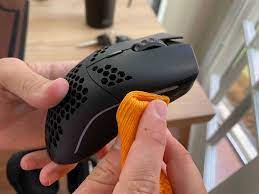
Using a clean and dry microfiber or lint-free cloth, wipe the surface of the mouse to remove any visible dust, dirt, and debris. Be gentle and avoid applying too much pressure as it may damage the surface coating of the mouse.

Step 4: Clean the Scroll Wheel

The scroll wheel is the most used part of the mouse and can become dirty and sticky over time. To clean the scroll wheel, use a cotton swab or toothbrush gently. Spin the wheel with the cotton swab or toothbrush to dislodge any debris trapped in the small crevices.

Step 5: Clean the Mouse Feet

The mouse feet are the small elliptical rubber or plastic pads on the bottom of the mouse that allow it to glide smoothly across a surface. Over time, dust and debris can accumulate under the feet and cause drag. Use a plastic or metal toothpick to gently scrape the debris out from under the feet.

Step 6: Clean the Sensor

The sensor is the small lens on the bottom of the mouse that registers the movement of the device. Clean the sensor using a lint-free cloth or cotton swab. Be careful not to scratch the lens as it may affect the mouse’s functionality.

Step 7: Reassemble the Mouse

Once you have thoroughly cleaned all the parts of your wireless mouse, reinsert the batteries and turn the device back on. Check if the mouse is functioning correctly.

In conclusion, keeping your wireless mouse clean is essential for ensuring that it functions smoothly and has a longer lifespan. Follow these seven simple steps to clean your mouse and enjoy using it for years to come.


Previous Article

What Is HDTV?

Next Article

Basic Circuit Laws

Matthew Lynch

Related articles More from author

  • Digital & Mobile Technology

    What Is Google Meet and How Does It Work?

    August 5, 2023
    By Matthew Lynch
  • Digital & Mobile Technology

    What Do the Android Status Bar Symbols Mean?

    June 7, 2023
    By Matthew Lynch
  • Digital & Mobile Technology

    The Best Options for iPhone Screen Repair

    June 6, 2023
    By Matthew Lynch
  • Digital & Mobile Technology

    How to Use the Mac’s Energy Saver Preferences Pane

    June 9, 2023
    By Matthew Lynch
  • Digital & Mobile Technology

    eMMC vs. SSD: Not All Solid-State Storage is Equal

    April 13, 2023
    By Matthew Lynch
  • Digital & Mobile Technology

    How to Find Blogs Worth Reading

    June 9, 2023
    By Matthew Lynch

Search

Login & Registration

  • Log in
  • Entries feed
  • Comments feed
  • WordPress.org

Newsletter

Signup for The Tech Edvocate Newsletter and have the latest in EdTech news and opinion delivered to your email address!

About Us

Since technology is not going anywhere and does more good than harm, adapting is the best course of action. That is where The Tech Edvocate comes in. We plan to cover the PreK-12 and Higher Education EdTech sectors and provide our readers with the latest news and opinion on the subject. From time to time, I will invite other voices to weigh in on important issues in EdTech. We hope to provide a well-rounded, multi-faceted look at the past, present, the future of EdTech in the US and internationally.

We started this journey back in June 2016, and we plan to continue it for many more years to come. I hope that you will join us in this discussion of the past, present and future of EdTech and lend your own insight to the issues that are discussed.

Newsletter

Signup for The Tech Edvocate Newsletter and have the latest in EdTech news and opinion delivered to your email address!

Contact Us

The Tech Edvocate
910 Goddin Street
Richmond, VA 23231
(601) 630-5238
[email protected]

Copyright © 2026 Matthew Lynch. All rights reserved.