The Tech Edvocate

Top Menu

  • Advertisement
  • Apps
  • Home Page
  • Home Page Five (No Sidebar)
  • Home Page Four
  • Home Page Three
  • Home Page Two
  • Home Tech2
  • Icons [No Sidebar]
  • Left Sidbear Page
  • Lynch Educational Consulting
  • My Account
  • My Speaking Page
  • Newsletter Sign Up Confirmation
  • Newsletter Unsubscription
  • Our Brands
  • Page Example
  • Privacy Policy
  • Protected Content
  • Register
  • Request a Product Review
  • Shop
  • Shortcodes Examples
  • Signup
  • Start Here
    • Governance
    • Careers
    • Contact Us
  • Terms and Conditions
  • The Edvocate
  • The Tech Edvocate Product Guide
  • Topics
  • Write For Us
  • Advertise

Main Menu

  • Start Here
    • Our Brands
    • Governance
      • Lynch Educational Consulting, LLC.
      • Dr. Lynch’s Personal Website
      • Careers
    • Write For Us
    • The Tech Edvocate Product Guide
    • Contact Us
    • Books
    • Edupedia
    • Post a Job
    • The Edvocate Podcast
    • Terms and Conditions
    • Privacy Policy
  • Topics
    • Assistive Technology
    • Child Development Tech
    • Early Childhood & K-12 EdTech
    • EdTech Futures
    • EdTech News
    • EdTech Policy & Reform
    • EdTech Startups & Businesses
    • Higher Education EdTech
    • Online Learning & eLearning
    • Parent & Family Tech
    • Personalized Learning
    • Product Reviews
  • Advertise
  • Tech Edvocate Awards
  • The Edvocate
  • Pedagogue
  • School Ratings

logo

The Tech Edvocate

  • Start Here
    • Our Brands
    • Governance
      • Lynch Educational Consulting, LLC.
      • Dr. Lynch’s Personal Website
        • My Speaking Page
      • Careers
    • Write For Us
    • The Tech Edvocate Product Guide
    • Contact Us
    • Books
    • Edupedia
    • Post a Job
    • The Edvocate Podcast
    • Terms and Conditions
    • Privacy Policy
  • Topics
    • Assistive Technology
    • Child Development Tech
    • Early Childhood & K-12 EdTech
    • EdTech Futures
    • EdTech News
    • EdTech Policy & Reform
    • EdTech Startups & Businesses
    • Higher Education EdTech
    • Online Learning & eLearning
    • Parent & Family Tech
    • Personalized Learning
    • Product Reviews
  • Advertise
  • Tech Edvocate Awards
  • The Edvocate
  • Pedagogue
  • School Ratings
  • A Visitors Guide to Long Beach (CA), United States

  • A Visitor’s Guide to Fresno (CA), United States

  • A Visitors Guide to New Orleans (LA), United States

  • A Visitors Guide to Sacramento (CA), United States

  • A Visitors Guide to Lyon, France

  • JisuLife Ultra2 Portable Fan: A Powerful Multi-Function Cooling Solution

  • A Visitors Guide to Viña del Mar, Chile

  • A Visitors Guide to Århus, Denmark

  • A Visitors Guide to Bakersfield (CA), United States

  • A Visitors Guide to Aurora (CO), United States

Assistive Technology
Home›Assistive Technology›How to Check How Long Any Chromebook Will Get Updates For

How to Check How Long Any Chromebook Will Get Updates For
By Matthew Lynch
June 21, 2023
0
Spread the love

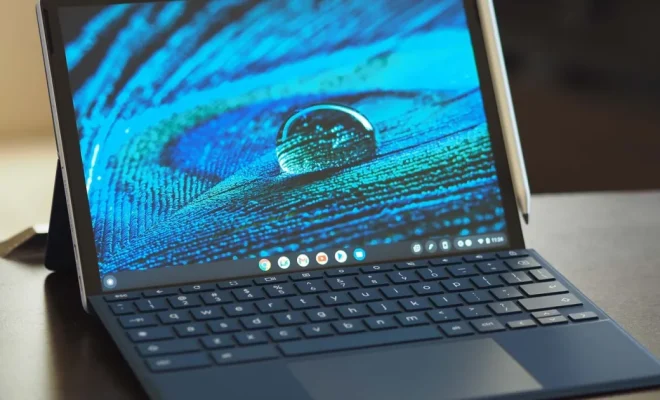
Chromebooks are lightweight and affordable laptops that run on Google’s Chrome operating system. They are popular among students, businesses, and any user looking for a reliable and easy-to-use device. Chromebooks receive regular updates from Google, which keep them secure and up-to-date with the latest features, improvements, and bug fixes. However, these updates are not forever, and depending on the model, users should be aware of how long they will receive updates to plan for future replacements.

Step 1: Identify your Chromebook model

The first step to check how long your Chromebook will receive updates is to identify its model. You can usually find this information on the bottom of your laptop or by clicking on the status area (bottom right corner of the desktop) and then clicking on the Settings icon.

Step 2: Go to Google’s Auto Update Policy webpage

Once you know your Chromebook model, you can visit Google’s Auto Update Policy webpage to see when your device will stop receiving updates. This webpage lists all Chromebook models and their respective End of Life dates, which is the date when Google will stop providing updates for that device.

Step 3: Check your Chromebook’s End of Life date

Find your Chromebook model on the Auto Update Policy webpage, and check its End of Life date. This date is listed in the column labeled “Updates until.” You can also see if your device is still receiving updates by checking the column labeled “Type.” If your Chromebook is on the Stable channel, it means that it is still being updated. However, if it’s on the Beta or Dev channels, it means that it has reached its End of Life date.

Step 4: Plan for replacement or upgrade

Knowing when your Chromebook will stop receiving updates is essential for planning for its replacement or upgrade. If your device has already reached its End of Life date, it means that it’s no longer secure and could be vulnerable to security threats. You should consider upgrading to a newer model or replacing it with a different type of device.

On the other hand, if your Chromebook is still being updated, you can rest assured that it will continue to receive updates for the foreseeable future. However, you should start thinking about its replacement since outdated hardware might not be able to keep up with newer web applications and services.


Previous Article

How to Decide Which iCloud Storage Plan ...

Next Article

Best 4chan Apps for Android and iPhone

Matthew Lynch

Related articles More from author

  • Assistive Technology

    Which Ubuntu Version Are You Using? Here’s How to Check

    June 15, 2023
    By Matthew Lynch
  • Assistive Technology

    How to Put a Location in an Instagram Photo or Video

    June 15, 2023
    By Matthew Lynch
  • Assistive Technology

    How to Block Spam Calls on Android

    June 6, 2023
    By Matthew Lynch
  • Assistive Technology

    How to See More Friends Posts on Facebook

    June 8, 2023
    By Matthew Lynch
  • Assistive Technology

    How to Never Lose Notes Again in Your OneNote Notebooks

    June 22, 2023
    By Matthew Lynch
  • Assistive Technology

    How to Fix Snipping Tool Not Working on Windows 11

    June 6, 2023
    By Matthew Lynch

Search

Login & Registration

  • Register
  • Log in
  • Entries feed
  • Comments feed
  • WordPress.org

Newsletter

Signup for The Tech Edvocate Newsletter and have the latest in EdTech news and opinion delivered to your email address!

About Us

Since technology is not going anywhere and does more good than harm, adapting is the best course of action. That is where The Tech Edvocate comes in. We plan to cover the PreK-12 and Higher Education EdTech sectors and provide our readers with the latest news and opinion on the subject. From time to time, I will invite other voices to weigh in on important issues in EdTech. We hope to provide a well-rounded, multi-faceted look at the past, present, the future of EdTech in the US and internationally.

We started this journey back in June 2016, and we plan to continue it for many more years to come. I hope that you will join us in this discussion of the past, present and future of EdTech and lend your own insight to the issues that are discussed.

Newsletter

Signup for The Tech Edvocate Newsletter and have the latest in EdTech news and opinion delivered to your email address!

Contact Us

The Tech Edvocate
910 Goddin Street
Richmond, VA 23231
(601) 630-5238
[email protected]

Copyright © 2025 Matthew Lynch. All rights reserved.