The Tech Edvocate

Top Menu

  • Advertisement
  • Apps
  • Home Page
  • Home Page Five (No Sidebar)
  • Home Page Four
  • Home Page Three
  • Home Page Two
  • Home Tech2
  • Icons [No Sidebar]
  • Left Sidbear Page
  • Lynch Educational Consulting
  • My Account
  • My Speaking Page
  • Newsletter Sign Up Confirmation
  • Newsletter Unsubscription
  • Our Brands
  • Page Example
  • Privacy Policy
  • Protected Content
  • Register
  • Request a Product Review
  • Shop
  • Shortcodes Examples
  • Signup
  • Start Here
    • Governance
    • Careers
    • Contact Us
  • Terms and Conditions
  • The Edvocate
  • The Tech Edvocate Product Guide
  • Topics
  • Write For Us
  • Advertise

Main Menu

  • Start Here
    • Our Brands
    • Governance
      • Lynch Educational Consulting, LLC.
      • Dr. Lynch’s Personal Website
      • Careers
    • Write For Us
    • The Tech Edvocate Product Guide
    • Contact Us
    • Books
    • Edupedia
    • Post a Job
    • The Edvocate Podcast
    • Terms and Conditions
    • Privacy Policy
  • Topics
    • Assistive Technology
    • Child Development Tech
    • Early Childhood & K-12 EdTech
    • EdTech Futures
    • EdTech News
    • EdTech Policy & Reform
    • EdTech Startups & Businesses
    • Higher Education EdTech
    • Online Learning & eLearning
    • Parent & Family Tech
    • Personalized Learning
    • Product Reviews
  • Advertise
  • Tech Edvocate Awards
  • The Edvocate
  • Pedagogue
  • School Ratings

logo

The Tech Edvocate

  • Start Here
    • Our Brands
    • Governance
      • Lynch Educational Consulting, LLC.
      • Dr. Lynch’s Personal Website
        • My Speaking Page
      • Careers
    • Write For Us
    • The Tech Edvocate Product Guide
    • Contact Us
    • Books
    • Edupedia
    • Post a Job
    • The Edvocate Podcast
    • Terms and Conditions
    • Privacy Policy
  • Topics
    • Assistive Technology
    • Child Development Tech
    • Early Childhood & K-12 EdTech
    • EdTech Futures
    • EdTech News
    • EdTech Policy & Reform
    • EdTech Startups & Businesses
    • Higher Education EdTech
    • Online Learning & eLearning
    • Parent & Family Tech
    • Personalized Learning
    • Product Reviews
  • Advertise
  • Tech Edvocate Awards
  • The Edvocate
  • Pedagogue
  • School Ratings
  • A Visitors Guide to Long Beach (CA), United States

  • A Visitor’s Guide to Fresno (CA), United States

  • A Visitors Guide to New Orleans (LA), United States

  • A Visitors Guide to Sacramento (CA), United States

  • A Visitors Guide to Lyon, France

  • JisuLife Ultra2 Portable Fan: A Powerful Multi-Function Cooling Solution

  • A Visitors Guide to Viña del Mar, Chile

  • A Visitors Guide to Århus, Denmark

  • A Visitors Guide to Bakersfield (CA), United States

  • A Visitors Guide to Aurora (CO), United States

Digital & Mobile Technology
Home›Digital & Mobile Technology›How to Change Your Facebook Page’s Username or URL

How to Change Your Facebook Page’s Username or URL
By Matthew Lynch
June 15, 2023
0
Spread the love

Facebook has become an integral part of modern-day communication and networking. Whether you are a business owner or a social media influencer, having a Facebook page is essential to reach your target audience. One of the most important aspects of managing a Facebook page is your page’s username or URL. A username or URL is a customized web address that identifies your Facebook page. It’s the link you share with people to navigate to your page, and changing it can be beneficial to your brand’s visibility. In this article, we will discuss how to change your Facebook page’s username or URL.

Step 1: Go to Facebook

First, you need to access your Facebook account. Log in to your Facebook account using your email address or phone number and password.

Step 2: Go to Your Page

Once you are logged in, go to the Facebook page whose URL you want to change. Click on the “Settings” tab on the top right-hand corner of your page.

Step 3: Click on “Edit Page Info”

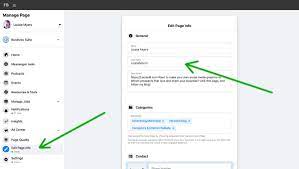
On the left-hand side of the Facebook page, click on “Edit Page Info.” Then, navigate to the “Username” section and click on the “Edit” button situated next to it.

Step 4: Enter Your Desired Username

Enter the new username that you want to use for your Facebook page. The username can’t contain spaces, must be unique for your account, and comply with Facebook’s policies.

Step 5: Check the Availability

Once you have entered the new username, Facebook checks its availability. If the username is already taken, you have to choose a different one. Alternatively, Facebook might suggest a few usernames related to your page that you can choose from.

Step 6: Check the Username’s Impact on Your Page

Changing your Facebook URL can impact your page’s search engine optimization (SEO) and could cause your existing links to break. Before finalizing the new username, make sure to check that your new URL doesn’t affect your existing campaigns, links, or marketing materials.

Step 7: Click on Create Username

If you are satisfied with the new username, click on the “Create Username” button to save the new URL to your Facebook page.

Step 8: Spread the Word

It’s essential to promote your newly updated Facebook URL across all social media platforms, emails, and marketing campaigns. You can even add the URL to your email signature to make it easily accessible for people to visit your Facebook page.

In conclusion, changing your Facebook page’s username or URL can be time-consuming, but it’s worth the effort. A well-thought-out URL can make your Facebook page more visible to your target audience, improve your brand recognition, and boost your online presence. Follow these simple steps to change your Facebook page’s username or URL and start reaping the benefits of an updated URL.


Previous Article

How to Reverse or Mirror Text in ...

Next Article

How to Fix the “add-apt-repository: command not ...

Matthew Lynch

Related articles More from author

  • Digital & Mobile Technology

    Windows 10/11 “Access Denied” Folder Errors: Easy Fixes

    June 23, 2023
    By Matthew Lynch
  • Digital & Mobile Technology

    How to Connect to a PostgreSQL Database Using Node.js

    June 5, 2023
    By Matthew Lynch
  • Digital & Mobile Technology

    How to Connect to Starbucks Wi-Fi

    September 7, 2023
    By Matthew Lynch
  • Digital & Mobile Technology

    How to Connect to Your Home Router as an Administrator

    May 30, 2023
    By Matthew Lynch
  • Digital & Mobile Technology

    How Does Portal Work?

    June 30, 2023
    By Matthew Lynch
  • Digital & Mobile Technology

    Why You Shouldn’t Run Emulators on Your Xbox Series X|S to Play Retro Games

    June 22, 2023
    By Matthew Lynch

Search

Login & Registration

  • Register
  • Log in
  • Entries feed
  • Comments feed
  • WordPress.org

Newsletter

Signup for The Tech Edvocate Newsletter and have the latest in EdTech news and opinion delivered to your email address!

About Us

Since technology is not going anywhere and does more good than harm, adapting is the best course of action. That is where The Tech Edvocate comes in. We plan to cover the PreK-12 and Higher Education EdTech sectors and provide our readers with the latest news and opinion on the subject. From time to time, I will invite other voices to weigh in on important issues in EdTech. We hope to provide a well-rounded, multi-faceted look at the past, present, the future of EdTech in the US and internationally.

We started this journey back in June 2016, and we plan to continue it for many more years to come. I hope that you will join us in this discussion of the past, present and future of EdTech and lend your own insight to the issues that are discussed.

Newsletter

Signup for The Tech Edvocate Newsletter and have the latest in EdTech news and opinion delivered to your email address!

Contact Us

The Tech Edvocate
910 Goddin Street
Richmond, VA 23231
(601) 630-5238
[email protected]

Copyright © 2025 Matthew Lynch. All rights reserved.