The Tech Edvocate

Top Menu

  • Advertisement
  • Apps
  • Home Page
  • Home Page Five (No Sidebar)
  • Home Page Four
  • Home Page Three
  • Home Page Two
  • Home Tech2
  • Icons [No Sidebar]
  • Left Sidbear Page
  • Lynch Educational Consulting
  • My Account
  • My Speaking Page
  • Newsletter Sign Up Confirmation
  • Newsletter Unsubscription
  • Our Brands
  • Page Example
  • Privacy Policy
  • Protected Content
  • Register
  • Request a Product Review
  • Shop
  • Shortcodes Examples
  • Signup
  • Start Here
    • Governance
    • Careers
    • Contact Us
  • Terms and Conditions
  • The Edvocate
  • The Tech Edvocate Product Guide
  • Topics
  • Write For Us
  • Advertise

Main Menu

  • Start Here
    • Our Brands
    • Governance
      • Lynch Educational Consulting, LLC.
      • Dr. Lynch’s Personal Website
      • Careers
    • Write For Us
    • The Tech Edvocate Product Guide
    • Contact Us
    • Books
    • Edupedia
    • Post a Job
    • The Edvocate Podcast
    • Terms and Conditions
    • Privacy Policy
  • Topics
    • Assistive Technology
    • Child Development Tech
    • Early Childhood & K-12 EdTech
    • EdTech Futures
    • EdTech News
    • EdTech Policy & Reform
    • EdTech Startups & Businesses
    • Higher Education EdTech
    • Online Learning & eLearning
    • Parent & Family Tech
    • Personalized Learning
    • Product Reviews
  • Advertise
  • Tech Edvocate Awards
  • The Edvocate
  • Pedagogue
  • School Ratings

logo

The Tech Edvocate

  • Start Here
    • Our Brands
    • Governance
      • Lynch Educational Consulting, LLC.
      • Dr. Lynch’s Personal Website
        • My Speaking Page
      • Careers
    • Write For Us
    • The Tech Edvocate Product Guide
    • Contact Us
    • Books
    • Edupedia
    • Post a Job
    • The Edvocate Podcast
    • Terms and Conditions
    • Privacy Policy
  • Topics
    • Assistive Technology
    • Child Development Tech
    • Early Childhood & K-12 EdTech
    • EdTech Futures
    • EdTech News
    • EdTech Policy & Reform
    • EdTech Startups & Businesses
    • Higher Education EdTech
    • Online Learning & eLearning
    • Parent & Family Tech
    • Personalized Learning
    • Product Reviews
  • Advertise
  • Tech Edvocate Awards
  • The Edvocate
  • Pedagogue
  • School Ratings
  • Shocking: Your Smart Ring Knows When You’re Having Sex

  • The SwiftRefi Scandal: 7 Astonishing Truths About Their ‘Zero-Fee’ Refinance

  • The AION 2 Scandal: Why This Korean MMO Controversy Is Boiling Over

  • The Bombshell Truth About Gaming’s Legal Reckoning

  • Staggering: AI’s ALS Breakthrough Comes With a $5 Million Price Tag

  • The Astonishing AI Predicting Housing Trends With 98% Accuracy — Regulators Are Freaking Out

  • Your Kids’ Classrooms Are Changing: Here’s What’s Coming by 2026

  • Jaw-Dropping: Millions Face Triple Tax Bills on Forgiven Student Loans

  • Mind-Blowing: Critical Infrastructure Faces Collapse From This Overlooked Threat

  • Unsettling: AI Agents Just Hacked 7 Major Banks — Here’s What It Means For Your Money

Digital & Mobile Technology
Home›Digital & Mobile Technology›How to Build a Personal DIY Cloud Storage With Remote Access

How to Build a Personal DIY Cloud Storage With Remote Access
By Matthew Lynch
June 26, 2023
0
Spread the love

In today’s world of technology and digital devices, it’s essential to have a personal cloud storage that can hold all your important data and files, enabling you to access them anytime and anywhere. Cloud storage has become one of the most popular methods of storing and sharing files, and it’s even more convenient when you have remote access to your cloud storage. In this article, we’ll show you how to build a personal DIY cloud storage with remote access.

Step 1: Choose a Cloud Storage Platform

Before you start building your DIY cloud storage, the first step is to choose a cloud storage platform that suits your needs. There are many options available in the market, such as Google Drive, Dropbox, iCloud, OneDrive, and many more. However, the problem with these services is that you have to pay for them, and you don’t have complete control over your data. Therefore, we recommend using an open-source cloud storage platform such as NextCloud, which allows you to host your data on your server while giving you full control over your data.

Step 2: Set Up a Server

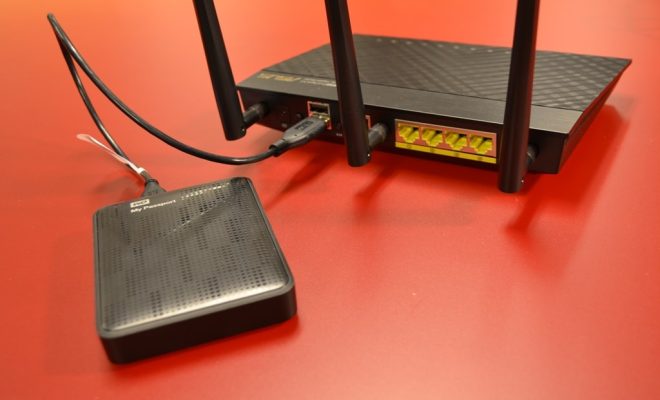
The next step is to set up a server that will host your cloud storage platform. For this, you will need a computer or a Raspberry Pi with enough storage space, RAM, and processing power to run the cloud storage platform efficiently. You can also use a VPS or a dedicated server if you don’t want to use your personal computer.

Step 3: Install NextCloud

Once you have set up the server, the next step is to install NextCloud on your server. NextCloud is an open-source cloud storage platform that allows you to store, access, and share your data securely. Installing NextCloud is relatively easy, and you can follow the instruction provided on their website.

Step 4: Configure NextCloud

After installing NextCloud, you need to configure it to suit your needs. You can set up users, groups, and permissions to control who has access to your data. You can also configure external storage like Google Drive, Dropbox, or OneDrive to integrate with your NextCloud instance.

Step 5: Enable Remote Access

The next step is to enable remote access to your NextCloud instance. This will allow you to access your data from anywhere, using any device with an internet connection. For this, you need to configure your router by forwarding the port used by NextCloud to your server’s IP address. You can find the port used by NextCloud in its configuration file.

Step 6: Set Up SSL Encryption

Enabling SSL encryption is essential to secure your data while accessing it remotely. You can obtain a free SSL certificate from Let’s Encrypt, which is an open certificate authority, or you can purchase one from any SSL provider.

Step 7: Access Your Cloud Storage Remotely

Once you have set up everything, you can now access your cloud storage remotely using the internet. You can use any device with a web browser or a NextCloud client app, available for Windows, Mac, Linux, Android, and iOS, to access your data securely.

Previous Article

How to Install Windows 10 and 11 ...

Next Article

5 Great Raspberry Pi IDEs For Programmers ...

Matthew Lynch

Related articles More from author

  • Digital & Mobile Technology

    iCloud Plus: What It Is and How to Use It

    June 10, 2023
    By Matthew Lynch
  • Digital & Mobile Technology

    Ways to Enter Picture in Picture Mode in Safari for Mac

    June 12, 2023
    By Matthew Lynch
  • Digital & Mobile Technology

    My Mouse Won’t Work! How Do I Fix It?

    June 6, 2023
    By Matthew Lynch
  • Digital & Mobile Technology

    Best Online Photo Printing Services of 2023

    June 2, 2023
    By Matthew Lynch
  • Digital & Mobile Technology

    Retopo for Beginners: Why Retopology Matters, and How to Do It

    June 12, 2023
    By Matthew Lynch
  • Digital & Mobile Technology

    What Would Happen If Bitcoin’s Price Crashes to Zero?

    August 5, 2023
    By Matthew Lynch

Search

Login & Registration

  • Log in
  • Entries feed
  • Comments feed
  • WordPress.org

Newsletter

Signup for The Tech Edvocate Newsletter and have the latest in EdTech news and opinion delivered to your email address!

About Us

Since technology is not going anywhere and does more good than harm, adapting is the best course of action. That is where The Tech Edvocate comes in. We plan to cover the PreK-12 and Higher Education EdTech sectors and provide our readers with the latest news and opinion on the subject. From time to time, I will invite other voices to weigh in on important issues in EdTech. We hope to provide a well-rounded, multi-faceted look at the past, present, the future of EdTech in the US and internationally.

We started this journey back in June 2016, and we plan to continue it for many more years to come. I hope that you will join us in this discussion of the past, present and future of EdTech and lend your own insight to the issues that are discussed.

Newsletter

Signup for The Tech Edvocate Newsletter and have the latest in EdTech news and opinion delivered to your email address!

Contact Us

The Tech Edvocate
910 Goddin Street
Richmond, VA 23231
(601) 630-5238
[email protected]

Copyright © 2026 Matthew Lynch. All rights reserved.