The Tech Edvocate

Top Menu

  • Advertisement
  • Apps
  • Home Page
  • Home Page Five (No Sidebar)
  • Home Page Four
  • Home Page Three
  • Home Page Two
  • Home Tech2
  • Icons [No Sidebar]
  • Left Sidbear Page
  • Lynch Educational Consulting
  • My Account
  • My Speaking Page
  • Newsletter Sign Up Confirmation
  • Newsletter Unsubscription
  • Our Brands
  • Page Example
  • Privacy Policy
  • Protected Content
  • Register
  • Request a Product Review
  • Shop
  • Shortcodes Examples
  • Signup
  • Start Here
    • Governance
    • Careers
    • Contact Us
  • Terms and Conditions
  • The Edvocate
  • The Tech Edvocate Product Guide
  • Topics
  • Write For Us
  • Advertise

Main Menu

  • Start Here
    • Our Brands
    • Governance
      • Lynch Educational Consulting, LLC.
      • Dr. Lynch’s Personal Website
      • Careers
    • Write For Us
    • The Tech Edvocate Product Guide
    • Contact Us
    • Books
    • Edupedia
    • Post a Job
    • The Edvocate Podcast
    • Terms and Conditions
    • Privacy Policy
  • Topics
    • Assistive Technology
    • Child Development Tech
    • Early Childhood & K-12 EdTech
    • EdTech Futures
    • EdTech News
    • EdTech Policy & Reform
    • EdTech Startups & Businesses
    • Higher Education EdTech
    • Online Learning & eLearning
    • Parent & Family Tech
    • Personalized Learning
    • Product Reviews
  • Advertise
  • Tech Edvocate Awards
  • The Edvocate
  • Pedagogue
  • School Ratings

logo

The Tech Edvocate

  • Start Here
    • Our Brands
    • Governance
      • Lynch Educational Consulting, LLC.
      • Dr. Lynch’s Personal Website
        • My Speaking Page
      • Careers
    • Write For Us
    • The Tech Edvocate Product Guide
    • Contact Us
    • Books
    • Edupedia
    • Post a Job
    • The Edvocate Podcast
    • Terms and Conditions
    • Privacy Policy
  • Topics
    • Assistive Technology
    • Child Development Tech
    • Early Childhood & K-12 EdTech
    • EdTech Futures
    • EdTech News
    • EdTech Policy & Reform
    • EdTech Startups & Businesses
    • Higher Education EdTech
    • Online Learning & eLearning
    • Parent & Family Tech
    • Personalized Learning
    • Product Reviews
  • Advertise
  • Tech Edvocate Awards
  • The Edvocate
  • Pedagogue
  • School Ratings
  • The Brutal Truth: Why Your AI Skills Training Is Failing (And How to Fix It)

  • 8 Essential AI Upskilling Programs Your Business Needs to Thrive Now

  • One Critical Mistake Companies Make With AI Skills Training

  • The AI Career Showdown: Which Path Pays More And Fits You Best?

  • The Shocking Truth About the Highest Paying AI Jobs in 2026

  • The Staggering Truth About 5 AI Job Roles That Will Redefine Your Career by 2026

  • Crypto Crackdown: Is the FCA’s Iron Fist Crushing Innovation, or Just Protecting You?

  • 7 Critical Steps to Survive the Crypto Crackdown: How to Navigate FCA Regulations

  • This One Thing Is Quietly Reshaping Illegal Crypto Trading — And Regulators Are Panicking

  • The AI Cyberattack That Changed Everything: Top Autonomous Security Software Reviews 2026

Digital & Mobile Technology
Home›Digital & Mobile Technology›How to Boot Your Computer From a Disc or USB Drive

How to Boot Your Computer From a Disc or USB Drive
By Matthew Lynch
May 19, 2023
0
Spread the love

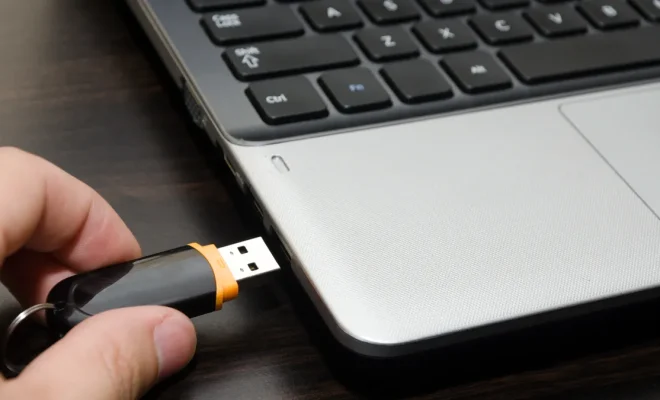
Booting your computer from a disc or USB drive can come in handy when you need to troubleshoot or perform a clean install of your operating system. The process may seem intimidating, but it is actually quite simple. In this article, we’ll walk you through the steps to boot your computer from a disc or USB drive.

First, you need to make sure your computer is set up to boot from a disc or USB drive. Most computers have a default boot order that prioritizes the internal hard drive over any external devices. To change this, you need to access the BIOS or UEFI firmware.

To access the BIOS or UEFI firmware, restart your computer and watch for a prompt such as “Press F2 to enter setup.” This key may vary depending on your computer’s manufacturer. Once you’re in the BIOS or UEFI firmware, look for the boot order settings. You may need to refer to your computer’s documentation or search online for instructions specific to your model.

Once you’ve accessed the boot order settings, you need to make sure your USB drive or disc drive is listed ahead of the internal hard drive. Move the USB drive or disc drive to the top of the list and save your changes before exiting the BIOS or UEFI firmware.

With the boot order set up correctly, you’re now ready to boot from your USB drive or disc. Insert your USB drive or disc into your computer and restart it. Depending on your computer’s manufacturer and model, you may need to press a key such as F12 or Esc to access the boot menu. This will allow you to select the USB drive or disc as the boot device.

After selecting the USB drive or disc as the boot device, your computer should start up from it. You may need to follow further prompts to install or use the software on the USB drive or disc.

In summary, to boot your computer from a disc or USB drive, you need to access the BIOS or UEFI firmware, change the boot order settings, and restart your computer with the USB drive or disc inserted. It’s a simple process, but it can be a valuable tool for troubleshooting and performing clean installs.

Previous Article

How To Boot Your Android Phone or ...

Next Article

How to Break an iPhone Code

Matthew Lynch

Related articles More from author

  • Digital & Mobile Technology

    The Google Pixel 7 and Pixel 7 Pro Prices Drop to Black Friday Levels Ahead of the Holidays

    June 6, 2023
    By Matthew Lynch
  • Digital & Mobile TechnologyDigital Literacy

    How To Use Video To Teach The 4 C’s Of Education

    May 11, 2021
    By Matthew Lynch
  • Digital & Mobile Technology

    What Are Smart Bags?

    June 6, 2023
    By Matthew Lynch
  • Digital & Mobile Technology

    Best Free Hard Drive Testing Programs

    June 1, 2023
    By Matthew Lynch
  • Digital & Mobile Technology

    Reset This PC: A Complete Walkthrough

    June 3, 2023
    By Matthew Lynch
  • Digital & Mobile Technology

    Things to Consider Before Using Your TV as a Monitor

    June 22, 2023
    By Matthew Lynch

Search

Login & Registration

  • Log in
  • Entries feed
  • Comments feed
  • WordPress.org

Newsletter

Signup for The Tech Edvocate Newsletter and have the latest in EdTech news and opinion delivered to your email address!

About Us

Since technology is not going anywhere and does more good than harm, adapting is the best course of action. That is where The Tech Edvocate comes in. We plan to cover the PreK-12 and Higher Education EdTech sectors and provide our readers with the latest news and opinion on the subject. From time to time, I will invite other voices to weigh in on important issues in EdTech. We hope to provide a well-rounded, multi-faceted look at the past, present, the future of EdTech in the US and internationally.

We started this journey back in June 2016, and we plan to continue it for many more years to come. I hope that you will join us in this discussion of the past, present and future of EdTech and lend your own insight to the issues that are discussed.

Newsletter

Signup for The Tech Edvocate Newsletter and have the latest in EdTech news and opinion delivered to your email address!

Contact Us

The Tech Edvocate
910 Goddin Street
Richmond, VA 23231
(601) 630-5238
[email protected]

Copyright © 2026 Matthew Lynch. All rights reserved.